
README file from
GithubSimple Bible Fetcher
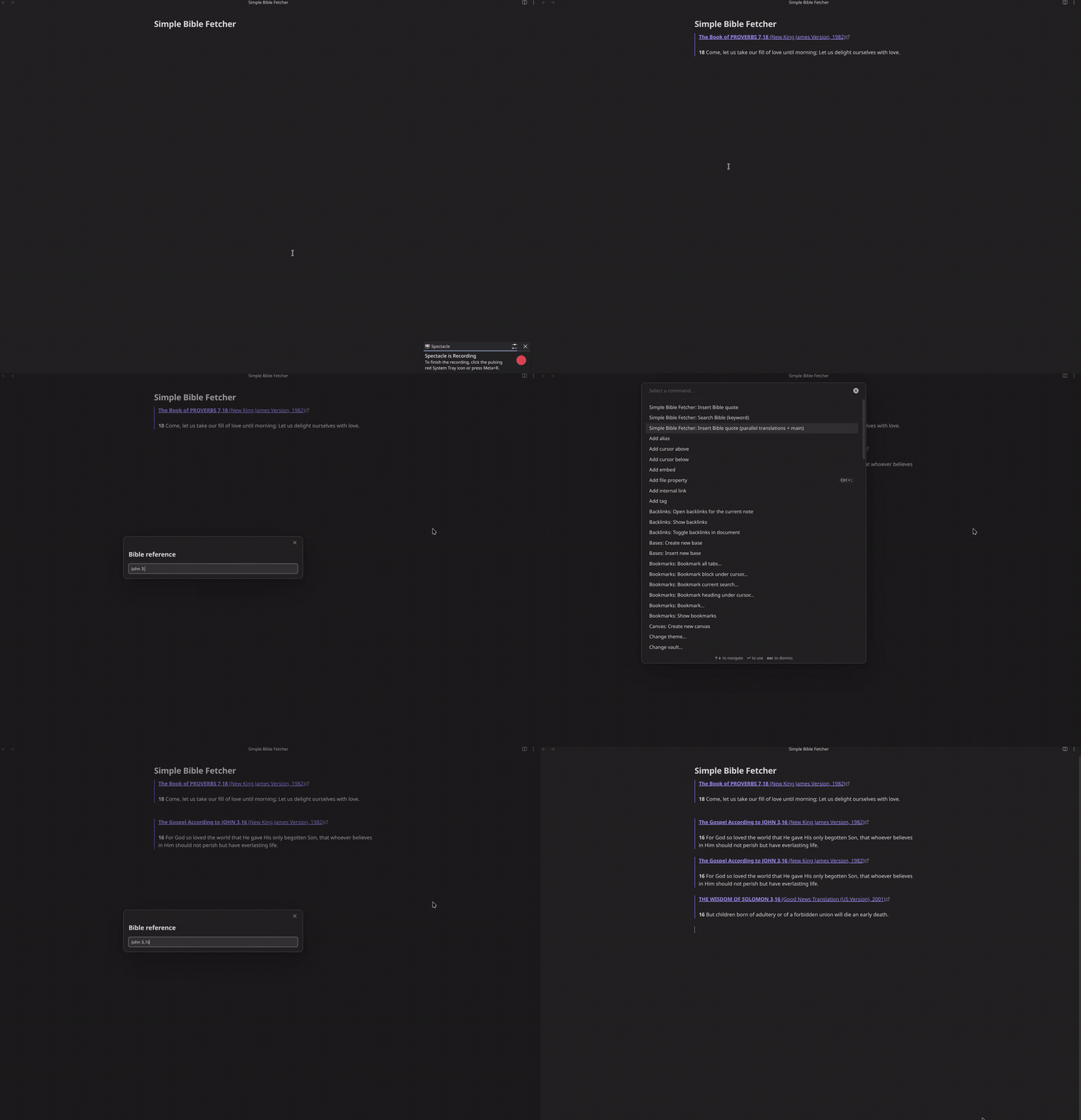
An Obsidian plugin that inserts Bible passages from the free bolls.life API as Markdown quotes.
Type a reference, pick a translation, and the passage is inserted at the cursor as a blockquote, one verse per line with a bold verse number.
> **John 3,16** (The Holy Bible, Berean Standard Bible)
>
> **16** For God so loved the world that He gave His one and only Son, that everyone who believes in Him shall not perish but have eternal life.
Several references at once, separated by ;:
> **Genesis 1,1** (The Holy Bible, Berean Standard Bible)
>
> **1** In the beginning God created the heavens and the earth.

> **Psalm 23,1** (The Holy Bible, Berean Standard Bible)
>
> **1** The LORD is my shepherd; I shall not want.
Features
- Insert passages via a command / hotkey.
- Reference parsing with book names, common abbreviations and book numbers
(
John 3:16,1 Cor 13,Ps 23,43 3:16,Gen 1:1). - Multiple references at once, separated by
;(John 3:16; Psalm 23). - Footnotes from the source are rendered as Markdown footnotes.
- Three preset output formats, a custom template, and an optional source link.
- Keyword search across a translation, inserting the passage you pick.
- Parallel translations: the main translation plus any number of additional translations at once.
- Every language offered by bolls.life, with the translation list and book-name matching following the chosen language.
- An offline cache: everything fetched once is reused, so it keeps working without a connection.
Supported languages
Every language available on bolls.life can be selected. The translation list
and book-name matching follow the chosen language, so you can type book names
as that translation writes them (for example Juan, Selon Jean or João).
Books can always be given by their number (1-66).
German and English additionally understand common abbreviations
(Joh, 1 Mos, Psalm, John), independently of the selected translation.
Usage
- Open a note and place the cursor where the passage should go.
- Run a command from the command palette (
Ctrl/Cmd+P), or assign it a hotkey under Settings → Hotkeys:- Simple Bible Fetcher: Insert Bible quote: enter a reference.
- Simple Bible Fetcher: Insert Bible quote (parallel translations): inserts the reference in every translation listed under Parallel translations.
- Simple Bible Fetcher: Search Bible (keyword): search the selected translation for a word or phrase and pick a hit to insert.
- Enter a reference (or search term) and press
Enter.
Reference syntax
| Input | Meaning |
|---|---|
John 3:16 |
single verse |
John 3:16-18 |
a verse range |
John 3:16.18 |
several single verses |
Psalm 23 |
a whole chapter |
43 3:16 |
book by its number (1-66) |
John 3:16; Psalm 23 |
several references (also with ;) |
The : and , separators are interchangeable (John 3:16 and John 3,16
both work). Book names are matched case-insensitively and ignore dots and
spaces, so
1. Samuel, 1 Samuel and 1sam all resolve to the same book. The heading
shows the book name as the chosen translation writes it.
Text cleanup
The raw bolls.life text is normalized before it is inserted:
- Footnotes can be shown or stripped (see the Footnotes setting). When
shown, the source markers become Markdown footnotes (
[^1]) and the matching text from bolls.life is appended after the passage, with cross-references linking back to bolls.life. Translations without footnotes are unaffected. - Formatting tags are stripped.
- Missing spaces are added after sentence punctuation, because the source
occasionally glues sentences together (
…mein Gott!Erleuchte…becomes…mein Gott! Erleuchte…). - Square brackets are escaped if present (
[ertönt]becomes\[ertönt\]), so words the translation added for clarity render literally instead of being treated as Markdown syntax.
Settings
| Setting | Description |
|---|---|
| Language | Translation language, and the book names recognized while typing. |
| Translation | bolls.life translation, filtered to the selected language (e.g. S00, LUT; BSB, WEB). |
| Format | Blockquote, bold verse number, One blockquote per verse, Blockquote, running text, or Custom template. |
| Passage template | Template for the Custom template format (see below). Shown only for that format. |
| Verse template | Template applied to each verse in the Custom template format. Shown only for that format. |
| Verse separator | Text placed between verses. Use \n for a line break. Shown only for the Custom template format. |
| Footnotes | Render source footnotes as Markdown footnotes, or strip the markers. |
| Source link | Make the heading itself link to the passage on bolls.life. |
| Parallel translations | Additional translations inserted after the main one, comma-separated (e.g. LUT, ELB). The main translation is always included first (see below). |
Custom template
With Format → Custom template you control the output yourself. The passage
template is rendered once per passage; {verses} is the verse template applied
to each verse and joined by the verse separator.
| Placeholder | Meaning |
|---|---|
{heading} |
Formatted heading, e.g. **John 3,16** (BSB). |
{reference} |
Reference without markup, e.g. John 3,16. |
{book} |
Book name as the translation writes it. |
{chapter} |
Chapter number. |
{translation} |
Translation code, e.g. BSB. |
{translationName} |
Full translation name. |
{sourceUrl} |
bolls.life URL for the passage. |
{verses} |
All verses (passage template only). |
{number}, {text} |
Verse number and text (verse template only). |
The three presets are just built-in templates; the default custom template
reproduces Blockquote, bold verse number.
Search
The Search Bible (keyword) command searches the whole selected translation for a word or phrase. Matches are listed with their reference and a short text preview in which the search term is highlighted, up to 100 results. Picking one inserts that passage with the current format settings.
Parallel translations
The Parallel translations setting takes a comma-separated list of
additional translation codes, for example LUT, ELB. The command
Insert Bible quote (parallel translations + main) always inserts the main
translation first, then every listed translation, in the order given. Entering
a single code therefore yields two translations, not one:
Main Translation S00 plus Parallel translations LUT gives:
> **Das Evangelium nach Johannes 3,16** (Schlachter 2000)
>
> **16** Denn so \[sehr\] hat Gott die Welt geliebt, dass er seinen eingeborenen Sohn gab, damit jeder, der an ihn glaubt, nicht verlorengeht, sondern ewiges Leben hat.

> **Johannes 3,16** (Luther (1912))
>
> **16** Also hat Gott die Welt geliebt, daß er seinen eingeborenen Sohn gab, auf daß alle, die an ihn glauben, nicht verloren werden, sondern das ewige Leben haben.
If a listed code equals the main translation, it is inserted only once. Each
translation is inserted with all of its references together, and that
translation's footnotes follow it. Multiple references are still separated by
;.
Offline cache
Fetched chapters, book lists and translation metadata are cached and reused on
later runs, so passages you have already looked up work without a connection.
The cache lives in the plugin's own data (data.json) alongside the settings.
It is unlimited and has no expiry. To clear it, remove the cache key from that
file; deleting the whole file also resets the settings.
Installation
Manual
Copy main.js, manifest.json and styles.css into
<vault>/.obsidian/plugins/simple-bible-fetcher/ and enable the plugin under
Settings → Community plugins.
From source
npm install
npm run build
Then copy the three files above into your vault, or symlink the project folder
into <vault>/.obsidian/plugins/simple-bible-fetcher.
Development
npm install
npm run dev     # watch build
npm run build   # typecheck + production build
Tests
The test suite runs on Vitest with jsdom. The Obsidian
API is replaced by a stub (test/obsidian-stub.ts), and the bolls.life HTTP
layer is driven by fixtures (test/fixtures.ts), so the tests never hit the
network.
npm test              # run the suite once
npm run test:watch    # watch mode
npm run test:coverage # run with a coverage report
npm run typecheck:test # type-check the tests too
The suite covers reference parsing and book resolution, text cleanup and footnotes, the output presets and the custom template, parallel translations and their footnote placement, keyword search, the persistent cache, settings persistence and the plugin commands, modals and settings tab. Coverage is enforced at 100 % for statements, branches, functions and lines; a drop fails the coverage run.
Because the suite runs against a stub rather than a real vault, it proves the logic, not the Obsidian integration. A manual smoke test in Obsidian is still worth doing before a release.
License
GPL-3.0-or-later. See LICENSE.