
README file from
GithubSimboard
A widget-based home dashboard for Obsidian. Drop a
simboard code block into any note and get:
- Banner: a wallpaper with a greeting, a live clock and today's date
- Calendar: the current month; days with a daily note get a dot and open the note on click (it floats over the banner)
- Quick links: a row of buttons that open your most-used notes
- Todos: a todo list backed by a plain markdown file. Add, check off, delete, drag to reorder; finished items are cleaned up after a few days
- Vault stats: note, attachment and folder counts, plus an 18-week activity heatmap
Colors come from your theme, so Simboard works with any community theme. There is also an optional high-contrast e-ink mode.
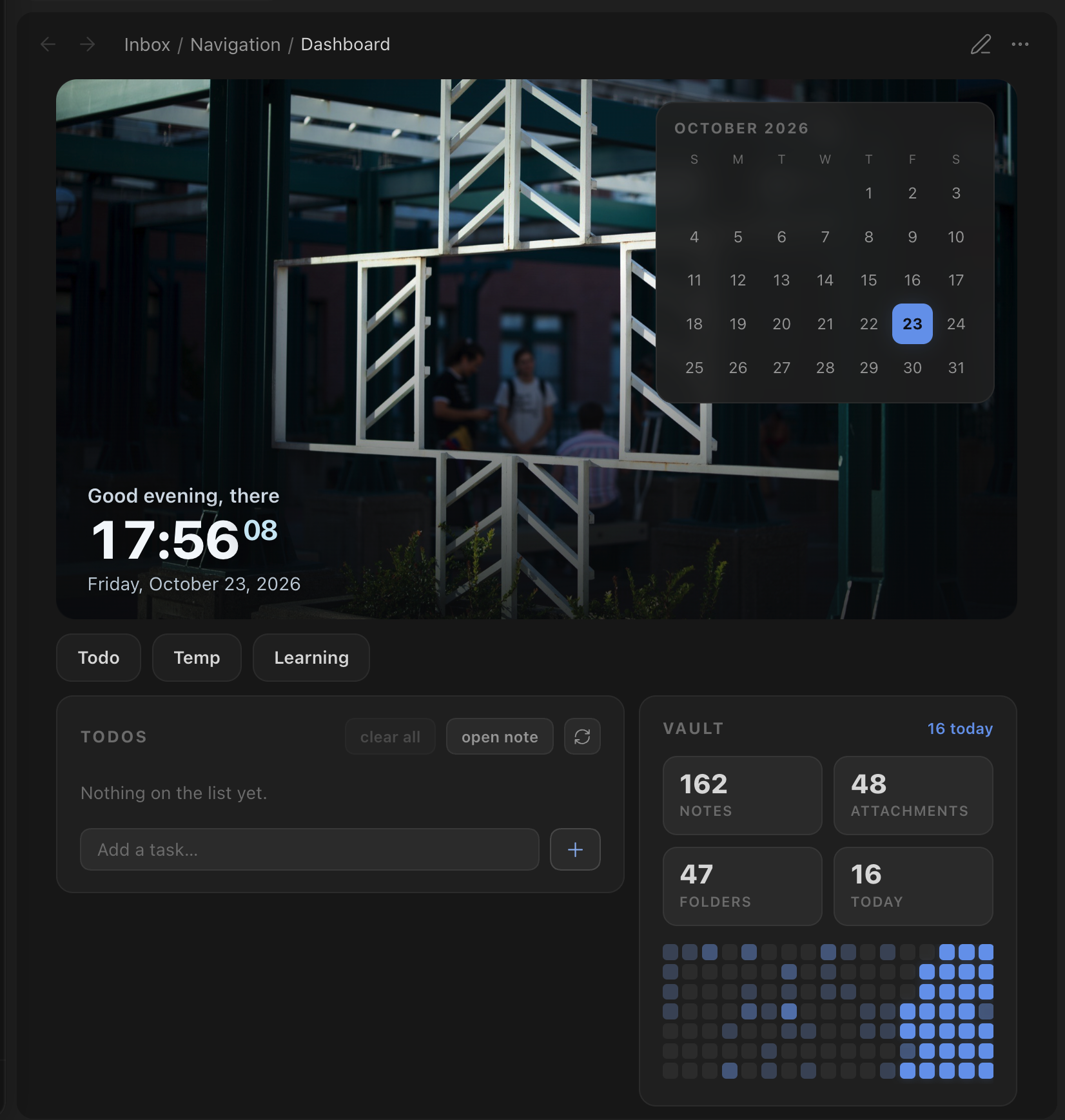
Simboard is desktop-only for now.
Usage
```simboard
```
An empty block shows the default widgets (set in Settings → Simboard). To pick widgets and their order, or to pass per-widget options, use YAML:
```simboard
widgets: banner, calendar, todos, vault-stats
name: Alex                # greeting name (else the note's `name` property)
banner:
  path: Attachments/wallpapers/   # overrides the banner image for this block
  ratio: 21 / 9
```
| Widget id | Layout |
|---|---|
banner |
full width |
calendar |
over the banner, otherwise a card |
quick-links |
full width |
todos |
card |
vault-stats |
card |
Cards that are next to each other share a row and stack on narrow panes.
Commands
| Command | What it does |
|---|---|
| Simboard: Open dashboard | Opens the dashboard note (also on the ribbon icon). Reuses an open tab. |
| Simboard: Insert dashboard block | Inserts an empty simboard block at the cursor. |
| Simboard: Refresh dashboards | Re-renders every open dashboard. |
Set the dashboard note in the settings. If you leave it empty, the first note
that contains a simboard block is used.
Full-page dashboard
Add the simboard-home CSS class to the note. It hides the note's title and
properties and lets the dashboard use the full pane width:
---
cssclasses:
  - simboard-home
---
Todo file format
Todos are ordinary markdown checkboxes in one file (set it in the settings), written in the Tasks date format:
## Todos
- [ ] Write the report 📅 2026-10-23
- [x] Book flights 📅 2026-10-20 ✅ 2026-10-22
New todos go under the ## Todos heading. Finished todos stay in the file for
the keep period and are then removed.
Installation
Until Simboard is in the community plugin list, install it with
BRAT (zhezhou1106/obsidian-simboard),
or copy main.js, manifest.json and styles.css from the latest release into
<vault>/.obsidian/plugins/simboard/.
Development
npm install
cp .env.example .env.local   # set OBSIDIAN_VAULT to your vault
npm run dev                  # watch + build + sync into the vault + hot reload
npm run build                # type-check + one-off build (also syncs)
npm run lint                 # Obsidian's official review rules (eslint-plugin-obsidianmd)
npm run dev:test             # same as dev/build, but for the vault in .env.test.local
npm run build:test
With .env.local set, each build copies main.js, manifest.json and
styles.css to <vault>/.obsidian/plugins/simboard/. If the
Obsidian CLI is installed, the plugin is also
reloaded in the running app.
Project layout
src/
├─ main.ts                    plugin entry: services, code block, settings tab
├─ core/
│  ├─ types.ts                DashboardWidget / WidgetScope / WidgetContext
│  ├─ DashboardRenderer.ts    layout, per-widget refresh, holds, slots
│  └─ blockConfig.ts          parses the simboard code block (YAML)
├─ widgets/
│  ├─ registry.ts             list of available widgets
│  └─ <id>/<Name>Widget.ts    one folder per widget
├─ services/                  TodoStore, ActivityTracker, DailyNotesService
├─ settings/                  types, defaults, normalize (migrations), tab
├─ i18n/                      UI strings (en.ts) + t()
├─ utils/                     date / DOM helpers
└─ styles/                    index.css → base, layout, page, widgets/*, eink
Adding a widget
- Create
src/widgets/<id>/<Name>Widget.tsthat exports aDashboardWidget:collect(ctx)gathers data (it can be async)render(el, data, ctx, scope)builds the DOM withcreateElshouldRefresh(file)says which vault changes should refresh the widget
- Register it in
src/widgets/registry.ts. - Add
src/styles/widgets/<id>.css, import it fromsrc/styles/index.css, and scope every rule under.simboard. - Put any settings in their own group in
settings/types.ts,defaults.tsandnormalize.ts.
Releasing
npm version patch            # bumps package.json, manifest.json, versions.json
git push && git push --tags  # the Release workflow drafts a GitHub release