
README file from
GithubSide Thing
An Obsidian plugin for adding marginal (sidebar) comments to selected text in your notes (google doc vibe).
Features
- Add comments to any selected text fragment via command palette or right-click context menu
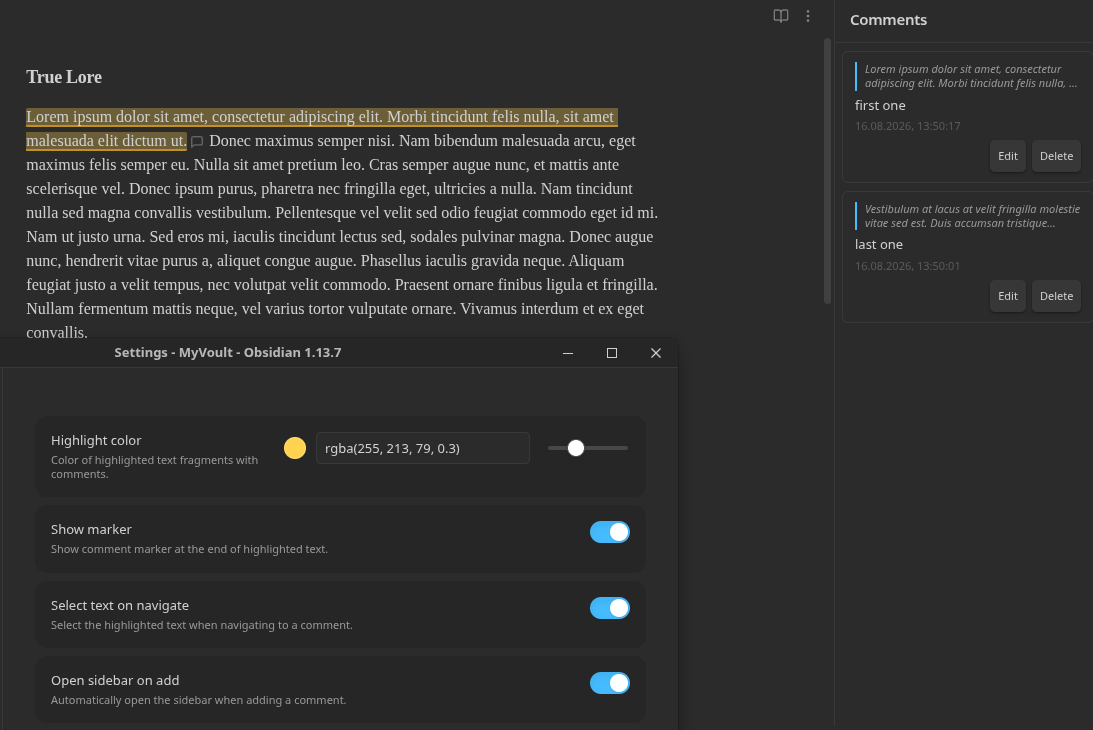
- Visual highlighting of commented text directly in the editor (Live Preview mode)
- Comment markers — optional SVG icons at the end of each highlighted fragment
- Sidebar panel with a list of all comments in the current note
- Navigation — click a comment in the sidebar to scroll to its location in the document
- Edit and delete comments through a popover or sidebar
- Overlap prevention — prevents creating duplicate comments on the same text
- Localization — automatically detects Obsidian's interface language (English / Русский)
- Customizable — highlight color with color picker and opacity slider, marker visibility, text selection on navigate
How to use
- Open a note and select a text fragment
- Add a comment using one of these methods:
- Command palette (Ctrl/Cmd+P) → "Add side comment"
- Right-click on the selection → "Add side comment"
- Write your comment in the popover and press Save (or Ctrl/Cmd+Enter)
- The selected text is now highlighted in the editor
- Open the sidebar via the ribbon icon (💬) or command palette → "Open comments sidebar"
- Click any comment in the sidebar to navigate to its location
- Edit or delete comments via the sidebar buttons or by clicking the marker in the editor
Settings
| Setting | Description | Default |
|---|---|---|
| Highlight color | Color of highlighted text (with color picker and opacity slider) | rgba(255, 213, 79, 0.3) |
| Show marker | Show a comment marker icon at the end of highlighted text | true |
| Select text on navigate | Select the highlighted text when navigating to a comment | true |
| Open sidebar on add | Automatically open the sidebar when adding a comment | true |
Installation
Manual installation
- Download
main.js,manifest.json, andstyles.cssfrom the latest release - Copy them to your vault:
VaultFolder/.obsidian/plugins/side-thing/ - Reload Obsidian
- Enable the plugin in Settings → Community plugins
Development
# Install dependencies
npm install

# Start development build with watch mode
npm run dev

# Production build
npm run build

# Lint
npm run lint
How it works
- Comments are stored in the plugin's
data.json, keyed by file path - Highlighting is implemented via CodeMirror 6
ViewPluginwithDecorationSet - The sidebar is an Obsidian
ItemViewregistered in the right sidebar - The comment editor is a
Modalstyled as a floating popover
File structure
src/
  main.ts                 # Plugin lifecycle, command/view registration
  settings.ts             # Settings interface and settings tab UI
  types.ts                # SideComment and CommentsStore interfaces
  store.ts                # Comment storage (loadData/saveData wrapper)
  i18n.ts                 # Localization (English / Russian)
  editor/
    extension.ts          # CodeMirror 6 ViewPlugin for highlighting
  ui/
    comment-popover.ts    # Floating popover for create/edit comment
    sidebar-view.ts       # Sidebar ItemView with comment list
  commands/
    register.ts           # Command and context menu registration
Compatibility
- Requires Obsidian 1.7.2 or later
- Works on desktop and mobile (
isDesktopOnly: false) - Highlighting works in Live Preview mode
API Documentation
License
0-BSD