
README file from
GithubShiori Bookshelf
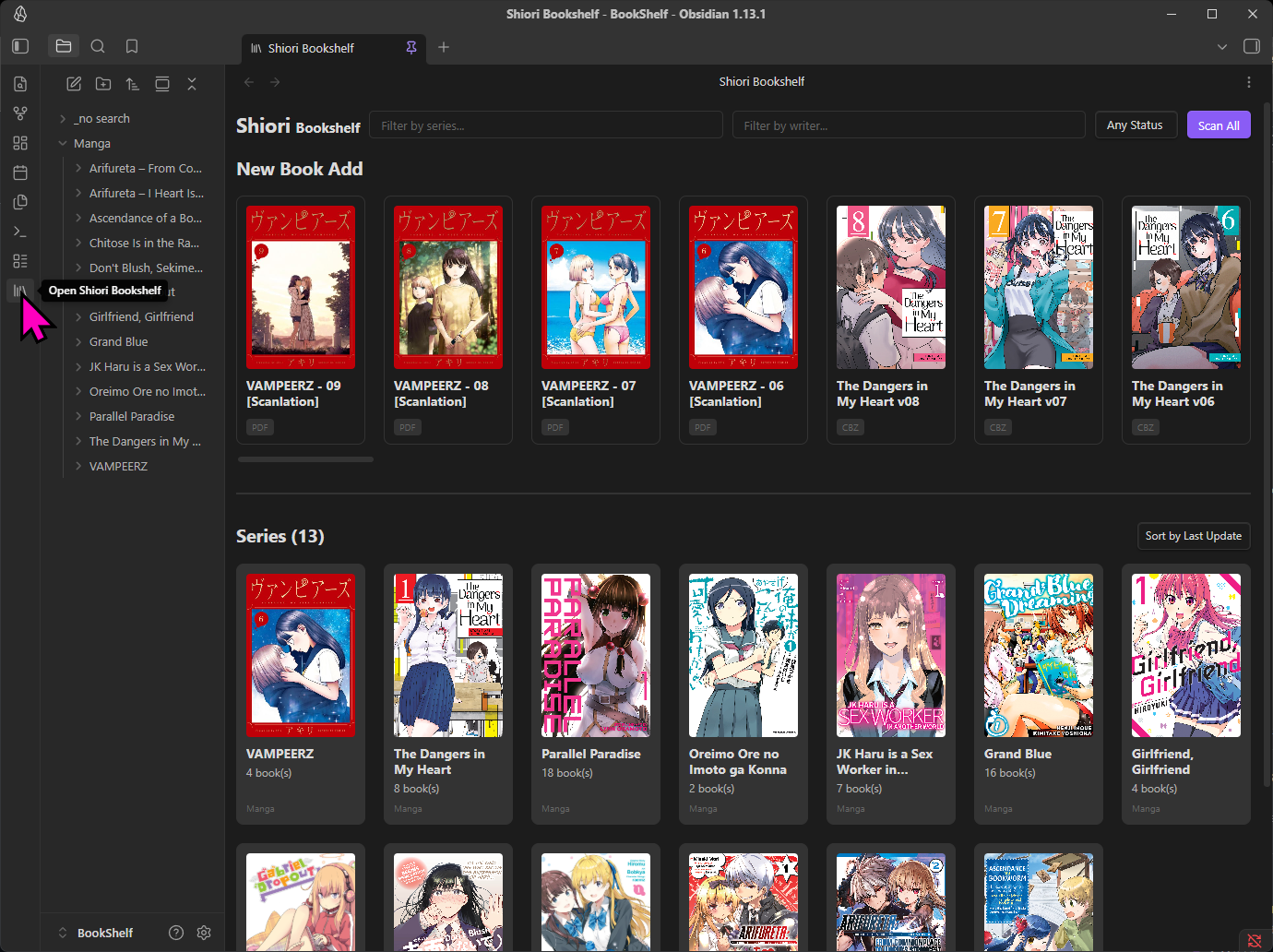
Shiori Bookshelf is a powerful Obsidian plugin that transforms your vault into a beautiful, fully-featured digital library. It allows you to organize, browse your PDF, EPUB, and CBZ files natively inside Obsidian, complete with automatic cover extraction and metadata management.
✨ Features
- Beautiful Bookshelf View:
- A visually rich, grid-based gallery view displaying your books and series covers natively inside Obsidian.
- Automatically sorts series by the last updated book.
- Lazy loading with infinite scroll (loads 50 items at a time for optimal performance).
- Library Organization:
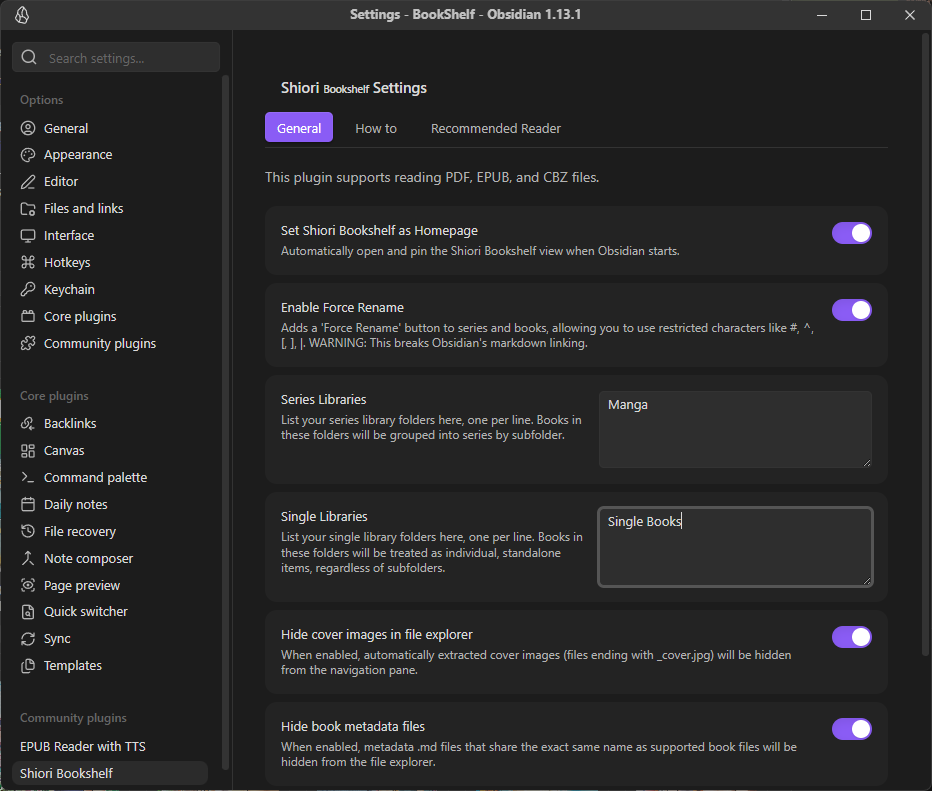
- Series Libraries: Automatically group manga, comics, or light novels into a series based on subfolders.
- Single Libraries: Manage standalone books independently, regardless of folder structure.
- WebApp Server (Remote Access):
- Built-in local web server allows you to browse and read your Obsidian library from any web browser, phone, or tablet on your local network.
- Features a fully responsive mobile-friendly UI, URL routing, advanced filtering, and a built-in remote web reader for all supported formats.
- WebApp Built-In Readers:
- Read your files natively without third-party apps!
- Full support for PDF, EPUB, and CBZ/CBR formats.
- CBZ reader features infinite-scroll lazy loading with progress tracking, allowing massive files to load instantly.
- Automated Metadata & AI Integration:
- Automatically extracts cover images (
_cover.jpg) directly from your EPUB, CBZ, and PDF files. - Gemini AI Auto-Fill: Connect your free Google Gemini API key to automatically fetch and fill rich metadata for your series (including Summary, Genres, Tags, Writers, Publisher, and Release Year) with a single click.
- Automatically extracts cover images (
- Advanced Search & Filtering:
- Search your library by Title, Writer, or File Name.
- Filter by reading status (All, Read, Unread, Reading).
- Use the Advance Filter to drill down by Libraries, specific Genres, or Tags.
- Context Menu Integration:
- Force Rename: Bypass Obsidian's restrictive character limits to rename files using characters like
#,^,[,],|. Automatically syncs the new name to the companion metadata and cover files. - Scan: Manually trigger cover extraction for all books inside a folder.
- Add to Libraries: Quickly add folders to your Series or Single libraries via right-click.
- Force Rename: Bypass Obsidian's restrictive character limits to rename files using characters like
- Clean File Explorer:
- Options to automatically hide the extracted
_cover.jpgand metadata.mdfiles from your Obsidian file explorer to keep your workspace completely clutter-free.
- Options to automatically hide the extracted
🚀 Installation
Note: This plugin is currently in development and can be installed manually.
- Download the latest release from the GitHub repository.
- Extract the contents (
main.js,manifest.json,styles.css) into your Obsidian vault's plugin directory:[Vault]/.obsidian/plugins/obsidian-plugins-shiori-bookshelf/. - Open Obsidian Settings -> Community Plugins.
- Refresh the plugin list and enable Shiori Bookshelf.
📖 Documentation & Guides
For detailed, step-by-step instructions on how to use specific features, please refer to the following guides:
- How to Setup Libraries
- How to Use the Bookshelf View
- How to Manage Metadata and Covers
- How to Use Force Rename
📦 Release Notes
v1.0.1
- File Size in List View: The Bookshelf List view now displays the file size next to the file extension.
- Remember View State: Your preferred view mode (Thumbnail, List, Detail, etc.), sort order, and filter settings are now automatically saved and remembered across sessions.
- ✨ Gemini Auto Fill: Added an "Auto Fill" button to the Edit Metadata window. You can now automatically fetch and fill series metadata (including Japanese/English/Romaji aliases, summary, writers, publisher, genres, tags, and age rating) using Google's Gemini AI.
- Gemini Settings: Added settings for "Gemini API Key" and "Gemini Model" to support the new Auto Fill feature.
v1.0.2
- Unified Context Menu: The right-click context menu (Open in new window, Force Rename, Delete, etc.) is now available across all view modes (Card, Thumbnail, List, and Detail View).
- Advance Filters: Added a new "Advance Filter" toggle in the home bookshelf to easily show/hide filter categories.
- Library Filtering: Added the ability to filter series by "Libraries" (your setup folders) alongside Genres and Tags.
- Improved Filter Organization: Filter sections are now reordered to Libraries, Genres, and Tags, and are expanded by default when you click the Advance Filter button.
- Reset Filters Button: Added a convenient "Reset Filters" button to instantly clear all selected filters across all categories.
- Thumbnail Zoom: Added zoom controls (
-,reset,+) for the Thumbnail view, allowing you to easily resize book covers.
v1.0.3
- Series Context Menu: Added a right-click context menu to Series cards, bringing feature parity with book cards. You can now easily perform actions like Open in new window, Copy path, Show in system explorer, Reveal in navigation, Regenerate Cover (for all books in the series), Open Metadata file, Force Rename, and Delete directly from the series folder.
- Fixed How To Tab: Fixed an issue where the "How To" instructions in the settings tab would disappear when the plugin was downloaded/installed via the community plugins directory. Instructions are now bundled directly within the plugin.
v1.0.4
- WebApp Advance Filters: Brought the "Advance Filter" functionality to the WebApp! You can now easily filter your entire library by Libraries, Genres, and Tags directly from your browser, complete with a convenient Reset Filters button.
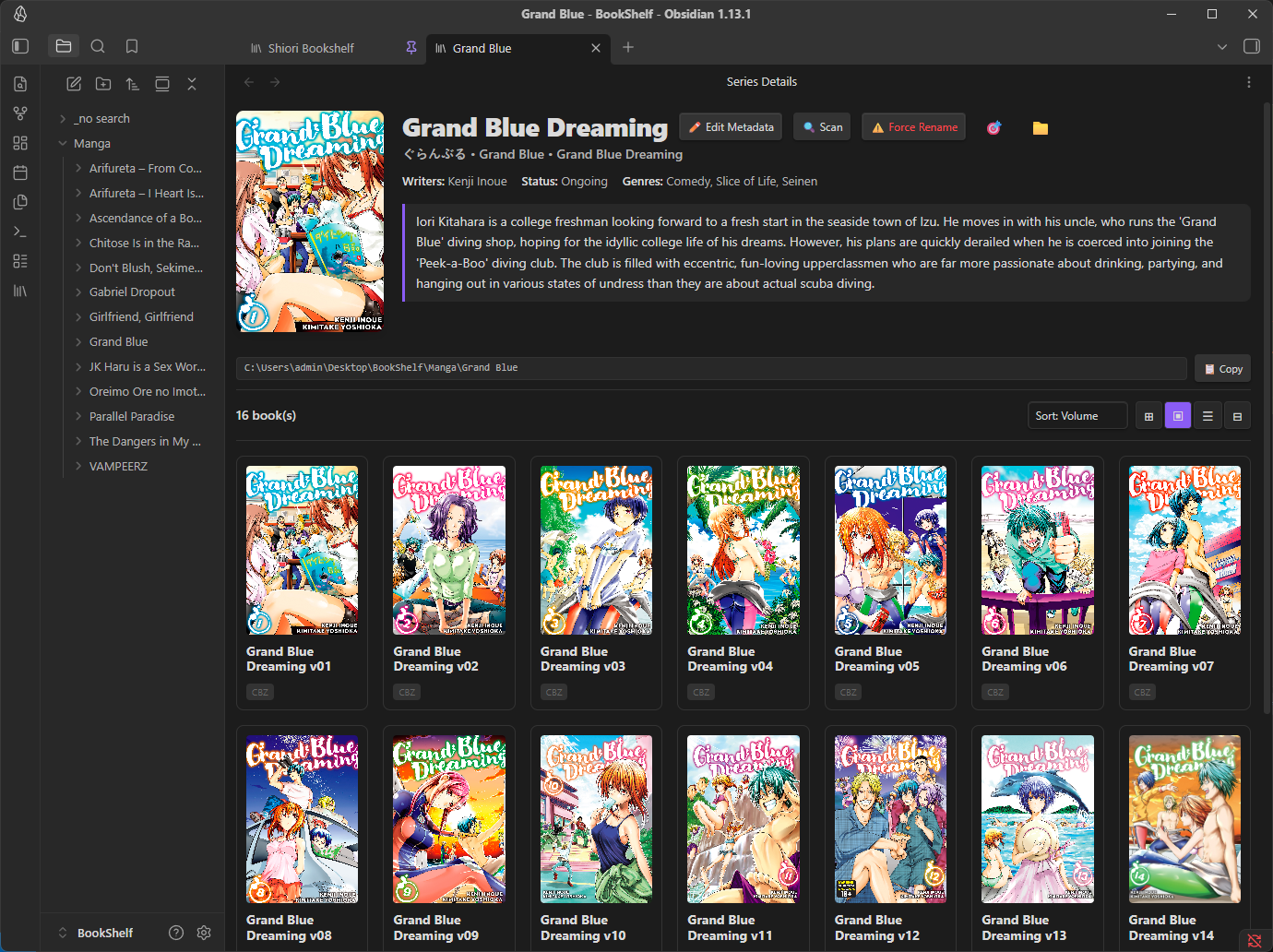
- WebApp Series Detail View: Overhauled the WebApp series view. When clicking into a series, it now beautifully displays full series details including the cover image, writers, publisher, release year, status, genres, tags, and summary, matching the rich experience of the Obsidian app.
- WebApp URL Routing: Implemented URL routing in the WebApp. Navigating into a series now updates the URL (e.g.,
/?series=...), allowing you to bookmark, share direct links to specific series, and use your browser's back/forward buttons seamlessly. - WebApp EPUB Reader: Added a built-in EPUB reader to the WebApp, allowing you to read
.epubfiles seamlessly directly in your browser. - WebApp CBZ Lazy Loading: Optimized the CBZ reader to lazy-load images as you scroll. This drastically improves initial load times and memory usage for large CBZ files (e.g., 500MB+) and includes a visual progress indicator.
- WebApp Reader Navigation: Fixed an issue where using the browser's back button while in the reader (PDF, CBZ, EPUB) would unexpectedly navigate away from the series view instead of just closing the reader.
- WebApp Responsive Header: Improved the layout of the WebApp header on small screens (mobile/tablet), ensuring the title, search inputs, and Advance Filter button stack gracefully without overlapping.
- Server Access Links: Added dynamic server access links in the plugin settings (under the Web Server tab) that display your
localhostand local network IP addresses, making it easy to open the WebApp on other devices like phones or tablets.
v1.0.5
- Scan Progress Indicator: Added a visual progress notice when scanning folders or series for missing covers. It now clearly shows how many books have been processed (e.g.
Scanning 20/400 books... Extracted: 5) and updates in real-time, preventing the app from hanging during large scans. - Force Regenerate Cover: Added a new "Force Regenerate Cover" option to both Book and Series right-click context menus. This allows you to forcibly extract and overwrite covers even if a
_cover.jpgalready exists. - Smart Cover Extraction: The regular cover extraction logic is now smarter! If you trigger a "Regenerate Cover" and a cover image already exists in the folder, it will instantly link it to the book's metadata without redundantly re-extracting it from the archive, saving significant time.
- Faster PDF Cover Extraction: Massively improved the performance of extracting covers from PDF files. Instead of loading the entire PDF file into memory, Shiori Bookshelf now efficiently streams only the required data chunks needed to render the very first page via HTTP Range Requests, saving a huge amount of memory and time.
v1.0.6 (Hotfix)
- API Compatibility Fix: Resolved a critical bug where users on Obsidian versions prior to 1.4.0 would experience silent failures during cover extraction due to the missing
processFrontMatterAPI. Added robust fallbacks for legacy versions. - Progress UI Fix: Fixed a crash caused by the new progress notice on older Obsidian versions lacking the
setMessagefunction. - PDF Extraction Fix: Fixed an issue where PDF cover extraction would fail and return 0 covers if the user had not explicitly opened a PDF document in their current session, by dynamically pre-loading Obsidian's built-in PDF.js library.
v1.0.7
- PDF Extraction Fix: Fixed a bug where PDF cover extraction would fail if
loadPdfJswas not globally available. The plugin now correctly imports the required API, ensuring reliable background PDF scanning. - Series Scan Fix: Resolved a silent crash that occurred when triggering a manual "Scan" or "Regenerate Cover" from the Series card context menu.
- Force Regenerate UI Fix: Ensured the bookshelf UI remains fully responsive during long scan operations, and that "Force Regenerate Cover" directly updates the visual DOM without requiring a full page reload.
v1.0.8
- WebApp Secure Authentication: Added a built-in Basic Authentication system for the Web Server! You can now turn on the "Require Authentication" toggle in settings and configure a list of allowed users (
username:password). This completely locks down the WebApp and its APIs, preventing unauthorized access on your local network. - Instant PDF Streaming (WebApp): Fixed a major performance bug with the WebApp's PDF reader. The local server's HTTP Range Request headers have been overhauled. PDF.js will now instantly fetch the file's structure and render the first pages immediately, completely eliminating the need to wait for the entire PDF to download!
- WebApp Search Polish: Fixed a UI issue where the "New Book Add" carousel would stay visible while using the search bar or advanced filters. It now hides itself intelligently when you are filtering your library.
- WebApp UI Tweak: Renamed the "Download / Open" button to just "Download" for a cleaner look.
v1.0.9
- Auto Save Metadata: The metadata edit window is now seamless! Changes to aliases, summaries, and tags are saved automatically as you type. Manual Save and Cancel buttons have been removed for a cleaner, modern experience.
- Detailed Auto Fill Notice: When using the Gemini Auto Fill feature, the notification now provides a detailed breakdown of exactly which fields (e.g., Aliases, Summary, Genres, Tags) were successfully updated.
- Enhanced Context Menus: The native Obsidian file explorer context menu has been upgraded. You can now launch the "Series Detail" or "Book Detail" modal directly from folders and files. Added an "Open Metadata file" shortcut to instantly access the raw data.
v1.0.10
- UI Overflow Fix: Fixed an issue where the Home screen search filters and buttons would overflow off the screen on narrower windows or when resizing. They now gracefully wrap to the next line.
- Seamless Scanning Experience: Completely eliminated home screen flickering and UI lag during background "Scan All" or cover extraction operations. You can now smoothly search, filter, and type without any interruptions while the plugin scans in the background.
- Sticky Notifications: Notifications will now remain visible on the screen until you manually click "Clear All", ensuring you never miss important detailed information or scan results.
- Auto-expanding Inputs: The "Web Server Users" and "Ignore Folders" input fields in the settings menu now automatically expand their height based on your text, exactly like the Libraries field.
- Improved Settings Format: The Extensions setting now accepts "one-per-line" format to match the behavior of the Libraries setting, removing the need for comma separation.
- Error Transparency: Added more detailed JSON error messages to aid in troubleshooting plugin issues.
- Bug Fix: Addressed an issue preventing the plugin from being fully enabled in certain edge cases by removing problematic view extension modification routines.
v1.0.11
- True Lazy Loading: The Home screen's Series grid has been completely rewritten to use true lazy loading with infinite scrolling. Instead of creating thousands of HTML elements at once, it now loads in instant batches of 50 as you scroll down. Opening the Home tab with massive libraries is now lightning fast and completely freeze-free.
❤️ Support & Donate
If this plugin has improved your Obsidian workflow, saved you time, or you just want to support its continued development, please consider donating!
Your support is incredibly appreciated, helps fix bugs, and keeps this project alive and growing. 🙏
https://buymeacoffee.com/endofday
Built with ❤️ for the Obsidian Community