
README file from
GithubSecret Mask
An Obsidian plugin that hides the middle part of sensitive values (phone numbers, SDK IDs, API keys, and any other string). Hover to reveal the full value, and copying always yields the complete value without any Markdown formatting.
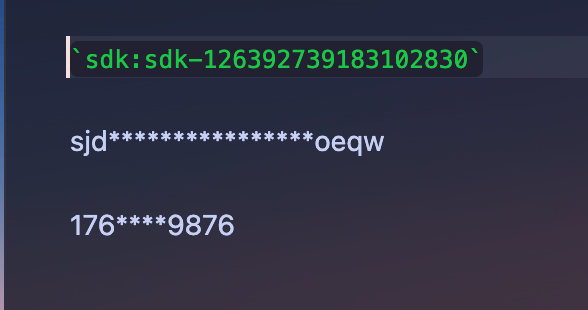
Usage
Wrap a value with the sdk: prefix inside inline code (backticks):
`sdk:17612343234`
`sdk:sdk-126392739183102830`
`sdk:sjdlajsdlajsdlaksguoeqw`
They are rendered in Reading view as:
176****3234
sdk***************1830
sjd****************oeqw
Values shorter than
prefix digits + suffix digits(default3 + 4 = 7) are shown as-is.
Behavior
| Situation | Result |
|---|---|
| Reading view | Shows the masked value |
| Live Preview (cursor not on the value) | Shows the masked value |
| Live Preview (click into the value) | Reveals the source so you can edit it normally |
| Hover | Shows the full value in a tooltip |
| Copy | Copies plain text only, full value, no formatting |
Settings
- Prefix digits: how many characters to show at the front (default
3) - Suffix digits: how many characters to show at the end (default
4) - Mask character: the character used to mask (default
*)
Development
npm install
npm run dev    # watch mode: rebuilds main.js on change
npm run build  # production build (includes type check)
Symlink this repository into your vault's plugin folder for testing. The folder name must match the id in manifest.json:
ln -s "$PWD" "/path/to/vault/.obsidian/plugins/secret-mask"
Then reload the plugin in Obsidian. You can also install the community plugin Hot Reload to reload automatically.
Project files
main.ts: plugin logicmanifest.json: plugin metadata (id, version, min app version, ...)versions.json: version to minimum app version mappingesbuild.config.mjs: build script.github/workflows/release.yml: builds and creates a release when a tag is pushed
Releasing to the Obsidian community directory
The plugin is listed in the official directory at community.obsidian.md. When a user installs it, Obsidian downloads main.js, manifest.json, and styles.css from your GitHub Release assets.
Before you begin
- Push the code to a public GitHub repository.
- Keep a
README.md(in English) and aLICENSEat the repository root. - Fill in
manifest.json, using a semanticversion. - Each release must attach these files as individual assets (exact filenames, not only a zip):
main.jsmanifest.jsonstyles.css(optional if the plugin has no styles)
Automated release (already configured)
The flow is: create a tag locally, push it, and GitHub Actions builds and publishes the release.
# 1. Bump the version in manifest.json and package.json
# 2. Create a tag that matches the manifest version (no "v" prefix recommended)
git tag 1.0.3
git push origin 1.0.3
Pushing the tag triggers .github/workflows/release.yml, which:
- runs
npm install && npm run build - attests build provenance for the assets
- creates a GitHub Release for that tag with
main.js,manifest.json, andstyles.cssattached
Submit to the directory (one time)
- Sign in at https://community.obsidian.md with your Obsidian account.
- Link your GitHub account to your profile.
- Make sure the
manifest.jsonon the default branch HEAD is correct and committed, and that the matching GitHub Release exists. - Add your plugin in the directory and select your repository.
- Address the automated and manual review feedback; fix issues by publishing a new, incremented version.
Updating later
Repeat the automated release step: bump the version, push a new tag. The directory picks up the latest release automatically, and users receive an update. No resubmission is needed.
Checklist
- Repository is public; root has
README.md(English) andLICENSE -
manifest.jsonidis unique and does not containobsidian - Release tag equals the
versioninmanifest.json - Release assets include
main.jsandmanifest.json(plusstyles.cssif present) -
main.jsis a build artifact (do not commit TypeScript source as the artifact)
中文说明
本插件用于隐藏敏感值(手机号、SDK、密钥等任意字符串)的中间部分,悬浮和复制时显示完整值。
- 用法:用反引号包裹
sdk:前缀 + 值,例如`sdk:17612343234` - 阅读视图显示掩码;编辑视图光标移开显示掩码,点进去自动还原源码可编辑
- 复制只得到纯文本,值完整、不带 Markdown 格式
- 设置项:前缀位数(默认 3)、后缀位数(默认 4)、掩码字符(默认
*) - 值长度 ≤ 前几位 + 后几位之和(默认 7)时不屏蔽
发布:改版本号 → git tag <版本> → git push origin <版本>,CI 自动构建、attest 并发布 Release。