
README file from
GithubRev-view
An Obsidian plugin that adds a nested kanban view to the core Bases plugin. This is NOT a plugin for reviewing!
Bases already gives you a kanban board: one column per group. Rev-view goes a level further and lets a column hold another board, and that board hold another, with the notes as cards at the innermost level. A structure with depth — project → milestone → task, say — then reads as one picture instead of several separately filtered views.
Requirements
- Obsidian 1.10.0 or later.
- The core Bases plugin enabled.
Quick start
Rev-view takes its nesting levels from the base's own Sort list, so there is nothing new to learn about picking properties.
-
Create a base.
-
Add a view and pick Refine from the view type menu.
-
Open Sort and add the properties you want to nest by, outermost first — for example:
folder → project → status.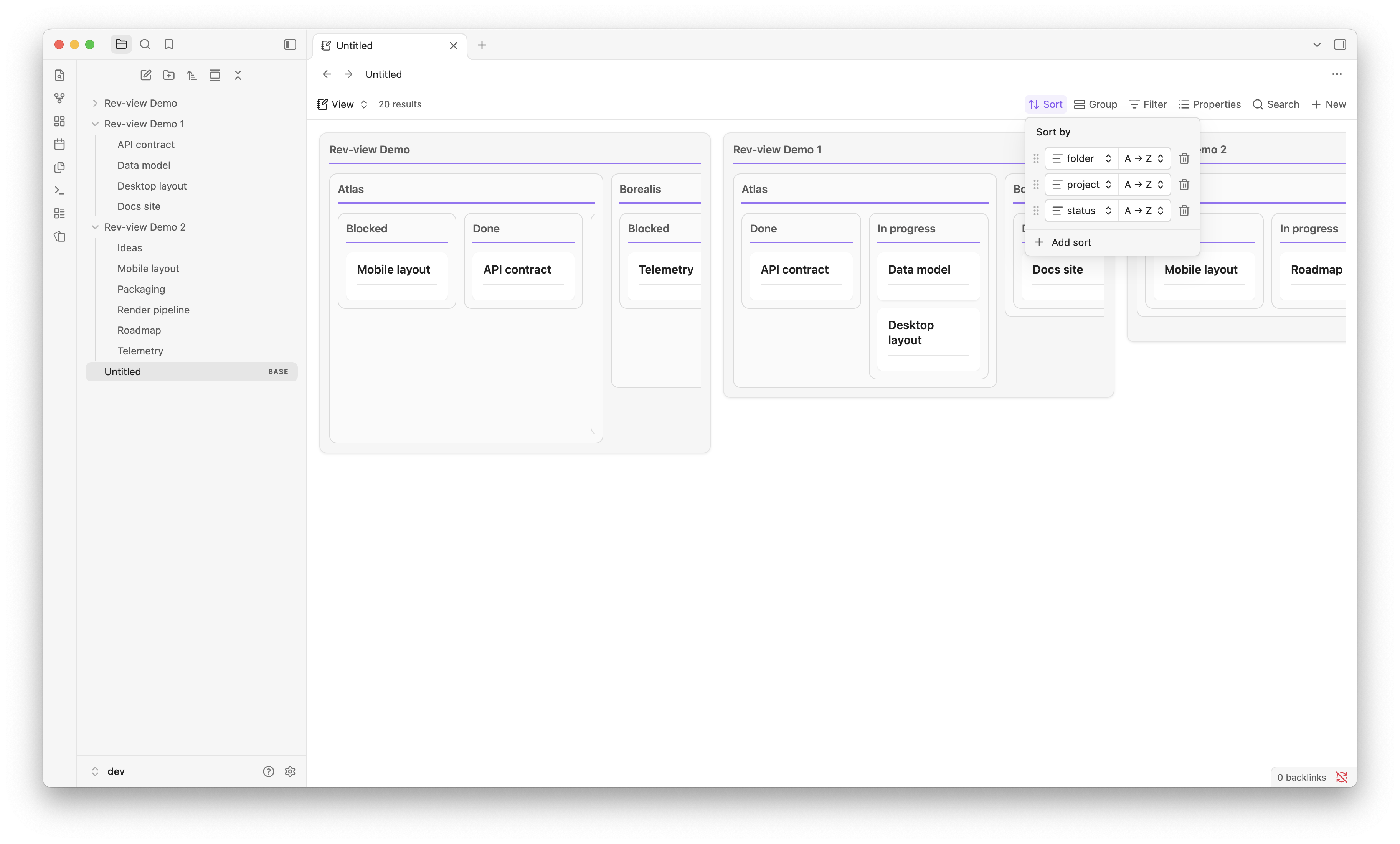
-
In the view options, set Nest depth to how many of those leading Sort entries should become nesting levels.
How the nesting works
The Sort list ends up doing two jobs at once.
They decides how the kanban is nested, in the order you listed them, upper sort entry will be the outter kanban. Nest depth is simply how many of them do, counting from the top.
The remaining entries don't contribute to the layout. They decide the order of the cards in the innermost board.
Leaving Nest depth empty means "use every sort entry".
Outlines on cards
Each card can carry an outline of its note's headings.
- The block collapses and expands per card, and a card keeps its own state until the view is reloaded. Auto expand outline switch starts every card expanded.
- Heading depth caps how deep the outline goes.
1draws only top-level headings,2adds the next level down, and so on.0turns the outline off entirely. - Outline label renames the toggle. Left empty, it follows your interface language.
- Outline sections narrows the outline to the headings you name, instead of the whole note. Point it at a formula property whose value is a heading's text, or a list of them:
["Goal", "Notes"]. Every matched heading is listed together. Left empty, the outline covers the whole note.
Options
| Option | What it does |
|---|---|
| Nest depth | How many leading Sort entries become nesting levels. Empty = all of them. |
| Outline sections | A formula property listing the headings the card outline keeps. Empty = the whole note. |
| Outline label | Text on the outline toggle. Empty = follow your interface language. |
| Auto expand outline | Start every card outline expanded. |
| Column width | Width of the outermost kanban. Nested kanban scale down from it. |
| Column height | Height ceiling per kanban. Longer card lists scroll inside it. |
| Heading depth | Deepest heading level drawn in a card outline. 0 hides the outline entirely. |
Development
npm install     # install dependencies
npm run dev     # esbuild in watch mode
npm run build   # typecheck + production bundle
npm run lint    # eslint
License
MIT. See LICENSE.