
README file from
GithubQMD Vault Search




Search your Obsidian vault with its own QMD index. No runtime dependencies.
Features
- Fast hybrid search: keyword and semantic results in one list.
- Deep search with LLM query expansion, on demand.
- A related-notes panel that follows the note you are on.
- The index refreshes at startup and once a day.
Requirements
-
Obsidian 1.13.0 or newer, desktop only. Tested on Linux (Flatpak and native) and macOS; Windows is untested.
-
qmd installed, and an index inside the vault that contains the vault. In the vault folder, run:
qmd init
qmd collection add .
qmd initalone creates an empty index; the plugin then says that it has no collections.
Models: qmd downloads its models the first time they are needed, into ~/.cache/qmd/models (or $XDG_CACHE_HOME/qmd/models).
- The first
qmd embeddownloads the embedding model (about 330 MB). - The first deep search downloads the query model (about 1.3 GB), and the reranker (about 640 MB) if Rerank deep search is on. The search box shows the progress, and the search waits for the download instead of timing out. Closing the search does not stop the download.
- To download them ahead of time, use the Search models button in the settings, or run
qmd pullin a terminal.
qmd installed with a Node version manager (fnm, nvm, volta, asdf, mise): the plugin also looks in the manager's default folders. If the status bar still says it can't find qmd, set Path to qmd in the settings. On macOS, Obsidian started from the Dock or Finder doesn't get the PATH set in your shell profile.
Installation
From the community directory (recommended)
- Open Settings → Community plugins and turn on community plugins if asked.
- Select Browse, search for QMD Vault Search, then select Install and Enable.
You can also open the plugin's page: community.obsidian.md/plugins/qmd-vault-search.
Manually
- Download
main.js,manifest.jsonandstyles.cssfrom the latest release. - In Settings → Community plugins, select the folder icon next to Installed plugins. This opens
<vault>/.obsidian/plugins/. - Create a folder named
qmd-vault-searchthere and put the three files in it. - Select the reload icon next to Installed plugins, then enable QMD Vault Search.
Beta versions: install BRAT and add dingzy53/obsidian-qmd.
Update or remove: select Check for updates or Uninstall in Settings → Community plugins.
Upgrading from the qmd-search or obsidian-qmd folder: the plugin ID is now qmd-vault-search. Copy data.json from the old plugin folder into the new one to keep your settings, then delete the old folder.
How it works
- The vault's own index. The plugin runs
qmdinside the vault folder, so qmd uses<vault>/.qmd/index.sqliteand<vault>/.qmd/index.yml(created withqmd initandqmd collection add .). If that index cannot be found the plugin says so and stops; it never falls back to the global index. - A warm server. While Obsidian is open the plugin keeps one
qmd mcp --httpprocess running so the embedding model stays loaded. A fused keyword + vector search then takes roughly 0.3–0.7 s instead of 10+ s per search through the CLI. The server stops when the plugin is disabled or Obsidian closes. - Scheduled refresh. About 20 seconds after launch, and once a day after a set hour, the plugin runs
qmd updateand, if anything changed,qmd embed. When nothing changed it does nothing else.
Usage
| Surface | Open with | What it does |
|---|---|---|
| Quick search | command QMD Vault Search: Search (assign a hotkey) | Type to search; results update as you type. |
| Vault search panel | ribbon icon ✨ or Open search panel | The same search in the right sidebar; results stay while you work. |
| Related notes | Open related notes | Notes semantically close to the note you are on. Follows the active note. |
| Selection | Search selected text | Sends the selection to the search panel. |
Each result shows the note name, its folder, the matched section and an excerpt taken from the note itself (math rendered, never cut mid-formula).
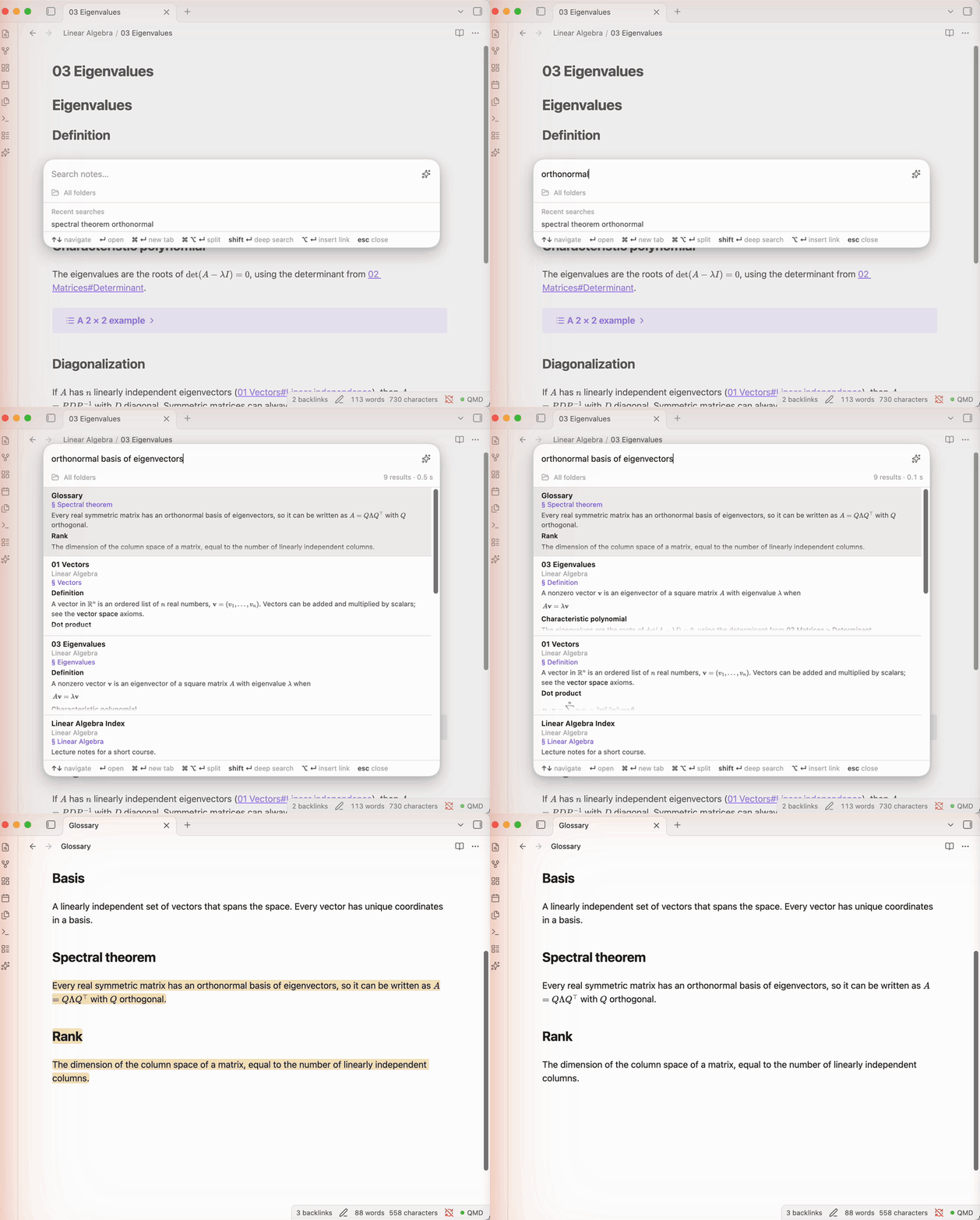
Keys in the search box
| Key | Action |
|---|---|
| ↑ / ↓ | Move through results (↑ on an empty box recalls the last query) |
| Enter | Open the note at the match and flash it |
| Ctrl/Cmd+Enter | Open in a new tab |
| Ctrl/Cmd+Alt+Enter | Open to the right |
| Shift+Enter | Deep search: rerun with LLM query expansion (typically 15–30 s on CPU; can take several minutes on low-RAM machines — see Deep search timeout in settings) |
| Alt+Enter | Insert a link to the result at the cursor |
Mouse: click opens, Ctrl-click or middle-click opens a new tab, resting on a row in a sidebar panel shows a page preview (after about 2 s, or at once with Ctrl held), right-click gives a menu, and a row can be dragged into a note to make a link.
Query syntax: "exact phrase" and -excluded work for the keyword half of the search. Folder filter: type a folder in the field under the search box.
Excluding folders: right-click a folder and choose Exclude from qmd index, or use Excluded folders in settings. Its notes leave search after a short refresh. Their text stays in the index file until you press Purge.
The status bar item qmd ● shows the state (green ready, yellow starting or indexing, red problem). Click it to update the index, restart the server or open settings.
Settings
| Setting | Default | Notes |
|---|---|---|
| Index location | vault root | Folder that contains .qmd. The row below it shows the index status. |
| Path to qmd | auto-detect | |
| Excluded folders | none | Saved as ignore rules in .qmd/index.yml, so qmd run from a terminal follows them too. |
| Refresh at startup | on | |
| Refresh daily | on, 04:00 | First chance after that hour while Obsidian is open. |
| Purge removed notes | button | Runs qmd cleanup with the server stopped. Notes you include again are embedded again. |
| Embed changed notes | on | Runs qmd embed after an update that changed something. |
| Keep a qmd server running | on | Off = keyword search only. Status, log and port show while it is on. |
| Port | 8421 | The next five are tried if it is taken. |
| Search results | 20 | Up to 40. |
| Related notes shown | 10 | |
| Hover preview delay | 2 s | Sidebar panels. Ctrl/Cmd-hover previews at once. |
| Rerank deep search | off | Minutes without a dedicated GPU. Shows Rerank candidates when on. |
| Deep search timeout | 10 min (20 with rerank) | Minutes to wait before stopping a deep search (0 for no limit). Raise or disable on low-RAM machines where loading the query model takes several minutes. |
| Search models | button | Shows which models are downloaded and what the button will fetch. Missing models are downloaded via qmd pull; already-cached models are kept. Needs a network connection. |
All settings appear in Obsidian's settings search.
Privacy and security
- Network: the plugin talks to the
qmdserver it starts itself, over HTTP onlocalhost. When you select the Search models download button in settings, the plugin also sends HTTPHEADrequests tohuggingface.cofor already-cached models that lack a.etagversion file, soqmd pulldoes not re-download them; no vault content or personal data is sent. qmd itself downloads its models from Hugging Face the first time they are needed or when you runqmd pull; see the qmd documentation. - Files outside the vault: the plugin runs the external
qmdprogram, which you install yourself. To find it, the plugin looks in the usual install folders (~/.local/bin,~/.bun/bin,~/.cargo/bin,/usr/local/bin,/opt/homebrew/bin,/usr/bin, the default folders of fnm, nvm, volta, asdf and mise, and npm's global folder on Windows) and onPATH. qmd keeps its models and cache in your home directory. The plugin reads the names and sizes of the files in qmd's model folder to show download progress, and writes missing.etagsidecar files there before runningqmd pullso cached models are not re-downloaded. If you set Index location to a folder outside the vault, the index is read from and written there. - Running programs (
child_process): the plugin starts only theqmdbinary, with fixed arguments and never through a shell: the search server, searches,update,embed,status,cleanupandpull, pluswhich/whereto locate qmd. Under Flatpak these run on the host throughflatpak-spawn --host, because qmd is installed outside the sandbox. - Direct file access (
fs): the index lives in a hidden.qmdfolder, or outside the vault if you choose, which Obsidian's vault API does not reach. The plugin uses Node'sfsonly to read.qmd/index.yml, to rewrite itsignorelist (see Config file), to check whether the qmd binary or/.flatpak-infoexists, to list nvm's installed Node versions, to list qmd's model folder, and to write missing.etagsidecar files there beforeqmd pull. Notes are read through Obsidian's vault API. - Config file: excluding or including a folder, or renaming an excluded one, edits the
ignorelist in.qmd/index.yml. Nothing else in that file is changed. - Clipboard: the plugin only writes to the clipboard, never reads it. It writes a link to a note when you choose Copy link on a result, or when you insert a link with no note open.
- No telemetry, ads, accounts or payments.
Limitations
.qmd/index.sqlitechanges whenever the index is refreshed after notes changed. While the server runs, the newest writes sit inindex.sqlite-waland are folded intoindex.sqlitewhen the server stops or restarts.- A fused search draws on the top 20 keyword and top 20 semantic hits. With a folder filter the plugin tops the list up with a wider keyword search.
- Reranking and query expansion are CPU-bound LLM work; only fast search is instant.
- Until you purge, the vectors of excluded notes still take up places among the nearest matches, so semantic results can be thinner. Including a folder again before a purge needs no re-embedding.
Development
npm install
npm run dev      # watch build
npm run build    # type-check and bundle to main.js
npm run lint     # the same eslint-plugin-obsidianmd rules the community-plugin review runs
npm test
QMD_PLUGIN_DIR=<vault>/.obsidian/plugins/qmd-vault-search npm run deploy   # build and copy into a vault
Then reload the plugin: obsidian plugin:reload id=qmd-vault-search. See AGENTS.md for design notes.
Releasing
npm version patch   # bumps package.json, manifest.json and versions.json, commits and tags (no "v" prefix, see .npmrc)
git push --follow-tags
The tag triggers the Release workflow. It lints, tests and builds, then attaches main.js, manifest.json and styles.css to a GitHub release. Never upload a main.js you built locally: the community directory rebuilds the tagged source with npm run build and checks that the result matches the release.
Community directory. The plugin is submitted once at community.obsidian.md, from the plugin's page there. Before tagging, run Review branch on main to preview the automated review (manifest, release assets, source code, build verification). After the first submission, every new GitHub release is picked up automatically, or straight away with Request review.
License
MIT © 2026 Ding Zheng Yuan