
README file from
Github乔木 UI 学习 · Qiaomu UI Learn
中文 | English
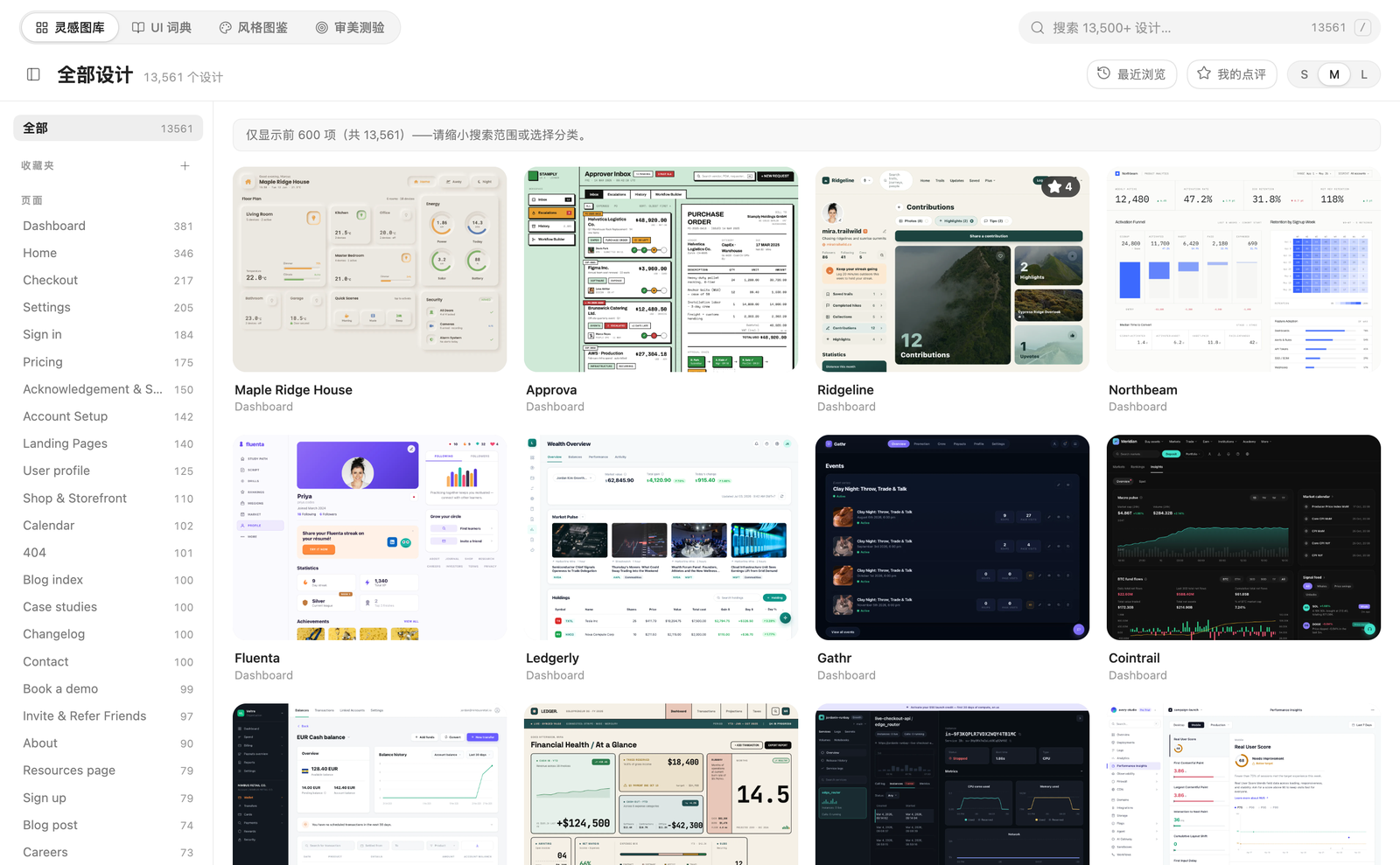
在 Obsidian 里学 UI 设计: 13,500+ 真实设计图库、中英双语 UI 词典、44 种风格图鉴、审美测验,学完直接做笔记,还能一键生成「复刻 Prompt」交给 AI 编程助手。
Learn UI design inside Obsidian: 13,500+ real designs, a bilingual UI dictionary, a 44-style atlas and an aesthetic quiz — take notes as you go, and copy a replication prompt for your coding agent.



已验证: 在 Obsidian 桌面端实机运行;npm run build 与 npm run check-i18n 通过;main.js 内置全部数据,只拷贝 main.js / manifest.json / styles.css 三个文件即可使用(社区安装同样如此)。
这是什么
做界面,难的往往不是“不会做”,而是“说不出它叫什么、也不知道好的长什么样”。这个插件把学习 UI 的四件事放在同一个标签页里:
| 标签 | 你得到什么 |
|---|---|
| 灵感图库 | 13,561 个真实网页 / 区块 / 动效 / 设计系统,按 184 个分类浏览;悬停分类看中文名;搜索支持中英文分类名和你自己写的标签 |
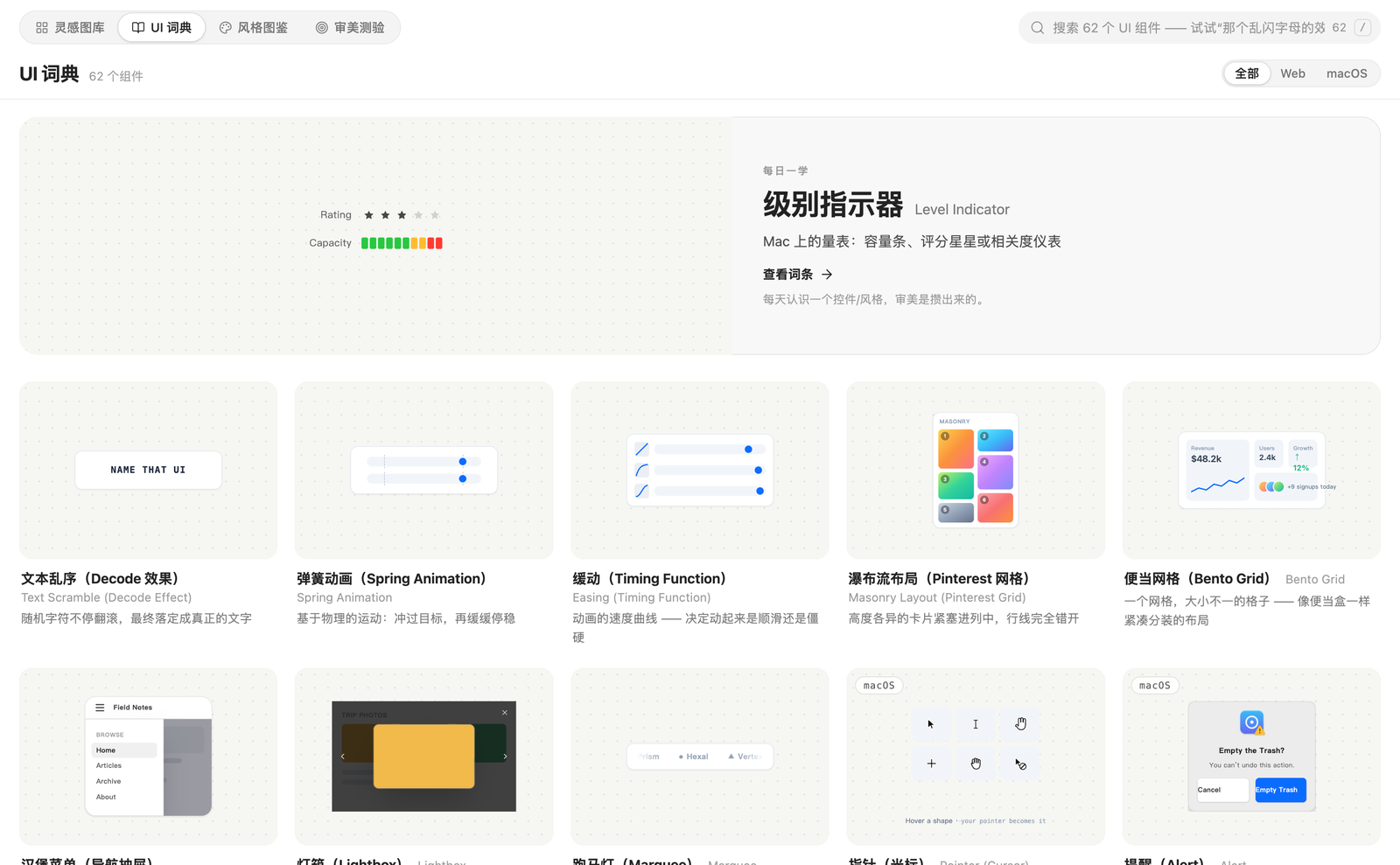
| UI 词典 | 62 个界面组件,每个都有可交互的实时标本、正式名称、人话解释、API 速查、AI Prompt 和 Debug Prompt;支持“那个乱闪字母的效果”这种口语搜索 |
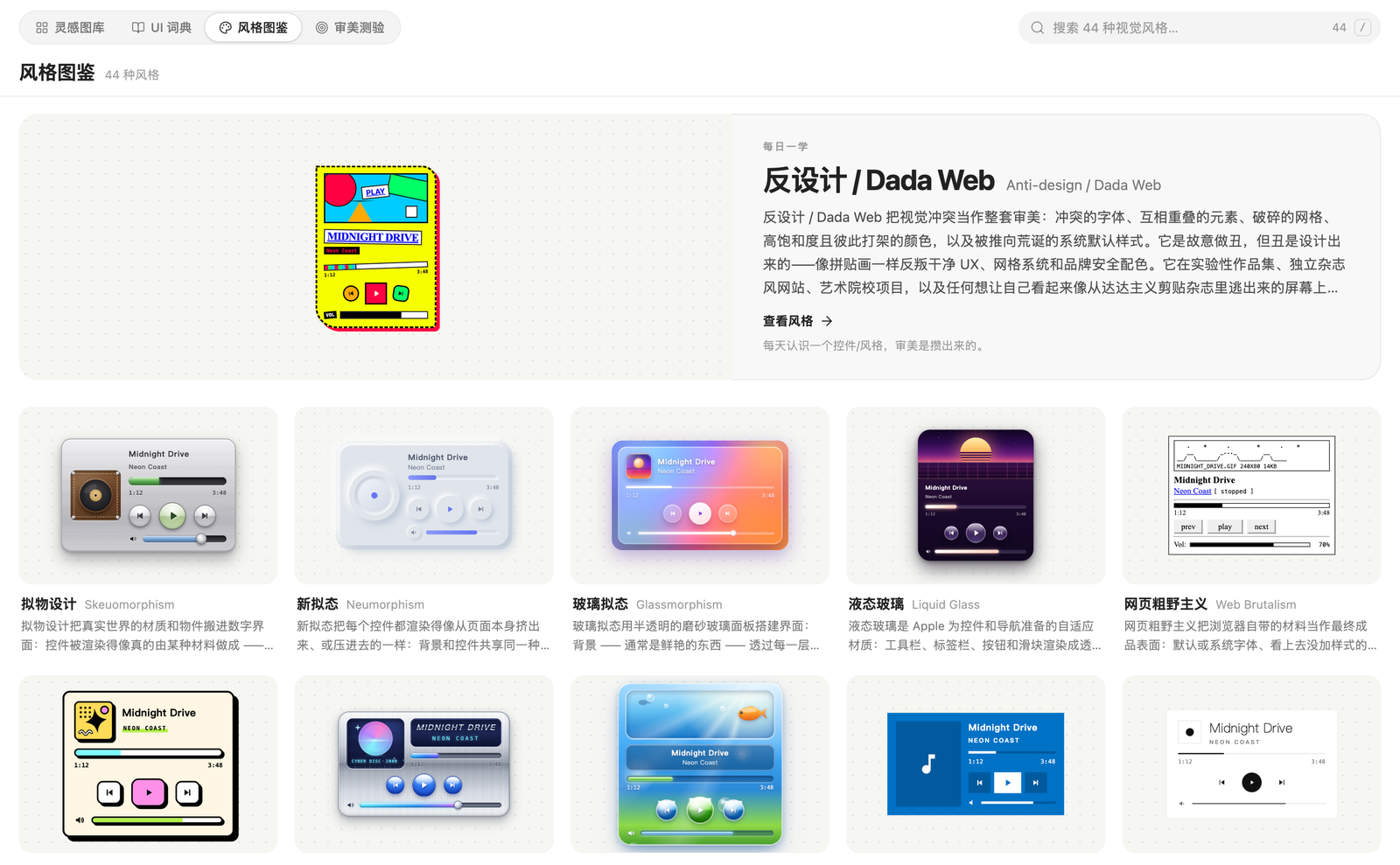
| 风格图鉴 | 44 种视觉风格(新拟态、玻璃拟态、野兽派……),每种有标本、识别信号、易混淆对比和可粘贴的风格 Prompt |
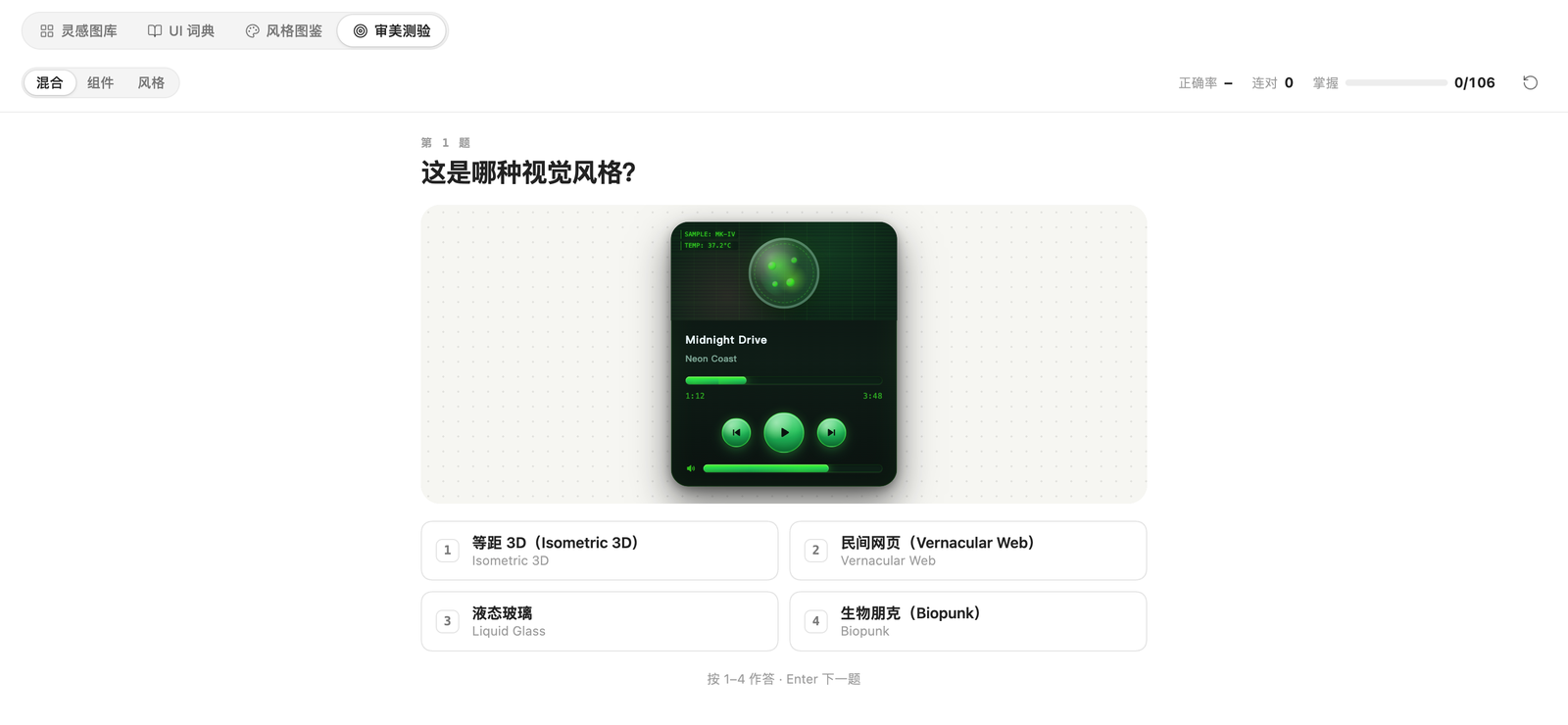
| 审美测验 | 看标本猜名字,间隔重复,连对 2 次算掌握,进度自动保存 |
为什么值得用
- 看得懂也记得住:不是收藏夹,而是“看图 → 学名词 → 做笔记 → 测验巩固”的闭环。
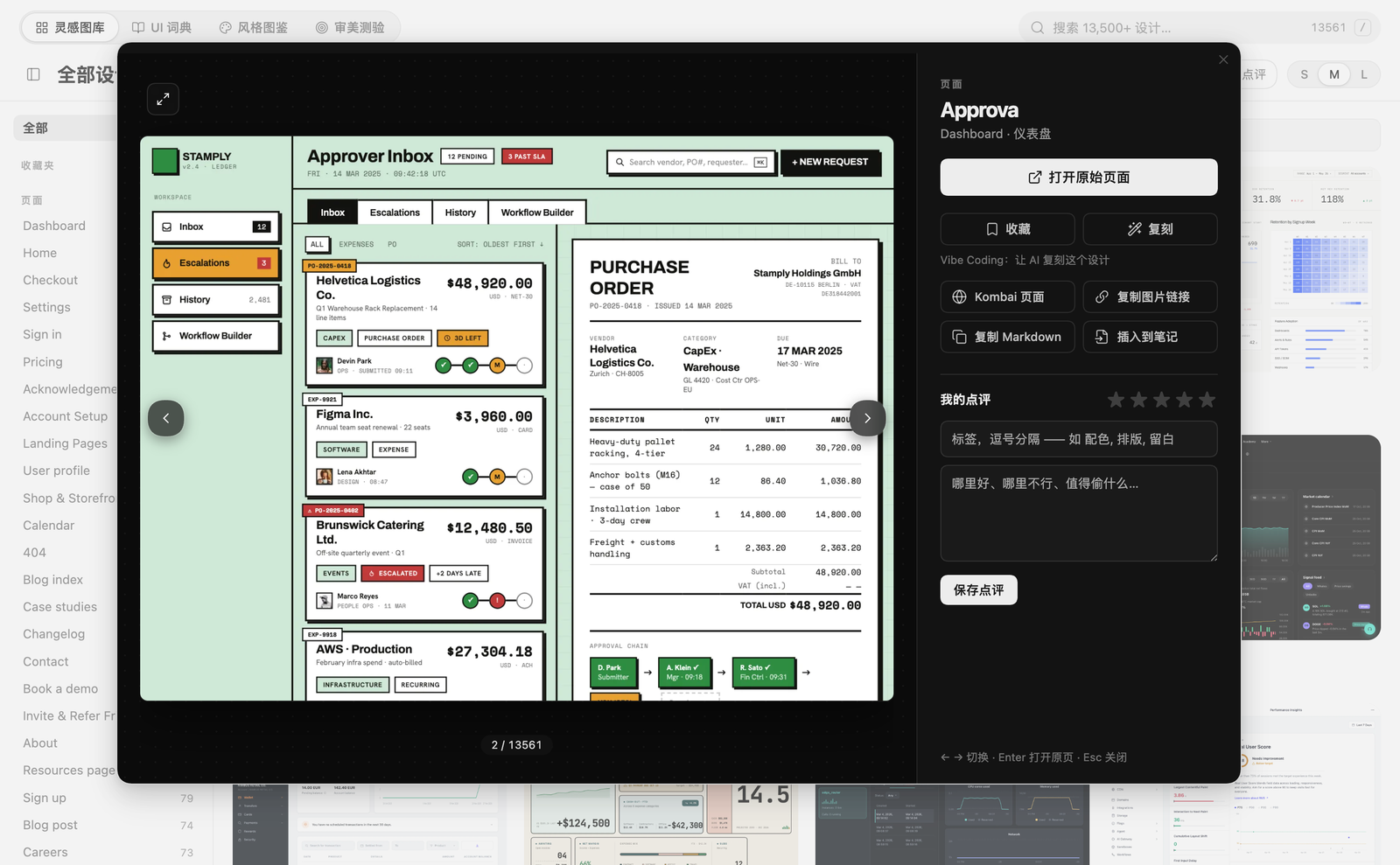
- 学了就能用(Vibe Coding):在任意设计上点「复刻」,生成包含截图、在线预览和做法步骤的 Prompt;页面和区块还能连同 HTML 源码一起复制。技术栈可在设置里改。
- 笔记在你自己的库里:评分、标签、点评都能导出为 Markdown;收藏夹、最近浏览一键回看。
- 跟随 Obsidian 主题:深浅色自动适配,窄屏有响应式布局,不加额外强调色。
核心能力
| 能力 | 说明 |
|---|---|
| 收藏夹 | 自建合集,卡片上悬停书签即可收藏,右键重命名 / 删除 |
| 复刻 Prompt | 复制 Prompt / Prompt + HTML 源码 / 存成笔记 |
| 点评与笔记 | 5 星评分 + 标签 + 文字,自动保存,一键导出学习笔记 |
| 悬停中文名 | 184 个分类全部带中文翻译,被截断的长名称悬停显示全称 |
| 最近浏览 / 我的点评 | 一键筛选 |
| 键盘友好 | / 搜索,灯箱 ← → 切换、Enter 打开原页,测验 1–4 作答 |
安装
社区插件(审核通过后): 设置 → 第三方插件 → 浏览 → 搜索「乔木 UI 学习 / Qiaomu UI Learn」。
手动安装 / BRAT:
# 1. 从 Releases 下载 main.js、manifest.json、styles.css
# 2. 放进 <你的库>/.obsidian/plugins/qiaomu-ui-learn/
# 3. 设置 → 第三方插件 → 启用「乔木 UI 学习」
BRAT 用户直接添加仓库 joeseesun/qiaomu-ui-learn 即可。
使用
- 左侧栏图标或命令面板:打开乔木 UI 学习、打开 UI 词典、打开风格图鉴、开始审美测验。
- 设计卡片 → 灯箱:打开原页 / 收藏 / 复刻 / 复制图片链接或 Markdown / 插入到当前笔记 / 写点评。
- 设置里可选默认打开的标签、笔记文件夹(支持浏览选择)、复刻技术栈,并查看学习统计。
联网与隐私
插件没有任何统计或上报。只在你使用到下面这些功能时才会访问网络:
| 用途 | 域名 |
|---|---|
| 图库缩略图(浏览时按需加载) | kombai-assets.b-cdn.net |
| 打开原页 / 设计详情页 / 复制 HTML 源码 | kombai.com、agent.kombai.com |
| 设置页里的打赏与公众号二维码 | radio.qiaomu.ai |
评分、点评、收藏夹、测验进度都保存在你库里的 .obsidian/plugins/qiaomu-ui-learn/data.json。
数据来源与版权
- 灵感图库的设计目录和缩略图来自 Kombai Gallery,版权归各设计作者与 Kombai 所有;插件只内置名称与索引,图片按需从其 CDN 加载,并非官方产品,与 Kombai 无隶属关系。
- UI 词典 / 风格图鉴的英文内容源自 namethatui.com(经 joeseesun/learnui 整理为中英对照),英文原文版权归原作者;中文译文、构建脚本与本插件代码以 MIT 开源。
- “复刻 Prompt”仅供学习参考,请不要照搬原设计的品牌、文案与图片。
如果你是上述内容的权利人并希望调整或移除,请通过 Issue 联系。
开发
npm install
npm run dev          # 监听构建
npm run build        # 类型检查 + 生产构建(输出 main.js)
npm run check-i18n   # 中英文词条必须同步
npm run build:learnui  # 由 vendor/learnui 重新生成词典数据
结构:src/(插件源码)· data/(目录与词典数据,构建时打进 main.js)· vendor/learnui/(词典源数据与标本)· docs/assets/(截图)。欢迎提 Issue / PR,见 CONTRIBUTING.md。
关于向阳乔木
- 网站 qiaomu.ai · 博客 blog.qiaomu.ai
- X @vista8 · GitHub @joeseesun
- 公众号:向阳乔木推荐看(二维码见插件设置页)
License: MIT
English
Qiaomu UI Learn turns Obsidian into a place to learn UI design. One tab gives you four things:
| Tab | What you get |
|---|---|
| Gallery | 13,561 real pages / sections / animations / design systems across 184 categories; hover a category for its Chinese name; search by category (English or Chinese) and by your own tags |
| UI Dictionary | 62 UI components with live, interactive specimens, the official name, a plain-language explanation, an API cheat sheet, and AI / debug prompts. Vernacular search works ("the shuffling-letters thing") |
| Style Atlas | 44 visual styles with specimens, recognition signals, "often confused with" comparisons and a pasteable style brief |
| Aesthetic Quiz | Guess the name from the live specimen; spaced repetition; mastery is saved |
Vibe coding: open any design and press Replicate to copy a ready-made prompt (screenshot, live preview, step-by-step approach). For pages and sections you can also copy the prompt together with the page's HTML source, or save it as a note. The tech stack is configurable.
Also included: collections (bookmarks), recent items, ratings + tags + notes with Markdown export, keyboard shortcuts (/ to search, ← → in the lightbox, 1–4 in the quiz), and light / dark theme support with a responsive layout.
Install
- Community plugins (once approved): Settings → Community plugins → Browse → "Qiaomu UI Learn".
- Manual / BRAT: download
main.js,manifest.json,styles.cssfrom the latest release into<vault>/.obsidian/plugins/qiaomu-ui-learn/, or addjoeseesun/qiaomu-ui-learnin BRAT. All data is bundled insidemain.js; no extra files are needed.
Network use & privacy
No analytics or telemetry. The network is touched only when you use these features: gallery thumbnails from kombai-assets.b-cdn.net; opening a design / copying HTML source via kombai.com and agent.kombai.com; the support QR codes on the settings page from radio.qiaomu.ai. Ratings, notes, collections and quiz progress stay in the plugin's local data.json.
Data sources & credits
The gallery catalogue and thumbnails come from Kombai Gallery; the dictionary and style atlas are adapted from namethatui.com via joeseesun/learnui with Chinese translations. Original content remains © its authors; this project is not affiliated with either site. Plugin code and translations are MIT. Replication prompts are for learning — do not copy original branding or copy. Rights holders who want changes or removal: please open an issue.
Development
npm install · npm run dev · npm run build · npm run check-i18n. See CONTRIBUTING.md.
By 向阳乔木 (Qiaomu) · X @vista8 · GitHub @joeseesun · License: MIT