
README file from
GithubProperty Order
Property Order enhances Obsidian Properties with safe list-value reordering plus configurable native property-name and property-value suggestions.
Demo
Move a value between supported top-level YAML list properties on desktop:
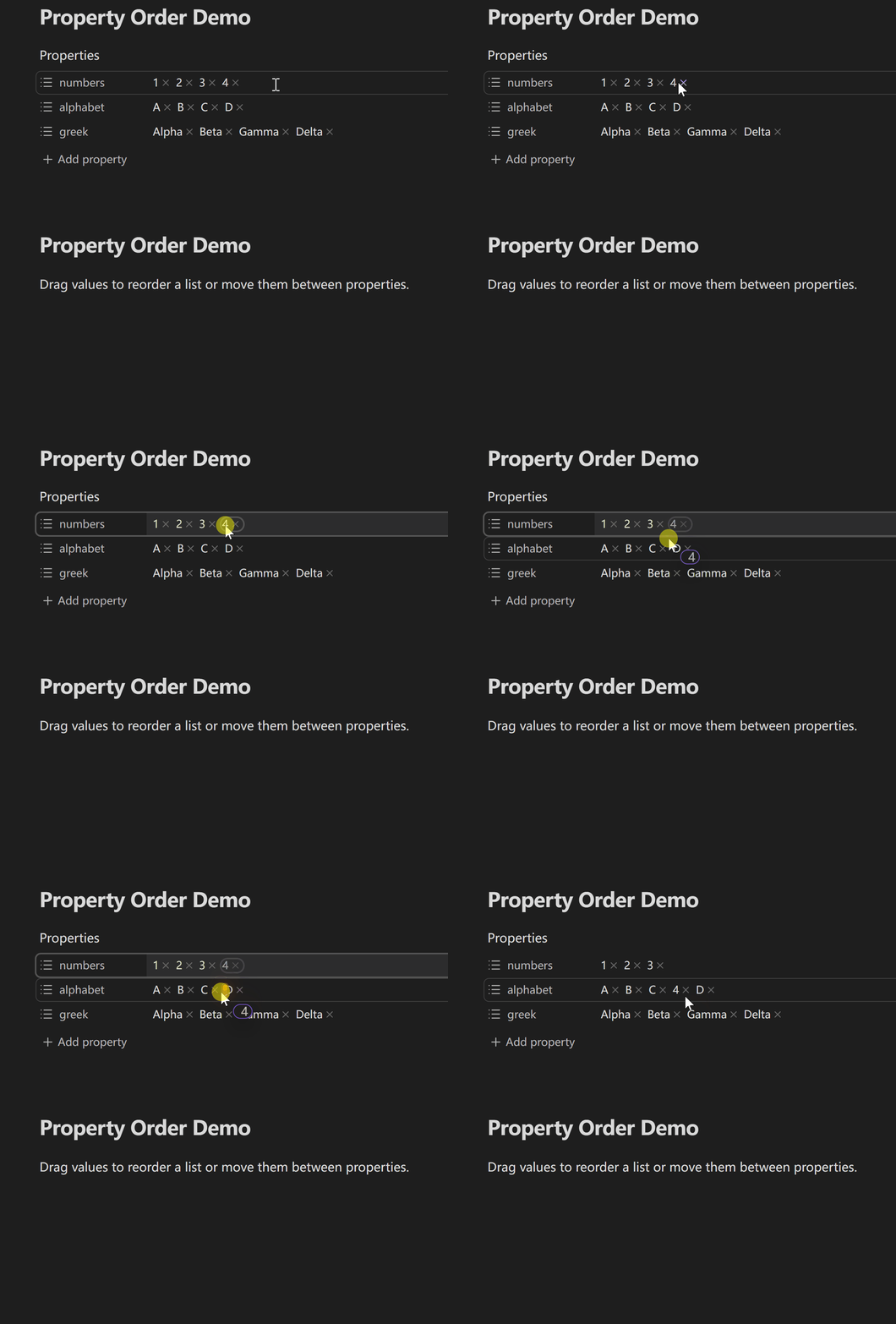
Cross-property drag is enabled by default and can be disabled in the Value order settings.
Features
- Reorder values by dragging inside a supported top-level YAML list.
- Move values between supported list properties in the same note. Cross-property moves are enabled by default and can be turned off.
- When Obsidian treats an empty value or scalar as a list property, Property Order can safely move values into or out of it. Non-text items are converted to text using their original YAML spelling.
- Keep each property's current list format, or choose bracket lists or bullet lists. Every successful drag creates a single undoable edit.
- Dragging works with wrapped and RTL layouts, can scroll supported Properties areas near the edge, and announces drag-state changes to screen readers.
- Customize native property-name suggestions: pin, move to the bottom, hide, sort by name, recently used order, or note count, with optional property-type grouping.
- Optionally manage property-value suggestions per property: native order, name order, confirmed selection frequency, note count, no suggestions, or custom candidates.
- Custom candidates can be pinned, left in the normal section, or placed at the bottom. Explicit presets remain available even if no note currently uses them.
- Recent-name history and value-selection counts change only after Obsidian confirms the edit. Hovering, navigating, cancelling, or leaving an edit unconfirmed does not count.
- When Property Order cannot safely understand the YAML or Obsidian's suggestion UI, it leaves the note or native UI unchanged.
Requirements and compatibility
- Obsidian 1.12.7 or later.
- Desktop supports direct dragging. Mobile uses an explicit action in Obsidian's native long-press menu before dragging.
- Property Order works only with top-level YAML properties that Obsidian identifies as text lists for value dragging. Value-suggestion enhancement normally reorders Obsidian candidates; custom behavior may additionally provide explicit preset candidates through the same property editor. Detailed boundaries are listed below.
Installation
Manual installation
Download property-order-<version>.zip from the latest release and extract it into Vault/.obsidian/plugins/. The archive contains the property-order/ directory with main.js, manifest.json, and styles.css. Reload Obsidian, then enable Property Order under Community plugins.
Upgrade
Back up and preserve Vault/.obsidian/plugins/property-order/data.json when it exists. Replace only main.js, manifest.json, and styles.css; delete data.json only when you explicitly want to reset all plugin preferences.
Usage
- Enable Property Order under Settings → Community plugins.
- Open a note with top-level YAML list properties in Obsidian Properties.
- On desktop, drag a value directly. On mobile, long-press a value, choose Reorder (or Reorder or move), then drag that value.
- Configure Key suggestions for property-name candidates and, if desired, enable Value suggestions to order Obsidian's existing property-value candidates with global defaults and per-property rules.
Settings
Every supported Obsidian version uses the same four settings tabs:
- General controls the plugin language and optional diagnostic notices.
- Value order controls list formatting, cross-property moves, and drag behavior. Turning value drag off does not erase the separate cross-property preference.
- Key suggestions controls pinned, bottom, and hidden property names plus Name, Recently used, and Note count sorting. Optional property-type grouping organizes normal candidates into Text, List, Number, Checkbox, Date, Date & time, Tags, and Automatic / unspecified; the chosen sort still applies inside each group.
- Value suggestions is opt-in. Unassigned properties use one default behavior, while exact property keys can be assigned to Name, Selection frequency, Note count, Native, No suggestions, or Custom candidates.
- Custom candidate rules use Pinned, Normal, and Bottom sections. Preset values can be entered directly, so they can remain selectable even before they appear in a note.
- Recent property-name history is limited to 100 names on the current device. Selection frequency is also device-local. Both are separate from
data.json, are not synced, and can be cleared from settings.
Limitations
- Value dragging works only with top-level YAML properties that Obsidian presents as text lists.
- Object lists, nested lists, multiline flow sequences, source-mode line dragging, and cross-file moves are not supported.
- On mobile, you first choose Reorder or Reorder or move from Obsidian's native long-press menu, then drag that value. Native actions such as Edit, Remove from list, and Copy remain available.
- Some type-mismatch rows can participate when Obsidian clearly identifies them as list properties. Ambiguous mixed-value rows are handled conservatively and may only accept an appended value.
- Custom preset candidates apply only to the Properties value editor. If no native popup is available, Property Order can show its own small fallback popup; if it cannot identify the editor safely, manual input is left alone.
- Converting bullet lists to bracket lists can discard comments or blank lines that bracket syntax cannot represent.
- Property values cannot currently be reordered directly from the keyboard. Pointer dragging does provide screen-reader status announcements.
Privacy and security
Property Order works locally. It does not require an account, upload note content, or call a remote service.
When a drag changes YAML, the plugin uses Obsidian's editor APIs and verifies the result before scheduling a save. Unsupported structures are not written.
For Note count sorting, Property Order enumerates Markdown files and reads cached frontmatter metadata; it does not read every note body. Recent property-name history and confirmed property-value selection counts are stored only in Obsidian's per-Vault local storage on the current device, separately from data.json, and can be cleared from settings.
Development
Use Node.js 24.19.0 and npm 11.17.0. Install the exact dependency graph from the frozen lockfile, then run the complete repository gate:
npm ci
npm run check
Documentation
- Product requirements
- UX specification
- Architecture
- Testing strategy
- Changelog
- Contributing guide
- Security policy
Support
- Q&A: Usage and configuration questions.
- Ideas: Early feature and workflow ideas.
- Show and tell: Tips, workflows, and reference implementations.
- Use the structured GitHub issue forms for reproducible bugs and concrete feature requests.
- Report vulnerabilities privately through the repository's security policy.
Remove private Vault paths, note content, YAML values, and credentials before posting publicly.
License
MIT © ZhengYX