
README file from
GithubProperty from Backlink
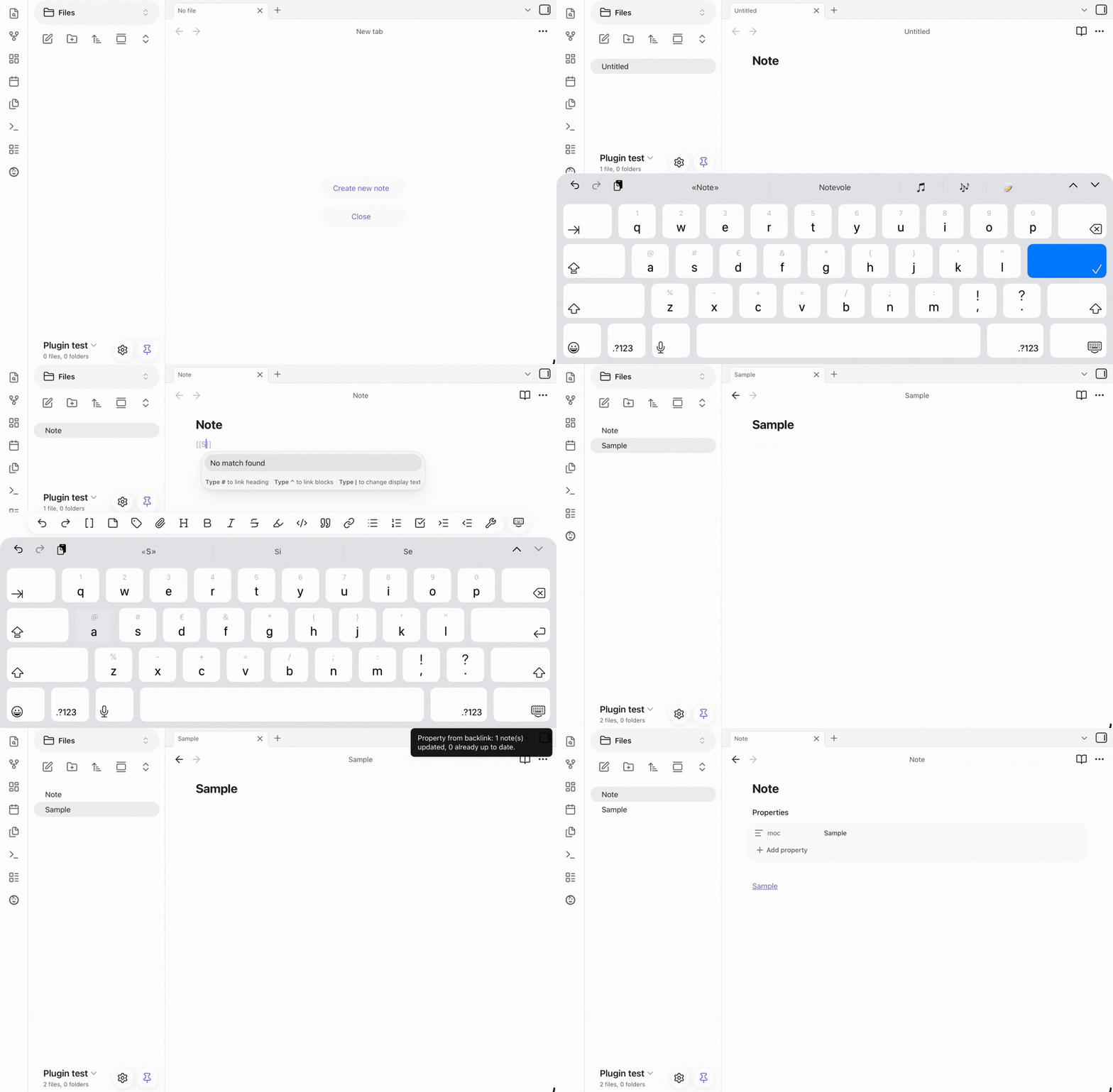
Automatically add or remove a frontmatter property on every note that links to a given note, using that note's name as the value.
What it does
This plugin gives you two command, built around the same idea: keeping a frontmatter property in sync with a note's backlink.
-
"Tag backlinks of this note with property" - adds the property to every note linking to the current note
-
"Remove property added by this note from backlinks" - removes the property to every note linking to the current note
Both work the same way:
- Open the note you want to use as the "source" (e.g. a MOC note called
Projects) - Run the command
- Every note that links to it is updated
Tagging backlinks
The plugin never overwrites data, it only adds to it:
- No existing property → the property is created with the source note's name as its value.
- Existing property with the same value already → nothing changes.
- Existing property with a different single value → the property becomes a list containing both the old and the new value.
- Existing property already a list → the new value is appended, unless it's already present. Running the command multiple times on the same note is always safe (idempotent) — it will never create duplicate entries.
Removing the property
- Property holds only that value → the property itself is removed from the note.
- Property is a list containing that value among others → only that value is removed; the rest of the list is left untouched. If only one value remains, the property becomes a plain value again instead of a single-item list.
- Property doesn't contain that value → nothing changes. Like tagging, this is safe to run multiple times — running it again on a note that's already clean does nothing.
Settings
- Property name — the frontmatter property used to store the source note's name. Defaults to
moc. Change it tocategory,hub, or anything that fits your vault's conventions.
Installation
From Obsidian
- Open Settings → Community plugins.
- Make sure "Restricted mode" is off.
- Click Browser, search for "Property from Backlink", and install it.
- Enable the plugin.
Manual installation
- Download
main.js,manifest.json, andstyles.cssfrom the latest release. - Create a folder named
property-from-backlinkinside your vault's.obsidian/plugins/directory. - Copy the three files into that folder.
- Reload Obsidian, then enable the plugin under Settings → Community plugins.
Requirements
Requires Obsidian v1.4.4 or later (uses the FileManager.processFrontMatter API).
License
0BSD — see LICENSE.