
README file from
GithubPosition Restore
English | 简体中文


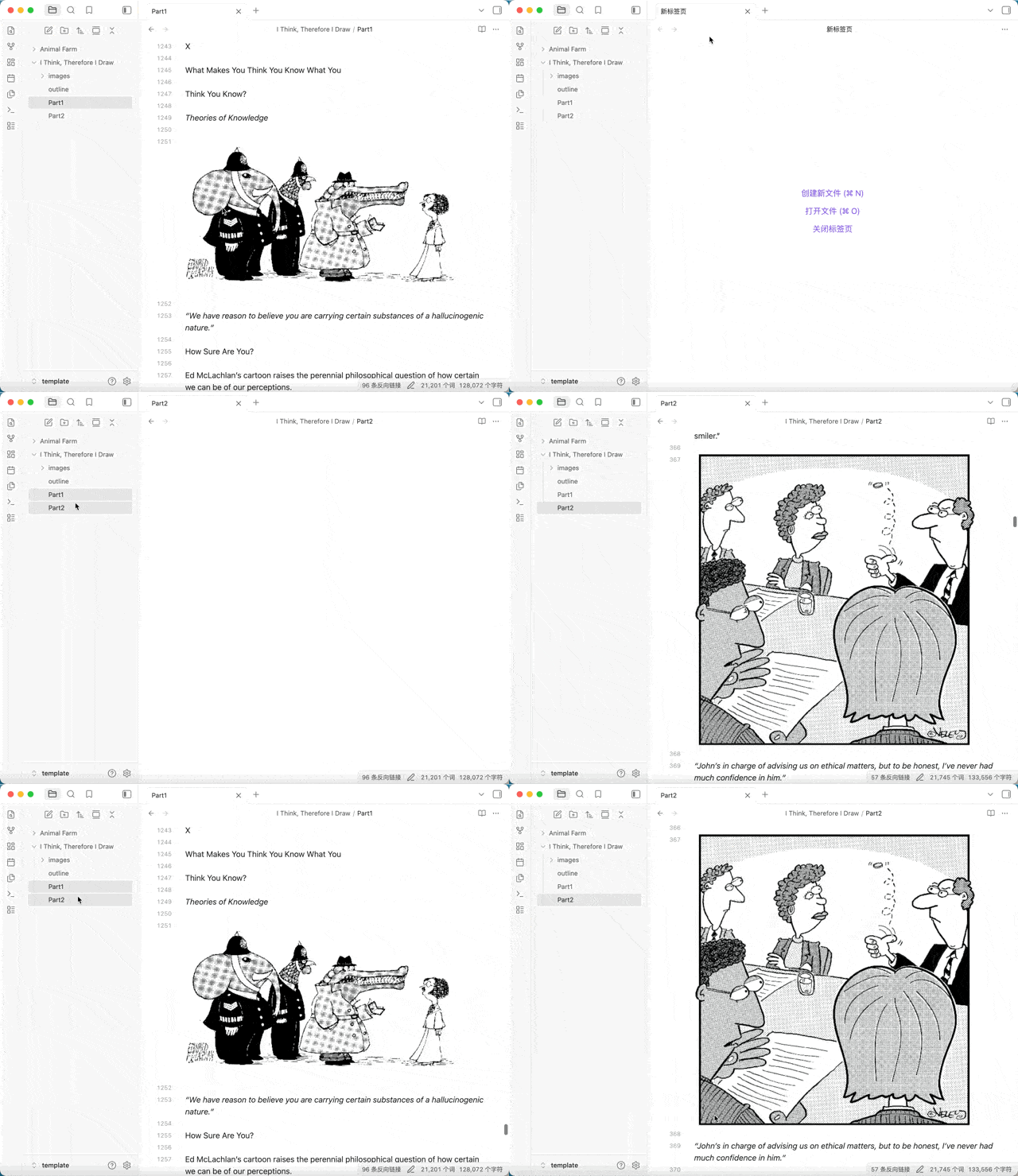
Tired of manually hunting for where you left off every time you reopen a note? Position Restore remembers the cursor and scroll position for each note and drops you right back — the restore completes within the file open itself, hidden behind a brief blank: the landing is calibrated first and revealed only when stable, with no top flash and no corrective jump. An optimized alternative to the Remember Cursor Position plugin.
Why this plugin
- Exact, jump-free restore — the restore completes within the file open, under a brief blank: the position is applied and the landing pixel-calibrated before the blank lifts; neither the "top-first then jump" flash nor a corrective jump afterward — when the blank lifts, the note is exactly where you left off
- Cursor and scroll, both restored — back to the exact line and column; records persist with the vault and survive app restarts and device switches (via vault sync)
- Independent per-tab positions — the same note open in several tabs keeps a separate cursor position per tab (device-local); background tabs auto-settle their saved landing after a restart instead of drifting until first activated
- Smooth opening experience — source / reading mode can each choose instant or glide (smooth scroll) restore; an optional restore breadcrumb shows your current position in the folder hierarchy after a restore
- Flexible recording filters — exclude selected folders (and their subfolders) from recording, set a minimum line count so short files (scratch notes, etc.) are never recorded, exclude whole classes of files via an existing frontmatter property (e.g.
publish: true), or opt a single file out/in with the per-fileposition-restoreproperty - Clean, controllable database — compact array storage with automatic recency-based pruning
Features & options
| Option | Description |
|---|---|
| Default behavior | When no saved position exists: Obsidian's default, or jump to end of file |
| Link-open behavior | Restore the saved position when opening [[links]], or always open at file start (heading/block anchor links automatically yield to the link target) |
| Restore method (source / reading) | Instant or glide (smooth scroll) restore, configured separately |
| Restore indicator | Off / breadcrumb / breadcrumb + notice, showing your current position in the folder hierarchy after a restore |
| Excluded folders | Skip files in selected folders (and their subfolders) |
| Minimum length filter | Short files (scratch notes, etc.) are never recorded |
| Frontmatter property exclusion | Never record files whose frontmatter matches a configured entry — either a property name (publish, any file that has it) or name: value (publish: true, only when the value matches). The properties usually already exist for another plugin, so no file needs editing |
| Per-file override property | Any file can opt out with position-restore: false in its frontmatter (overrides every rule) or opt in with position-restore: true (records despite excluded folders, the minimum-length filter and the property rule) |
| Bases scroll recording | Optionally record scroll position in Obsidian Bases views |
| Database file | Customizable storage path; entry count shown in settings |
Recording filters, in detail
The recording rules stack as follows (the first matching line wins):
position-restore: falsein the file's frontmatter — never record this file, and drop any saved record (overrides everything below)position-restore: true— always record this file (overrides the folder, length and property rules below)- The file is inside an excluded folder (or subfolder)
- The file has fewer lines than the minimum-length filter
- The file's frontmatter matches a configured exclusion entry. An entry is either a bare property name (
publish— presence-only, any file that has the property is excluded, whatever its value) orname: value(publish: true— excluded only when the property equals that value). Booleans accept yes/no/on/off aliases, and arrays match when any element matches. The properties usually already exist for another plugin, so no file needs editing
Beware bare property names: an entry like
tagswould match nearly every note.
Installation
From Obsidian Community Plugins (recommended)
- Open Settings → Community plugins and turn off Restricted mode (safe mode)
- Click Browse and search for Position Restore
- Click Install and enable the plugin
Manual installation
- Download the latest release (
main.js,manifest.json) from the releases page - Create a
.obsidian/plugins/position-restore/directory in your vault and copy the downloaded files into it - Restart Obsidian and enable Position Restore in Settings → Community plugins
Migrating from Remember Cursor Position?
This plugin's data format differs from dy-sh/obsidian-remember-cursor-position, so existing positions won't carry over automatically. Since both plugins restore positions and would interfere with each other, it's best to disable or uninstall the original after installing this one; notes you open afterwards will gradually build up their own records.
Data storage & privacy
- Positions are stored in a local JSON file inside your vault (default:
positions.jsonin the plugin directory); the path is customizable in settings - No network access, no data uploaded; the database file can be backed up and synced along with your vault
How it works
Each time you move the cursor or scroll in a note, the plugin records that state. When the note is reopened, the plugin applies the saved position within the open itself: a brief blank covers the screen while the landing is pixel-calibrated, and the reveal shows the note exactly in place — no "top-first then jump" flash, no corrective jump. In source mode (instant restore) the position is additionally merged into the ephemeral state of the file open and applied by Obsidian's native restore, so even tabs opened in the background land correctly. Each tab also tracks its own position independently (device-local): the same note open in several tabs restores every tab to where that tab left off, and restart-restored background tabs auto-settle under their own cover so they don't sit at a drifted position until first activated. Unlike the original plugin's "delay after open, then jump" approach, the restore completes within the open itself, avoiding the jump at the mechanism level.
Credits
This plugin started as an attempt to improve the performance of dy-sh/obsidian-remember-cursor-position and add a few options, but the changes grew far beyond that and it became a standalone rewrite. It also draws on ideas from omeyenburg/obsidian-scrolling. Thanks to these projects for the inspiration.
Feedback & support
- Found a bug or have a feature request? Please open an issue
- If this plugin helps you, consider giving it a Star ⭐