
README file from
GithubPLIST Viewer
PLIST Viewer is a read-only plugin for inspecting Apple .plist and .mobileconfig files as typed trees, line-numbered source, and configuration profile security summaries.
It is built for local inspection of property lists, MDM and configuration profile exports, Wi-Fi payloads, VPN payloads, certificates, restrictions, and payload identifiers. It does not install, activate, enroll, trust, sign, provision, or apply profiles.
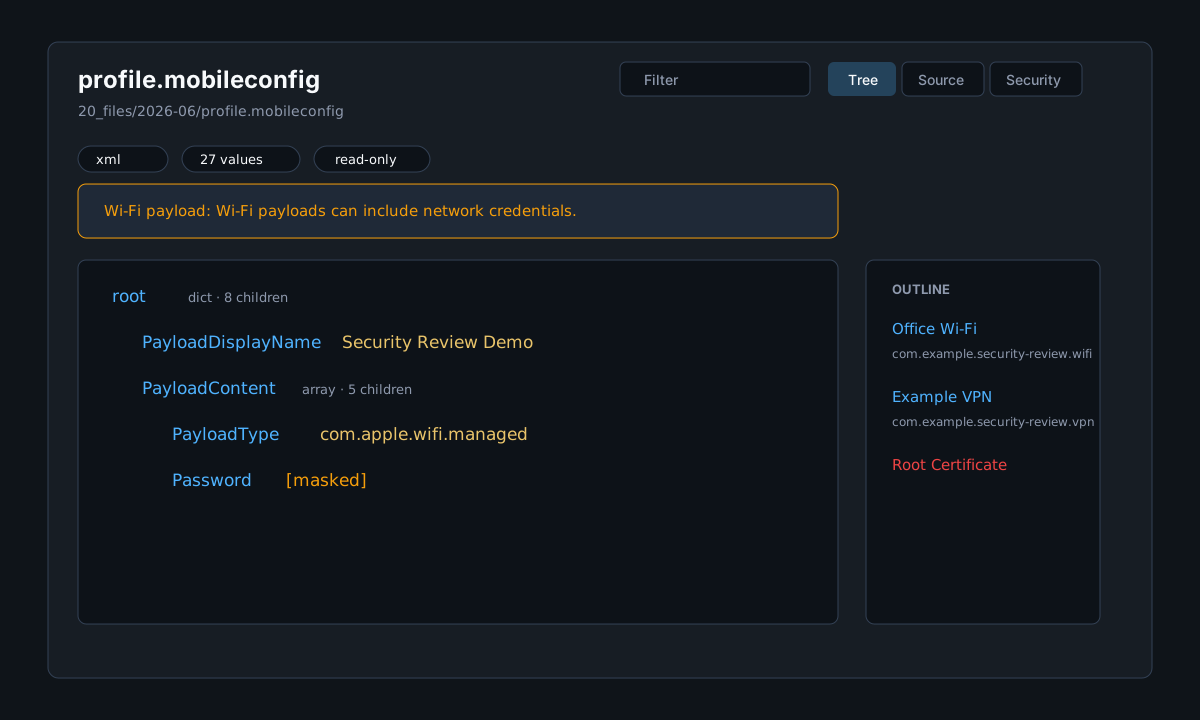
Features
- Opens
.plistand.mobileconfigfiles in a dedicated read-only view. - Parses XML plist values into typed nodes: dict, array, string, integer, real, bool, date, and data.
- Detects binary plist headers and shows a safe unsupported state instead of attempting conversion.
- Shows a tree view with key paths, type badges, masked secret-like values, search, and an outline.
- Shows a source view with line numbers and lightweight XML highlighting.
- Shows a security view for configuration profiles with profile metadata and payload summaries.
- Warns for MDM, Wi-Fi credentials, VPN, certificates, root certificates, restrictions, unknown payload types, sensitive values, and removal-disallowed profiles.
- Keeps invalid XML, binary files, and large files inspectable through explicit fallback states.
- Provides a refresh button for files changed outside the app.
Security model
PLIST Viewer is intentionally inspect-only:
- It never installs or activates
.mobileconfigprofiles. - It never performs MDM enrollment, provisioning, signing, certificate validation chain checks, or trust decisions.
- It never writes
.plistor.mobileconfigfiles back to disk. - It does not convert binary plists into new files in v0.1.
- It does not open macOS or iOS system dialogs or external apps.
- It does not use network APIs or clipboard APIs.
- It does not use dynamic code execution.
The plugin reads file contents through the vault API and renders a local view. Secret-like values are masked in the tree view where practical; the source view remains a local raw inspection view.
Binary and large files
Binary plist support in v0.1 is detection-only. Files starting with the bplist00 header are reported as unsupported with a clear warning. Large files use a safe fallback or render cap to avoid freezing the interface.
Installation
Community plugin directory
PLIST Viewer is prepared for Community plugin directory submission. Once accepted, it can be installed from Settings -> Community plugins -> Browse.
Manual installation
Until the community directory submission is accepted:
- Download
main.js,manifest.json, andstyles.cssfrom the latest release. - Create this folder in your vault:
.obsidian/plugins/plist-viewer/. - Put the downloaded files in that folder.
- Reload the app.
- Enable PLIST Viewer in Settings -> Community plugins.
BRAT installation
For beta testing, install the plugin with BRAT using this repository URL:
https://github.com/viggomeesters/obsidian-plist-viewer
Usage
Open any .plist or .mobileconfig file in your vault. The file opens with PLIST Viewer.
Use the toolbar to:
- filter keys, values, payload types, and identifiers
- switch between tree, source, and security views
- refresh the file after external changes
Invalid XML, unsupported binary plist files, and large files show explicit fallback states so the viewer does not crash or silently apply anything.
Development
npm install
npm run build
npx tsc --noEmit
npm test
For local development, copy or symlink this repository into .obsidian/plugins/plist-viewer/ inside a test vault.
Release process
Community plugin files are installed from GitHub releases. For each release:
- Update
manifest.json,package.json, andversions.json. - Run
npm install,npm run build,npx tsc --noEmit, andnpm test. - Create a GitHub release whose tag exactly matches
manifest.json.version. - Attach
main.js,manifest.json, andstyles.cssas release assets.
Community directory submission
Submit this repository URL:
https://github.com/viggomeesters/obsidian-plist-viewer
The repository contains the expected root plugin files, security-focused documentation, parser fixtures, runtime assets, and version metadata for a v0.1.0 release.
Official references: