
README file from
GithubInstall Pi Edge → Obsidian Community Plugins
Pi Edge
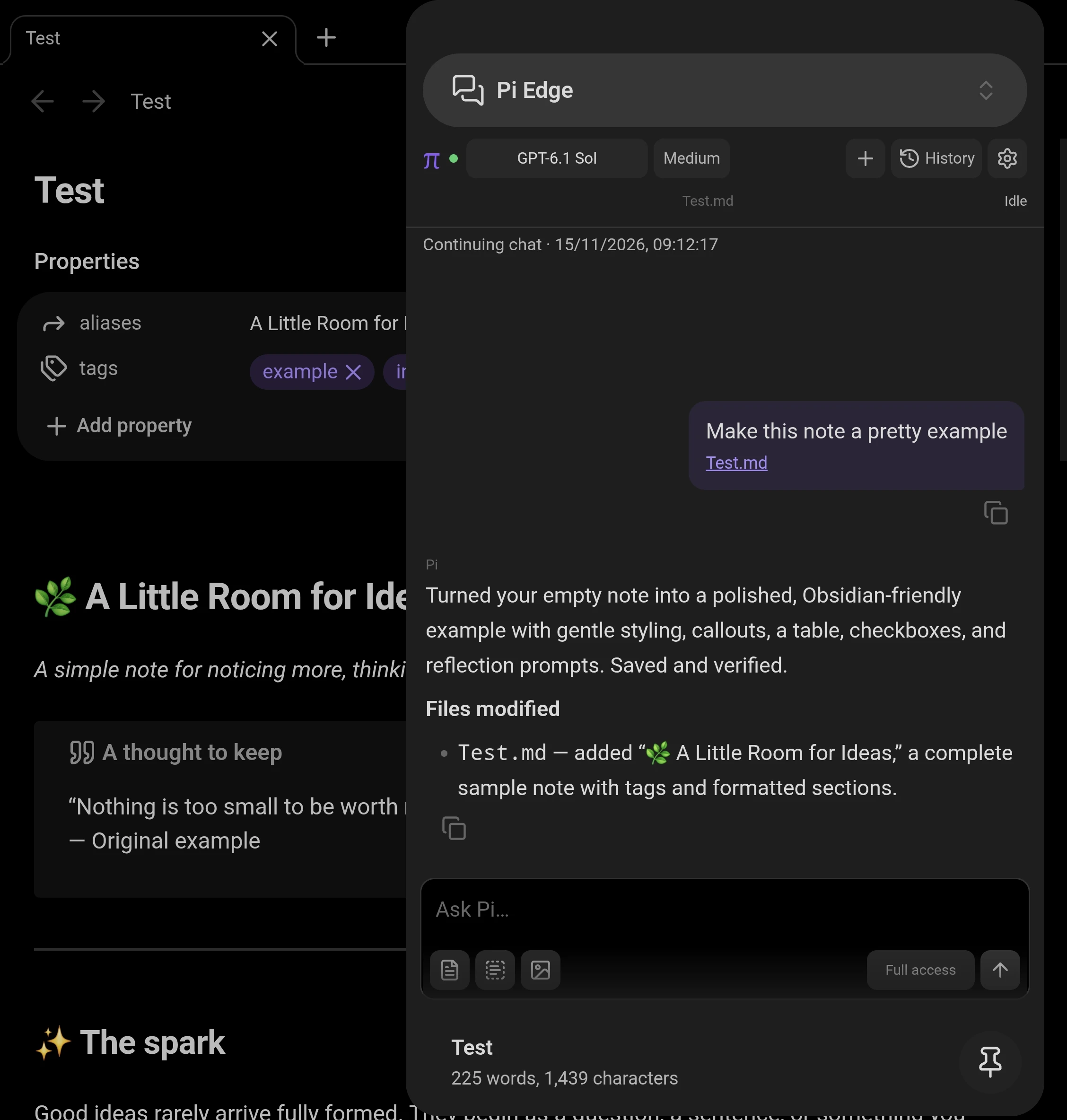
Use Pi Durable from Obsidian on your phone or desktop. Chat beside your notes, attach notes and images, switch models, and resume earlier conversations. Pi Durable runs on your computer and saves conversations in SQLite, with recovery for unfinished tasks after a restart.
Setup
Let your agent set it up
Copy this entire prompt into a coding agent on your computer. It will set up or update the bridge and give you the pairing code to paste into Obsidian:
Set up or update Pi Edge on this computer using Pi Durable.
Repository and guide: https://github.com/Anderbone/pi-obsidian-edge
Check Node.js 22.19+ and configure Pi model credentials; help me sign in if needed.
Find my existing vault and bridge configuration, or ask which vault to use.
Use the prebuilt bridge (Durable is bundled; no clone or build needed):
npx --yes https://github.com/Anderbone/pi-obsidian-edge/releases/download/bridge-0.3.7/pi-edge-bridge.tgz --cwd "/path/to/your/vault"
Replace the placeholder with my computer's vault path. Use Tailscale if connected,
otherwise a trusted private LAN reachable from my Obsidian device.
For an existing installation, wait for active tasks to finish before restarting.
Preserve the account, vault path, pairing token, history, network/tool options,
private state directory and ~/.pi/agent/. Remove --backend cli. Update any existing
background service; run only one bridge per vault and state directory.
If Pi Durable bridge 0.3.3+ is already running, verify it rather than reinstalling.
Verify connectivity and model access. Keep the bridge running. Give me the pairing
code privately and tell me to paste it into Pi Edge: Pair computer in Obsidian.
If my existing pairing still works, tell me to open Pi Edge and send a message.
Then install and enable Pi Edge in Obsidian and follow step 3 to pair. To set up the computer yourself, follow steps 1–3 below.
1. Configure Pi on your computer
- Install Node.js 22.19+.
- Install Pi and connect a model provider. Open
pi, sign in, and send a message to check your setup. The bridge reuses Pi’s credentials and model configuration. - Connect your computer and Obsidian device to the same private network. For remote access, use Tailscale on both devices.
2. Start Pi Durable
Run this in your computer’s terminal, replacing the path with your Obsidian vault folder on the computer:
npx --yes https://github.com/Anderbone/pi-obsidian-edge/releases/download/bridge-0.3.7/pi-edge-bridge.tgz --cwd "/path/to/your/vault"
The bridge bundles Pi Durable and starts it by default; no separate Durable installation or service is needed. Keep the terminal running and the computer awake. Run the same command to restart it.
Optional configuration:
| Option | Purpose |
|---|---|
--model provider/model |
Set the starting model; you can also choose a model in Pi Edge. |
--host IP-or-hostname |
Choose the listening interface; defaults to Tailscale, then private LAN, then localhost. |
--port 8771 |
Change the listening port. |
--state-dir "/path/to/private/storage" |
Change the private Durable storage root; defaults to ~/.config/pi-obsidian-edge/durable/. |
3. Pair Obsidian
Install and enable Pi Edge from Settings → Community plugins → Browse in Obsidian 1.8.7 or newer.
Run Pi Edge: Pair computer from the command palette and paste the pairing code printed by the bridge, or scan its QR code. Then run Pi Edge: Open chat. Pair each device separately and keep pairing codes private.
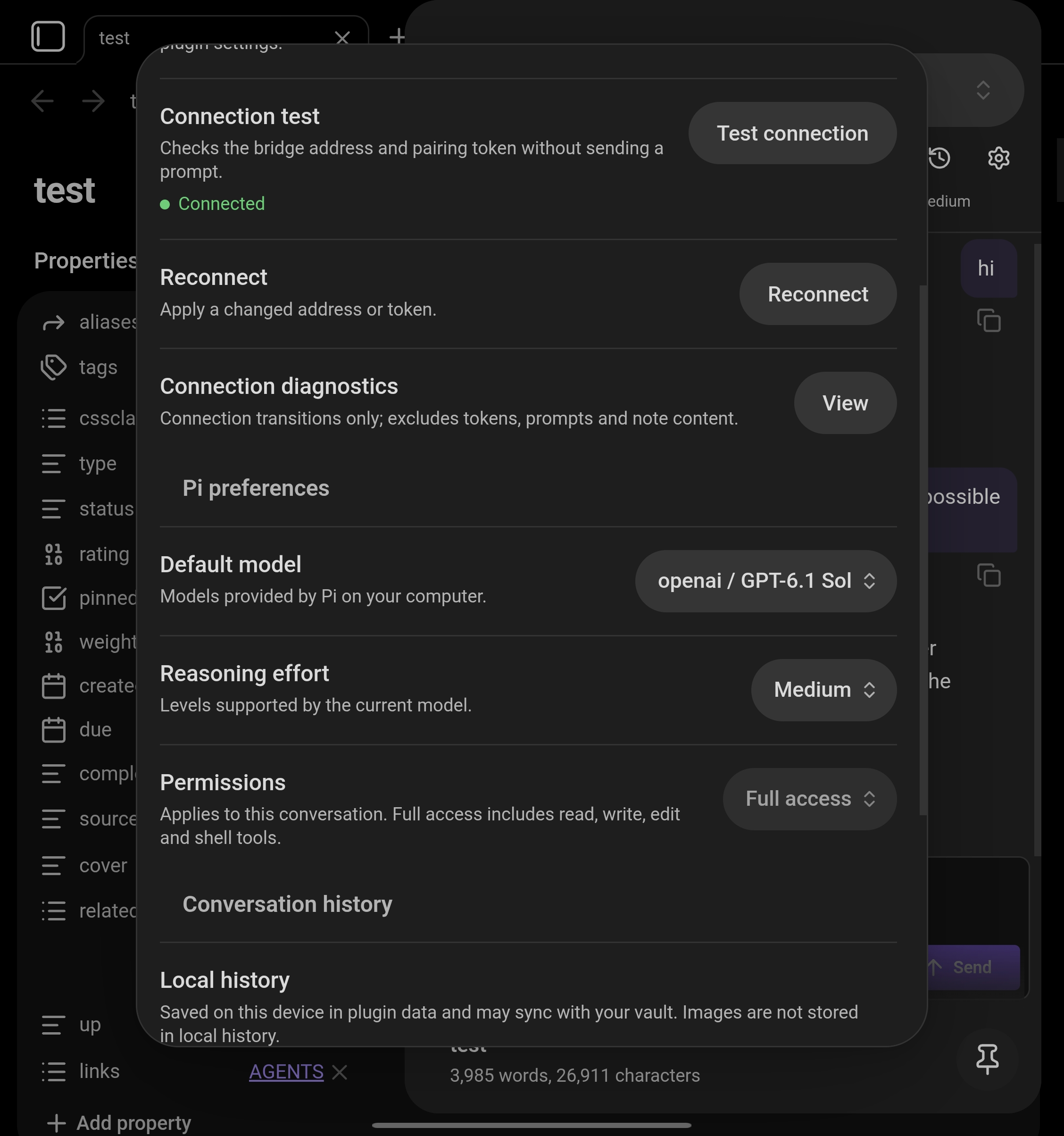
In Pi Edge settings, choose your model, reasoning effort, and permissions. Full access is the default and allows file edits and shell commands; permission presets are not filesystem sandboxes. The top of settings checks your connection automatically; a green Connected status confirms the bridge is reachable. See the user guide for connection help and advanced configuration.
Upgrading to 0.3.6
Already using Pi Durable with bridge 0.3.3 or newer? Update the Obsidian plugin, test the connection, and send a message. No bridge reinstall is needed for 0.3.6.
Using an older bridge or --backend cli? Update both the plugin and the computer bridge:
- Let active tasks finish, then stop the old bridge (
Ctrl+Cor stop its background service). - Run the command in step 2 above with Node.js 22.19+, using the same computer account and vault path. Keep your existing
--host,--port,--url,--tools, and--state-diroptions. Remove--backend clito use Pi Durable. - For a background service, update its launch command and restart it. For a source checkout, pull the new code, run
npm ci, and restart the bridge. Run only one bridge for the same vault and state directory. - In Obsidian, wait for the green Connected status in Pi Edge settings, then open an earlier chat from History and send a message. The connection status alone does not verify the bridge version or model access.
Keep ~/.config/pi-obsidian-edge/ (including token and durable/), any custom state directory, and ~/.pi/agent/. Pairing and mobile history are retained; pair again only if the address or token changed. Existing CLI chat context imports when first opened, without modifying the original session files.
Updating the plugin or dismissing its upgrade notice does not update the computer bridge. Open Pi Edge settings → Pair computer for agent instructions or the expandable manual setup.
To use the previous runtime, add --backend cli. Durable-only chats cannot be continued with that backend.
Messages and attachments go through your computer to your configured model provider. Chat text may sync with your vault. No telemetry or hosted relay.