
README file from
GithubPeriod Calendar
A calendar for Obsidian where every period is clickable — day, week, month, quarter and year — with ISO weeks handled correctly.
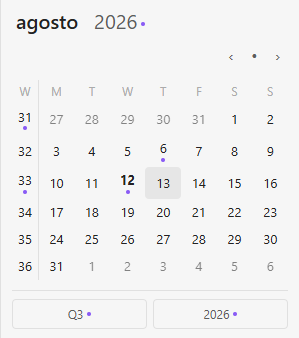
Click a day, a week number, the month name, the year, or the quarter button. Dots show which periods already have a note. It reads the configuration you already have in Periodic Notes or Daily Notes, so your existing notes keep resolving to the same files.
Why this exists
Two things kept coming up in the issue trackers of the plugins people use for this, and neither was ever fixed:
1. Only days and weeks were clickable. Monthly, quarterly and yearly notes had no way in from the calendar. Across both trackers this is the single most requested feature, with over a hundred reactions spread across seven separate issues.
2. Week filenames break at the turn of the year. This one is subtle and costs you real notes.
Moment.js has two week systems that look almost identical:
| Tokens | System | Week starts | Week 1 is |
|---|---|---|---|
GGGG WW E |
ISO 8601 | Monday | the week containing the first Thursday |
gggg ww e |
Locale | depends on locale | depends on locale |
YYYY is the calendar year and does not belong with either of them. Mix them and you get this:
2024-12-30 is a Monday, and it belongs to ISO week 1 of 2025.

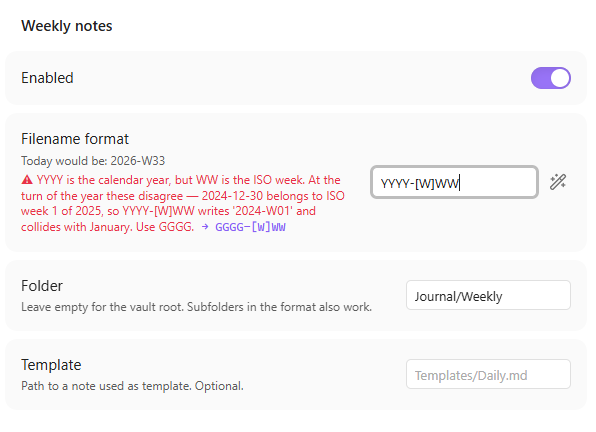
  YYYY-[W]WW  →  2024-W01   ✗  collides with January 2024, sorts wrong
  GGGG-[W]WW  →  2025-W01   ✓
That silent collision is what produces "unable to create new file" and duplicate weekly notes every January. Period Calendar detects it, explains it in plain language, and fixes it with one click.
Features
- Five periods, all clickable. Click a day, a week number, the month name, the year, or the quarter button.
- Format validation as you type. Wrong week tokens, missing year,
DD-MM-YYYYordering that breaks your file explorer — each one is caught, explained, and fixable in one click. - ISO or locale weeks, with a configurable first day of the week.
- Subfolders in the format.
YYYY/MM/YYYY-MM-DDcreates the folder tree for you. - Imports your existing setup from Periodic Notes or core Daily Notes.
- Strict filename parsing, so
Meeting notesis never mistaken for a date. - Commands for everything, including opening the calendar view itself, and next/previous for each period.
- Open today's note on startup, optional.
- Finds notes that are not named exactly like the format. Turn on title matching and
2026-07-27 Groceriescounts as that day, as long as the date is written the way your own format writes it. Point it at a frontmatter property and a note whose name carries no date is matched by the date it declares. - Dots on every period, not just days — the week number, the month, the quarter and the year all show whether a note exists.
- URI support:
obsidian://period-calendar?period=week&date=2026-07-27opens that note from anywhere, including outside Obsidian. - Choose where notes open — current pane, new tab or split — with Ctrl or Cmd click always overriding it.
- Templates per period, and a middle-click to open in a new tab.
Installing
From the community plugins browser: search for Period Calendar.
Manually: download main.js, manifest.json and styles.css from the latest release into <your vault>/.obsidian/plugins/period-calendar/, then enable it in Settings → Community plugins.
Requires Obsidian 1.13 or later. The settings screen uses the declarative settings API introduced in that version, which is what makes these options show up in Obsidian's own settings search. On older versions Obsidian serves you 0.2.0 instead, which works and has the same calendar — only the settings screen differs.
Coming from Periodic Notes?
If you use Periodic Notes for monthly, quarterly or yearly notes, you have probably wanted a calendar that can actually open them. That integration is the single most requested thing across both plugins' issue trackers, and it is what this one is built around: the month name, the year, the quarter button and the week number are all clickable, not just the days.
You also get the week format checked. Periodic Notes will happily accept YYYY-[W]WW, and that quietly writes the wrong filename every January — see the section above.
Migrating from Calendar or Periodic Notes
Go to Settings → Period Calendar → Migration and press Import. It reads the configuration those plugins already store in your vault and copies it over, so nothing moves and no note is orphaned.
Periods you configured here that the older plugins never supported — monthly, quarterly, yearly — are left untouched by the import. It only brings over what actually exists on the other side.
If the imported format has one of the problems described above, it gets flagged right there with the fix.
You can keep the old plugins installed while you try this one — they do not conflict.
Default formats
| Period | Default | Example |
|---|---|---|
| Day | YYYY-MM-DD |
2026-07-26 |
| Week | GGGG-[W]WW |
2026-W30 |
| Month | YYYY-MM |
2026-07 |
| Quarter | YYYY-[Q]Q |
2026-Q3 |
| Year | YYYY |
2026 |
Anything in square brackets is literal text, so [W] prints a W and is never read as a token. All of these are editable.
Suggestions and requests are welcome
This plugin is new and actively maintained. If something you need is missing, or something behaves in a way you did not expect, open an issue — feature requests are genuinely read, not filed away.
Everything added in 0.2.0 came from what people had been asking for, for years, in the issue trackers of the plugins that stopped being maintained: notes with a title after the date, dots on every period, a URI handler, choosing where notes open, and matching by a frontmatter date. Asking works.
Development
npm install
npm test          # 61 unit tests over the period logic
npm run build     # bundles to build/main.js
The period logic lives in src/periods.ts and has no Obsidian dependencies, so it is testable with plain Node. The tests cover the year-boundary cases, both week systems, leap years, subfolder paths, strict parsing, legacy import, which files the index has to look at, and which period a frontmatter date belongs to.
Note when testing inside Obsidian:
Ctrl+Rdoes not reload plugin code. Restart Obsidian, or toggle the plugin off and on.
License
MIT