
README file from
Github页墨手记 PageInk
Obsidian 插件,支持 Markdown、分页手写、无边画布、PDF 批注和独立草稿纸。界面使用简体中文。
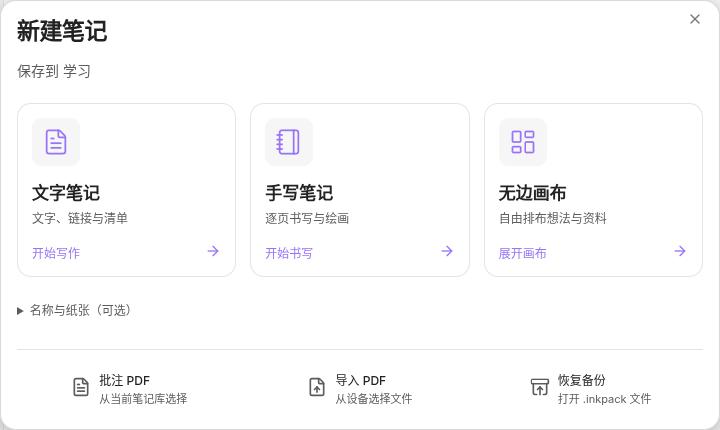
功能
| 类型 | 功能 |
|---|---|
| 文字笔记 | 原生 Markdown 编辑、属性和手写区域引用。 |
| 手写笔记 | 分页绘写、纸张模板、页边距、区域书签。 |
| 无边画布 | 文字、笔迹和来源卡片,支持分组与连线。 |
| PDF 批注 | 书写、文字搜索、原文复制和摘录。 |
| 草稿纸 | 与正文独立的内容、视口和撤销历史,支持停靠与浮动。 |
文件夹浏览提供内容预览和搜索。绘写可导出 PDF、PNG 或完整可编辑备份。
安装
需要 Obsidian 1.12.7+。在「设置 → 第三方插件 → 浏览」中搜索 PageInk,安装并启用。更新使用第三方插件设置中的「检查更新」。
手动安装:从 Releases 下载安装 ZIP,将 pageink 文件夹解压至笔记库的 .obsidian/plugins/,重新启用插件。也可下载 main.js、manifest.json 和 styles.css,放入 .obsidian/plugins/pageink/。
使用
在文件列表的新建菜单或文件夹右键菜单中选择笔记类型。「纸张设置与导入」设置名称、纸张,或导入 PDF 和备份。「以缩略图浏览」打开当前文件夹的内容预览。
文字笔记由 Obsidian 保存。绘写自动保存到库内;「导出 → 可编辑备份」生成包含笔迹、草稿纸和附件的 .inkpack。
使用指南 · 开发指南 · 更新记录 · 插件目录 · 问题反馈
运行与数据
PageInk 离线运行,无账号、广告或遥测。字体与 PDF 资源内嵌在约 46 MB 的主脚本中。Obsidian Sync Standard 的单文件上限为 5 MB,使用该方案时需在各设备分别安装插件。
绘写文档由 .inknote 入口、Drawing Resources/ 和关联 PDF 组成。迁移使用 .inkpack 或同步整个库;多设备编辑需等待资源传输完成。保存周期、冲突恢复及设备支持见使用指南。
Installation and usage
PageInk supports Markdown notes, paginated handwriting, an infinite canvas, PDF annotations, and a separate scratchpad. It requires Obsidian 1.12.7+ and uses a Simplified Chinese interface.
- Search for PageInk in Settings → Community plugins → Browse, then install and enable it. For manual installation, extract the ZIP from Releases into
.obsidian/plugins/. - Use the file explorer's New note menu: 文字笔记 creates Markdown, 手写笔记 creates paginated handwriting, and 无边画布 creates an infinite canvas. 纸张设置与导入 imports PDFs and backups.
- Choose 导出 → 可编辑备份 for a complete
.inkpackbackup. Drawing data includes the.inknotefile, vault resources, and the source PDF.
PageInk runs offline with bundled fonts and PDF resources. Its approximately 46 MB main script exceeds Obsidian Sync Standard's 5 MB file limit; install it separately on each device with that plan.
许可
自有代码采用 MIT。Excalidraw、Lucide、字体及其他依赖的许可见第三方声明,PDF 解码器来源与哈希见 PDF runtime assets。