
README file from
Github
Owen Wiki Template Obsidian Plugin
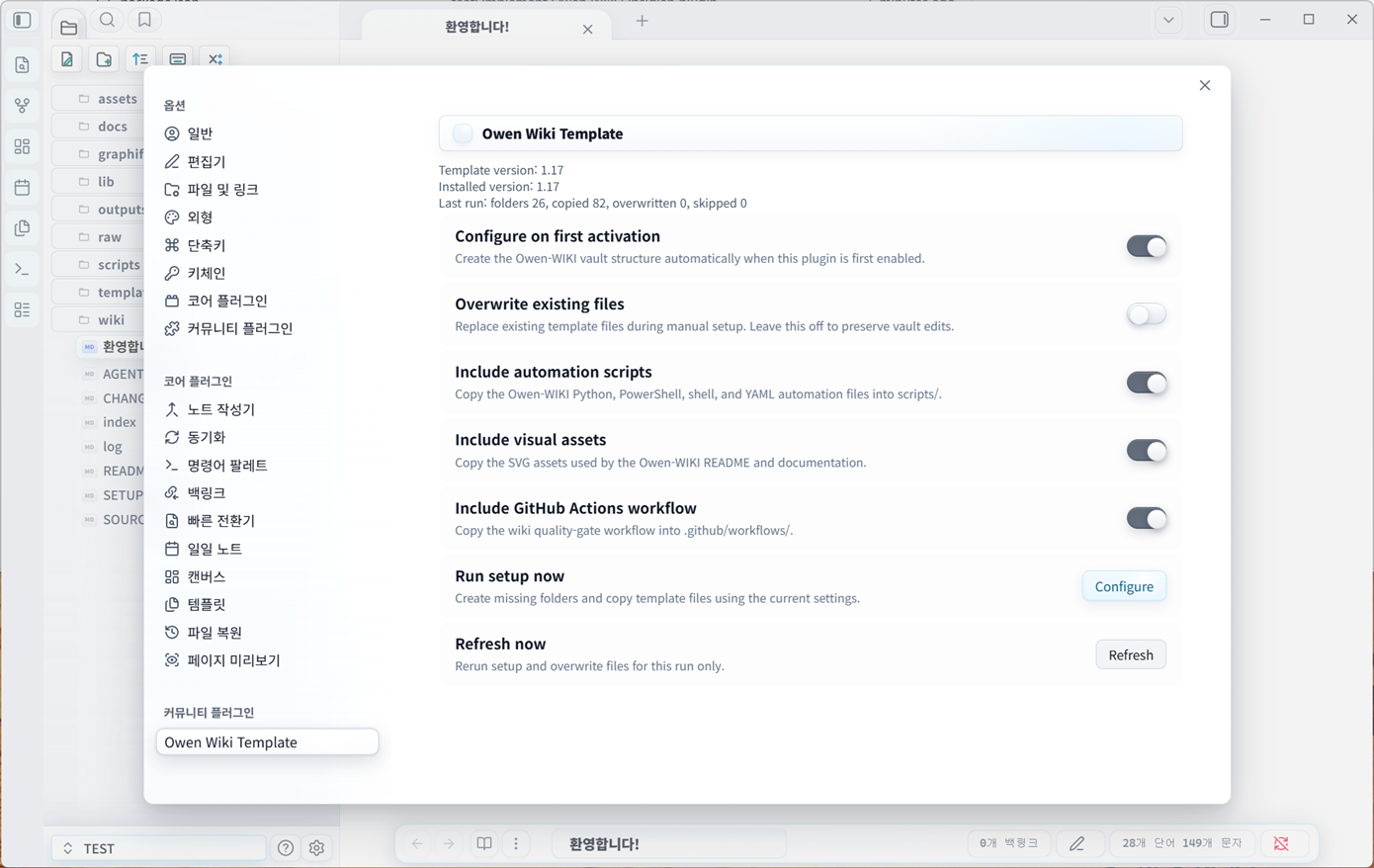
Owen Wiki Template is an Obsidian plugin that installs the Owen-WIKI Template Kit into the active vault. When the plugin is enabled, it can create the LLM wiki operating structure, starter pages, ontology templates, page templates, automation scripts, assets, and optional GitHub Actions workflow.
Install
Manual Install
- Download
main.js,manifest.json, andstyles.cssfrom the latest GitHub Release. - Place them into
<your-vault>/.obsidian/plugins/owen-wiki/. - Open Obsidian and enable community plugins if prompted.
- Enable Owen Wiki Template.
- Choose Configure in the first-run prompt or run Configure Owen Wiki template from the command palette.
The plugin asks before creating vault files on first activation. Existing files are skipped by default.
BRAT Install
- Install the Obsidian BRAT community plugin.
- Add beta plugin repository
towishy/owen-wiki-plugin. - Enable Owen Wiki Template after BRAT downloads the plugin.
- Run the setup prompt or command palette action.
BRAT is useful for testing release builds before the plugin is distributed through the official community plugin browser.
What It Creates
AGENTS.md,README.md,CHANGELOG.md,SETUP-GUIDE.md,index.md, andlog.mdraw/articles/YYYYMM/,raw/obsidian/Clippings/YYYYMM/, andraw/obsidian/outputs/YYYYMM/attachments/wiki/entities/,wiki/concepts/,wiki/summaries/,wiki/comparisons/,wiki/synthesis/, andwiki/ontology/templates/,scripts/,assets/,outputs/wiki-ops/, andgraphify-out/- Optional
.github/workflows/wiki-lint.yml
Existing files are skipped by default. Enable Overwrite existing files in the plugin settings only when you intentionally want to refresh template files.
Setup Presets
- Minimal: core schema, starter wiki folders, ontology templates, and page templates.
- Standard: Minimal plus automation scripts and README visual assets.
- Full: Standard plus the GitHub Actions wiki quality-gate workflow.
- Custom: shown when you manually toggle scripts, assets, or workflow options.
Commands
- Configure Owen Wiki template: creates missing template files and folders.
- Refresh Owen Wiki template files: reruns setup using the current settings.
After each run, the plugin shows a setup report with created, overwritten, and skipped file counts plus a compact file list.
Safety Tools
- Dry Run preview shows the folders and files that would be created, copied, overwritten, or skipped without writing to the vault.
- Back up before overwrite saves replaced files under
.owen-wiki-backups/YYYYMMDDTHHMMSSZ/. - Repair missing files recreates only missing Owen-WIKI folders and files while preserving existing files.
- Health check validates required folders, required files, and the bundled
template-manifest.json. - Setup report export writes run history to
outputs/wiki-ops/setup-report-*.md. - Open start document after setup opens
wiki/synthesis/overview.mdwhen setup completes.
The plugin includes a left ribbon button for quick setup access. Settings and setup dialogs can be shown in English or Korean.
On mobile, use the plugin primarily for vault structure and Markdown document creation. The bundled Python and PowerShell automation scripts are intended for desktop environments.
Development
Sync the bundled template kit from a local Owen-WIKI template repository:
npm run sync:template -- D:/Github/owen-wiki
Build and package the plugin:
npm install
npm test
npm run package
See docs/testing.md for the smoke test flow used with a local Obsidian test vault.
Release Build
npm install
npm run package
The package script creates release/owen-wiki-1.20.4.zip for local smoke tests. GitHub Releases publish only the supported Obsidian assets: main.js, manifest.json, and styles.css.