
README file from
Githubtitle: README
README
🔍 Table of Contents
- README ^toc-readme
- 📑 AI Primary Files ^toc-aiprimaryfiles
- 🎯 Project Abstract & Core Value [[#^toc-abstract|TOC]] ^toc-projectabstractcorevaluetocabstracttoc
- 🛠%EF%B8%8F Technology Stack at a Glance [[#^toc-stack|TOC]] ^toc-efb88ftechnologystackataglancetocstacktoc
- 🗺%EF%B8%8F Project Layout Blueprint [[#^toc-blueprint|TOC]] ^toc-efb88fprojectlayoutblueprinttocblueprinttoc
- ⚡ Quick Start for AI Developers [[#^toc-quickstart|TOC]] ^toc-quickstartforaideveloperstocquickstarttoc
- 1. Verify Environment ^toc-1verifyenvironment
- 2. Compile & Run Tests ^toc-2compileruntests
- 🚀 Go to... [[#^toc-goto|TOC]] ^toc-gototocgototoc
Injects an animated color-rotating border overlay box around hovered or active items using direct, sequential border-color frames.

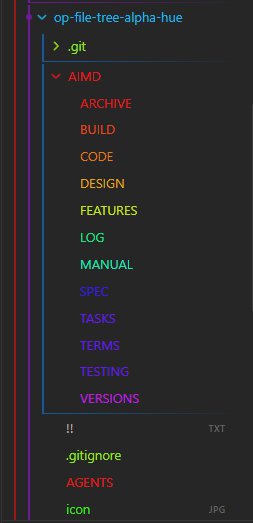

📑 AI Primary Files
- 🔹 AGENTS.md
- 🔹 ARCHIVE.md
- 🔹 BUILD.md
- 🔹 CODE.md
- 🔹 DESIGN.md
- 🔹 FEATURES.md
- 🔹 LOG.md
- 🔹 MANUAL.md
- 🔸 README.md
- 🔹 SPEC.md
- 🔹 TASKS.md
- 🔹 TERMS.md
- 🔹 TESTING.md
- 🔹 VERSIONS.md
🎯 Project Abstract & Core Value [[#^toc-abstract|TOC]]
- A specialized UI enhancement utility designed to inject floating, hardware-accelerated color-rotating border overlays onto active and hovered nodes within the Obsidian file tree workspace, operating over an independent layout plane to eliminate overflow clipping constraints.
🛠%EF%B8%8F Technology Stack at a Glance [[#^toc-stack|TOC]]
- Target Operating System: Cross-platform (Windows, macOS, Linux)
- Core Languages & Runtimes: JavaScript (ES6+), Node.js runtime, CSS3 Keyframe Animations
- Integrations: Obsidian API (Plugin Architecture Core), HTML5 Document Object Model (DOM)
🗺%EF%B8%8F Project Layout Blueprint [[#^toc-blueprint|TOC]]
AGENTS.md➔ System prompts and operational boundaries for AI teammates.AIMD/ARCHIVE.md➔ Scriptorium for scrapped ideas and sunset components.AIMD/BUILD.md➔ Compiler pipelines, flags, and packaging steps.AIMD/CODE.md➔ Syntax style guidelines and error-handling mandates.AIMD/DESIGN.md➔ Structural topology, design patterns, and data flows.AIMD/FEATURES.md➔ Capability matrices and functional product roadmap.AIMD/LOG.md➔ Chronological audit trail of development decisions.AIMD/MANUAL.md➔ Installation, user runbooks, and diagnostic workflows.README.md➔ Primary entry point and structural system abstract.AIMD/SPEC.md➔ Technical constraints, parameters, and protocol definitions.AIMD/TASKS.md➔ Dynamic task board and backlog management queue.AIMD/TERMS.md➔ Technical glossary, definitions, and vocabulary indexes.AIMD/TESTING.md➔ Automation suites, edge cases, and QA assertion routines.AIMD/VERSIONS.md➔ Change trackers and version milestone evolution lists.
⚡ Quick Start for AI Developers [[#^toc-quickstart|TOC]]
1. Verify Environment
node -v && npm -v
2. Compile & Run Tests
npm install && npm run build
🚀 Go to... [[#^toc-goto|TOC]]
- 🔹 AGENTS.md
- 🔹 ARCHIVE.md
- 🔹 BUILD.md
- 🔹 CODE.md
- 🔹 DESIGN.md
- 🔹 FEATURES.md
- 🔹 LOG.md
- 🔹 MANUAL.md
- 🔸 README.md
- 🔹 SPEC.md
- 🔹 TASKS.md
- 🔹 TERMS.md
- 🔹 TESTING.md
- 🔹 VERSIONS.md