
README file from
GithubOdaily
A schedule-focused Obsidian plugin for capturing ideas, managing notes and tasks, and boosting personal productivity.
Screenshots
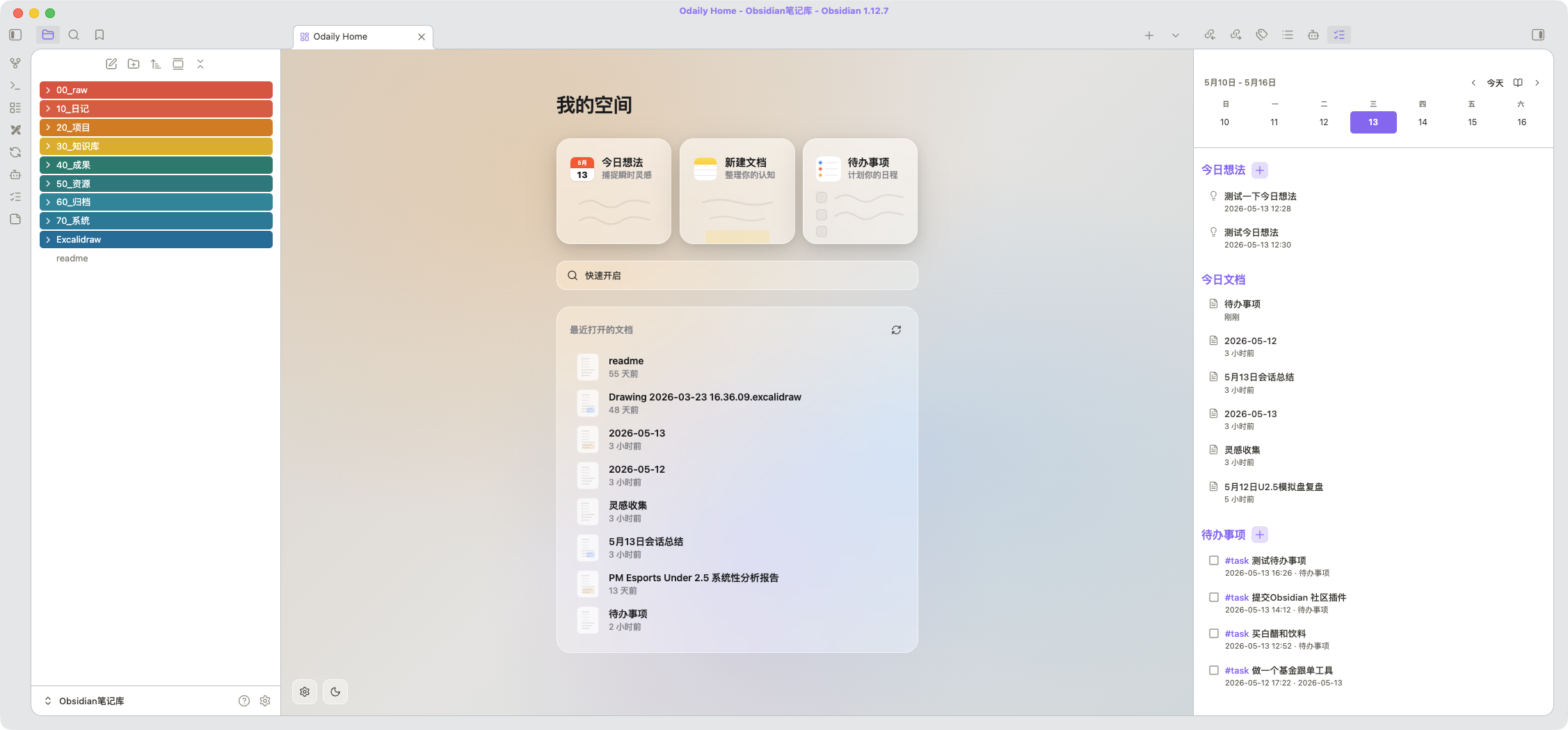
Features
Home View (New Tab Page)
- Quick Note — opens today's daily note in one click
- New Document — creates an untitled document in the vault's configured new note folder
- Todo List — add tasks to your daily note or a dedicated file
- Quick Switcher —
Cmd/Ctrl+Ostyle search from the home screen - Recent Files — shows recently opened or modified notes
- Custom Backgrounds — set per-theme (light/dark) backgrounds from vault images, URLs, or CSS gradients
- Theme Toggle — switch between light and dark mode from the home screen
Sidebar (Overview Panel)
- Calendar Week/Month View — navigate by day, week, or month with a date picker
- Daily Memos — capture
#memotagged thoughts with timestamps - Today's Documents — see files modified today (or selected date)
- Task Management — view and complete open tasks with 1-second undo confirmation
- Completed Tasks — see what was finished today with completion timestamps
- Tag Filtering — filter tasks by custom tags (e.g.,
#todo,#待办) - Copy Day Summary — copy the selected day's memos, docs, tasks, and completed items to clipboard
- Search — search and highlight keywords across all sidebar sections
Commands
Open Odaily home— open the home view in a new tabOpen Odaily sidebar— open the overview panel in the right sidebarOdaily: add memo— capture a quick thought to your daily noteOdaily: add todo— add a task to your configured target file
Settings
- Light/Dark Background: Set custom backgrounds using vault image paths, external URLs, CSS colors, or CSS gradients. Light and dark themes are configured independently.
- Task Tags: Filter the sidebar task list to show only tasks matching specific tags.
- Todo File: Choose where new tasks are saved (leave empty to use daily notes).
- Todo Position: Append new tasks to the top or bottom of the target file.
Installation
From Community Plugins
- Open Obsidian Settings > Community Plugins
- Disable Safe Mode if needed
- Click Browse and search for "Odaily Home"
- Install and enable
Manual Installation
- Download the latest
main.js,manifest.json, andstyles.cssfrom GitHub Releases - Copy them into
<vault>/.obsidian/plugins/odaily-home/ - Restart Obsidian or reload plugins
- Enable the plugin in Settings > Community Plugins
BRAT (Beta)
- Install the BRAT plugin
- Add
guchang/Odailyas a beta plugin - BRAT will keep the plugin updated automatically
Development
git clone https://github.com/guchang/Odaily.git
cd Odaily
npm install
npm run dev    # watch mode
npm run build  # production build
For local testing, symlink the plugin folder:
ln -s $(pwd) "<vault>/.obsidian/plugins/odaily-home"
License
MIT. See LICENSE for details.