
README file from
GithubSimple Mindmap
Create keyboard-centric mind maps in Obsidian with wiki-linked notes, drag-and-drop editing, and Markdown export.



Overview
Simple Mindmap adds a dedicated mind map view to your vault. Build hierarchies with the keyboard, link nodes to existing notes, reorganize with drag-and-drop, and export outlines or merged documents when you are ready to publish.
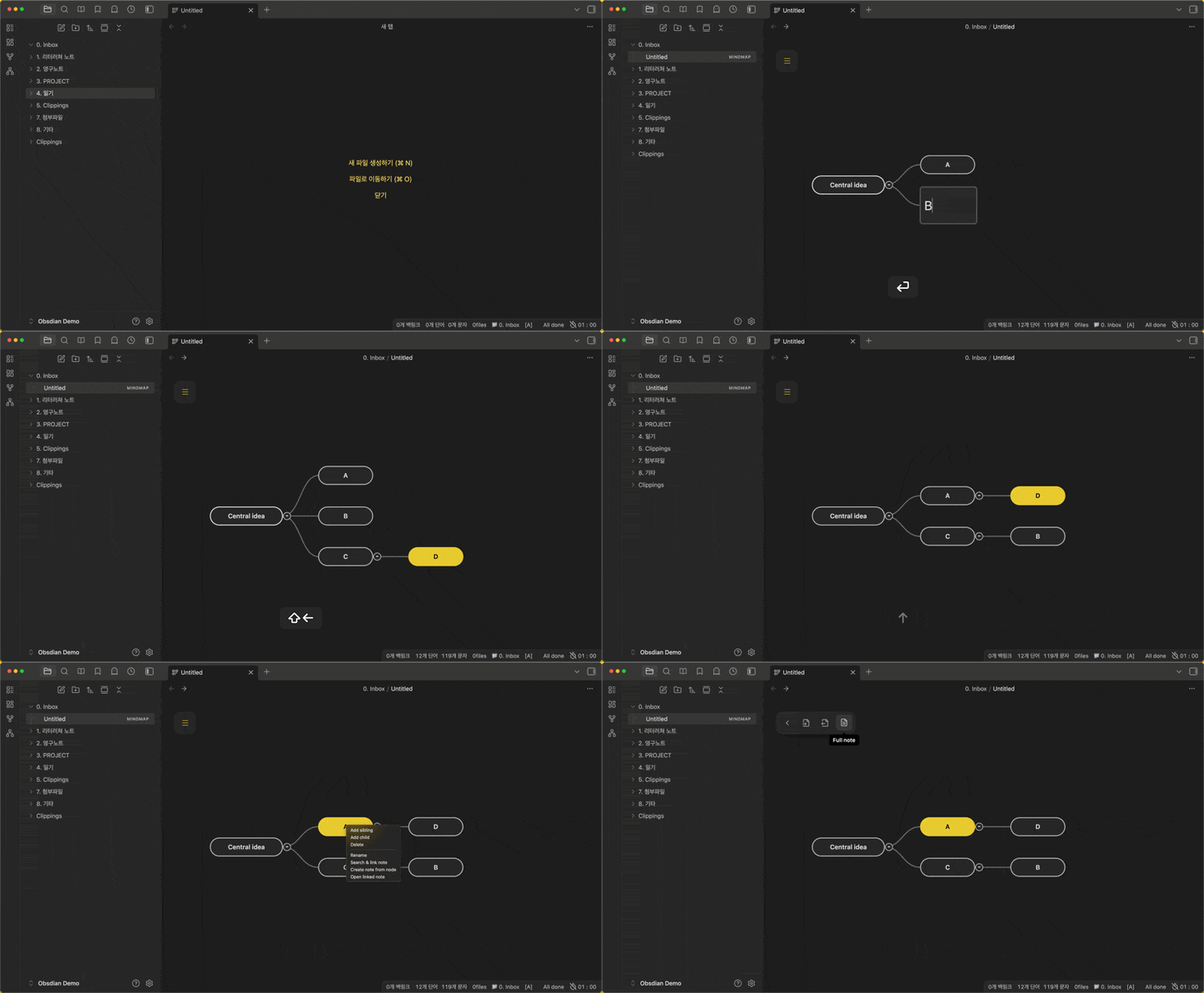
Features
- Mind map editing — Create, rename, delete, collapse, and reorder nodes; multi-select; undo (
Ctrl/Cmd+Z). - Keyboard-first workflow — Navigate and edit without leaving the keyboard; customizable hotkeys in settings.
- Note integration — Link nodes with
[[wikilinks]], search and attach notes, create notes from nodes, open linked notes. - Drag-and-drop — Reorder siblings, reparent nodes, and drop external notes onto the map.
- Markdown import/export — Import the active note’s list structure; export the map as a Markdown outline.
- Full note export — Compile linked note content into one Markdown document (optional YAML stripping).
.mindmapfiles — Store maps as vault files with a JSON data block for persistence and version control.
Getting started
- Enable Simple Mindmap in Settings → Community plugins.
- Click the network ribbon icon or create/open a
.mindmapfile. - Select the map canvas so keyboard shortcuts apply (click the background once).
- Use
Tab/Enterto add nodes, arrow keys to move selection, andShift+Enterto rename.
Toolbar (floating)
| Button | Action |
|---|---|
| Import markdown | Build a map from the active note’s list items |
| Export markdown | Save the map as a Markdown outline |
| Full note | Export merged content from linked notes |
Pan with click-drag on the canvas; zoom with the mouse wheel.
Default hotkeys
| Action | Default |
|---|---|
| Create child | Tab |
| Create sibling | Enter |
| Edit node text | Shift+Enter |
| Delete node | Delete |
| Search and link note | Shift+Ctrl+Enter (macOS: Shift+Cmd+Enter) |
| Create note from node | Ctrl+Shift+N (macOS: Cmd+Shift+N) |
| Open linked note | Ctrl+Shift+L or double-click |
| Toggle collapse | Ctrl+/ |
| Navigate | Arrow keys |
| Reorder / promote / demote | Shift + Arrow keys |
| Undo | Ctrl/Cmd+Z |
All shortcuts can be changed under Settings → Simple Mindmap.
Commands
| Command | Description |
|---|---|
| Import current note | Converts the active Markdown note’s list structure into a mind map |
Settings
| Setting | Description |
|---|---|
| Export folder | Default folder for new .mindmap files and exports |
| Theme | Map color theme |
| Hotkeys | Per-action keyboard bindings |
| Strip metadata | Remove YAML frontmatter when exporting full notes |
| Hover preview | Show note preview on linked nodes |
| Max node length | Truncate long labels in the view |
| Node style | Pill or rectangle node shape |
Installation
Community plugins (recommended)
After Simple Mindmap is listed in the directory:
- Open Settings → Community plugins.
- Turn off Restricted mode if needed.
- Search for Simple Mindmap and install.
Manual install
- Download
main.js,manifest.json, andstyles.cssfrom the latest release. - Create
.obsidian/plugins/obsimap/in your vault. - Copy the three files into that folder.
- Enable the plugin under Settings → Community plugins.
Beta (BRAT)
- Install BRAT.
- Add Beta plugin →
https://github.com/Creative781/obsimap.
Development
Requires Node.js 16+.
git clone https://github.com/Creative781/obsimap.git
cd obsimap
npm install
npm run build
Copy main.js, manifest.json, and styles.css into your vault’s .obsidian/plugins/obsimap/ folder and reload Obsidian.
See CONTRIBUTING.md for guidelines.
Compatibility
- Obsidian:
1.4.14and later (minAppVersioninmanifest.json). - Desktop and mobile: No Node.js-only APIs;
isDesktopOnlyisfalse. - Network: The plugin does not send vault data to external servers. The settings tab may load a Buy Me a Coffee button image from
cdn.buymeacoffee.comif you open plugin settings.
Privacy
Simple Mindmap reads and writes files only through Obsidian’s vault APIs. Mind map data stays in your vault (.mindmap files and exported Markdown). No analytics or third-party sync are included.
Support
License
MIT — see LICENSE.
Simple Mindmap (한국어)
옵시디안에서 키보드 중심 마인드맵을 만들고, 위키 링크로 노트를 연결하며, Markdown으로보낼 수 있는 플러그인입니다.
주요 기능
- 마인드맵 편집 — 노드 생성·이름 변경·삭제·접기·순서 변경, 다중 선택, 실행 취소
- 키보드 우선 — 설정에서 단축키 사용자 정의 가능
- 노트 연동 —
[[위키링크]], 노트 검색·연결, 노드에서 새 노트 생성, 연결 노트 열기 - 드래그 앤 드롭 — 형제 순서·부모 변경, 외부 노트 드롭
- Markdown — 현재 노트 목록 가져오기, 아웃라이너보내기, 연결 노트 통합(Full note)
.mindmap파일 — 보관함에 맵 데이터 저장
시작하기
- 설정 → 커뮤니티 플러그인에서 Simple Mindmap 활성화
- 리본의 network 아이콘 클릭 또는
.mindmap파일 열기 - 캔버스를 한 번 클릭해 포커스를 맞춘 뒤 단축키 사용
기본 단축키
| 기능 | 기본값 |
|---|---|
| 자식 노드 | Tab |
| 형제 노드 | Enter |
| 텍스트 편집 | Shift+Enter |
| 삭제 | Delete |
| 노트 검색·연결 | Shift+Ctrl+Enter |
| 노트 생성 | Ctrl+Shift+N |
| 노트 열기 | Ctrl+Shift+L 또는 더블 클릭 |
| 이동 | 방향키 |
| 순서/계층 변경 | Shift + 방향키 |
설치
커뮤니티 플러그인
승인 후 설정 → 커뮤니티 플러그인에서 Simple Mindmap 검색·설치.
수동 설치
- 릴리즈에서
main.js,manifest.json,styles.css다운로드 - 보관함
.obsidian/plugins/obsimap/에 복사 - 플러그인 활성화
베타 (BRAT)
https://github.com/Creative781/obsimap
서포트
라이선스
MIT — LICENSE 참고.