
README file from
GithubEPUB Marginalia
中文 | English
在 Obsidian 中直接阅读 EPUB 电子书,支持目录导航、阅读进度、文本高亮与标注、摘录导出、阅读主题、分屏共读与多语言界面。
安装
从 Obsidian 社区插件安装
- 打开 设置 → 社区插件
- 如需要,关闭 安全模式,点击 浏览
- 搜索 EPUB Marginalia
- 点击 安装,然后 启用
手动安装
- 从 最新 Release 下载
main.js、manifest.json、styles.css - 复制到 Vault 的
.obsidian/plugins/ob-epub-reader/目录 - 在 设置 → 社区插件 中启用 EPUB Marginalia
功能
- 内置阅读器 — 点击 Vault 中的
.epub文件即可在阅读视图中打开 - 目录与标注侧栏 — 章节目录(阅读时自动高亮当前章节)、当前书籍的标注列表(支持搜索与按颜色/想法类型筛选)
- EPUB 书架 — 浏览 Vault 中所有 EPUB,查看各书阅读进度与累计阅读时长(可在设置中关闭)
- 阅读进度 — 自动保存位置,摘录 frontmatter 记录进度百分比、章节与阅读时长
- 文本高亮与标注 — 选中文字后可画线(黄/红/绿/蓝/紫)或添加想法;画线/改色自动复制摘录
- 复制与画线 — 点击画线颜色自动复制;关闭标注模式下仅复制(可选颜色);分屏共读时可自动插入最近编辑的 Markdown 笔记
- 五种想法类型 — 做笔记、灵感、准备实践、反复看、疑问;可在设置中自定义名称与图标
- 摘录导出 — 标注自动写入 Vault 中的 Markdown 摘录文件,支持五种可配置的摘录链接格式(含纯文本,仅保留选中文字,便于复制到外部);摘录文件夹与文件名支持
{filefolder}、{title}、{filename}占位符 - 深度链接 — 使用 Wiki 链接
#cfi=...从摘录跳回 EPUB 原文;旧版obsidian://ob-epub-goto与块引用格式可自动兼容并迁移 - 阅读设置面板 — 工具栏 ⚙ 弹出:字号滑条、两侧空白、六种阅读主题、高亮透明度、自动粘贴开关
- 阅读模式 — 分页 / 滚动,可调字体大小与两侧空白(12–120 px)
- 工具栏位置 — 顶部(阅读区内)或底部(常驻 Obsidian 底栏),含进度条
- 阅读主题 — 跟随 Obsidian、默认白、护眼黄、护眼绿、羊皮纸、夜间(阅读设置面板切换,设置中可设默认)
- 键盘与滚轮 — 方向键、PageUp/PageDown、鼠标滚轮翻页
- 多语言界面 — 英文、简体中文、繁体中文、日文;可跟随 Obsidian 或单独指定
- 功能分组 — 可独立关闭「标注与摘录」或「书架与快捷入口」,保留纯阅读/复制模式
使用
打开书籍
- 在文件列表中点击任意
.epub文件 - 命令面板:
打开 EPUB 书架— 浏览 Vault 中所有 EPUB 及阅读进度 - 命令面板:
在 EPUB 阅读器中打开— 打开当前选中的 EPUB 文件
高亮与标注
- 在阅读器中选中文字,弹出上下文菜单
- 选择颜色画线,或点击「标注」添加想法(可选五种想法类型之一)
- 摘录写入
{摘录文件夹}/下按模板命名的 Markdown 文件(默认《书名》摘录.md) - 点击原文旁的想法图标,或侧栏标注列表,可查看、编辑或删除标注
分屏共读:与 Markdown 笔记左右分屏时,在阅读器中「复制」或带颜色复制摘录会写入剪贴板;开启 复制摘录自动粘贴(阅读设置面板中的 🌟)时,还会自动插入到最近编辑过的笔记光标处(阅读模式下仅复制到剪贴板)。
摘录块示例(默认 Callout + 标题链接 格式):
> [!ob-epub|yellow] [[书名.epub#cfi=/6/14!/4/2/1:0&end=...|第三章]]
> 选中的原文内容

<!-- ob-epub-note-type: inspiration -->
可选的想法文字

---
摘录链接格式
在 设置 → 摘录链接格式 可选择五种预设。修改设置仅影响新标注;已有摘录需点击 转换已有摘录链接 → 立即转换 批量转换。
| 演示 | ID | 设置名称 | 写入示例 | 颜色 |
|---|---|---|---|---|
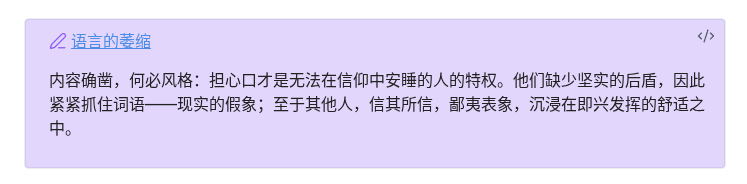 |
callout-title |
Callout + 标题链接 | > [!ob-epub|purple] [[book.epub#cfi=...|章节]] + > 正文 |
callout metadata |
 |
inline-suffix |
正文 + 文末「原文」 | 正文。[[book.epub#cfi=...|原文]] |
不保存,读回 yellow |
 |
inline-colored |
着色正文 + 文末「原文」 | <span style="color: #8b5cf6;">正文</span> [[...|原文]] |
span hex → 最近高亮色 |
 |
wiki-text-alias |
链接即正文 | [[book.epub#cfi=...|摘录全文]] |
不保存,读回 yellow |
| — | plain-text |
纯文本 | 仅选中文字,无链接与注释 | 不写入文件;读回 yellow;无法回到原文 |
纯文本格式示例(摘录文件与剪贴板内容一致):
在投资领域里……周期最可靠。基本面、心理因素、价格与收益的涨跌,提供了犯错或者从别人的错误中获利的机会。这些都是已知的事实。
摘录文件、剪贴板与复制结果均与上例一致:只有选中正文,无链接、无注释、无定位信息。
想法区块(五种格式共用,纯文本格式下可选):
<!-- ob-epub-note-type: inspiration -->
想法内容
多行摘录:格式 2/3(inline-suffix、inline-colored)与格式 5(plain-text)保留换行;格式 4(wiki-text-alias)写入时将正文换行合并为单行(空格连接),别名需转义 \|、\]。
回到原文
摘录中的 Wiki 链接([[书名.epub#cfi=...|...]])、原文 链接、或 ob-epub callout 标题链接,均可跳转到 EPUB 阅读器的对应位置(分屏模式下同样有效)。纯文本格式不含任何链接,不支持回到原文。
旧版
obsidian://ob-epub-goto?file=...&cfi=...、旧块引用、旧 CFI 注释行会在插件首次加载或手动转换时迁移为当前选中的摘录格式。
阅读设置
点击工具栏 ⚙ 打开阅读设置面板,可快速调节:
- 字号 — 滑条或 A-/A+(10–32 px,持久保存)
- 两侧空白 — 滑条或 ◧-/◧+(12–120 px,分页与滚动模式均生效)
- 阅读主题 — 六种主题色块即时切换
- 高亮透明度 — 调节阅读器内画线层浓淡(标注功能开启时显示)
- 自动粘贴 — 🌟/★ 切换分屏共读时是否自动插入 Markdown 笔记
工具栏还提供 分页/滚动 切换与 ◀/▶ 翻页;工具栏位置 可在设置中选择顶部或底部(底栏模式含进度条)。
阅读主题
阅读器 ⚙ 阅读设置 面板提供 6 种主题色块,可随时切换;设置 → 默认阅读主题 决定新开书籍的初始主题。
| 演示 | 主题 | 背景色 | 说明 |
|---|---|---|---|
 |
跟随 Obsidian | 随编辑器 | 正文配色与 Obsidian 编辑器一致,深浅模式自动跟随 |
 |
默认白 | #FFFFFF |
白底深灰字,通用阅读 |
 |
护眼黄 | #FAF9DE |
偏暖浅黄底,减轻长时间阅读疲劳 |
 |
护眼绿 | #E3EDCD |
淡绿底,类似传统护眼模式 |
 |
羊皮纸 | #F4ECD8 |
暖棕色调,仿纸质书观感 |
 |
夜间 | #1C1C1E |
深灰底浅字,适合暗光环境 |
想法类型与图标
添加想法时可选择一种类型;类型图标会显示在高亮文字旁,侧栏标注列表也会同步展示。名称与图标可在 设置 → 想法类型 中自定义(内部 id 固定不变)。
| 图标 | 类型 | id | 适用场景 |
|---|---|---|---|
| 📝 | 做笔记 | note |
一般记录与摘要 |
| 💡 | 灵感 | inspiration |
触动、联想、创意 |
| ✅ | 准备实践 | practice |
打算落地的方法或行动 |
| 🔁 | 反复看 | revisit |
需要多次回看的段落 |
| ❓ | 疑问 | question |
尚不清楚、待查证的内容 |
想法图标的大小与位置可在 设置 → 想法图标 中调节(默认直径 20 px,相对高亮右缘偏移 2 px)。
设置
在 设置 → EPUB Marginalia 中可配置(设置页按功能分组,可折叠):
通用
| 选项 | 说明 | 默认值 |
|---|---|---|
| 显示语言 | 插件界面语言(英文 / 简体中文 / 繁体中文 / 日文 / 跟随 Obsidian);不影响已有摘录文件 | 跟随 Obsidian |
阅读器
| 选项 | 说明 | 默认值 |
|---|---|---|
| 默认阅读模式 | 分页 / 滚动 | 滚动 |
| 默认字体大小 | 内容区字号(px) | 16 |
| 两侧空白 | 阅读正文左右留白(px) | 12 |
| 默认阅读主题 | 跟随 Obsidian / 默认白 / 护眼黄 / 护眼绿 / 羊皮纸 / 夜间 | 跟随 Obsidian |
| 工具栏位置 | 顶部显示 / 底部显示(Obsidian 底栏) | 底部显示 |
| 复制摘录自动粘贴 | 开启后复制摘录会插入最近编辑的 Markdown 笔记 | 开启 |
标注与摘录
可在设置中整体关闭本组功能;关闭后仅保留选区复制(可选颜色),不写入高亮与摘录。
| 选项 | 说明 | 默认值 |
|---|---|---|
| 摘录文件夹 | 摘录 Markdown 保存目录;支持 {filefolder}(EPUB 所在目录),如 {filefolder}/anno |
epub-books/anno |
| 摘录文件名 | 支持 {title}(书名)、{filename}(EPUB 文件名),如 《{title}》摘录.md |
《{title}》摘录.md |
| 摘录链接格式 | 五种预设格式;见上文 | Callout + 标题链接 |
| 默认画线颜色 | 不保存颜色的格式在解析/转换时的回退色 | 黄色 |
| 摘录 callout 背景透明度 | 控制摘录文件中 ob-epub callout 背景浓淡 | 20% |
| 转换已有摘录链接 | 批量重写摘录文件夹内所有摘录文件为当前格式 | — |
| 检查摘录元数据 | 检查 frontmatter 的 epub-source 是否指向有效 EPUB |
— |
| EPUB 高亮透明度 | 阅读器内画线/高亮层透明度 | 见设置页 |
| 想法类型 | 五种想法分类的名称与图标(id 固定,可恢复默认) | 见设置页 |
| 想法图标大小 | 原文旁想法图标的直径(px) | 20 |
| 想法图标位置 | 相对高亮区域的水平/垂直偏移(px) | 2 / 0 |
书架与快捷入口
可在设置中关闭本组功能(不影响「在 EPUB 阅读器中打开」)。
| 选项 | 说明 | 默认值 |
|---|---|---|
| EPUB 书架 | 侧栏书架视图、功能区图标、命令「打开 EPUB 书架」 | 开启 |
数据存储
| 文件 | 位置 | 内容 |
|---|---|---|
| 摘录 Markdown | {摘录文件夹}/(文件名可配置,默认 《书名》摘录.md) |
高亮、标注;frontmatter 含 epub-source 与阅读进度 |
data.json |
.obsidian/plugins/ob-epub-reader/ |
插件设置 |
摘录 frontmatter 进度字段:progress-percent、progress-cfi、progress-chapter、last-read、reading-time-seconds(累计阅读秒数)。
旧版本曾将标注和进度保存在 data.json 或 reading-progress.json 中,插件首次加载时会自动迁移到摘录 frontmatter。迁移后可手动删除旧的 reading-progress.json。
要求
- Obsidian 1.8.0+
- 仅桌面端
开发
npm install
npm run build    # 输出到 dist/
npm run release  # 构建并打包 zip
npm run dev      # 监听模式
npm test         # 运行单元测试
直接部署到 Vault 插件目录:
PLUGIN_DIR="/path/to/vault/.obsidian/plugins/ob-epub-reader" npm run build
许可
MIT