
README file from
GithubNotes to HTML Pages
中文 · English
把 Obsidian Markdown 笔记变成适合深度阅读、可批注、可离线打开的 HTML 页面。




English Overview
Notes to HTML Pages is an Obsidian plugin that turns Markdown notes into clean, standalone HTML pages for long-form reading. Exported pages work offline, open directly inside Obsidian, and can be annotated while you read.
Key capabilities
- Export one note or a folder as self-contained HTML with no network dependency.
- Read with a clickable table of contents, responsive navigation, readable tables, callouts, code blocks, and ASCII diagrams.
- Choose between the Clean and Claude reading styles.
- Set a custom reading font (any font installed on your computer) and text size.
- Select text to underline it and add notes; annotations can sync back to the source Markdown note.
- Copy every highlight on the page to the clipboard with one click.
- Open exported
.htmlfiles directly from the Obsidian file explorer.
For full English installation and usage instructions, see README.en.md.
中文介绍
Notes to HTML Pages 是一个面向长文阅读的 Obsidian 插件。它把本地 Markdown 笔记转换成清晰、素净、有目录的 HTML 页面,让调研、复盘、年度总结和深度文章更像一篇真正可读的文章或小册子。
导出的 .html 完全自包含:纯 CSS、内联资源、无需联网。你可以直接双击在浏览器打开,也可以在 Obsidian 的文件列表中直接阅读。阅读过程中还可以选中文字划线、添加批注,并默认同步回原来的 Markdown 笔记。
适合的场景
- 把长笔记、调研文档、年度总结或深度文章整理成更舒服的阅读版;
- 在长文中通过可点击目录快速跳转;
- 阅读时圈出重点、写下想法,并把批注留回原笔记;
- 需要可离线打开、归档或分享的单文件 HTML;
- 希望在不离开 Obsidian 的情况下完成阅读和批注。
效果预览
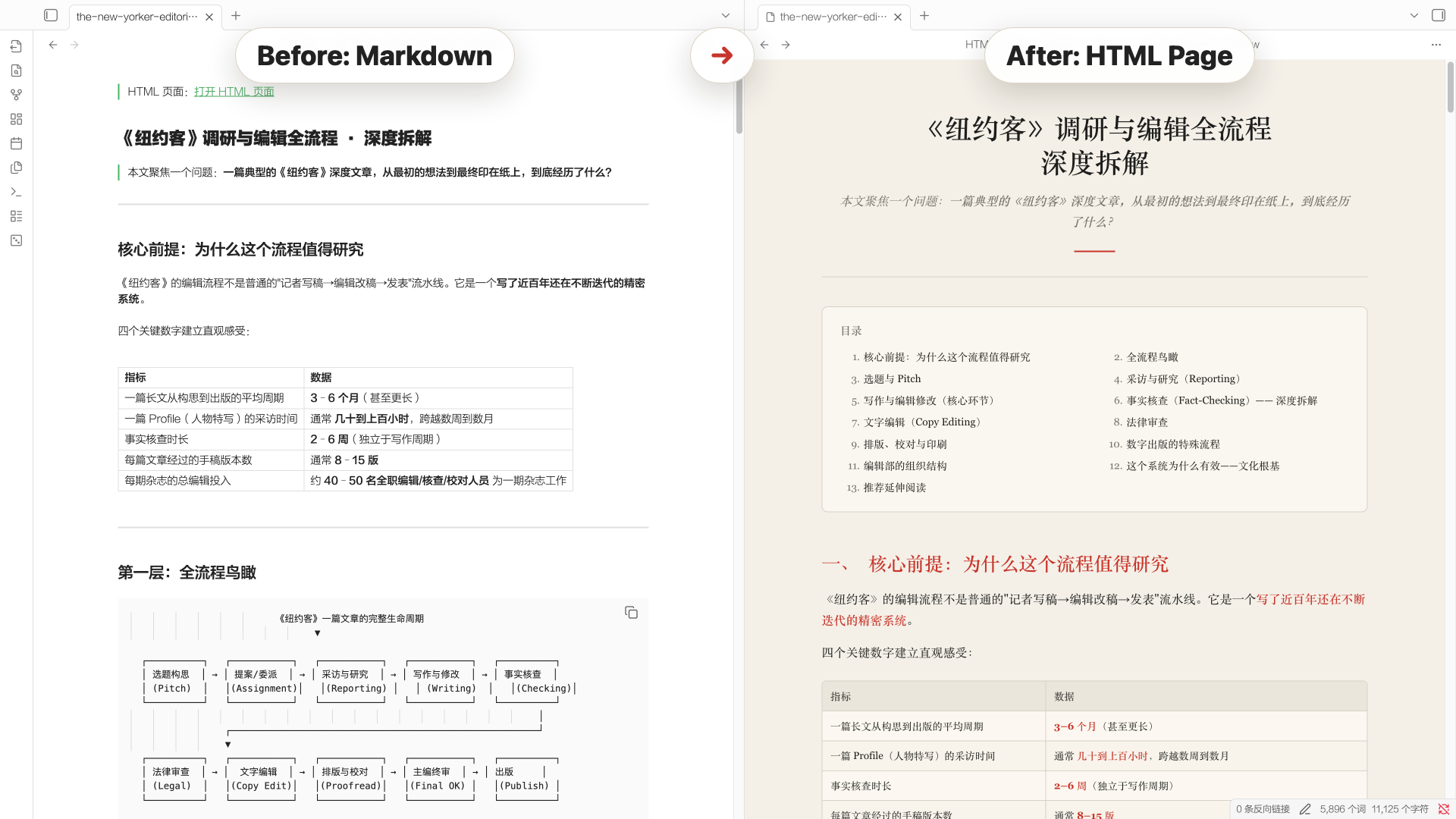
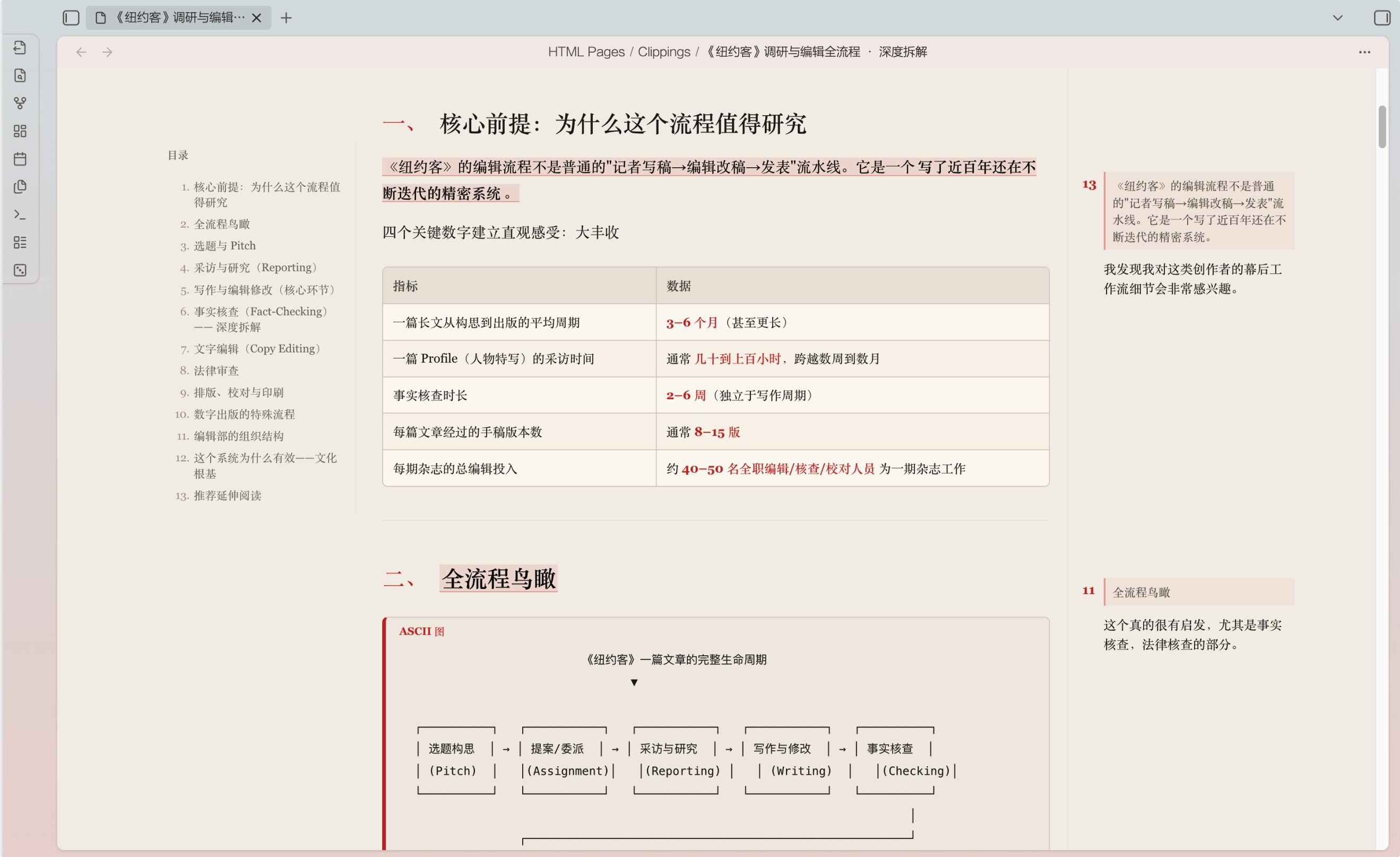
目录和右侧批注效果:
功能特性
- 自包含 HTML 导出:导出当前笔记或整个文件夹为
.html。样式和可选的本地图片都写入页面,离线也能打开。 - 为长文设计的排版:提供「简洁」与「Claude 风格」两套阅读样式;均支持窄栏正文、清晰标题层级、引言、表格、引用块、重点提示、结论卡片,以及代码和 ASCII 图块。
- 自定义正文字体与字号:在设置中填入电脑里已安装的字体名(例如「霞鹜文楷 / LXGW WenKai」),并从偏小、默认、偏大、特大中选择正文字号;导出页据此呈现,使用本机字体,无需联网。
- 双重目录导航:文章开头自动生成可点击目录;宽屏阅读时,左侧还会出现跟随滚动的章节目录。
- 在 Obsidian 内直接阅读 HTML:导出的
.html会出现在文件列表中,点击即可在应用内打开,不再需要额外的入口笔记。 - 选择、划线与批注:在 Obsidian 内阅读 HTML 时,选中任意长度的文本,包括跨行和跨段文字,即可划线并写下批注。
- 贴合阅读宽度的批注呈现:空间足够时,批注在右侧留白区与原文对应;较窄时,带批注的段落末尾会出现小型批注入口,点击后在正文中展开内容。纯划线不会产生编号入口。
- 批注同步回 Markdown:默认开启。批注的原文、备注与时间会写回源 Markdown,重新导出后仍会显示。关闭开关后,浏览器里仍可用于临时划线和备注,但不会改动原文。
- 可编辑、可删除:点击批注进入编辑状态;保存更新同步回原文,删除也会同时清除页面与源笔记中的对应批注。
- 一键复制所有划线:阅读页右下角有一个与纸面融合的低调按钮,点击即可把本页全部划线原文与备注一次性复制到剪贴板,方便整理读书笔记。
- 保留笔记结构:默认保留文件夹层级;可把 Wikilink 转换为同名 HTML 链接,并可内嵌本地图片。
- 源笔记回链:可选在源笔记开头维护一个整洁的 HTML 阅读页链接,重复导出不会累积重复内容。
- 中英文界面:插件命令、右键菜单、设置与提示支持中文和 English 切换。当前版本优先支持桌面端。
安装
从 Obsidian 社区插件安装
- 打开 Obsidian 的「设置」→「第三方插件」。
- 搜索
Notes to HTML Pages。 - 安装并启用插件。
手动安装
-
从 Release 下载:
main.js与manifest.json。 -
在你的 vault 中创建插件目录:
.obsidian/plugins/notes-to-html-pages/ -
将两个文件放入该目录。
-
重启或重新加载 Obsidian。
-
在「第三方插件」中启用 Notes to HTML Pages。
使用
导出阅读页
打开一篇 Markdown 笔记,在命令面板运行:
Notes to HTML Pages: Export current note to HTML page
也可以在文件列表中右键 Markdown 文件或文件夹,选择导出命令。默认导出到:
HTML Pages/
设置页可调整阅读样式(简洁 / Claude 风格)、自定义正文字体、正文字号、导出目录、是否保留文件夹结构、是否转换 Wikilink、是否内嵌图片、是否直接在 Obsidian 打开 HTML、是否在源笔记插入回链,以及批注同步开关。
在阅读页中批注
- 在 Obsidian 中打开导出的 HTML 页面。
- 选中一段文字,点击「划线」。
- 在同一处出现的小输入框中写下备注并保存。
- 宽屏下,批注显示在右侧;窄屏下,段尾出现小型批注入口。
- 点击已有批注可以修改内容;点击「删除」会清除对应的划线和批注。
「批注同步回原 Markdown」默认开启。开启时,批注会被保存到源笔记末尾的受插件管理区块中;重新导出时会自动恢复。这个功能只在 Obsidian 内阅读 HTML 时同步,独立浏览器打开的页面仍可用作临时阅读和标记。
隐私
转换、导出、HTML 阅读和批注同步都在本地 vault 中完成。插件不会上传你的笔记内容,也不依赖任何外部服务。
开发
npm install
npm run build
生产构建会将 main.js 输出到仓库根目录。
发布说明: Obsidian 社区插件要求 GitHub Release 标签与
manifest.json中的版本号完全一致,且不带v前缀。Release 资产需分别包含main.js与manifest.json。本仓库会在推送版本标签后自动构建、生成来源证明并创建 Release。
许可
基于 MIT License 发布。