
README file from
GithubNotekit Edit is an Obsidian plugin that turns any passage of a note into a prompt: select text, say what should change, and the rewrite streams into the note in place. Put the cursor on an empty line instead and it writes there, using the whole note as context. It runs on the Claude Pro/Max or ChatGPT subscription you already have (through the Claude Code and Codex CLIs), on an API key, or on any OpenAI-compatible or ACP agent, including a self-hosted one on another machine.
Made by pocketcorp.
Trailer
Watch the full trailer (MP4, 960p preview).
| Edit a selection | Write at the cursor |
|---|---|
 |
 |
Highlights
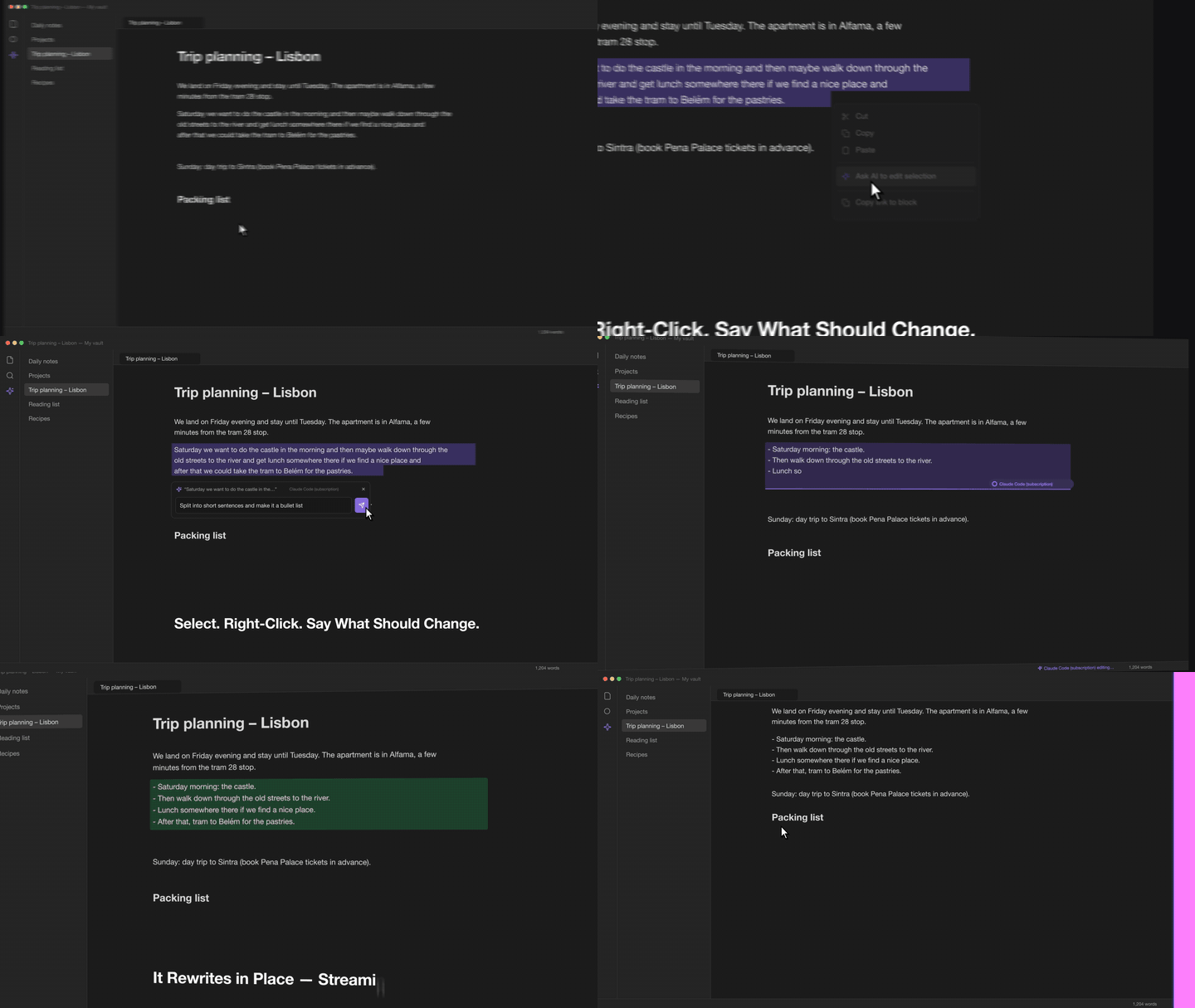
- Edit in place. Right-click a selection, type an instruction, and the replacement streams into the note while the passage is highlighted. One undo step reverts it.
- Ask AI about it. Right-click and choose Ask AI about selection (or about this note): a sidebar chat opens where you can ask follow-up questions, then copy an answer, insert it at the cursor or let it replace the selection.
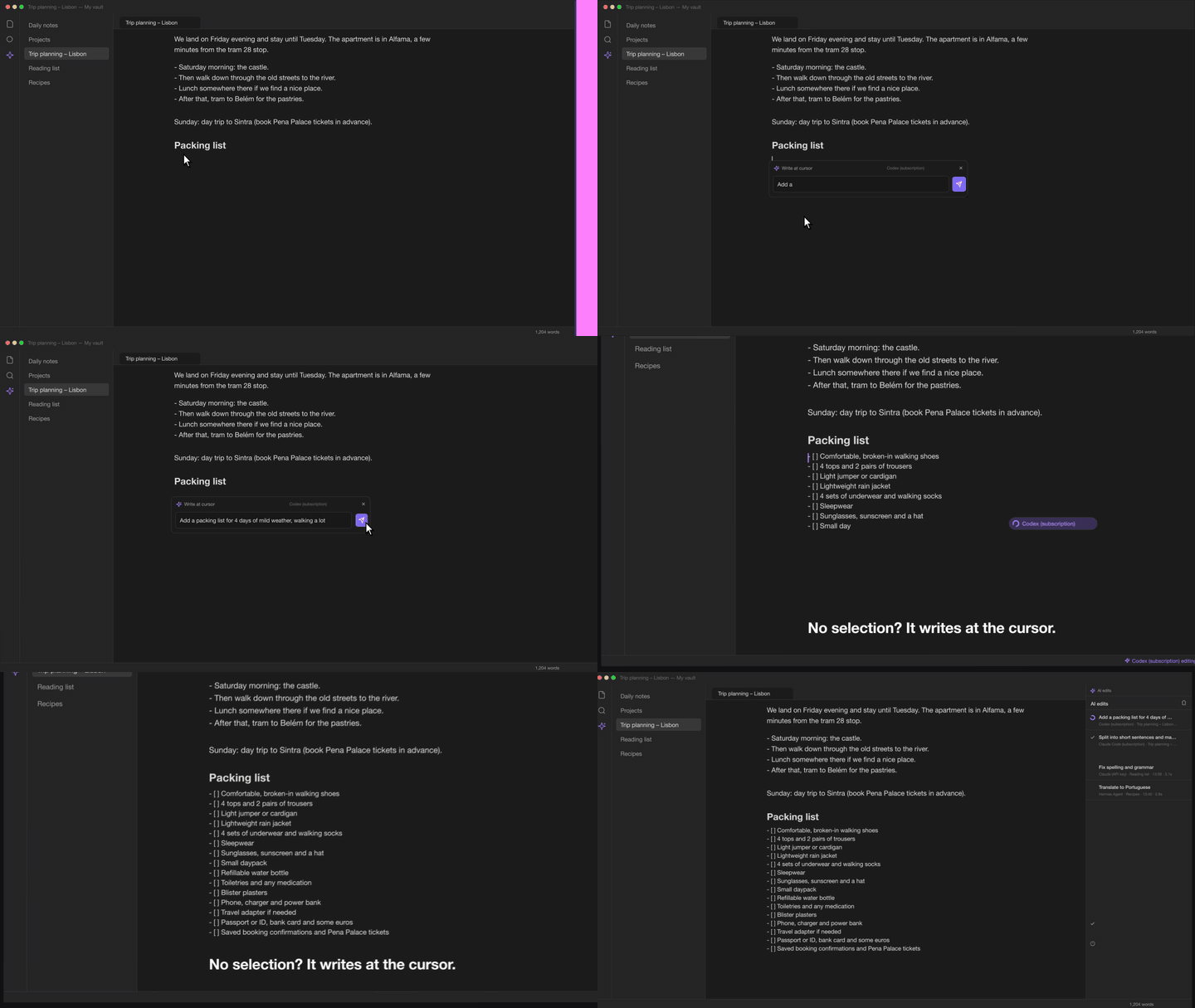
- Write at the cursor. With nothing selected, the AI writes new text at the cursor with the full note as context.
- Your subscription, no key required. The default agent runs the locally installed Claude Code CLI and reuses its login. Codex works the same way with the ChatGPT login.
- Any other agent. Anthropic or OpenAI API keys, OpenAI-compatible servers (Hermes Agent, Ollama, LM Studio, OpenRouter, vLLM), and Agent Client Protocol agents over stdio.
- Desktop and mobile. Phones use the bundled bridge to reach a subscription on a computer; scan the QR code the bridge prints and the phone is set up.
- Transparent. A sidebar panel logs every edit with the original text, the exact output, the model's reasoning where the agent exposes it, and errors.
Quick start
- Install from the community plugin list (search for "Notekit Edit", once listed) or download
main.js,manifest.jsonandstyles.cssfrom the latest release into<vault>/.obsidian/plugins/notekit-edit/, then enable the plugin. - The setup wizard opens: choose Claude or Codex, then subscription or API key. With a subscription
there is nothing to enter as long as
claude(orcodex) is installed and logged in. - Open a note, select some text, right-click and choose Ask AI to edit selection.
The full walkthrough is in docs/getting-started.md.
Documentation
| Document | Contents |
|---|---|
| Getting started | Installation, the setup wizard, first edit, mobile |
| Agents | Claude Code, Codex, API keys, ACP agents, OpenAI-compatible servers, Hermes |
| Bridge | Using a subscription from a phone or another computer |
| Setup links | Setting up an agent from a QR code; the link format for your own generators |
| Usage | Prompt box, cursor mode, the edits panel, commands, settings |
| Troubleshooting | Common errors and how to read the edits panel |
| Architecture | How the editor extension, backends and bridge fit together |
| Development | Building, tests, lint, project layout |
| Releasing | Versioning rules, changelog, tagging, CI/CD |
| Changelog | What changed in each version |
Requirements
- Obsidian 1.7.2 or newer (desktop and mobile).
- For subscription use on desktop: Claude Code (
claude) and/or the Codex CLI (codex), logged in. - For mobile subscription use: a computer running the bridge (Node 18 or newer). From a clone of
this repository,
npm install && npm run build && npm run bridge:setup -- --installsets it up and shows the QR code for the phone; see docs/bridge.md. - An account with the AI provider you choose: a Claude or ChatGPT subscription, or an Anthropic or OpenAI API key (pay per use), or your own OpenAI-compatible server.
Privacy, network access and security
This section lists everything the plugin does beyond editing text inside Obsidian, as required by the Obsidian developer policies.
Network requests. Nothing is sent anywhere until you configure an agent. The plugin then talks directly to the service behind the agent you selected; there is no intermediate server run by pocketcorp. Depending on the agent type it connects to:
- the Anthropic API at
https://api.anthropic.com(agent type Claude (Anthropic API key)), or a base URL you enter instead; - the OpenAI API at
https://api.openai.com(the wizard's OpenAI (API key) choice); - any OpenAI-compatible endpoint you enter as base URL (Hermes Agent, Ollama, LM Studio, OpenRouter, vLLM, or the plugin's own bridge running on one of your computers);
- for the CLI and ACP agents, the plugin itself makes no request: the
claude,codexor ACP process it starts connects to its own provider (Anthropic, OpenAI, Google, or whatever the agent uses) with that tool's login.
The Test button on an agent card makes one request to the same endpoint (/models, the CLI's
--version and login status, or an ACP initialize).
What is sent. Every edit sends the full content of the current note (capped at 150,000 characters before and after the target for very large notes), the note's name, the selected text or the cursor position, your instruction, and the Extra instructions from the settings. Every question in the Ask AI chat sends the note's current full content (capped at 300,000 characters), the selected passage if the chat is about one, and the conversation so far. No other notes and no vault metadata are sent. Nothing is sent when you only open the prompt box or the chat.
External executables. On desktop, and only for agents of the types Claude Code CLI, Codex CLI
and ACP agent, the plugin starts a local process with the command you configured: claude -p
(with tools disabled), codex exec (read-only sandbox, no approvals) or the ACP command line, using
the vault folder as working directory. The command is resolved on your PATH plus the usual CLI
install locations (/opt/homebrew/bin, /usr/local/bin, ~/.local/bin, nvm, volta, bun). With an
ACP agent and Allow tools switched on, the agent may read and write files inside the vault folder
and run commands there; leave it off unless you want that. Mobile builds never start processes; those
agent types report an error and you use an API key or the bridge instead.
Stored credentials. API keys, bridge keys and any extra headers you enter are stored in plain
text in the vault's .obsidian/plugins/notekit-edit/data.json, together with the agent
configuration and the last 50 entries of the edits panel (instruction, original text, output and
reasoning). Exclude that file from syncs or backups you do not trust, and remember that vault sync
services copy it. The CLI agents store nothing in Obsidian; they reuse the login kept by the CLI.
Setup links and QR codes. The QR code the bridge prints, and any obsidian://notekit-edit setup
link, can contain an API or bridge key; treat them like the key itself. Opening a link never saves
anything without confirmation, and a link can only add network agents, never one that starts a
program. See docs/setup-links.md.
Accounts and payment. The plugin is free and open source, but every agent needs an account with its provider: a Claude Pro/Max or ChatGPT subscription for the CLI agents, a paid Anthropic or OpenAI API key, or your own server.
Telemetry. None. The plugin collects no usage data, contains no analytics or crash reporting, and does not phone home; the only network traffic is the requests to the agent you selected. Nothing is logged to the developer console during normal use.
The bridge. bridge/claude-bridge.cjs is an optional Node script you run yourself on a computer.
It listens on the network (all interfaces, port 8765 by default), requires a key, and forwards
requests to the local CLI or ACP agent. See docs/bridge.md for its security notes.
License
MIT. Copyright 2026 pocketcorp.