
README file from
GithubNote and PDF Voice Reader
Language: English | 简体中文
Read aloud your notes, PDFs, HTML files and web pages in Obsidian. Listen while following the original document, jump between sections, or export audio for later.
One-click reading toolbar: click the audio icon in the pane header to show or hide playback controls above the original document.
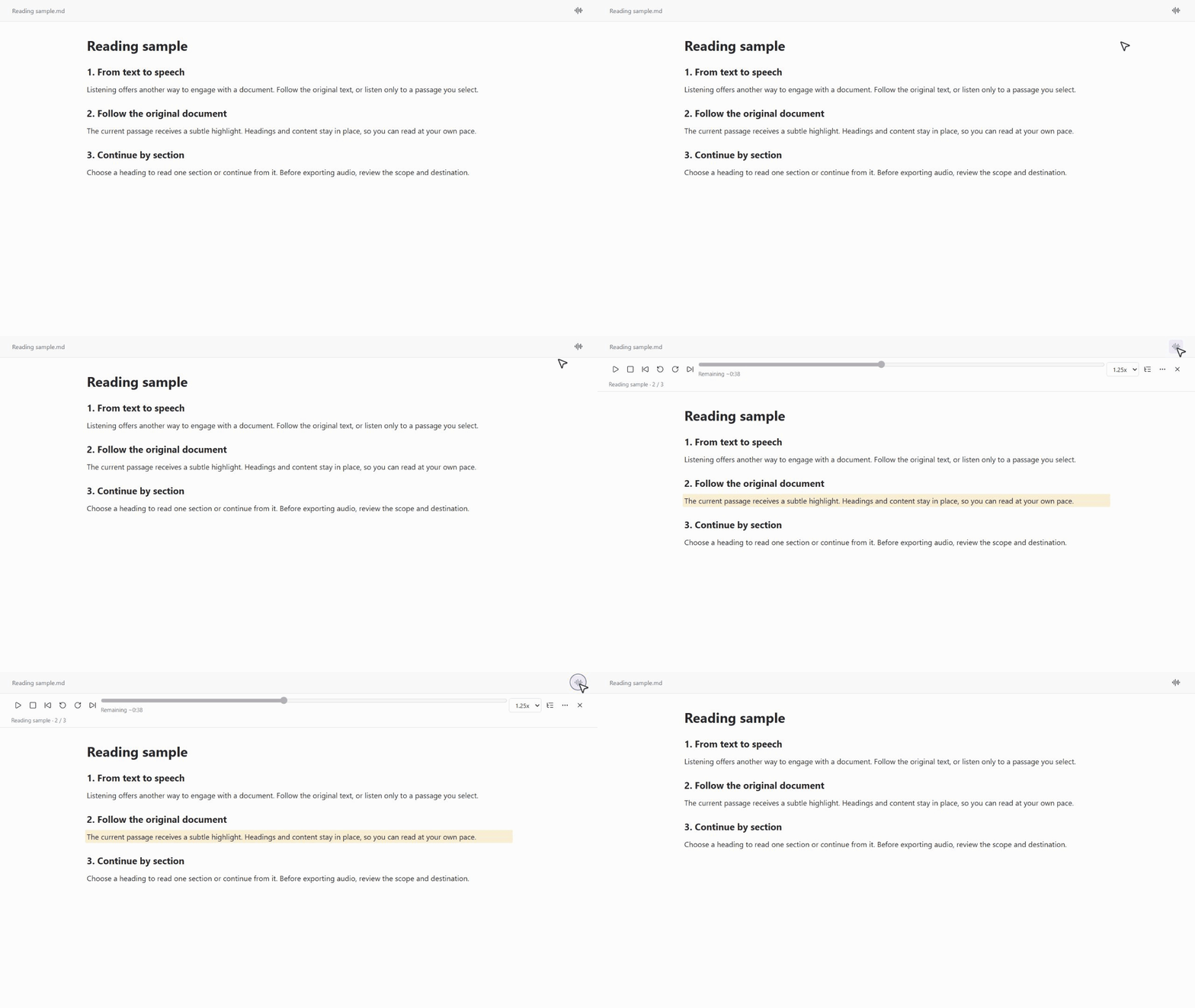
English demo with public sample text, rendered from the plugin's interface code; appearance varies by theme.
Why use it?
- Privacy under your control. Document text is extracted locally. Online speech requires explicit consent; installed offline system voices and local CosyVoice keep synthesis on your device.
- Read from where you are. Read the whole document, only selected text, or continue from a selected position, including in PDFs.
- Follow along without losing the layout. Optional, adjustable highlighting in Markdown/live preview, text PDFs, local HTML and Web viewer. The toolbar stays with the original content.
- Navigate by outline. Use note headings, PDF bookmarks or locally inferred PDF headings, and HTML headings or coherent section numbering. Read one section or continue from it.
- Start listening sooner. Progressive text extraction and short startup audio parts reduce the wait; later PDF pages can be processed while playback begins.
- Avoid unnecessary synthesis. By default, online playback prepares only one upcoming audio part. Choose zero prefetch for on-demand synthesis. Audio export always asks for confirmation.
- Keep an audio copy. Export all, selected or remaining text; insert the result into a Markdown note. If final merging fails, retry with retained audio instead of synthesizing it again.
Text PDFs must contain selectable text; scanned pages need OCR first. Highlighting and inferred outlines depend on source structure and are not guaranteed for every layout. Sentence-level highlighting requires reliable timing; other engines use segment highlighting.
Choose a voice service
For a first try, choose based on what matters most to you, rather than installing every engine.
| Your priority | Start with | What you need | Important trade-off |
|---|---|---|---|
| Try Chinese speech without an initial API charge | Xiaomi MiMo | A regular MiMo API key | Currently temporarily free; online processing, not confirmed ZDR |
| Many online voices without a user API key | Edge TTS | Install the third-party edge-tts helper |
Online, no explicit ZDR guarantee for plugin calls |
| The simplest offline setup | System local speech | A compatible installed Windows/macOS voice | No speech API quota; quality depends on installed voices |
| Compare speech models without a local helper | OpenRouter TTS | API key and usable account credit | Paid, model-dependent voices; enforced ZDR routing |
| Keep text local with a dedicated voice model | Local CosyVoice | Local runtime, model and wrapper | More setup and local computing resources |
| Use an existing Microsoft cloud resource | Azure Speech | Speech resource, region and key | Cloud setup and service quota |
MiMo's official pricing lists mimo-v2.5-tts as temporarily free, checked 2026-10-04. Availability, prices and quotas can change. Voice quality is subjective: test a short, non-sensitive passage before choosing.
Quick start
Install
On Obsidian desktop, install and enable Note and PDF Voice Reader, then open its settings. Manual installation is covered in INSTALL.md.
The initial engine is local CosyVoice, which needs configuration. Choose one of the following engines before your first reading. Online consent applies only to the service you enable.
1. Xiaomi MiMo: a convenient first try for Chinese
- Create a regular API key in the MiMo console, not a Token Plan key.
- Select Xiaomi MiMo TTS and store the key using Obsidian SecretStorage.
- Read the notice and enable Allow MiMo online processing.
- Keep the default Bai Hua / 白桦 (Chinese male) or select another voice, then try a short selection.
MiMo sends text to Xiaomi. Its privacy policy says supplied text is not used for training without prior consent; this is not a zero-retention guarantee.
2. Edge TTS: online voices without an API key
- Install
edge-ttsusingpipx install edge-tts. If Python/pipx is not installed, follow the detailed installation guide. - Select Microsoft Edge online voice, enable Allow Edge online processing, and set Edge TTS executable to
edge-ttsor its full executable path. - Choose a voice and test a short selection.
The helper is third-party software, not bundled with the plugin. Speech is online, even though the helper runs locally. The interface does not explicitly guarantee ZDR for these requests.
3. System speech: no API key, no cloud speech quota
- Select System local speech (Windows/macOS).
- Choose System default or a detected installed voice; use Refresh after installing more voices.
- Preview the voice, then read a selection.
With compatible offline voices, no speech text is sent to a TTS provider. Windows Narrator Natural / Natural HD downloads are not available through this plugin's system synthesis interface. Ordinary installed voices are supported; quality varies. See the voice-download and Narrator notes below.
4. OpenRouter: model choice with enforced ZDR
- Create an OpenRouter API key, set a spending limit, and ensure the account has usable credit.
- Select OpenRouter TTS, store the key in Obsidian SecretStorage, and enable Allow OpenRouter online processing.
- Choose a model and one of its compatible voices. Test a short selection before a long reading or export.
- Keep account-level logging and data sharing disabled for private content.
The plugin always requests ZDR and denies provider data collection; it does not relax these settings if a route is unavailable. Text still passes through OpenRouter and an eligible provider. Voices and prices differ by model.
Start reading
Open a note, text PDF, local HTML file or a loaded Web viewer page. Open the reader sidebar or toolbar, choose whole document, selection, or from selection, then start playback.
For local HTML: first install and enable HTML Reader from Settings -> Community plugins -> Browse, then open a vault-local .html or .htm file in it. HTML Reader is required for HTML selections, reading from a selected position, and the original-page toolbar, highlighting and outline navigation. Whole-file text extraction itself does not depend on that renderer. External web pages use Obsidian's built-in Web viewer, not HTML Reader.
Use pause/resume, playback speed, volume, segment navigation and seeking without starting a new synthesis just to change playback speed. For exports, review the scope, character count and destination before confirming.
Toolbar shortcuts (0.8.1): Space pauses/resumes, and Left/Right Arrow seeks backward/forward five seconds, including across audio parts. In live preview and editing mode, these shortcuts work only while the toolbar or its buttons have focus; click a playback control or the toolbar background to focus it. In Markdown reading mode, they also work in the original reading pane while the toolbar is open. Text fields, sliders, menus and modified key combinations keep their normal keyboard behavior. Hover the pause/resume and seek buttons for shortcut hints.
Interface
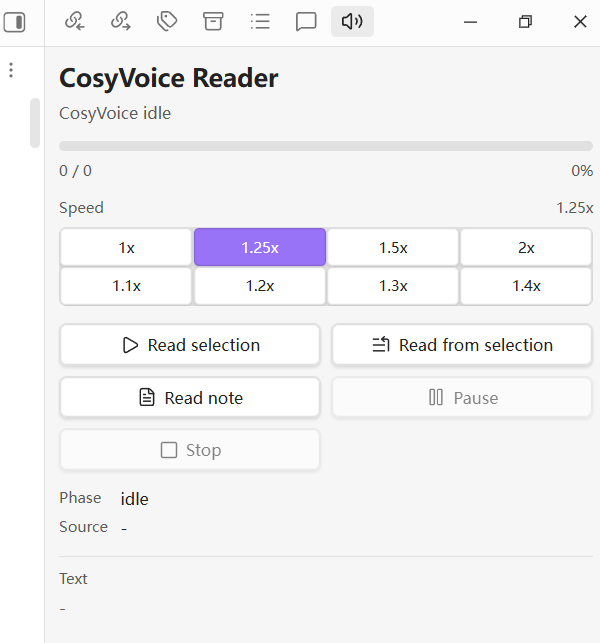
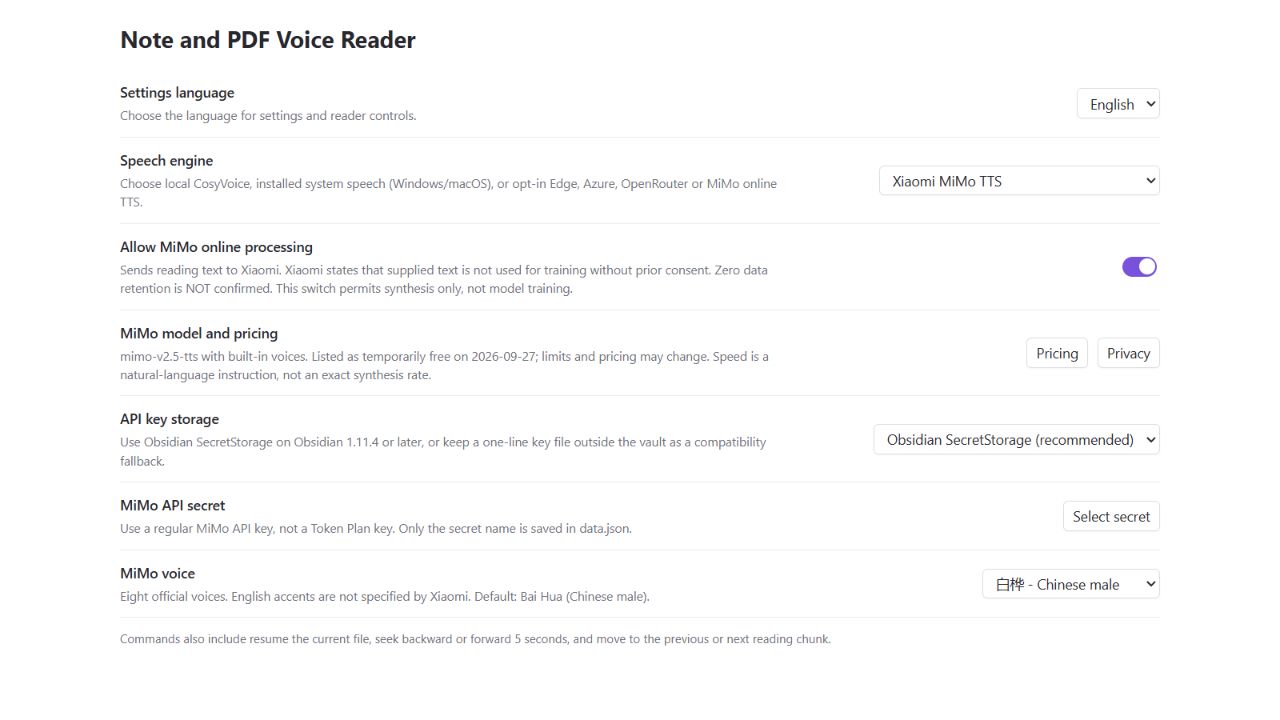
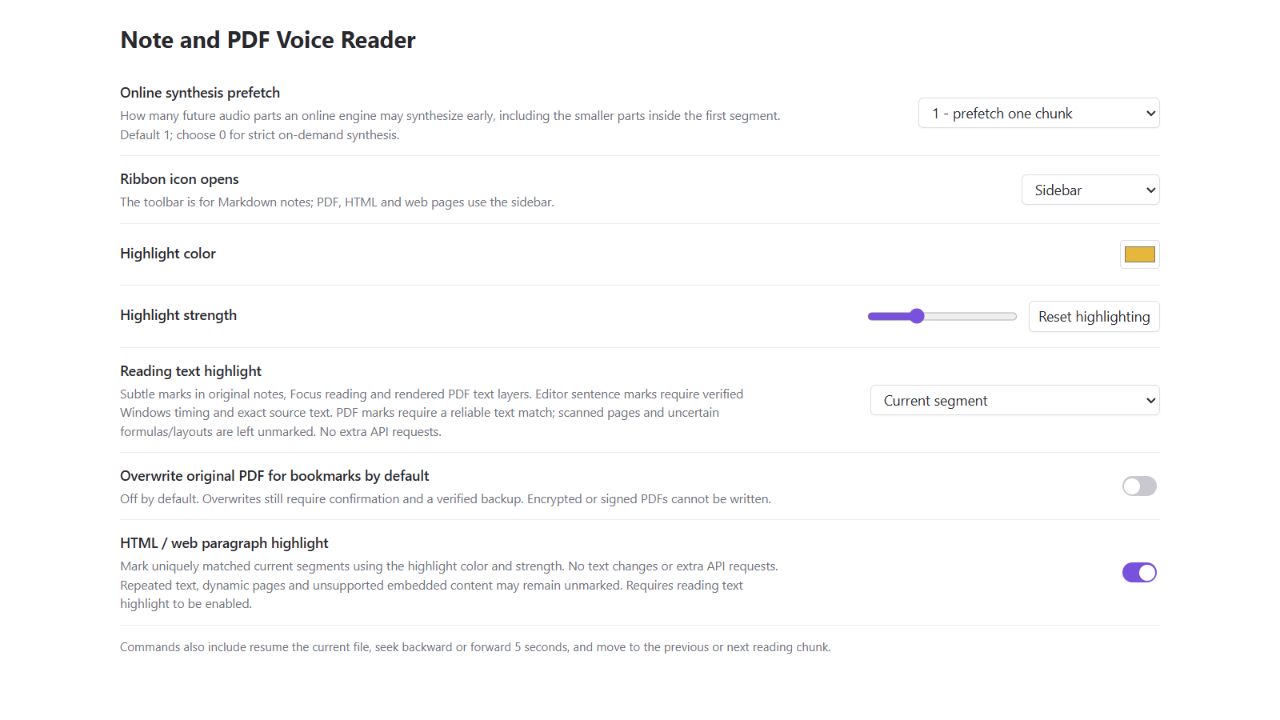
Public demonstration rendered from the current plugin's interface code, with sample text and an empty API-secret selection. Obsidian theme details can vary.
Voice setup: engine selection, online consent and the default MiMo voice.
Reading preferences: highlighting, online prefetch and PDF bookmark saving.
For stricter privacy or advanced setups
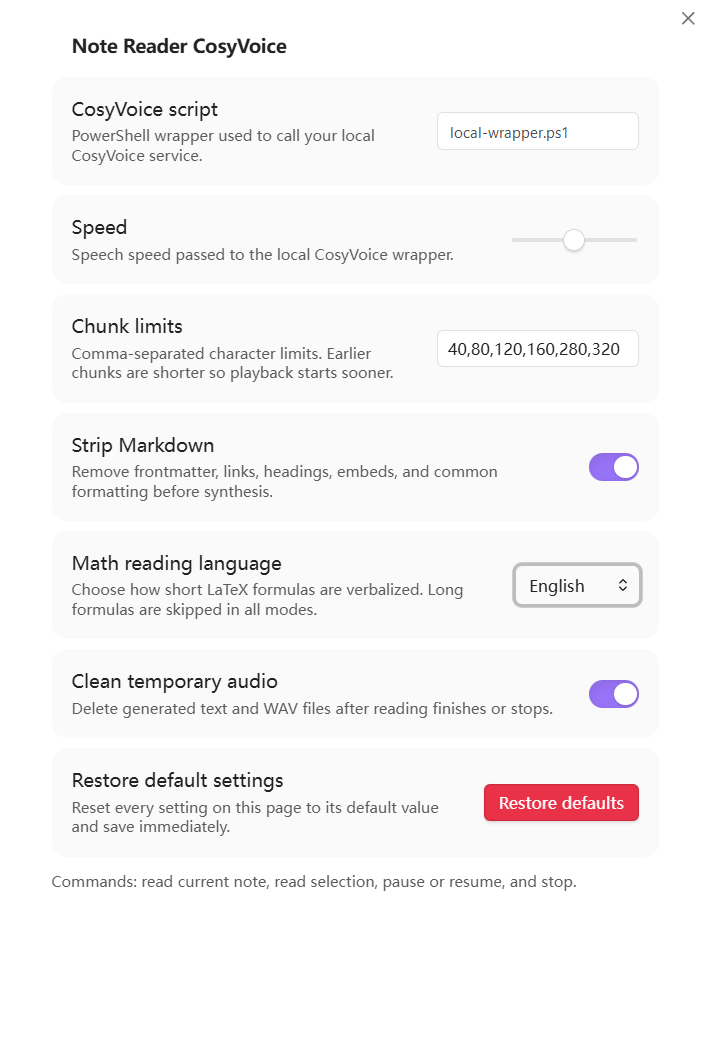
Prefer no cloud text processing? Use installed offline system voices for the easiest setup, or configure local CosyVoice for a dedicated local model. For CosyVoice, install and test the runtime and model, select Local CosyVoice, and set CosyVoice script to your compatible wrapper. Keep online consent switches off. The configured runtime and wrapper remain part of your trust boundary.
Already using Azure? Select Microsoft Azure Speech, configure your Speech resource's cloud and region, save its key in SecretStorage, and enable Azure online processing. See Azure configuration.
Online speech, temporary audio, exported attachments and vault synchronization have different privacy boundaries. No service choice makes every part of the workflow automatically private. The reference below explains these boundaries and advanced controls.
Detailed reference
System voice details
- Select System local speech (Windows/macOS) in plugin settings. No API key, model download or extra TTS package is required when a compatible voice is already installed.
- Choose System default (already installed) or an installed voice from the detected list. Use Refresh after installing voices and Preview to test a voice without sending note text to a provider. Windows and macOS voice preferences are stored separately.
- Read and export using the usual controls. System speech produces normal-pace PCM WAV; the panel adjusts playback speed and volume without resynthesis. Exported WAV remains at normal pace. Pause, segment navigation, progress seeking and confirmed scoped export remain available.
Optional Windows voice downloads: Install ordinary system voices from Settings -> Time & language -> Speech -> Manage voices -> Add voices, then refresh the plugin list. Narrator-only downloads are separate: recent Windows 11 uses Settings -> Accessibility -> Narrator (or Win+Ctrl+N) -> Narrator's voice -> Add voices -> Add; older layouts may show Add natural voices or Add legacy voices. See Microsoft's help. The plugin cannot directly synthesize audio with Narrator Natural / Natural HD voices, even after download. Microsoft does not currently provide a supported public interface for this plugin to use those Narrator voices; Windows system speech uses SAPI, not Narrator. Refreshing or downloading again cannot unlock them. Alternatively, use the independent Reading text view with Windows Narrator, as explained below. Do not modify the registry to force access. This limitation does not apply to macOS voices or Microsoft online speech services.
On macOS, open System Settings -> Accessibility -> Read & Speak (older versions: Spoken Content) and manage/download System voice options; names vary by version. Download a language or offered enhanced voice, then refresh the plugin list. See Apple's official steps. Siri-only voices may not appear in say.
Privacy: With installed offline voices, synthesis is local, similar to local CosyVoice: this mode does not send reading text to a TTS provider, install voice packs, or fall back to a cloud engine. Voice downloads require internet and are an explicit OS action. This is a simpler text-processing boundary than online TTS, not a guarantee about all OS telemetry, third-party installed voice engines, exported audio or vault synchronization. Temporary text/audio still follow the plugin's cleanup policy. No speech API quota is used. Voice quality and language coverage depend on installed voices; do not assume cloud-level neural quality. Windows native synthesis has been tested; macOS command handling has automated tests but still needs validation on a real Mac.
Reading Toolbar and Focus Reading (0.8.0)
Settings let the ribbon icon open the sidebar, toolbar or both in Markdown, PDF, HTML Reader and Web viewer panes. Choose a highlight color and 5–60% strength, or reset highlighting independently. The sidebar includes a collapsible outline; export and diagnostic details are under More actions.
Use Reading toolbar in the control panel, the pane header's audio icon, or Toggle reading toolbar in current note, PDF, HTML or web page. The toolbar stays above the original content, preserving images, embeds and layout. It provides pause/resume, segment navigation, five-second seeking, progress, speed, volume and three reading scopes. Close it without stopping playback. Outline controls are available for Markdown, PDF and local HTML Reader, not external Web viewer pages.
The outline menu uses the note's headings: select a heading to navigate, then explicitly choose to read that section (including nested subsections) or continue to the end. The additional controls support whole-note, selected-text and from-selection reading. Export still requires confirmation. A changed note invalidates cached reading positions rather than starting at an outdated location.
The optional Focus reading view remains useful for extracted text and system Narrator. Its selection commands use the actual selected occurrence, including repeated phrases. Reading from a selected position in a progressively loaded PDF body requires the complete body first.
PDF highlighting: the original PDF pane can mark the currently spoken text with a faint background. It reuses rendered text layers and the existing column-ordering logic, without uploading the PDF or making extra speech requests. Marks require a unique match on the expected page (and the following page for a crossing segment); uncertain layouts, transformed formulas and unavailable text layers receive no guessed marks. Scanned pages require OCR. This is segment-level marking, not word timing, and does not automatically scroll the PDF.
HTML/web highlighting: an independent setting marks uniquely matched current paragraphs in HTML Reader and Web viewer (including Reader mode). It uses temporary text highlights without rewriting the page or replacing selection. Repeated text, changed content, unsupported browser versions and inaccessible frames remain unmarked. Optional following is off by default; when enabled, an off-screen new segment scrolls into view. This adds no speech API requests.
PDF outline and bookmarks: prefer existing bookmarks; otherwise detect numbered headings and typography locally. Review titles, numbering and levels, navigate, read one section or continue from it. The draggable title bar and Center button reposition the dialog; Select all / Deselect all control bookmark inclusion. Reopening an unchanged PDF reuses its outline and edits from a bounded memory-only cache (up to three PDFs, subject to a size cap). Reloading the plugin, clearing temporary data, file changes or cache eviction require reanalysis. No outline text is stored in settings.
HTML outlines: use semantic HTML headings first, with conservative detection of short, standalone consecutive section numbers such as 1, 1.1 and 1.1.1. Inferred entries are labeled; isolated numbers, missing parents, ordinary lists and dates are excluded where detectable. Navigate or explicitly read a section with its subsections, or continue from it. Review inferred headings: numbering alone cannot prove that a paragraph is a heading.
Saving bookmarks requires confirmation. Save a copy by default, or enable overwrite with a verified original backup. Existing bookmarks can be kept, merged or replaced. Encrypted or signed PDFs are refused. This writes PDF bookmarks, not a visible table-of-contents page, and does not change the document layout.
Focus Reading, Highlighting and Windows Narrator
Click Focus reading in the control panel, or run Toggle focus reading / Narrator document. Click again, or use the view's back button, to close it and return to the original attached note without stopping playback. The view loads text locally without TTS requests or API secrets. Markdown uses Obsidian's native renderer and theme fonts, retaining headings, lists, emphasis, formulas and tables, with selectable text. Images and embeds are not automatically loaded; executable code-block processors and raw HTML are disabled in this view. Other formats display extracted text, not their original page layout. Playback reuses the existing queue, including progressively parsed PDF chunks; the view never saves a second document to settings.
- Highlight: off, current segment, or sentence when reliable timestamps exist. Original Markdown editor/live-preview and reading panes also receive temporary source-block marks without changing text or selection. Windows ordinary system voices collect word boundaries during the same synthesis; exact source matches allow sentence marks in the editor. Native Markdown reading mode uses block marking; other engine adapters use segments. Edits or uncertain source mapping disable original-note marks rather than guessing. PDF marks follow the conservative matching rules above. No extra per-sentence API requests are made.
- Follow: off by default. Only scrolls when a new highlight leaves the viewport; manual scrolling suspends following and keyboard focus stays unchanged. Text and selected ranges are not rebuilt on progress updates.
- Narrator: stop plugin playback, then choose the accessibility icon in the reading view and confirm startup. Select a starting paragraph and use Narrator key (
Caps LockorInsert) +R;Ctrlstops speech and Narrator key +Escexits. Windows Narrator uses the voice selected in its own settings, including installed natural voices. This is an accessibility route, not direct synthesis through the plugin: the plugin's pause, seek, audio export and sentence timeline do not control Narrator. The plugin does not change the registry, install voice packs or terminate an already-running Narrator.
Windows WAV uses 16 kHz mono 16-bit PCM to avoid the observed boundary-time mismatch caused by resampling ordinary SAPI voices; macOS remains at 24 kHz. Invalid or incomplete boundary metadata falls back to segment highlighting. Windows English and Chinese public-text samples passed live boundary checks; macOS sentence synchronization is not implemented.
Xiaomi MiMo TTS Quickstart
MiMo defaults to a configurable 200-character chunk cap (a conservative client setting, not an official API limit). Shorter configured limits are preserved. This can increase request count. Non-normal completion reasons and malformed/truncated WAV files stop reading without advancing or automatically resynthesizing. A normal completion signal is not proof of word-for-word fidelity; MiMo currently returns no audio transcript for verification.
- Create a regular API key in the MiMo console, not a Token Plan key.
- Select Xiaomi MiMo TTS in the plugin settings. Store the key with Obsidian SecretStorage, or use a one-line key file outside the vault on older Obsidian versions.
- Read the privacy notice and enable Allow MiMo online processing. Select one of eight official voices; the default is Bai Hua / 白桦 (Chinese male). Xiaomi does not specify US/UK accents for these presets.
- Read or export a note/PDF using the existing controls. The model is
mimo-v2.5-tts, producing WAV audio. Online chunking and the one-upcoming-chunk prefetch limit also apply. Synthesis speed is requested through a natural-language instruction, not a guaranteed numerical rate.
Pricing lists this model as temporarily free as of 2026-10-04; pricing and quotas may change. The MiMo privacy policy states that supplied text is not used for training without prior consent, but zero data retention is not confirmed. Plugin consent only permits synthesis, not training. MiMo is a separate direct API engine, not an OpenRouter ZDR route. Voice cloning and voice design are not included.
Features
- Reads the current Markdown note, text-based PDF or local HTML file, selected text in the corresponding view, or from the selection to the end of the active file. HTML selections integrate with HTML Reader.
- Extracts PDF text locally with Obsidian's built-in PDF.js, uses coordinates to improve common two-column reading order, and progressively feeds speech chunks while later pages continue parsing.
- Uses paragraph-, line-, sentence-, and clause-aware chunk boundaries while keeping configured character limits as hard upper bounds.
- Can optionally remember and resume the current Markdown, PDF or HTML position. The setting is disabled by default and includes a separate clear-history control.
- Exports all, selected, or remaining content from Markdown notes, text-based PDFs and local HTML files as one audio file: WAV for local CosyVoice and MiMo, MP3 for Edge, Azure and OpenRouter. Save it in Obsidian's attachment folder, beside the source file, or in a custom vault folder; Markdown notes also support exporting and inserting the completed attachment.
- Opens a right-side
Voice Readercontrol panel. - Shows synthesis/playback phase, whole-reading progress, percentage, and text preview.
- Supports pause, resume, stop, Space to pause or resume in the control panel, repeated Left/Right Arrow 5-second seeking, previous/next chunk buttons, and progress dragging while the current audio chunk is playing.
- Provides right-panel speed presets:
1x,1.25x,1.5x,2x,1.1x,1.2x,1.3x, and1.4x. - Lets you choose
Local CosyVoice,Microsoft Edge online voice,Microsoft Azure Speech, orOpenRouter TTSin settings. Local CosyVoice is the default. - Lets you switch the complete plugin settings page between English and Chinese.
- Requires a separate opt-in before each online engine can receive text.
- Uses separate local and online chunk limits. Online notes, PDFs and HTML default to
200,400,800, with at most one future audio part synthesized early by default. MiMo's additional chunk cap still applies. - For quicker startup, the first logical segment is synthesized in up to three audio parts: complete sentences reaching 20 non-whitespace characters, then 40 more, then the remaining text. All parts share one segment number and progress timeline. The default prefetch prepares only the next audio part. This can add up to two requests; actual latency depends on the provider. Audio export uses normal chunking.
- Uses Obsidian SecretStorage for Azure and OpenRouter API keys by default on Obsidian 1.11.4 or later, with an external key-file compatibility option.
- Provides common Chinese and English voice presets, model-specific OpenRouter voice menus, and custom voice ID fields.
- Cleans Markdown before synthesis and converts Markdown tables into speech-friendly column and row descriptions while skipping empty cells.
- Reads numeric citations such as
[28],[28, 29], and[28-30]as spoken references while preserving unit labels such as[s]and[%]. - Provides a settings-page
Restore defaultsbutton for resetting all plugin settings. - Provides a settings-page link to GitHub Issues for feedback and bug reports.
- Handles common LaTeX before synthesis with a configurable
Math reading languagesetting:- Skips formulas longer than 12 non-space characters.
Englishis the default for public releases, for example$a_b$->a subscript b.Chinesekeeps Chinese math words, for example$a_b$->a 下标 b.- Converts short absolute-value notation such as
$|Y_{k,h}|$into spoken words instead of sending raw vertical bars. Skip mathskips short formulas as well as long formulas.- Leaves common Greek commands as English names, such as
\alpha->alpha,\beta->beta, and\pi->pi. - Reads common non-Greek symbols such as
\leq,\times, and_. - Unwraps style commands such as
\textbf{...},\mathbf{...}, and\boldsymbol{...}. - Reads short
\frac{a}{b}asa over bin English mode ora 分之 bin Chinese mode.
Privacy
By default, the plugin uses local TTS. In Local CosyVoice mode, the plugin itself does not send note or extracted PDF text to Microsoft, OpenAI, or another remote TTS service. The configured wrapper remains part of your trust boundary and may make its own network requests.
PDF extraction uses Obsidian's bundled PDF.js and Vault.readBinary; the PDF file itself is not uploaded by this feature. To support PDF selection commands, the plugin temporarily keeps the selection's page number, relative in-page coordinates, and up to 2,000 characters of locator text in memory only; none of this selection locator is saved to settings or diagnostic logs. When an online speech engine is selected and its consent is enabled, extracted PDF text chunks are transmitted under the same rules as note text. Scanned or image-only PDFs need OCR before the plugin can read them.
HTML body extraction uses a bundled inert HTML parser. It decodes entities and removes scripts, styles, embedded frames, forms, navigation, footers, and explicitly hidden elements, without executing HTML or fetching resources. HTML Reader controls how the page itself is displayed; its own security settings and resource loading are separate from this reader's extraction. Selected HTML text, the extracted body, and range offsets are held transiently in memory and are not written to settings or diagnostic logs. Online engines receive readable text in the chosen scope only after consent; the HTML source file and resource URLs are not uploaded by this feature. Optional resume history can save a short HTML text anchor under the same 180-character limit as notes.
Remember reading position is off by default. If you enable it, data.json stores the file path, file timestamp, PDF page or speech-chunk index, update time, and a normalized text anchor capped at 180 characters. It does not store the complete note or PDF body. Use Clear saved reading positions to remove all saved anchors; disabling the setting stops future use and updates but does not silently delete existing history.
Edge, Azure, and OpenRouter are opt-in online modes. Edge passes each chunk to the configured edge-tts executable. Azure sends each chunk by HTTPS to the selected Azure Speech cloud and region. OpenRouter sends each chunk to OpenRouter and an eligible upstream TTS provider. The plugin will not start an online mode until its separate online-processing consent setting is enabled. OpenRouter consent permits that transmission only; it does not permit non-ZDR routing. By default, the plugin may synthesize the next chunk while the current chunk is playing, but it never prefetches more than one future chunk. Stopping early can therefore leave at most one prefetched chunk unused. Set prefetch to 0 for strict on-demand synthesis. Provider billing units vary, so this bounds avoidable work rather than guaranteeing a fixed cost reduction.
Audio export always requires a separate per-export acknowledgement before synthesis starts. For an entire PDF or a PDF export from selection, local extraction and selection matching finish before the confirmation appears. The dialog then shows the selected scope, cleaned readable character count, exact number of planned synthesis segments, and planned vault-relative save path. For an online engine, only readable text in that scope is sent through those sequential segments and may consume provider quota or incur charges. Temporary failures can trigger bounded retries, so the number of network attempts can exceed the planned segment count. Export does not prefetch playback-continuity chunks, creates no vault attachment until every segment and finalization succeed, and can be cancelled with Stop.
Temporary text and audio are stored in a vault-specific folder under the operating system temporary directory, not inside the Obsidian vault. With Clean temporary audio enabled, plaintext chunk files are removed immediately after synthesis, remaining session files are removed when reading ends or stops, and stale plugin-owned files plus the legacy in-vault cache are cleaned at startup. The deliberate exception is a post-synthesis export failure: completed audio segments are kept locally for the current plugin session so Retry merge only can reuse them without another TTS request. A successful retry, Clear temporary data, or unloading the plugin while cleanup is enabled removes them. Diagnostic logging is off by default; when enabled, it records only bounded failure metadata without note names, note text, or child-process output.
Azure and OpenRouter keys use Obsidian SecretStorage by default on Obsidian 1.11.4 or later. The plugin's data.json contains only the selected secret identifier, not the secret value. Obsidian documents SecretStorage as vault-specific local secret storage; it should not be described as a guaranteed operating-system credential manager or macOS Keychain integration. A one-line key file outside every vault remains available as a compatibility fallback, and existing key-file configurations retain that mode when upgraded. See the official Obsidian SecretStorage guide.
Microsoft states that its real-time text-to-speech API does not retain the submitted text or generated audio; the text is still transmitted to and processed by the selected Azure Speech service. Confirm the terms applicable to your cloud and subscription. See Azure Speech text-to-speech data privacy and security.
Every OpenRouter request forces provider.zdr: true and provider.data_collection: "deny"; when no endpoint satisfies those restrictions, synthesis fails rather than weakening the policy. OpenRouter states that prompt storage is opt-in by default, but account-level input/output logging or data-sharing settings can still change that behavior, and request metadata is retained. Keep those account settings disabled for private content. See OpenRouter data collection and Zero Data Retention.
Disclosures
- Network use: local mode launches your wrapper; Edge mode uses
edge-tts; Azure uses an official regional endpoint derived from the selected cloud and validated region; OpenRouter uses the fixedhttps://openrouter.ai/api/v1/audio/speechendpoint. - Shell execution: the plugin launches the configured PowerShell wrapper in local mode or the configured
edge-ttsexecutable in Edge mode. Azure and OpenRouter modes do not launch shell commands. - Direct storage access: temporary files are written under the operating system temporary directory. The plugin checks the local wrapper path and reads Azure/OpenRouter credentials from Obsidian SecretStorage or a configured key file outside the vault.
- Telemetry: the plugin does not include client-side or server-side telemetry.
- Updates: the plugin does not include a self-update mechanism.
Requirements
- Obsidian desktop.
Shared architecture
Platform-neutral text cleanup, semantic chunking, PDF coordinate ordering, reading-position anchors, and playback state live in note-reader-core. This desktop repository retains filesystem access, child processes, local CosyVoice, edge-tts, audio merging, and export handling. The separate note-reader-mobile plugin uses the same core without bundling desktop-only APIs or local executable calls.
- For
Local CosyVoice: a working local CosyVoice setup and a PowerShell wrapper compatible with:
cosyvoice-wrapper.ps1 -InputPath <txt> -OutputPath <wav> -Speed <speed>
A recommended script path is:
%LOCALAPPDATA%\note-reader-cosyvoice\cosyvoice-wrapper.ps1
For local CosyVoice installation, hardware guidance, OS-specific notes, and wrapper examples, see Local CosyVoice setup.
For Microsoft Edge online voice: install the edge-tts CLI and either make the command available on PATH or enter its absolute executable path in Edge TTS executable. The plugin calls it with --file, --write-media, --voice, and --rate.
Install And Configure Microsoft Edge Online Voice
edge-tts is a third-party Python package published on PyPI that calls Microsoft Edge's online text-to-speech service. It is not bundled with this plugin and is not a local voice model.
Recommended command-line-only install:
pipx install edge-tts
If pipx is not installed yet:
py -m pip install --user pipx
py -m pipx ensurepath
Then open a new PowerShell window and run pipx install edge-tts.
Alternative install if you manage Python packages directly:
py -m pip install --user edge-tts
After installation, open a new PowerShell window and verify that the command is available:
edge-tts --help
To list available voices:
edge-tts --list-voices
Then open Settings -> Note and PDF Voice Reader:
- Set
Speech enginetoMicrosoft Edge online voice. - Enable
Allow Edge online processing. - Set
Edge TTS executableto eitheredge-ttsor an absolute path to the executable. - Choose a common voice preset or enter a custom voice ID.
- Adjust
Speedif needed. The plugin converts this to theedge-tts --rateoption.
Common presets include zh-CN-XiaoxiaoNeural, zh-CN-YunxiNeural, zh-CN-YunyangNeural, en-US-JennyNeural, en-US-GuyNeural, and en-GB-SoniaNeural. Use edge-tts --list-voices for the complete list supported by your installed version.
If Obsidian cannot find edge-tts, use the absolute executable path in the plugin settings and fully restart Obsidian. Do not rely on an unrelated application's private virtual environment unless you intentionally trust and maintain that installation.
Privacy note: Edge mode sends each text chunk to Microsoft Edge TTS. Microsoft's Edge Read aloud privacy documentation says text and generated audio used for online conversion are deleted immediately after conversion, but the third-party edge-tts calling interface used by this plugin does not expose an explicit ZDR guarantee for plugin requests. Treat it as online processing without a guaranteed ZDR control, and keep Speech engine set to Local CosyVoice for private or sensitive notes. See User data and privacy in Microsoft Edge.
Store Azure and OpenRouter API keys
On Obsidian 1.11.4 or later, the recommended and default API key storage choice is Obsidian SecretStorage. Use the secret control on the plugin settings page to create or select a secret containing the raw API key. Only that secret's identifier is saved in this plugin's data.json; the key value remains in Obsidian's vault-specific local secret store.
For an older Obsidian release or an existing file-based setup, select External one-line key file. Create a plain-text file outside every Obsidian vault, put the key on its only non-empty line, and do not sync, commit, or share the file. An existing configuration with a key-file path is migrated to this compatibility mode automatically.
Configure Microsoft Azure Speech
Azure mode uses the official real-time Speech REST endpoint and supports Azure public cloud and Azure China operated by 21Vianet. Create a Speech resource in the intended cloud, then note its region and one subscription key. The required HTTPS request, SSML body, authentication header, and audio output header follow Microsoft's text-to-speech REST API reference.
If you select the external key-file fallback, a suitable path is:
%LOCALAPPDATA%\note-reader-cosyvoice\azure-speech-key.txt
Then open Settings -> Note and PDF Voice Reader:
- Set
Speech enginetoMicrosoft Azure Speech. - Enable
Allow Azure online processing. - Select
Azure public cloudorAzure China operated by 21Vianet. - Enter the resource region, such as
eastasia,southeastasia,chinaeast2, orchinanorth3. - Choose
Obsidian SecretStorageand create/select the Azure key secret, or choose the external file option and enter its absolute path. - Choose a common voice preset or enter a custom Azure voice ID.
Presets include Mandarin Chinese zh-CN-XiaoxiaoNeural, zh-CN-XiaoyiNeural, zh-CN-YunxiNeural, and zh-CN-YunyangNeural; Cantonese and Taiwanese Mandarin; common US English en-US-JennyNeural, en-US-GuyNeural, and en-US-AriaNeural; and common UK English en-GB-SoniaNeural and en-GB-RyanNeural. The default Edge and Azure voice is the UK male voice en-GB-RyanNeural, selected for restrained long-form and academic reading.
The plugin derives the HTTPS host from the validated region and selected cloud; it does not accept a free-form Azure endpoint. Azure China endpoint differences are documented in Azure Speech sovereign clouds. Check the current Azure Speech language and voice list if a voice is unavailable in your region.
Configure OpenRouter TTS
OpenRouter exposes an OpenAI-compatible TTS endpoint that accepts text and returns raw MP3 or PCM audio. This plugin always requests MP3 and validates the HTTP status and Content-Type before saving it. See the official OpenRouter TTS documentation.
The plugin retries temporary 408, 425, 429, 500, 502, 503, and 504 responses and transient network failures up to three total attempts with short bounded delays. It does not retry credential, model, voice, privacy-policy, malformed-request, or unexpected-content errors. A final HTTP 502 therefore indicates that OpenRouter or its upstream provider remained unavailable after the limited retries, rather than normally indicating an unsupported text character.
Create a dedicated API key in OpenRouter API Keys. Use a low spending limit and an expiration date where appropriate. If you select the external key-file fallback, a suitable path is:
%LOCALAPPDATA%\note-reader-cosyvoice\openrouter-api-key.txt
Then open Settings -> Note and PDF Voice Reader:
- Set
Speech enginetoOpenRouter TTS. - Enable
Allow OpenRouter online processing. - Choose
Obsidian SecretStorageand create/select the OpenRouter key secret, or choose the external file option and enter its absolute path. - Choose a built-in ZDR-compatible model and one of its voices, or enter custom IDs.
- Keep OpenRouter account-level input/output logging and input/output data sharing disabled.
The overall default is fish-audio/s2.1-pro with a measured UK English male voice, selected for long-form and academic reading. Fish has six curated voice presets covering Mandarin Chinese, US English, and UK English, with one male and one female option for each. When a different built-in model is selected, the plugin chooses a publisher-identified English male voice where available: MAI-Voice-2.1 Flash uses UK English male Harry, older MAI models use US English male Ethan, while Gemini uses the informative Charon because Google does not publish fixed gender or US/UK accent labels for its voices. Voice IDs are model-specific and are not interchangeable.
-
microsoft/mai-voice-2.1-flash: defaults to UK English maleen-GB-Harry:MAI-Voice-2.1-Flash. Ten curated OpenRouter-listed voices cover Mandarin Chinese, UK English and US English, with male and female choices. OpenRouter lists 97 voices across 23 languages at$15/M characters; this model appeared in its speech + ZDR directory on 2026-10-02. See the model page. -
microsoft/mai-voice-2-flash: defaults to Microsoft-published US English maleen-US-Ethan:MAI-Voice-2-Flashand adds Microsoft-published US English and Mandarin voices as compatibility presets alongside the four IDs exposed by OpenRouter. -
microsoft/mai-voice-2: defaults to Microsoft-published US English maleen-US-Ethan:MAI-Voice-2; additional US English male and Mandarin ShortNames are compatibility presets because OpenRouter may accept them even when itssupported_voicesmetadata omits them. -
google/gemini-3.1-flash-tts-preview: defaults to informativeCharonand offers 12 curated presets from the 30 voices exposed by OpenRouter. Google describes these multilingual voices by delivery style rather than fixed gender or US/UK accent, so the plugin does not label any Gemini preset as a confirmed male or accent-specific voice. -
fish-audio/s2.1-pro: six public Fish Audio voice-reference presets: Mandarin Chinese female and male, US English female and male, and UK English female and male. The default is the measured UK English male voice. -
hexgrad/kokoro-82m: low-cost alternative with 12 presets covering Mandarin Chinese, US English, and UK English, with male and female options for each group. Its default is the UK English malebm_george.
Fish voice presets use 32-character public Fish Audio reference IDs; Kokoro keeps its own short voice IDs. OpenRouter's model metadata does not enumerate Fish presets, so the plugin offers curated IDs from Fish Audio's public voice library; if an upstream endpoint rejects a preset, the custom voice field remains available for another verified ID. Fish Audio voices may have separate usage rights; check the voice page before using one beyond personal reading.
OpenRouter currently lists Fish S2.1 Pro at $15/M UTF-8 bytes, compared with $15/M characters for MAI-Voice-2 Flash and $22/M characters for MAI-Voice-2. English ASCII text is roughly one byte per character, so Fish is near MAI Flash for English; Chinese Han characters commonly use three UTF-8 bytes, making an all-Chinese million-character estimate roughly $45. Kokoro is the low-cost choice: OpenRouter currently shows provider-dependent rates starting around $0.62/M characters (another listed provider is $4/M characters). The route actually selected under the plugin's ZDR restriction may have a different rate; actual prices depend on the serving endpoint and can change. See the Fish S2.1 Pro, Kokoro 82M, MAI-Voice-2 Flash, and MAI-Voice-2 pages for current rates.
The settings page shows model characteristics and only the presets for the selected model. Model, voice, and ZDR endpoint availability can change. Fish and Kokoro appeared in OpenRouter's speech + ZDR model-filter check on 2026-09-23; this means each had at least one advertised ZDR endpoint at that time, not that every provider endpoint has the same retention policy or that availability is permanent. OpenRouter defines zdr=true as returning models with ZDR endpoints, and the plugin also enforces this restriction on every synthesis request. See the live speech + ZDR model API and OpenRouter's API documentation. Fish presets link to public entries in the Fish Audio voice library, and Microsoft's MAI voice catalog supplies official MAI ShortNames. Gemini voice names follow Google's TTS voice list. Custom model IDs remain available, but a model with no eligible ZDR endpoint returns an error because the plugin never relaxes its privacy routing rules.
Settings include Find a custom voice ID with model-page and voice-catalog links appropriate to the selected model. Select Custom voice, then paste a supported ID into OpenRouter TTS voice. For MAI, include the complete model suffix (for example en-GB-Harry:MAI-Voice-2.1-Flash); for Fish, use a public voice-reference ID. A provider's full catalog may include voices not accepted by the corresponding OpenRouter endpoint.
Model Storage, Other TTS Engines, And Chunk Limits
This plugin does not download models. Plan storage for the local TTS runtime before installing a voice model:
- Current CosyVoice model repositories are often several GB each. As of 2026-06, public Hugging Face examples range from about
2.5 GBfor a 300M model to about9 GBfor a 0.5B CosyVoice3 model. - Reserve more than the raw model size. A practical starting point is
10-20 GBfor one model and30 GB+if you keep multiple models, source checkouts, Conda environments, and caches. - Put model files and caches on a local SSD when possible. Avoid syncing model folders through cloud-drive clients.
The configured script can call another local TTS engine instead of CosyVoice if it follows the same wrapper contract: read UTF-8 text from -InputPath, write a valid WAV file to -OutputPath, accept -Speed, and exit non-zero with a clear error on failure. Check the other model's license, language coverage, audio format, speed controls, startup latency, and whether it sends text outside your machine or trusted local network.
The Edge, Azure, and OpenRouter online modes are separate from the local wrapper contract. They write temporary MP3 files and use their corresponding voice setting. OpenRouter may ignore Speed for models whose provider does not support that parameter.
Use Local chunk limits to balance local startup latency and synthesis stability:
- CPU-only or low-end GPU: start with
30,60,90,120,160,200. - Mid-range GPU: use the default
40,80,120,160,280,320. - Faster GPU or low-latency local service: try
80,140,220,320,480,640. - If synthesis times out, fails, or the first audio takes too long, lower the numbers. If speech sounds too fragmented and your model is stable, raise them gradually.
Online chunk limits applies to both notes and PDFs in Edge, Azure, and OpenRouter modes. Its default is 200,400,800, which uses a shorter first request and longer later requests to balance startup time, continuity, and request count.
Online synthesis prefetch defaults to 1: while the current chunk is playing, the plugin may prepare the next chunk to improve continuity. It never prepares more than one future chunk, so stopping early can leave at most one prefetched request unused. Set it to 0 when avoiding every unused future request matters more than the pause between chunks.
Commands
Open voice reader controlsRead current note, PDF or HTML aloudExport audio from current note, PDF or HTMLExport audio from the current note and insert itRetry pending audio export merge onlyResume reading current note, PDF or HTMLRead current PDF aloudRead current PDF from selection aloudRead selection aloudRead from selection aloudPause or resume voice readingSeek backward 5 secondsSeek forward 5 secondsMove to previous reading chunkMove to next reading chunkStop voice reading
Audio Export
Open a Markdown note, text-based PDF or local HTML file and choose Export audio. A scope picker offers Entire document, Selected text only, and From selection to end; the latter two require a usable text selection. Local text extraction and position matching run before confirmation. The subsequent confirmation reports the exact readable character count, selected engine, synthesis segment count, scope, and planned save path, and its checkbox must be selected before synthesis starts. HTML and PDF exports save an attachment; inserting the result directly is available for Markdown notes only.
Local mode combines PCM WAV segments into one WAV file. Edge, Azure, and OpenRouter combine validated MP3 frames into one MP3 file. Audio export save location can use Obsidian's attachment folder (the default), the source file's folder, or a custom vault folder. Entire, selected, and remaining exports use filenames such as Note name - narration.mp3, Note name - selection narration.mp3, and Note name - continued narration.mp3, with a numeric suffix when needed. For Markdown, Export & insert audio embeds the result at the current cursor or appends it to the original note. PDF export saves an audio attachment only because a PDF cannot be edited to insert an Obsidian embed.
Export processes exactly the displayed chunks in sequence and does not perform playback prefetch. If synthesis fails or the task is stopped, no partial attachment is added. If every segment has already been synthesized but merging or attachment finalization fails, the control panel exposes Retry merge only; it reuses the kept local segments and makes no TTS API request. Starting another export is blocked until that retry succeeds or Clear temporary data discards the kept segments.
Keyboard And Progress Seeking
When the Voice Reader control panel is focused, Space pauses or resumes reading, and Left Arrow or Right Arrow seek backward or forward in 5-second steps while audio is available.
The triangle buttons beside the progress bar jump to the previous text chunk or the next text chunk. Already synthesized chunks are reused when possible; otherwise the target chunk is synthesized before playback.
The overall progress bar navigates between reading segments. The separate current-segment slider seeks within the current segment's available audio. A target that is not yet synthesized may require a wait. Playback speed controls adjust audio playback without resynthesis.
PDF Reading
Open a PDF stored in the vault, then click Read file in the control panel or run a PDF-capable command. Text extraction happens locally page by page. Once enough text for the first configured chunk is available, synthesis and playback can begin while later pages continue parsing. The Stop button cancels parsing, playback, and outstanding synthesis requests.
To start at a specific position, select text in the PDF text layer and click Read from selection, or run Read current PDF from selection aloud. The plugin starts extraction on that page and combines the selection's relative page coordinates with text matching, so repeated wording in an abstract and a later column can be distinguished. Read selection reads only the selected PDF text. If coordinates are unavailable, text matching remains as a compatibility fallback; if neither locator can be matched, the plugin displays a notice and starts at the beginning of the selected page.
The PDF must contain selectable embedded text. Password-protected, damaged, scanned, or image-only files cannot be extracted; run OCR or unlock the file first. Version 0.4.0 and later use text coordinates to recognize common two-column pages and read each vertical band left column before right column, while treating full-width headings as boundaries. Unusual layouts, rotated text, sidebars, and complex tables can still require a manual selection start or a better-tagged source PDF.
If Remember reading position is enabled, use Resume file in the control panel or Resume reading current note, PDF or HTML in the command palette. PDF resume starts on the saved page and locates the short anchor again; Markdown resume locates the same normalized anchor and falls back to the nearest saved chunk if the note changed.
PDF Outline And Bookmarks
PDF panes also offer a toggleable reading toolbar from the pane's Reading toolbar action or the toolbar command. It follows the ribbon's sidebar/toolbar/both preference and provides playback, segment/5-second seeking, progress, speed, volume, selection scopes and the PDF outline dialog. Bookmark titles missing a section number recover it from a unique matching heading in the PDF; unverified numbers are not invented.
Open a PDF, expand Read by outline in the reader sidebar, and choose PDF outline and bookmarks (also available as a command). Existing PDF bookmarks take priority. Without them, headings are inferred locally from numbering and typography; review automatic results before use. You can edit titles/levels, exclude entries, jump to a section, read only that section, or continue from it. Analysis does not call a speech API.
Saving requires confirmation. Choose keep, merge, or replace for existing bookmarks. The default saves a .bookmarks.pdf copy beside the original. Overwrite original PDF for bookmarks by default is an optional setting, also adjustable per save. Overwriting first creates and verifies a .before-bookmarks.pdf backup; existing files get a numbered suffix. Concurrent source changes abort saving. Encrypted, restricted, or signed PDFs are rejected. Automatic headings and bookmark-derived reading boundaries can be imperfect; scans need OCR. Review the saved copy before adopting it, especially with third-party annotations.
HTML Reading
- Install HTML Reader: Settings -> Community plugins -> Browse -> search "HTML Reader" -> Install -> Enable, then open a vault-local
.htmlor.htmfile in it. See HTML Reader's installation guide. This is the supported local HTML view for selections, from-selection reading, toolbar, highlighting and outline navigation; other HTML-viewing plugins are not guaranteed compatible. Whole-file text extraction reads the local file directly. - Choose
Read fileto read the extracted body,Read selectionto read only highlighted text, orRead from selectionto continue from its start to the end. Selection offsets come from the rendered document, so repeated phrases are not located by a first-match text search. The HTML Reader frame must be accessible; an unavailable selection produces a notice instead of reading a different document. - Playback speed, volume, seeking, first-segment startup parts, and bounded prefetch use the existing controls.
Export audiosupports the same three scopes and mandatory confirmation. No extra converter or executable is needed.
HTML markup is always parsed, independent of Strip Markdown; decoded literal comparison signs are preserved. Extraction preserves headings, paragraphs, lists and table-cell text, but does not attempt CSS visual-order reconstruction. This path covers static local HTML, not MHT/MHTML archives, nested frames, scanned/image-only pages, or content that requires scripts to generate it. Web viewer support uses the separate path below. Do not enable scripts or weaken HTML Reader's security settings for this feature. Whole-file extraction is limited to 50 MiB of source and five million readable characters. HTML resume uses a short text anchor; if the anchor disappears after editing, reading restarts from the beginning with a notice.
Web page reading (0.5.0)
- Enable Obsidian's desktop core Web viewer and open an HTTP/HTTPS article in it. Chrome/Edge tabs outside Obsidian are not supported.
- Use
Read filefor the loaded article,Read selectionfor highlighted text, orRead from selectionto continue from the exact DOM selection. Obsidian's Reader view is also supported. For a cluttered page, switch to Reader view before reading. Export audiooffers entire article, selected text, and from-selection scopes. Review the character count, planned requests and vault save path before confirming. Web audio is an attachment;Export & insert audioremains Markdown-only. A web page has no note folder, so the same-folder setting uses the vault root.
Whole-page extraction uses bundled Mozilla Readability on an inert copy of the loaded visible content, falling back to visible body text when no article is found. Selection offsets use original DOM nodes rather than matching repeated phrases. From-selection reads the remaining readable DOM flow, which may include visible non-article material; Reader view is preferable for complex pages. Scripts, frames, navigation, forms, editable fields and hidden content are excluded from text extraction. The extractor does not request additional pages/resources, read cookies or browser storage, or expose API keys to the page. Normal website browsing still makes network requests and may run the website's scripts; this is not offline browsing or a guarantee that visible page content contains no sensitive information.
Extraction runs only after a reading/export action, not in the background. Online TTS still requires the selected engine's existing explicit consent and sends the extracted text to that service; OpenRouter still enforces ZDR routing. Web URLs, text and resume positions are not saved in reading history. Temporary speech text/audio use the existing cleanup policy; confirmed exports are saved to the chosen vault location. Closing, navigating or reloading a page invalidates its pending selection/export context. A page is bounded to five million readable characters and 200,000 visited nodes; extraction errors stop rather than silently reading a different note. Unloaded/infinite-scroll content, nested frames, shadow DOM, canvas/image-only text and CSS visual reordering are not covered. This desktop adapter uses Web viewer internals verified with Obsidian 1.13.7, not a stable public Web viewer plugin API; older apps keep local reading but may not have the web feature.
Development
Source modules live under src/. Build and run all tests before publishing:
npm install
npm test
The build bundles src/main.js and its local modules into the single root main.js required by the Obsidian Community installer. obsidian remains an external runtime dependency supplied by the host application.
Shared Package Contents
The install package contains only:
manifest.jsonmain.jsstyles.cssREADME.mdINSTALL.mdLICENSE
It intentionally excludes data.json, legacy cache/last-error.log files, system temporary data, secrets, and local test files.
License
MIT.
Feedback
Questions or problems? Open a GitHub issue. Please remove note content, API keys and private paths from screenshots and logs.