
README file from
GithubNote Progress Bar
An Obsidian plugin that shows a progress bar for the checkboxes in the current note.

There are settings to tell the plugin what sort of checkboxes are considered complete.
Usage
Add a code block with the language progress-bar anywhere in a note:

The block renders as a bar with a label such as "Progress: 3/5 completed, 60%". It counts every checkbox in the note and updates as you edit.
Settings
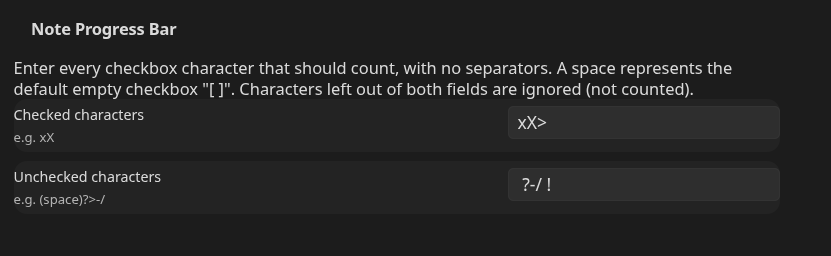
- Checked characters: default
xX - Unchecked characters: default a space plus
?>-/
Enter the characters with no separators. A checkbox whose character appears in neither field is ignored and not counted.
I use extended checkboxes via a CSS snippet and, for example, I consider a "forwarded" checkbox to be "complete". My settings are shown below.
Installation
Install from Settings > Community plugins once the plugin is listed. To install manually, download main.js, manifest.json and styles.css from the latest release and place them in <vault>/.obsidian/plugins/note-progress-bar/.
Licence
MIT