
README file from
GithubNL2LaTeX




🌍 Choose Language / Scegli la lingua:
📖 Table of Contents
- ✨ Features
- 🚀 How to Use
- 🧮 Supported Constructs
- ⚙️ Custom Regex Snippets
- 📥 Installation
- 🛠️ Building from Source
- 🤝 Contributions and License
NL2LaTeX is an Obsidian plugin that allows you to write complex mathematical expressions in natural language (English and Italian) and convert them into formatted LaTeX code on the fly.
✨ Features
-
Natural Language Parsing: Automatically understands spoken math like "integral of x", "limit as x approaches 0", or "square root of x".
-
Bilingual Support (EN/IT): Mix and match English and Italian seamlessly (e.g., "integral of x squared" or "integrale di x al quadrato").
-
Auto-Conversion Markers: Type your math between customizable markers (default
;;) and watch it turn into LaTeX the moment you close them. -
Custom Regex Snippets: Build your own personal dictionary of shortcuts using JavaScript Regular Expressions.
-
Configurable Output: Choose whether to wrap the generated LaTeX in inline (
$...$), block ($$...$$), or no delimiters.
🚀 How to Use
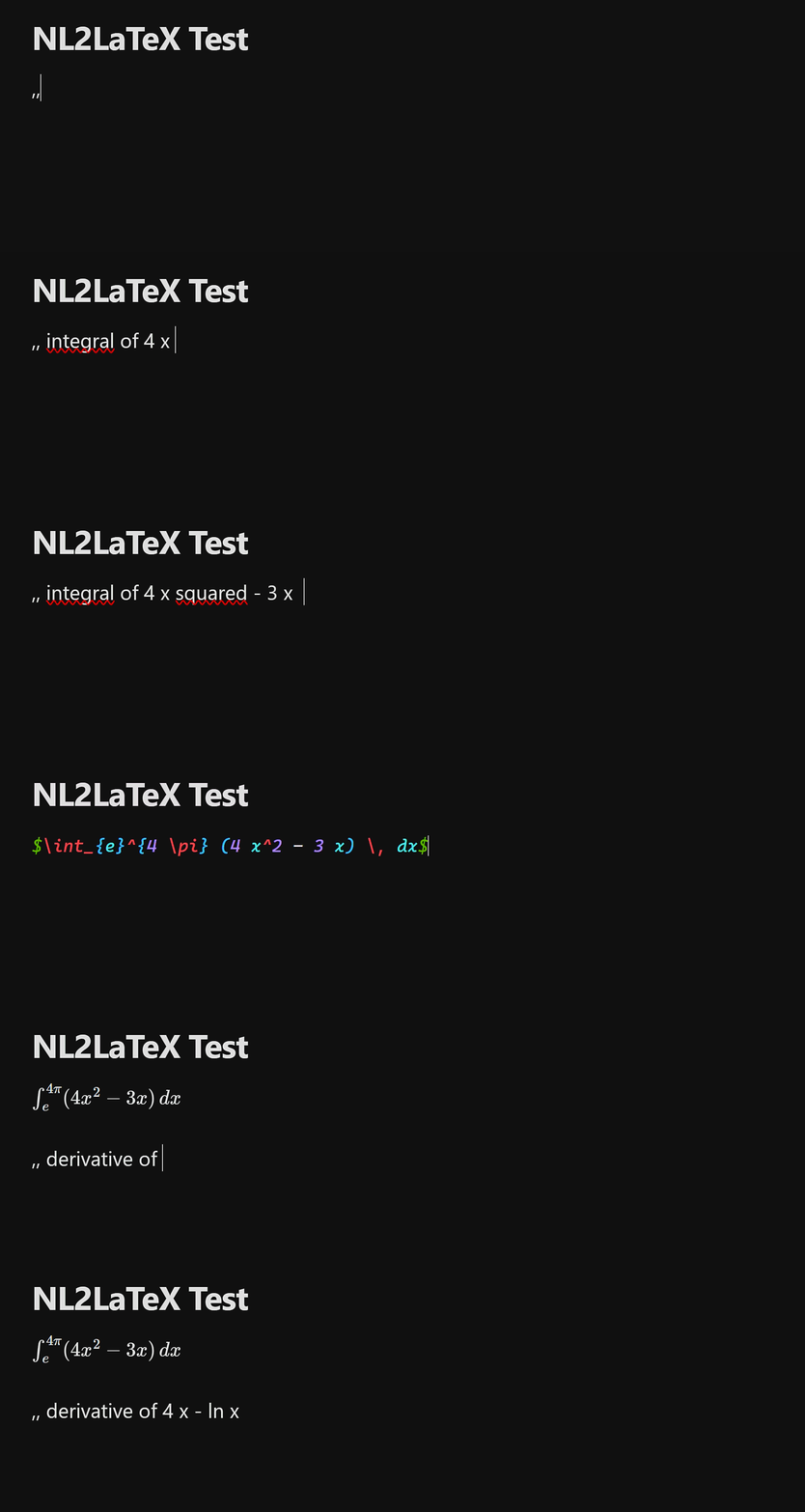
1. Marker Auto-Conversion (Recommended)
By default, the plugin listens for the ;; markers. Type your natural language expression between them. As soon as you type the closing ;;, it converts automatically.
Input:
;; integral of x squared from 0 to pi ;;
Output:
$\int_{0}^{\pi} (x)^2 \, dx$
2. Selection Conversion
Select any standard text in your note, open the Command Palette (Ctrl/Cmd + P), and run NL2LaTeX: Convert selection to LaTeX. You can also assign a custom hotkey to this command in Obsidian's settings.
🧮 Supported Constructs
The parser understands standard math vocabulary and groups them logically. Here are some examples of what you can type:
| Construct | English Example | Italian Example | Output |
|---|---|---|---|
| Integrals | integral of x from A to B |
integrale di x da A a B |
\int_{A}^{B} x \, dx |
| Derivatives | derivative of x with respect to y |
derivata di x rispetto a y |
\frac{d}{dy}(x) |
| Limits | limit of x as y approaches 0 |
limite di x per y che tende a 0 |
\lim_{y \to 0} x |
| Sums | sum of x from n = 1 to 10 |
sommatoria di x da n = 1 a 10 |
\sum_{n=1}^{10} x |
| Roots | square root of x, 3rd root of x |
radice quadrata di x, radice di ordine 3 di x |
\sqrt{x}, \sqrt[3]{x} |
| Powers | x squared, x cubed, x to the power of n |
x al quadrato, x al cubo, x elevato a n |
(x)^2, (x)^3, (x)^{n} |
| Greek Letters | alpha, beta, gamma, omega... |
alfa, beta, gamma, omega... |
\alpha, \beta, \gamma, \omega |
| Logic/Relations | x implies y, for all x, x and y |
x implica y, per ogni x, x e logico y |
x \implies y, \forall x, x \land y |
Note: You can combine operators naturally, like sin of x plus cos of y divided by 2.
⚙️ Custom Regex Snippets
If you use specific notations frequently, you can add your own Regex rules in the plugin settings. These snippets are processed before the natural language engine.
Example:
-
Label: Vectors
-
Pattern:
vector (?:of )?([a-zA-Z0-9]+) -
Replacement:
\vec{$1}
Now, typing vector of v will instantly convert to \vec{v}.
📥 Installation
Manual Installation (from Releases)
-
Go to the Releases page of this repository.
-
Download the
main.jsandmanifest.jsonfiles from the latest release. -
Create a folder named
nl2latex-obsidianinside your vault's.obsidian/plugins/directory. -
Place both downloaded files into that folder.
-
Reload Obsidian and enable the plugin in Settings > Community Plugins.
🛠️ Building from Source
If you want to compile the plugin yourself or contribute to the development, follow these steps:
-
Prerequisites: Ensure you have Node.js and npm installed on your machine.
-
Clone the repository:
   git clone https://github.com/antodellarte/nl2latex-obsidian.git
   cd nl2latex-obsidian
- Install dependencies:
npm install
- Compile the plugin:
npm run build
- Result: The compilation will create a
build/folder containing the ready-to-usemain.jsandmanifest.jsonfiles. Copy this folder into your Obsidian vault under.obsidian/plugins/to test your local build.
🤝 Contributions and License
Any bug reports or Pull Requests are welcome! The project is distributed under the MIT license.
🇮🇹 Guida in Italiano
📖 Indice
- ✨ Caratteristiche
- 🚀 Utilizzo
- 🧮 Costrutti supportati
- ⚙️ Snippet Personalizzati
- 📥 Installazione
- 🛠️ Compilando da source
- 🤝 Contibuzione e Licenza
NL2LaTeX è un plugin Obsidian che consente di scrivere espressioni matematiche complesse in linguaggio naturale (inglese e italiano) e convertirle al volo in codice LaTeX formattato.
✨ Caratteristiche Principali
-
Supporto Bilingue Nativo: Il motore di conversione comprende sia l'italiano che l'inglese, permettendoti anche di mescolarli (es. "integrale di x squared").
-
Conversione al volo: Digita la tua formula tra due marcatori personalizzabili (di default
;;) e il plugin la trasformerà in LaTeX non appena digiti il marcatore di chiusura. -
Snippet Regex Personalizzati: Crea scorciatoie su misura utilizzando le espressioni regolari (RegEx) direttamente dalle impostazioni del plugin.
-
Stile Flessibile: Scegli se racchiudere l'output in blocchi inline (
$...$), blocchi isolati ($$...$$) o senza alcun delimitatore.
🚀 Utilizzo
1. Conversione Automatica (Consigliata)
Usa i marcatori di conversione rapida. Digita l'espressione in linguaggio naturale e chiudi con i marcatori.
Cosa scrivi:
;; integrale di x al quadrato da 0 a pi greco ;;
Cosa ottieni:
$\int_{0}^{\pi} (x)^2 \, dx$
2. Conversione da Selezione
Evidenzia un testo qualsiasi, apri il riquadro dei comandi di Obsidian (Ctrl/Cmd + P) e cerca NL2LaTeX: Convert selection to LaTeX. Puoi anche assegnare una scorciatoia da tastiera personalizzata a questo comando.
⚙️ Snippet Personalizzati
Nelle impostazioni del plugin puoi aggiungere regole personalizzate che hanno la priorità sul motore di traduzione standard.
Ad esempio, se vuoi una scorciatoia veloce per i vettori:
-
Etichetta: Vettore
-
Pattern Regex:
vettore (?:di )?([a-zA-Z0-9]+) -
Sostituzione:
\vec{$1}
In questo modo, scrivendo vettore di v oppure vettore x, il testo verrà convertito rispettivamente in \vec{v} e \vec{x}.
📥 Installazione manuale (da Releases)
-
Visita la pagina Releases di questo repository.
-
Scarica i file
main.jsemanifest.jsondall'ultima versione disponibile. -
Crea una cartella chiamata
nl2latex-obsidiandentro il percorso.obsidian/plugins/del tuo vault. -
Inserisci i due file scaricati all'interno della cartella.
-
Riavvia Obsidian e attiva il plugin da Impostazioni > Plugin della community.
🛠️ Compilando da source
Se vuoi compilare autonomamente il plugin o contribuire allo sviluppo, segui questi passaggi:
-
Requisiti: Assicurati che Node.js e npm siano installati correttamente sul tuo dispositivo.
-
Clona la repository:
   git clone https://github.com/antodellarte/nl2latex-obsidian.git
   cd nl2latex-obsidian
- Installa le dependencies:
npm install
- Compila il plugin:
npm run build
- Risultato: Il compilatore creerà una cartella
build/contenete i filemain.jsemanifest.jsonpronti all'uso. Copia questa cartella nel tuo vault Obsidian in.obsidian/plugins/per testare la tua build locale.
🤝 Contributi e Licenza
Eventuali segnalazioni di bug o Pull Request sono i benvenuti! Il progetto è distribuito sotto licenza MIT.