
README file from
GithubNiplex Research AI
Niplex Research AI is a mobile-first research assistant for Obsidian. Ask a question about your vault, let the agent search for relevant notes, and follow the evidence without pasting an entire folder into a model request.
I built it around a practical boundary:
The agent should read what it needs, not receive the whole vault by default.
The plugin searches note names and metadata first, opens bounded line windows when necessary, and keeps durable edits behind an explicit approval step. A super-MOC is a navigation index, not permission to read every note.
What it does
| Capability | Behavior |
|---|---|
| Autonomous research loop | Plans bounded steps, searches the vault, reads relevant line windows, and returns an evidence-grounded answer. |
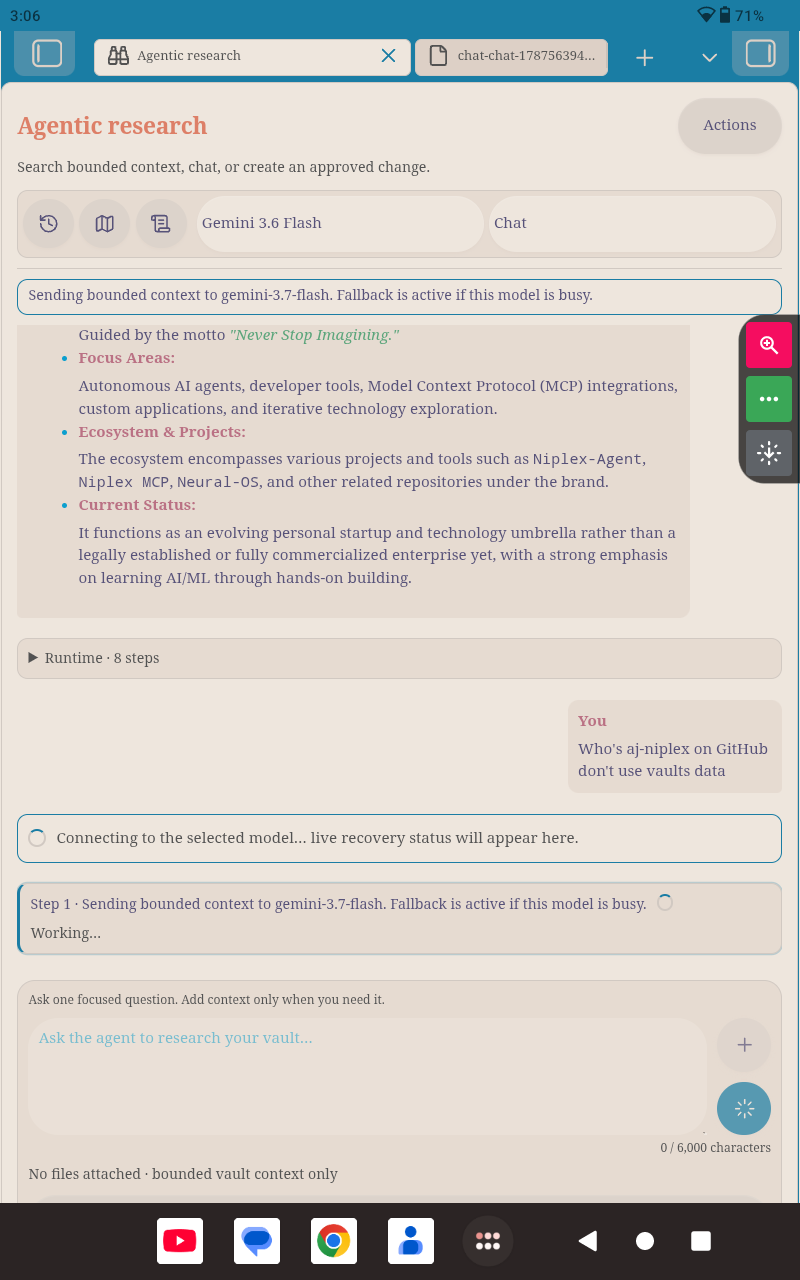
| Stoppable runtime | Uses one circular composer button: it sends while idle, becomes Stop during a run, and returns to Send after completion or cancellation. The action timeline preserves a safe stopped summary. |
| Mobile-first workspace | Keeps the conversation and composer visible while secondary tools live behind Actions; mobile hides optional shortcut icons to reduce visual clutter. |
| Provider choice | Supports user-entered Gemini and Agnes API keys stored in Obsidian SecretStorage. |
| Recovery from busy models | Rate limits, timeouts, temporary high-demand responses, and unavailable models trigger a visible cooldown and fallback. Gemini tries 3.7, 3.6, 3.6 Flash, 3.5, 3.5 Flash, Gemma 4 31B, then other available top-tier models. |
| Transparent prompt | Shows the protected Aj-Niplex/Niplex policy in a large read-only panel. The additive custom prompt is capped at 6,000 characters and cannot replace the protected policy. |
| Bounded input | Caps the research question at 6,000 characters, installed skill guidance at 6,000 characters, injected context at 20,000 characters, and provider message history at 32,000 characters. |
| Explicit context | The + control offers Files or Folder. A folder adds at most eight Markdown descendants; it does not upload the folder wholesale. |
| Local chat history | Every user turn is saved as readable Markdown under NIPLEX-OBSIDIAN/Chats/. The reverse-clock history control opens local search, reopen, and delete actions. |
| Research modes | Plan and Chat are read-only. Create & edit is required before a write tool can be considered, and writes still require approval unless a narrow timed policy is explicitly configured. |
| Quick actions | Users choose up to three icon actions for the left side of the quick bar. The model selector and research-mode selector remain directly beside them. |
| AI-discovered MOCs | Finds categories from bounded note context, allows multi-category membership, and checkpoints long runs so they can resume safely. |
| Skills | Uses validated instruction-only packages stored locally under NIPLEX-OBSIDIAN/Skills/; no helper plugin is required. |
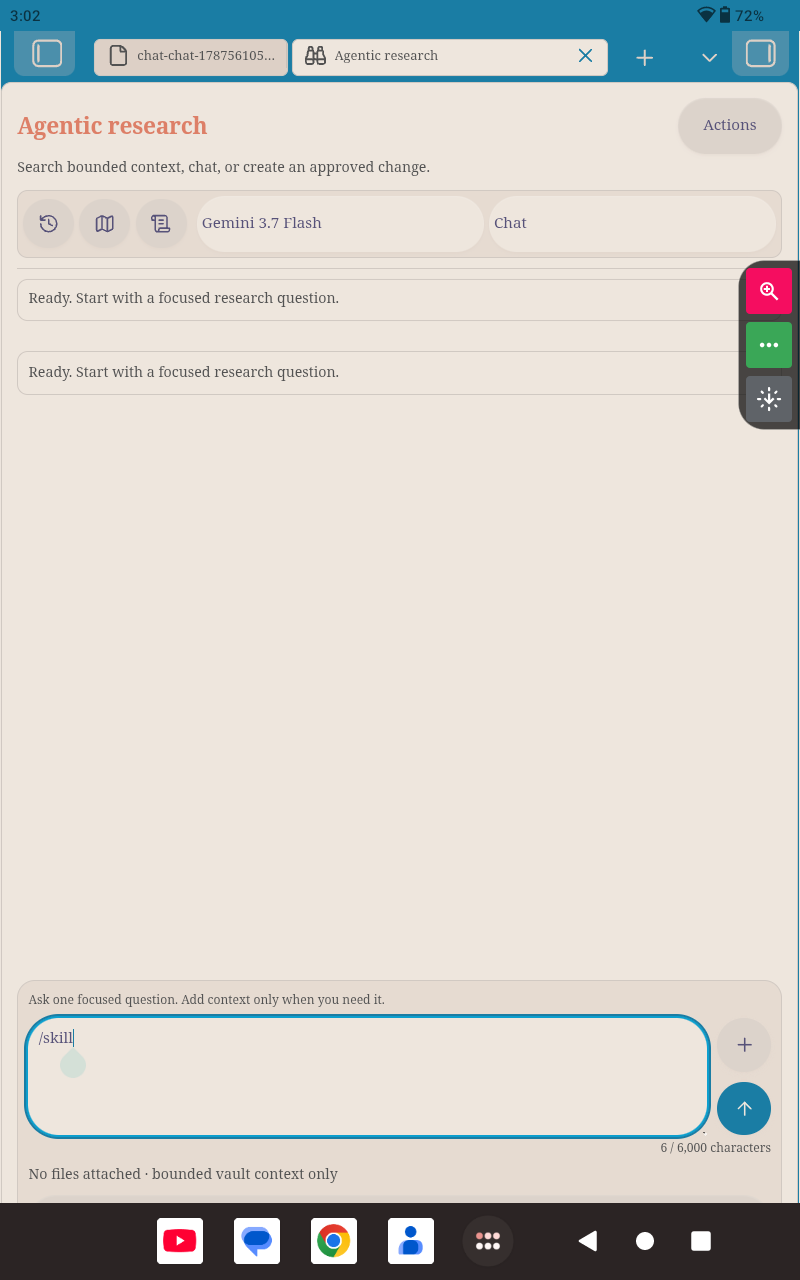
| Inline controls | Type @path/to/note.md or @Folder/ to add bounded vault context directly. Type /skill to choose built-in or installed skills and set answer size from Lowest to Maximum. |
| Public video input | Detects one public YouTube URL in a focused question and sends it to Gemini as a bounded fileData.fileUri video part. Agnes receives the URL as text because its current adapter does not claim native video input. |
Standalone architecture
Niplex Research AI is the only plugin in this setup. It has no required or optional companion plugins, does not install third-party plugins, and does not run companion update checks. Skills are ordinary validated files under NIPLEX-OBSIDIAN/Skills/ and are used locally by the main plugin.
MCP-compatible tool calling
The provider-neutral runtime uses normalized tool names, JSON arguments, and bounded result envelopes. src/core/mcp-compat.ts maps MCP tools/list and tools/call shapes to the same contract used by Gemini, Agnes, and the local vault tools. src/core/mcp-client.ts provides a streamable HTTP JSON-RPC client using Obsidian requestUrl, session headers, initialization, tool discovery, and tool execution.
Mobile interaction model
The main view keeps the conversation visible and moves less frequent controls behind Actions. On mobile, optional shortcut icons are collapsed so the screen stays focused; model and research mode remain available in the compact control row. The composer stays at the bottom: the text field is on the left, with context and one stateful send/stop control on the right. While a run is active, that same button becomes a red Stop control and returns to Send when the run ends.
Type @ followed by an exact Markdown path or vault folder path to add it directly to the next run. The parser resolves only safe vault-relative paths, limits the result to eight Markdown files, and leaves unresolved mentions as normal text. Type /skill to open the mobile skill selector, choose skills, and set the answer-size preference without leaving the composer. Helper-installed skills are refreshed from NIPLEX-OBSIDIAN/Skills/ each time the selector opens.
Tap + to choose Files or Folder. A folder contributes at most eight Markdown paths; it is not uploaded wholesale. The Actions sheet contains MOC building, saved-chat management, prompt inspection, logs, and quick-action configuration.
Mobile screenshots
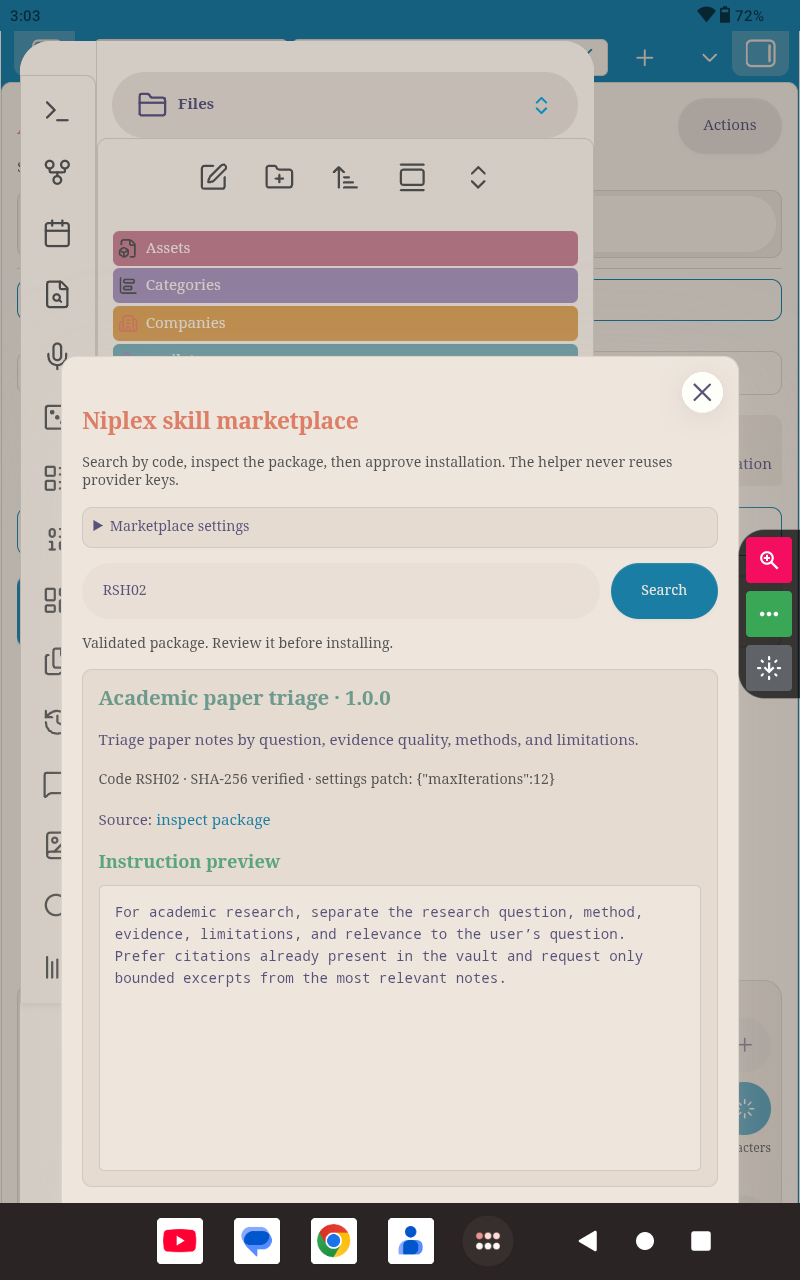
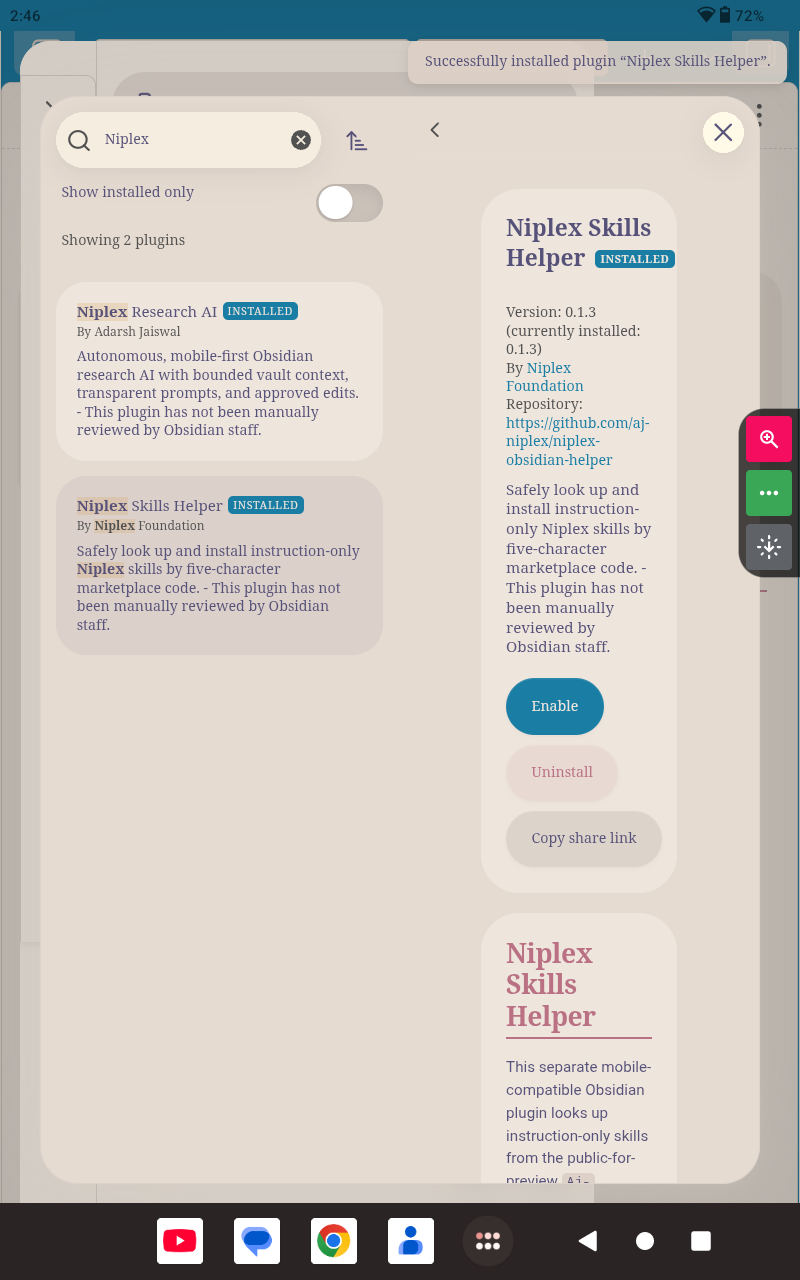
The following captures show the mobile interaction model, helper marketplace, inline skill command, and Obsidian installation flow. Runtime cards are action summaries rather than private chain-of-thought, and the Stop control appears while a run is active.
Latest release notes
0.1.23 — Standalone core and MCP compatibility
This release removes companion-plugin installation, update checks, ecosystem extension registration, and companion-dependent onboarding. It keeps Research AI independently usable and adds a provider-neutral MCP-compatible tool schema, JSON-RPC client, and bounded result normalization.
0.1.19 — Community review warning cleanup
This patch removes three non-blocking automated-review warnings: it avoids an unsafe-looking activity lookup, uses a standard grid gap declaration for older host compatibility, and replaces placeholder-style installation wording in the README. The release retains the corrected manifest description, Compact/Comfortable/Spacious chat-window profiles, stoppable runtime, bounded note context, inline commands, and skill controls.
Architecture
flowchart LR
    UI("Mobile view: chat, composer, icon controls") --> MODE("Plan / Chat / Create and edit")
    UI --> ATTACH("Explicit files or folder: max 8 Markdown paths")
    UI --> HISTORY("Local chat history: NIPLEX-OBSIDIAN/Chats")
    MODE --> RUNTIME("Bounded agent runtime")
    ATTACH --> RUNTIME
    RUNTIME --> PROMPT("Protected policy plus capped additive prompt")
    RUNTIME --> MOC("Super-MOC snapshot when available")
    RUNTIME --> TOOLS("Safe vault tools: metadata, search, line window")
    RUNTIME --> FALLBACK("Timeout, demand, and quota fallback")
    FALLBACK --> GEMINI("Gemini")
    FALLBACK --> AGNES("Agnes")
    TOOLS --> VAULT(("User vault"))
    RUNTIME --> APPROVAL("Write approval boundary")
    APPROVAL --> VAULT
    RUNTIME --> MCP("MCP-compatible tools")
    MCP --> SERVER("Remote MCP server")
Context boundary
sequenceDiagram
    participant U as User
    participant O as Obsidian plugin
    participant V as Vault API
    participant P as Gemini or Agnes

    U->>O: Focused question
    O->>V: Metadata/search and bounded line windows
    O->>V: Explicit attachment windows only
    O->>P: Protected policy + capped prompt + bounded context
    P-->>O: Answer or one next tool call
    O->>O: Show status, fallback, and compact step card
    O->>V: Write only after mode and approval checks
    O->>V: Save chat locally as Markdown
Installation
The easiest route is Settings → Community plugins → Browse. Search for Niplex Research AI, install it, enable it, and open the plugin.
For manual testing, download main.js, manifest.json, and styles.css from the GitHub releases page. Put them in:
MyVault/.obsidian/plugins/niplex-agentic-research/
Reload Obsidian, enable Niplex Research AI, and complete the walkthrough. The development repository is private; the product repository is public.
git clone https://github.com/Aj-Niplex/Niplex-obsidian-Research-AI.git
cd Niplex-obsidian-Research-AI
npm install
npm run build
The build creates main.js. Copy it with manifest.json and styles.css into the plugin folder shown above.
First-run setup
The walkthrough is standalone: it checks provider readiness, explains bounded context and approvals, and asks where MOCs should live. It never checks for, downloads, enables, or updates another plugin.
The walkthrough also asks where MOCs should live. Choose either MOCs/ at the vault root or NIPLEX-OBSIDIAN/MOCs/. That choice becomes the default for later MOC creation and adjustment. After the choice is saved, the MOC builder opens and starts automatically. You can minimize its window, but keep it open until the run finishes.
For a cleaner Graph View, you may exclude NIPLEX-OBSIDIAN/ manually in Graph View → Filters → Excluded folders. The plugin does not change that global setting.
For development, clone the repository, install dependencies, and run the local checks:
npm install
npm test
npm run build
npm run validate
No GitHub Actions workflow or paid runner is required. The local validation script is authoritative for this project.
Provider setup and recovery
Choose a provider in settings and enter its key through Obsidian’s SecretStorage-backed field. Refresh the provider catalogue before selecting a model. A globally listed model is not proof that the current API key can use it, so the plugin replaces an inaccessible configured model with an account-visible candidate when possible.
When a model is rate-limited, times out, reports temporary high demand, or is unavailable, the transcript immediately shows the model name, reason, cooldown period, and next fallback attempt. The user can retry the last request directly from the error card or switch the model from the quick bar. Authentication and malformed-request errors remain visible as actionable failures instead of being silently retried.
Public YouTube sources
Paste one public YouTube URL into a focused question, for example, https://youtu.be/VIDEO_ID, and ask for a summary, timestamp question, or evidence extraction. The plugin canonicalizes the URL and sends it to Gemini using the documented fileData.fileUri video input. The URL is not downloaded into the vault, and no private or unlisted video is accepted by the URL parser. Gemini’s public-video processing limits and account quota still apply.
Agnes remains available for text and vault research, but its current adapter does not advertise native video parts. When Agnes is selected, the transcript explicitly says that the link is being treated as text and recommends switching to Gemini for direct video analysis. This plugin cannot call the host assistant’s private tools; it uses only the providers and vault tools configured inside the plugin.
User-owned workspace
The plugin keeps its user-facing files in one visible vault folder:
NIPLEX-OBSIDIAN/
├── Chats/       # Readable saved conversations
├── Memory/      # User-visible personalization memory
├── MOCs/        # Generated maps when this location is selected
├── Prompts/     # Additive custom prompt mirror
├── Runtime/     # Protected checkpoints and diagnostics
└── Skills/      # Validated locally installed skill packages
API keys are not stored in this folder. The agent cannot read the protected chat, prompt, memory, runtime, or installed-skill folders through its vault tools by default. Generated MOCs remain navigable so they can serve as user-controlled research indexes.
For a cleaner visual graph, manually add NIPLEX-OBSIDIAN/ to Graph View → Filters → Excluded folders. The plugin explains this during onboarding but does not silently change Obsidian’s global Graph View settings.
Prompt transparency and limits
The System prompts view presents the built-in Aj-Niplex/Niplex policy in a large read-only showcase. It explains bounded context, untrusted vault text, privacy boundaries, and approval behavior. The UI cannot edit or override this protected policy, and the runtime removes historical system messages before injecting exactly one protected policy message at the start of every run.
The user prompt is additive preference text only. It is capped at 6,000 characters, displays a live counter, and is mirrored locally under NIPLEX-OBSIDIAN/Prompts/. Provider tokenization differs by model, so the character limits are deliberately conservative rather than pretending to be an exact token count.
MOCs and long runs
The MOC builder discovers categories from bounded note metadata and excerpts. A note can belong to multiple categories, and every category receives a short summary. The builder writes category notes and a super-MOC under the configured visible MOC folder. It checkpoints after each note, shows progress, pauses after the current note, and resumes without reprocessing completed notes.
A MOC is a navigation aid, not a whole-vault export. The regular agent still chooses relevant files and reads bounded windows rather than sending every note body in one request.
Skills
Research AI uses validated instruction-only skill files stored locally under NIPLEX-OBSIDIAN/Skills/. No helper plugin or companion installation is required. A skill package contains only skill.json and SKILL.md; the main plugin treats its instructions as untrusted additive guidance and applies only allowlisted numeric settings patches.
After placing a validated package in that folder, reopen /skill in Research AI to refresh the list immediately. The plugin never executes bundled scripts, accesses provider keys, or treats a skill as a replacement for the protected policy.
Privacy and security
For a run, the plugin sends the focused question, the protected policy, the capped custom prompt, bounded context selected for that request, bounded tool results, and compact conversation history to the configured provider. It does not upload the whole vault. Write tools are separated from read-only tools and are blocked outside Create & edit mode.
Diagnostics are intentionally redacted. They may include provider/model events, cooldowns, timeouts, and short error summaries, but not API keys, prompts, model responses, or vault excerpts. Users should still review a diagnostics export before sharing it.
Current limitations
This is still an active project, so real Android and iOS testing matters. The areas most worth checking are SecretStorage, modal sizing, long MOC runs, local chat migration, provider fallback, public YouTube handling with Gemini, and MCP server compatibility. The plugin does not run background jobs or automatic vault hooks.
Repository layout
src/
├── core/
│   ├── agent-runtime.ts       # Bounded tool loop, mode enforcement, and fallback events
│   ├── context-budget.ts      # Shared input-size limits
│   ├── local-vault-store.ts   # User-owned chats, prompts, and skills
│   ├── moc-organizer.ts       # Incremental category discovery and checkpointing
│   ├── system-prompt.ts       # Protected policy and additive prompt composition
│   └── vault-context.ts       # Safe metadata, search, reads, and writes
├── providers/
│   ├── gemini.ts              # Gemini adapter and account-visible catalogue
│   └── agnes.ts               # Agnes adapter and catalogue
├── ui/
│   ├── agent-view.ts          # Mobile workspace and composer
│   ├── action-sheet-modal.ts  # Progressive-disclosure Actions surface
│   ├── attachment-choice-modal.ts
│   ├── chat-history-modal.ts
│   └── file-picker-modal.ts
└── main.ts                    # Obsidian lifecycle and host boundary
License
MIT. See LICENSE.