
README file from
GithubnanalStamp
English: this document · 한국어: README.ko.md
Seal your notes with tamper-proof timestamps — anchored to the Bitcoin blockchain — without ever uploading a single word of your content.
nanalStamp watches the notes you choose and, whenever a note settles (you pause typing, switch away, or close Obsidian), it computes a SHA-256 hash on your device and sends only that hash to the nanalStamp server. The server chains your hashes, signs each entry, and periodically anchors the chain head into Bitcoin via OpenTimestamps. The result is independently verifiable proof that a given note existed, in a given form, at a given time — proof that does not depend on trusting nanalStamp.
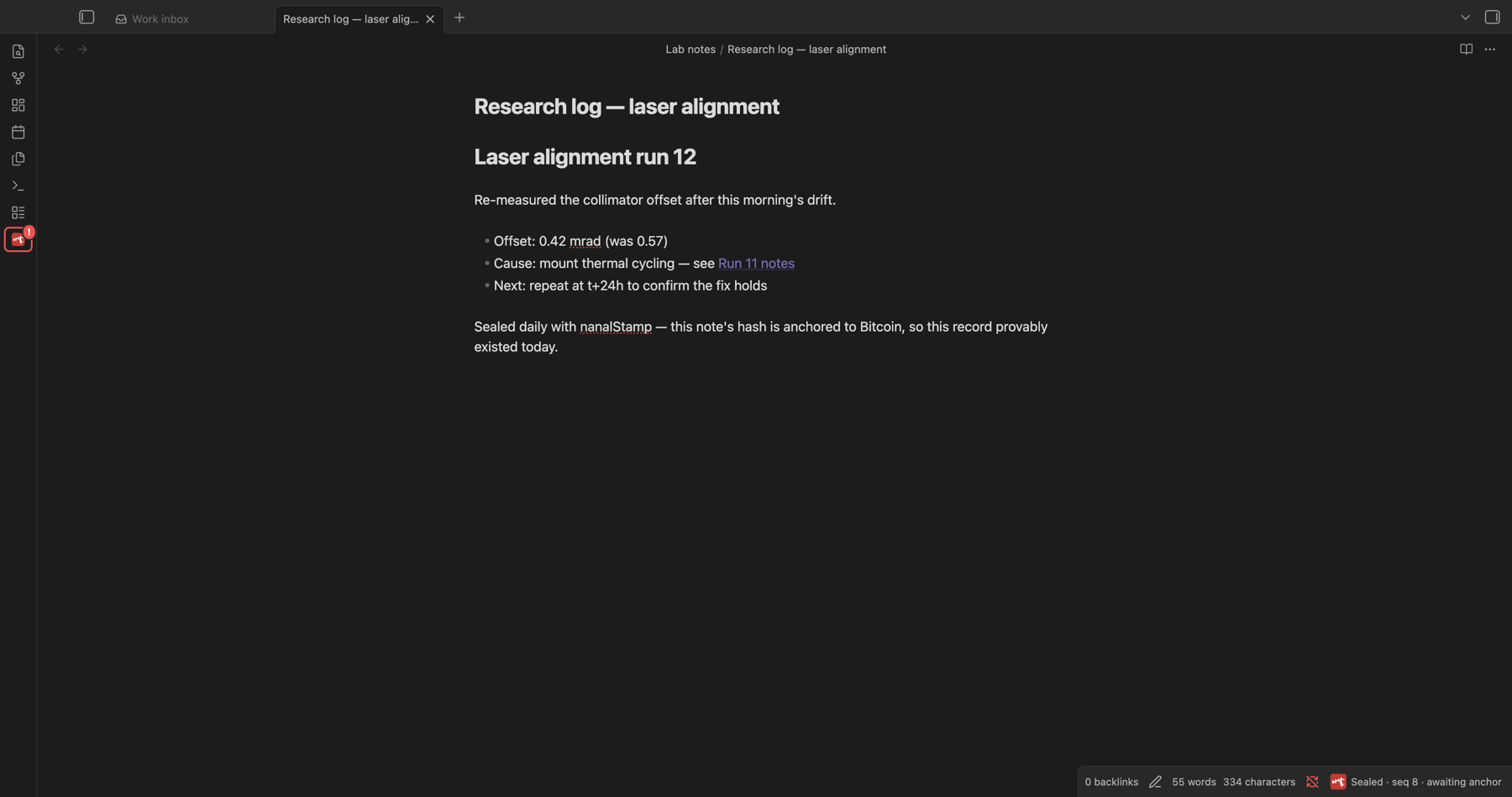
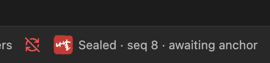
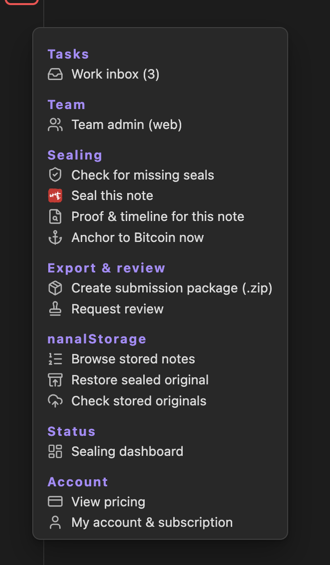
Everything lives in one menu — the ribbon seal icon is the entry point:
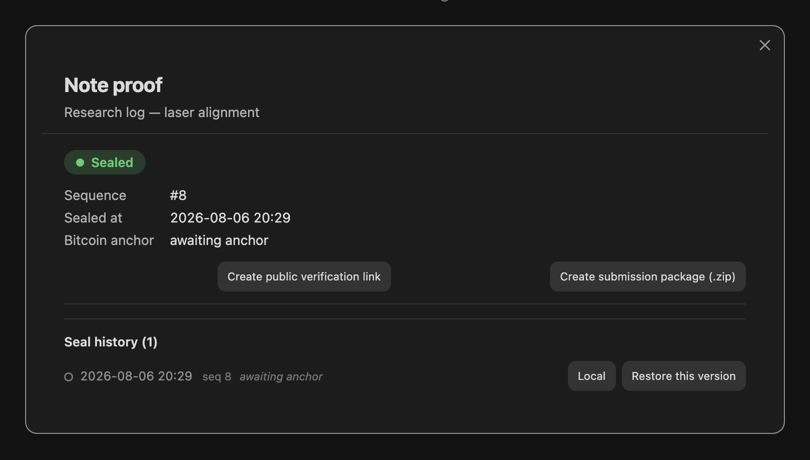
Per-note proof & history — sealed state, sequence, Bitcoin anchor status, and every sealed version with restore:
Why start today — you can't prove the past retroactively
nanalStamp is not just "this file existed once." Its real value is proving that a note has been worked on continuously, day after day, and that its edit history is an unbroken chain — not something assembled at the end and back-dated.
That continuity cannot be created retroactively. Each day's state is anchored independently into that day's Bitcoin block, and you cannot go back and place an anchor in a block that is already mined. So the proof you can show only ever covers the period from the moment you start sealing forward — every day you wait is a day of provable history you can never get back.
If a note matters — a research log, an invention record, a journal — seal it now, not later. The proof is only as long as the streak you've actually been building.
What this proof is (and isn't)
nanalStamp provides an electronic timestamp / proof-of-existence with strong tamper-evidence: hash-chained, signed, and Bitcoin-anchored, independently verifiable without trusting us. It is designed to be admissible as supporting evidence of a record's integrity and time (e.g. it aligns with the kind of hash-based verification courts already accept).
It is not a government-accredited or "qualified" timestamp / "공인" service — no such certified status is claimed. Whether and how it is weighed in any specific dispute is up to the relevant court or authority.
Privacy & network use (please read)
No third-party analytics, tracking, or telemetry — ever. These are all the hosts the plugin can contact, and when:
| Host | When | What is sent |
|---|---|---|
api.nanalstamp.com |
Always (sealing) | Content hash + path hash + timestamp + your API key — hashes only, never content |
api.nanalstamp.com |
Only if you subscribe to original-file storage (paid) | Your original notes/attachments, encrypted on your device before upload (keys are managed by the service so it can restore your files back to you) |
mempool.space |
Only while building a submission package | Bitcoin block heights from your own proofs (public numbers) — to cross-check anchors; no vault data |
github.com / api.github.com |
Only if you connect the optional GitHub offsite archive | Your original files, pushed to your own GitHub repository with a token you authorize (device flow; token stored locally) |
nanalstamp.com |
Pricing/account/checkout links | Opened in your external browser — the plugin itself sends nothing |
The API host is fixed to api.nanalstamp.com — there is no setting that redirects your data anywhere else.
During sealing — the default, always-on activity — what leaves your device is:
- The SHA-256 hash of the note's content (a 64-character digest — the content cannot be reconstructed from it).
- The SHA-256 hash of the note's file path — so even the folder and file names never leave your device in readable form.
- A client timestamp and, if you are signed in, your API key.
Your note content is uploaded only if you explicitly enable a storage feature (paid original-file storage, or the GitHub offsite archive to your own repo) — sealing itself never sends content, readable file names, or any other vault data.
When requests happen:
- When a watched note settles (debounced), when you leave or close it, and a "catch-up" pass for notes changed since last run.
- When you explicitly run a command (issue certificate, create public link, anchor now, build a submission package, open pricing/account).
- When you quit Obsidian with an unsent seal pending, the final seal goes out via
navigator.sendBeacon— the only delivery that reliably completes during app shutdown. Same single API host, hash-only payload; this is a seal, not analytics (the plugin has no analytics at all).
You can stop all sending at any time by disabling the plugin (Settings → Community plugins → nanalStamp), and you can limit which notes are watched with the include/exclude folder settings.
Account & payment (optional)
- Sealing works with a free API key. Sign-in is optional and only used to auto-fetch your key.
- Official certificates (PDF) and public verification links are paid features. The "Buy Pro" / "Buy certificate credit" commands open an external checkout page in your browser. No payment happens inside Obsidian.
- Pricing and account management live at nanalstamp.com.
How verification works
- Content proof — the content hash proves what the note contained. Reveal the note; anyone can re-hash it and match.
- Path commitment — the path hash is a commitment. If you later want to prove which note (its path/name) a proof refers to, you reveal the path and a verifier recomputes
SHA-256("nanalstamp/path/v1\n" + path)and matches it. - Chain + signature — each entry binds
user | seq | prev_hash | content_hash | path_hash | received_at, is signed with the server's Ed25519 key, and links to the previous entry. Reordering or back-dating breaks the chain. - Bitcoin anchor — the chain head is submitted to OpenTimestamps and, once confirmed, carries a Bitcoin block height. Verification is possible independently, without trusting the server.
Usage
- Install and enable the plugin.
- Open Settings → nanalStamp and paste your API key (or sign in to fetch it).
- (Optional) Restrict watched notes with Include folders / Exclude folders.
- Keep writing. Notes are sealed automatically; the status bar shows a seal icon and a running count.
Commands
- Seal current note now — seal immediately.
- Anchor to Bitcoin now — submit the current chain head to Bitcoin.
- Export proof (.nanalproof) — save a portable proof file for the active note.
- Issue official certificate (PDF) — paid; requires a certificate credit.
- Create public verification link — paid (Pro).
- New dev note (today) and entry-insert commands — optional note templates.
- View pricing / My account & subscription — open the website.
Settings
| Setting | Purpose |
|---|---|
| Account / API key | Sign in to fetch your key automatically, or paste it. An optional separate team account can be connected for team folders. |
| Sealing scope | Include / exclude folders, whole-vault mode, and whether attachments are sealed. |
| Attachment size limit | Shown per plan; oversized attachments are held instead of sealed. |
| Work inbox | Optional team task inbox with system notifications. |
| Storage | Original-file storage backend and the local archive folder (a git repository outside your vault). |
| Proof ledger & backfill | Where verified proof bundles are written, and catch-up sealing for notes edited before install. |
| GitHub export (advanced) | Optional offsite copy of originals to your own repository. |
| Templates · language | Note/digest templates, their folders, and UI language. |
Sealing timing is automatic and not configurable: a note is sealed about 5 seconds after you stop typing, at most once per 5 minutes per note, and failed sends are retried every 30 seconds.
Desktop only (for now)
nanalStamp is currently desktop-only. The local original archive keeps a git repository outside your vault, which needs desktop filesystem access. Mobile support is planned for a future release, once it has been validated as thoroughly as the desktop experience.
Independent verification
Verification never requires trusting the nanalStamp server: proofs are independently checkable with the downloadable verifier, standard tools (sha256sum, OpenTimestamps clients), or the public /check page.
License
GPL-3.0 © 2026 nanalLabs — free to use, study, and modify; if you distribute a modified version, it must remain open under the same license.
한국어 요약
nanalStamp은 선택한 노트가 정착될 때 기기에서 SHA-256 해시를 계산해 그 해시만 보냅니다. 기본 동작(봉인)에서 접속하는 곳은 https://api.nanalstamp.com 하나이고, 제3자 분석·추적·텔레메트리는 일절 없습니다. 봉인에서는 노트 내용도, 읽을 수 있는 파일·폴더 이름도 전송되지 않습니다(경로도 해시화). 원문이 올라가는 것은 사용자가 켠 보관 기능뿐입니다 — 유료 원문 보관은 기기에서 암호화 후 같은 API로, 선택형 GitHub 오프사이트 보관은 본인 GitHub 저장소로 갑니다. 제출 패키지를 만들 때는 앵커 검증을 위해 mempool.space 에 블록 번호(증명에 이미 든 공개 숫자)만 조회합니다. 서버는 해시를 체인으로 묶고 Ed25519로 서명한 뒤 주기적으로 비트코인(OpenTimestamps) 에 앵커링해, "그 시점에 그 노트가 존재했다"를 서버를 신뢰하지 않고도 검증할 수 있게 합니다.
- 전송 중단: 설정 → 커뮤니티 플러그인에서 nanalStamp 비활성화
- 감시 범위 제한: 포함/제외 폴더 설정
- 인증서(PDF)·공개 검증 링크는 유료이며 외부 결제 페이지가 브라우저에서 열립니다(Obsidian 내 결제 없음).
왜 지금 시작해야 하나 — 과거는 소급 증명할 수 없습니다. nanalStamp의 핵심 가치는 "이 파일이 한 번 존재했다"가 아니라 "이 노트를 오래전부터 꾸준히 써왔고 편집 이력이 끊김 없이 이어졌다" 는 연속 증명입니다. 각 날짜의 상태는 그 날의 비트코인 블록에 독립적으로 고정되며, 이미 채굴된 과거 블록에는 앵커를 넣을 수 없으므로 이 연속성은 소급 생성이 불가능합니다. 즉 증명할 수 있는 기간은 봉인을 시작하는 순간부터 앞으로만 쌓입니다. 늦게 시작할수록 증명 가능한 과거가 짧아집니다 — 중요한 노트(연구기록·발명·저널)라면 나중이 아니라 지금 봉인하세요.
이 증명의 성격. nanalStamp은 무결성·존재시점을 강하게 증빙하는 전자 타임스탬프/존재증명이며, 법정에서 증거로 채택 가능하도록 설계되었습니다(법원이 이미 인정하는 해시 기반 검증 방식과 정합). 다만 정부 공인·"qualified"·공인 타임스탬프가 아니며 그러한 지위를 주장하지 않습니다. 개별 분쟁에서의 증거 가치 판단은 해당 법원·기관의 몫입니다.