
README file from
GithubMove Tab to Group
Move the active tab into the tab group on its left or right with one command. If there is no group on that side, a new one is split off for the tab.
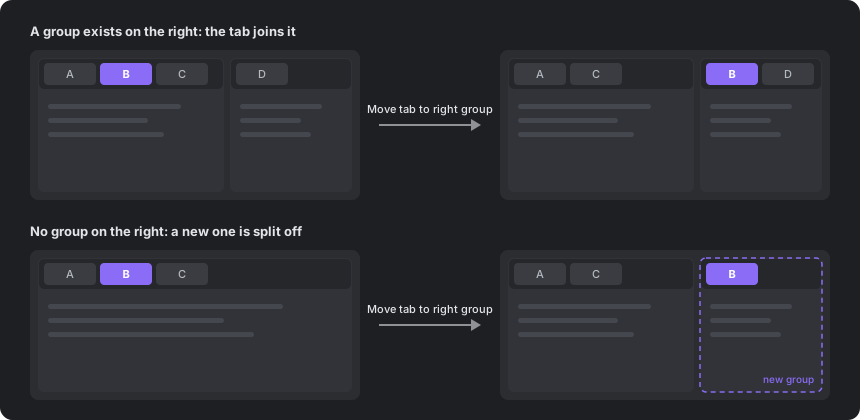
Obsidian's built-in split commands open a copy of the note in a new pane, and dragging tabs between groups needs the mouse. This plugin moves the tab itself, so the original tab leaves its group and keeps its history.
Commands
| Command | What it does |
|---|---|
| Move tab to left group | Moves the active tab to the end of the group on the left. If there is none, splits a new group off on the left. |
| Move tab to right group | Moves the active tab to the front of the group on the right. If there is none, splits a new group off on the right. |
Details:
- The tab stays focused after it moves.
- In nested layouts, the tab goes to the nearest group on that side.
- A tab that is alone in its group is not moved into a new group, because that would leave the layout unchanged.
- Only left and right moves are supported. If the groups on the target side are stacked vertically, the tab goes to the top one.
- Works in popout windows. Sidebars are not affected.
Hotkeys
The plugin sets no default hotkeys. Assign your own in Settings → Hotkeys by searching for "Move tab to".
Ctrl+Alt+← and Ctrl+Alt+→ work well. On Windows and Linux these keys are bound to Navigate back and Navigate forward by default, so remove or change those bindings first.
Installation
From Obsidian: open Settings → Community plugins → Browse, search for "Move Tab to Group", then install and enable it.
Manually: download main.js and manifest.json from the latest release and put them in <vault>/.obsidian/plugins/move-tab-to-group/.
Compatibility
Desktop only. Obsidian has no public API for moving an open tab between groups, so the plugin uses internal workspace methods. It was tested on Obsidian 1.13.7. A future Obsidian update may break it; please open an issue if it stops working.