
README file from
GithubMonthly Tracker Plugin for Obsidian
Visualize your daily note data as monthly tracker strips — right inside your notes. Turn habits, moods, exercise, sleep, and anything else you log into color-coded patterns you can read at a glance.
How It Works
- Your monthly note declares
yearandmonthin its frontmatter — or the code block names the month itself. - The plugin scans your daily notes folder for files starting with
YYYY-MM-DD. (Folder is read from settings, or auto-detected from the Daily Notes / Periodic Notes plugin.) - It reads a frontmatter property from each daily note and renders a full month of colored cells.
- Click any cell to open that day's note.
Prerequisites
Monthly Note
By default the plugin reads year and month from the current note's frontmatter to determine which month to render.
---
year: 2026
month: 6
---
A code block can also name its month directly with year and month options — see Pinning a specific month. When it does, the note's frontmatter is ignored.
Daily Notes
File names must start with your configured date format (default: YYYY-MM-DD). Text after the date is ignored — 2026-06-03.md and 2026-06-03 Tuesday.md both work.
Values to track go in each daily note's frontmatter:
---
workout: true
mood: good
distance: 5.2
sleep: 7
---
Usage
Add a monthly-tracker code block anywhere in your monthly note:
```monthly-tracker
type: boolean
property: workout
color: blue
```
Tracker Types
1. Boolean — Completion
Highlights days where a property is truthy. Perfect for habit tracking.

| Option | Required | Description |
|---|---|---|
type |
✅ | boolean |
property |
Frontmatter key in daily notes (omit to use file existence) | |
color |
✅ | Preset name or hex color code |
source |
Folder override (falls back to plugin setting) | |
year |
Year to render (requires month; falls back to note frontmatter) |
|
month |
Month 1–12 to render (requires year; falls back to note frontmatter) |
Habit tracking — preset color
```monthly-tracker
type: boolean
property: workout
color: blue
```
Habit tracking — hex color
```monthly-tracker
type: boolean
property: meditation
color: "#66bb6a"
```
File existence — omit property
If property is omitted, any day that has a file in the source folder will be highlighted. Useful for journals or logs where creating the file is the record itself (e.g. morning journals, meal diaries).
```monthly-tracker
type: boolean
source: Calendar/Morning Journals
color: yellow
```
2. Colormap — Categories
Maps string values to colors. Use it when you want to classify data by label — mood, condition, workout type, focus level, etc.

| Option | Required | Description |
|---|---|---|
type |
✅ | colormap |
property |
✅ | Frontmatter key in daily notes |
colors |
✅ | Value → color map |
source |
Folder override (falls back to plugin setting) | |
year |
Year to render (requires month; falls back to note frontmatter) |
|
month |
Month 1–12 to render (requires year; falls back to note frontmatter) |
Workout type
```monthly-tracker
type: colormap
property: workout-type
colors:
  run: "#e53935"
  lift: "#7986cb"
  yoga: "#66bb6a"
  swim: "#29b6f6"
```
Focus level — 4 labels
```monthly-tracker
type: colormap
property: focus
colors:
  great: "#1565c0"
  normal: "#64b5f6"
  low: "#ffb74d"
  none: "#e57373"
```
3. Heatmap — Activity Volume
The higher the value, the darker the color. Great for sleep hours, running distance, pages read, and any other numeric data.

| Option | Required | Description |
|---|---|---|
type |
✅ | heatmap |
property |
✅ | Frontmatter key in daily notes (number) |
bins |
✅ | Threshold values that define intensity levels |
colorScheme |
Built-in color theme name | |
colors |
Custom color array (length = number of bins + 1) | |
unit |
Unit string shown in tooltip and total (e.g. km, h) |
|
showTotal |
Show monthly total above the tracker | |
totalLabel |
Label for the total (default: localized Total) |
|
source |
Folder override (falls back to plugin setting) | |
year |
Year to render (requires month; falls back to note frontmatter) |
|
month |
Month 1–12 to render (requires year; falls back to note frontmatter) |
Running distance — colorScheme
```monthly-tracker
type: heatmap
property: distance
colorScheme: indigo
bins: [3, 5, 7, 10]
unit: km
showTotal: true
```
Setting bins: [3, 5, 7, 10] with 4 boundary values creates 5 intensity levels:
| Range | Level |
|---|---|
| 0 – 3 km | 1 (lightest) |
| 3 – 5 km | 2 |
| 5 – 7 km | 3 |
| 7 – 10 km | 4 |
| 10 km+ | 5 (darkest) |
Sleep — custom colors
```monthly-tracker
type: heatmap
property: sleep
unit: h
bins: [5, 6, 7, 8]
colors:
  - "#ffcdd2"
  - "#ef9a9a"
  - "#e57373"
  - "#ef5350"
  - "#c62828"
showTotal: true
```
Pages read — no total
```monthly-tracker
type: heatmap
property: pages
colorScheme: green
bins: [10, 30, 60, 100]
unit: p
```
Pinning a specific month
Any tracker type accepts year and month options. When present they override the note's frontmatter, so a block can render a fixed month from any note — a dashboard, a yearly review, or two months side by side in the same note:
```monthly-tracker
type: heatmap
property: steps
bins: [3000, 6000, 9000]
year: 2026
month: 5
```
year and month must always be set together. A block with only one of them shows an error.
Built-in Colors
Boolean color / Heatmap colorScheme
| Name | Color |
|---|---|
blue |
#64b5f6 |
green |
#66bb6a |
red |
#e57373 |
purple |
#ba68c8 |
orange |
#ffb74d |
yellow |
#ffd54f |
teal |
#4db6ac |
indigo |
#7986cb |
pink |
#f06292 |
You can also use any hex color directly: color: "#ff5722"
For Boolean, the color is applied as a single solid fill. For Heatmap, the chosen theme is rendered as a gradient from light (low/no data) to dark (high). Default theme is indigo.
Settings
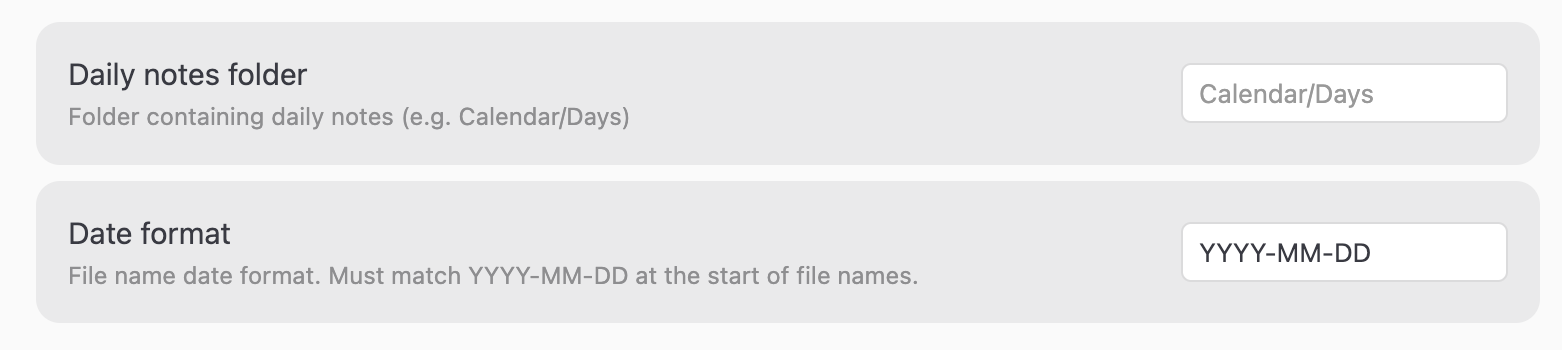
Settings → Monthly Tracker:
| Setting | Default | Description |
|---|---|---|
| Daily notes folder | (auto-detected) | Folder to scan for daily notes. If set, that path is used. If left empty, the folder is auto-detected from the Daily Notes or Periodic Notes plugin settings. |
| Date format | YYYY-MM-DD |
Date format used at the start of daily note file names. |
Use YYYY (year), MM (month), and DD (day) tokens with any separator:
| Format | Example file names |
|---|---|
YYYY-MM-DD |
2026-06-03.md, 2026-06-03 Tuesday.md |
YYYY/MM/DD |
2026/06/03.md |
YYYY.MM.DD |
2026.06.03.md |
Need a different format? Feel free to open a PR.
For trackers that need to scan a different folder than the default, use the source option:
type: boolean
source: Calendar/Morning Journals
color: yellow
Troubleshooting
Missing required field: type — Add type: boolean, type: colormap, or type: heatmap to the code block.
heatmap requires "bins" — bins is required for heatmap trackers. Add e.g. bins: [3, 5, 7, 10].
Current note must have 'year' and 'month' in frontmatter — Add year and month to the monthly note's frontmatter, or set them on the code block itself.
Specify both 'year' and 'month' in the code block, or omit both — The block has only one of the two. Add the missing one, or remove both to use the note's frontmatter.
Cells not colored — Check that the property name exactly matches the frontmatter key in your daily notes, and that your daily note files are in the configured folder with names starting in the correct date format.
Contributing
Have ideas for new color themes, features, or improvements? PRs are welcome.
Development setup
Requires Node.js 20 or newer.
npm install      # install dependencies
npm run dev      # build main.js and rebuild on change
npm run build    # type-check and produce a production main.js
main.js is a build artifact and is not tracked in the repo — run npm run build (or npm run dev) before loading the plugin in Obsidian for local testing.
Tests
Pure logic (date patterns, folder resolution, config validation, color presets) and the renderer's DOM output are covered by Vitest. The renderer tests run under happy-dom, so no Obsidian runtime is needed.
npm test         # run the full suite once
npx vitest       # watch mode: re-run on change
Please add or update tests when changing behavior. Lint, build, and tests run automatically on every pull request via GitHub Actions.