
README file from
GithubMomentum Life — Obsidian plugin

All-in-one life dashboard for Obsidian: habits, tasks, fitness, nutrition, studies and finances rendered directly from your vault's Markdown files. Everything is stored as plain Markdown under a single folder, so your data stays yours.
Why Momentum Life
- Reads/writes files locally via the Vault API — no GitHub token, no CORS workarounds.
- Frontmatter parsing handled by Obsidian's metadata cache.
- Cross-device sync handled by Obsidian Sync / iCloud / git.
- Renders with Obsidian's DOM API and theme variables (no remote code, no CDN).
- Works offline. Network use is opt-in and limited to two features (see Network use & privacy).
Modules
| Tab | What it does |
|---|---|
| 🎯 Cockpit Life | The landing page: today's whole picture in one screen — quick task capture, habits with streaks, study progress, evolution charts and one-tap actions |
| 🚀 Habit Tracker | Monthly bullet-journal trackers: a clickable dot per day, weekly consistency bars and a rolling completion-rate line, per habit |
| ✅ Tasks | Kanban (drag & drop, folder-backed boards, priorities, columns) + Eisenhower matrix, search, optional Google Tasks sync |
| 🏋️ Fitness | Workout splits, active workout w/ timer, strength & cardio exercises, calendar, progress charts, monthly summaries |
| 🥗 Nutrition | Fixed meal plans, food logging, calorie calendar & trends, water tracking, Open Food Facts search |
| 📚 Studies | Kanban by topic (drag & drop, subtopics, URLs) + list view |
| 💰 Finances | Income/expense ledger, monthly summaries, category breakdown, recurring templates (monthly & weekly), net worth trend, savings buckets |
All visualizations use inline SVG (no external libraries / CDN).
Screenshots
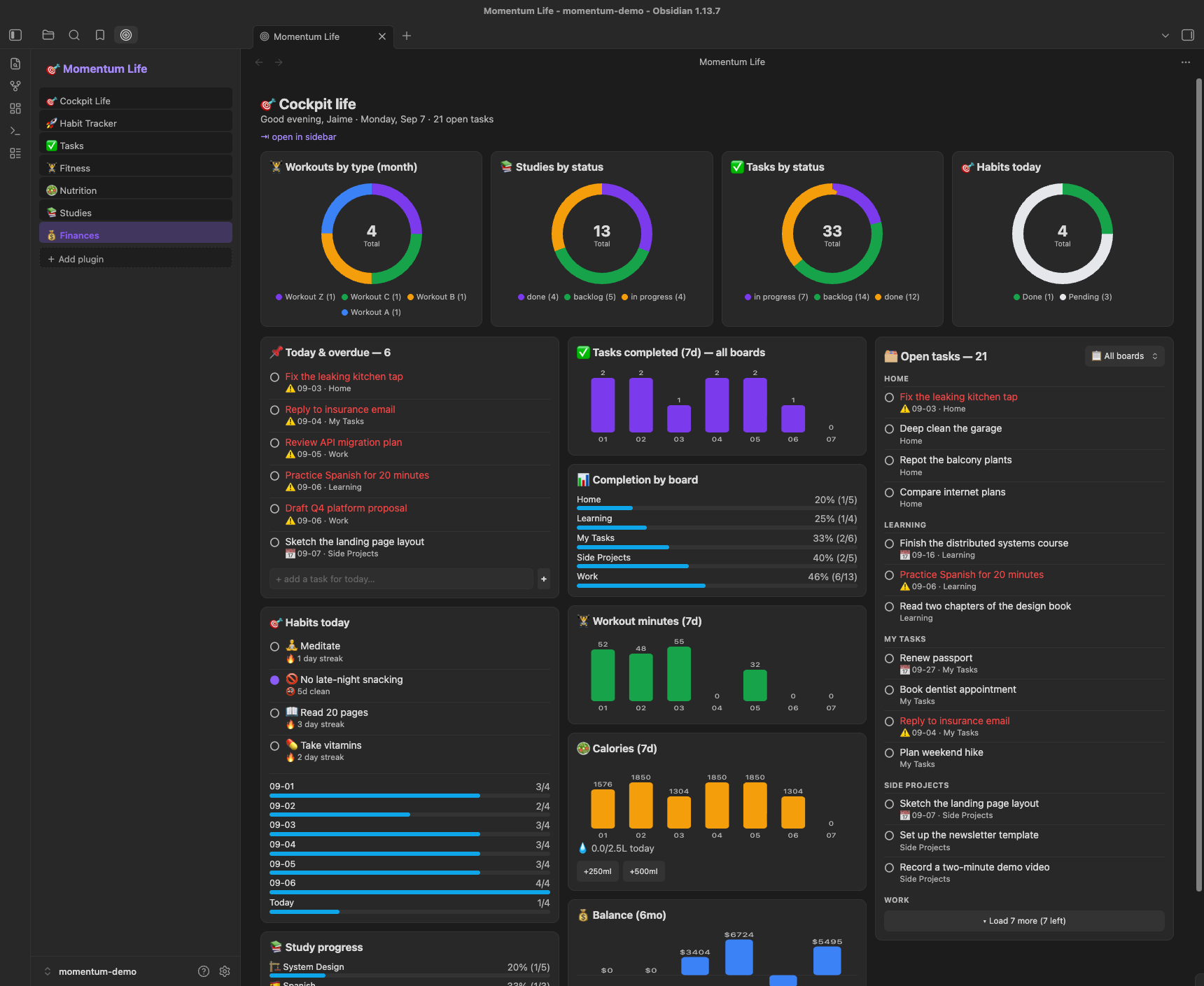
🎯 Cockpit Life
Everything the day needs in three columns: capture and tick off what's due, toggle habits, watch the trends, and work the full open-task list without leaving the page.
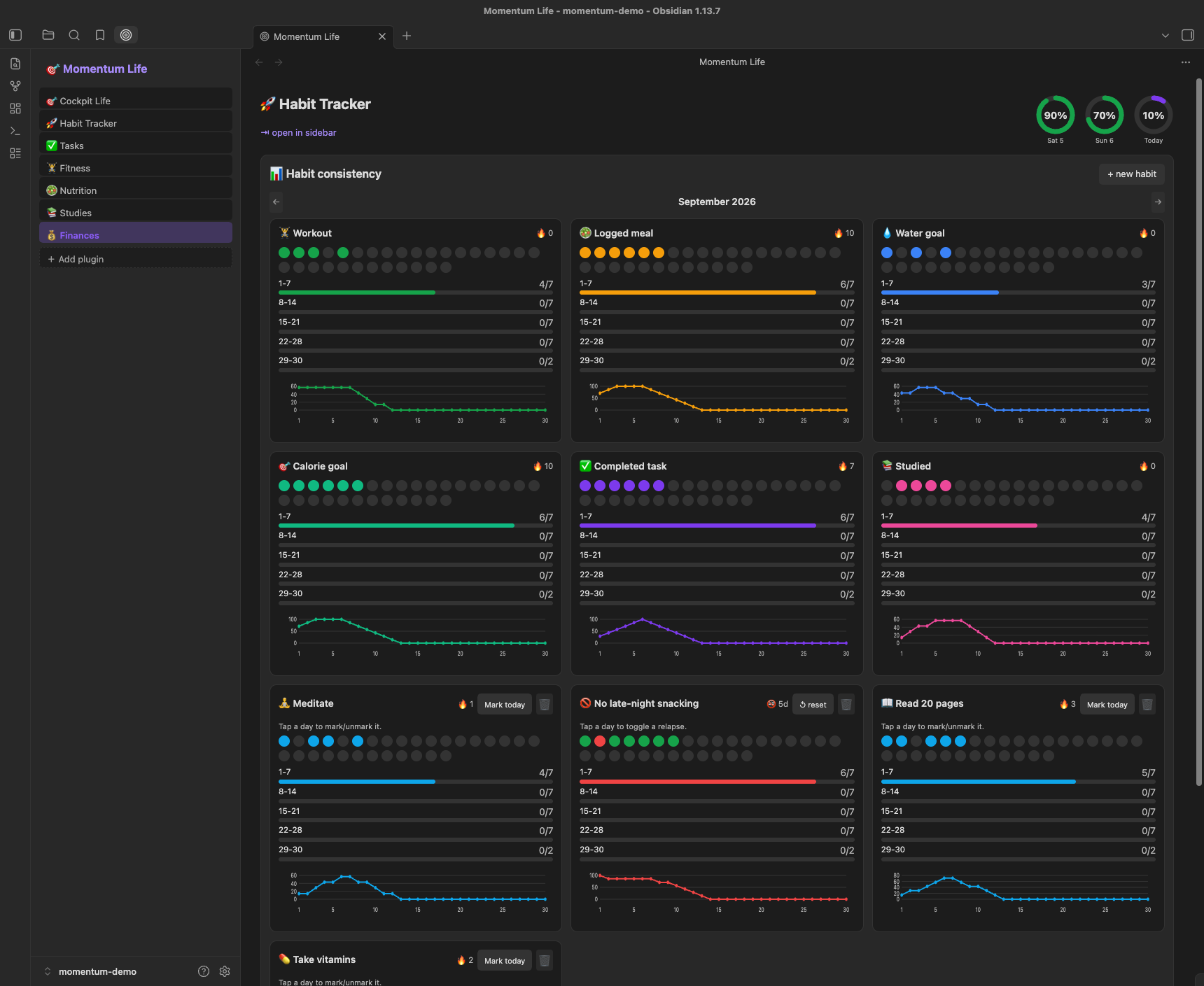
🚀 Habit Tracker
One monthly tracker per habit — tap any day to log it, including days you forgot.
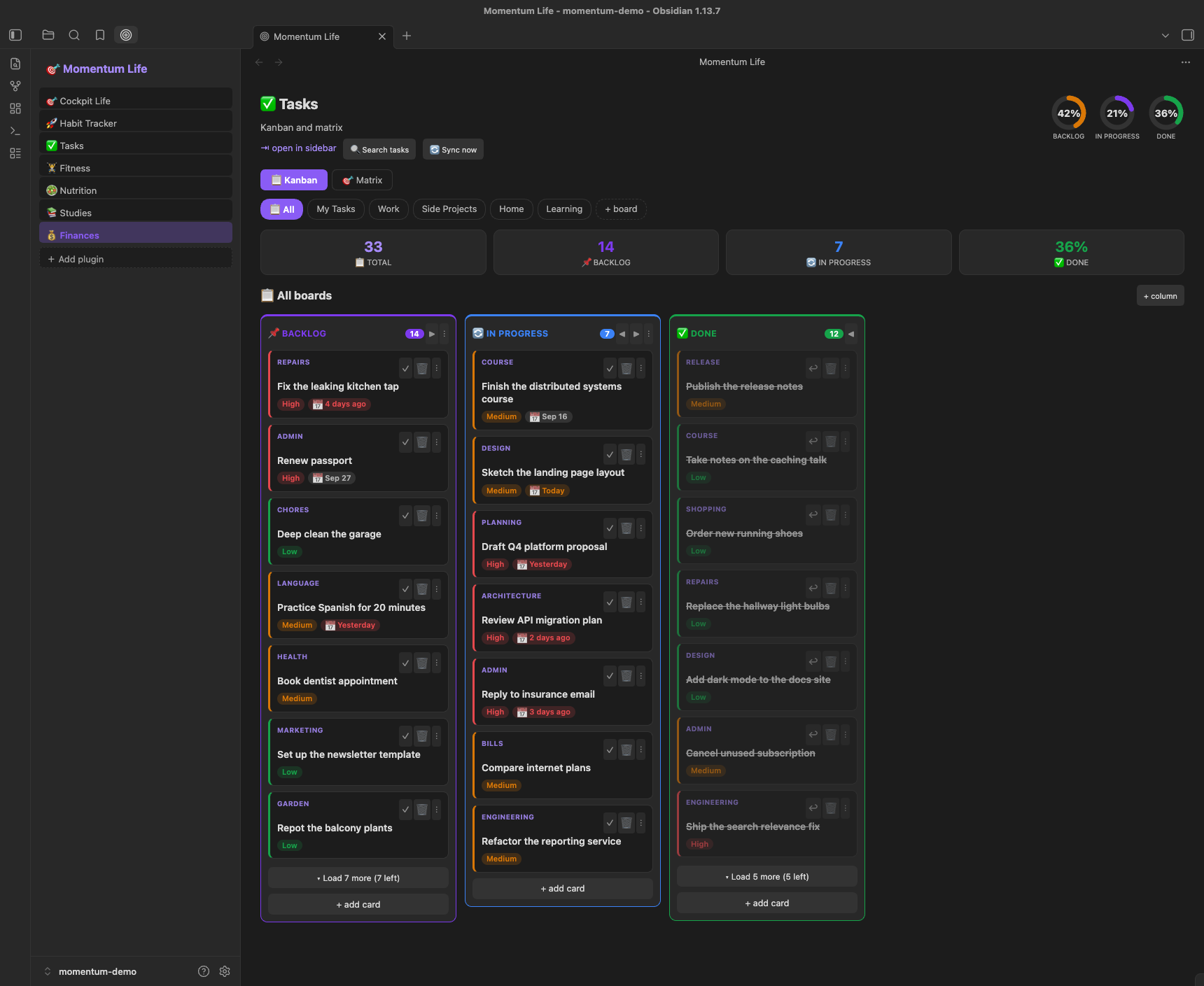
✅ Tasks
Kanban over folder-backed boards, plus an Eisenhower matrix you can drag tasks around in.
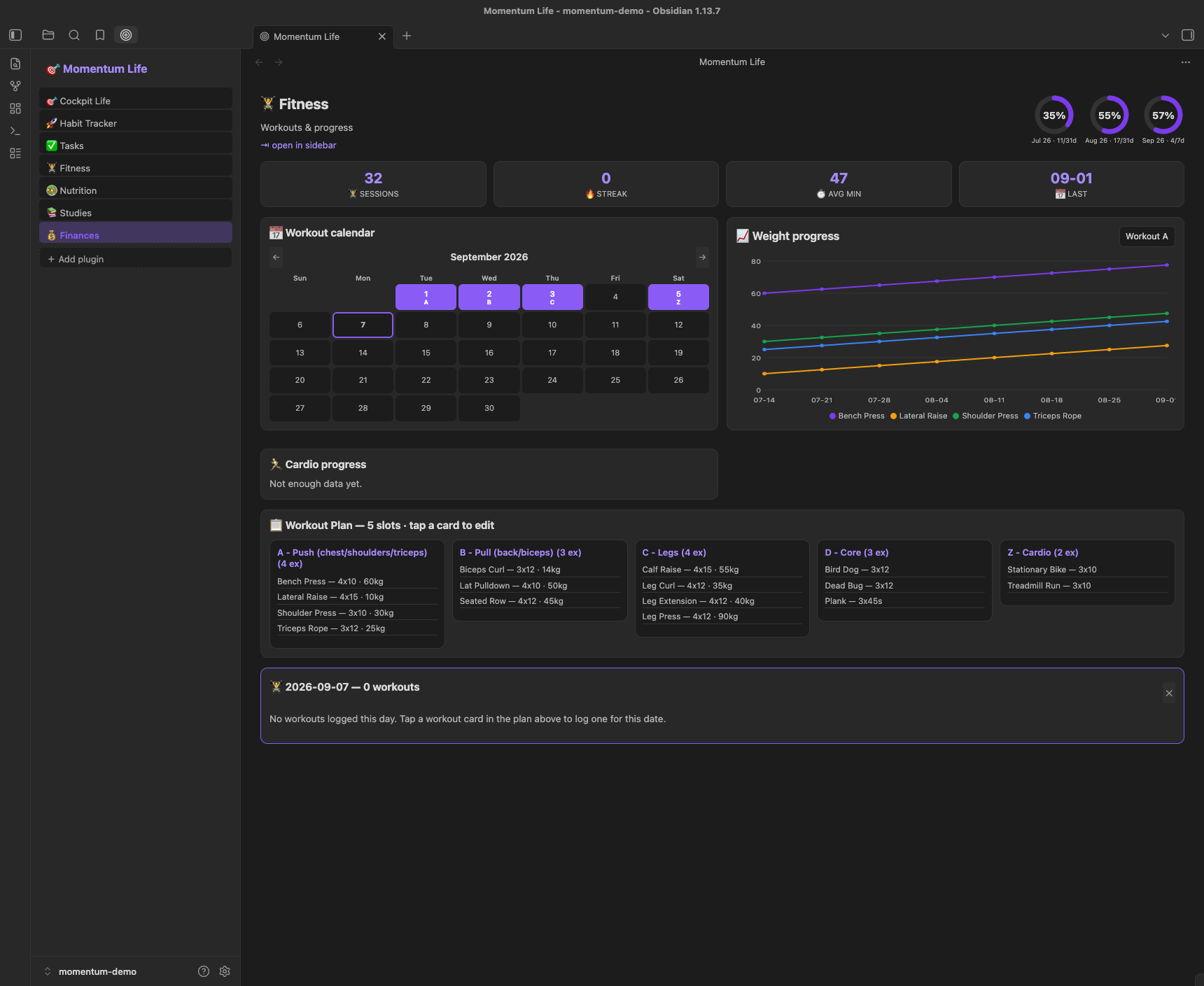
🏋️ Fitness
Splits, a live workout timer, and progress charts for both strength and cardio.
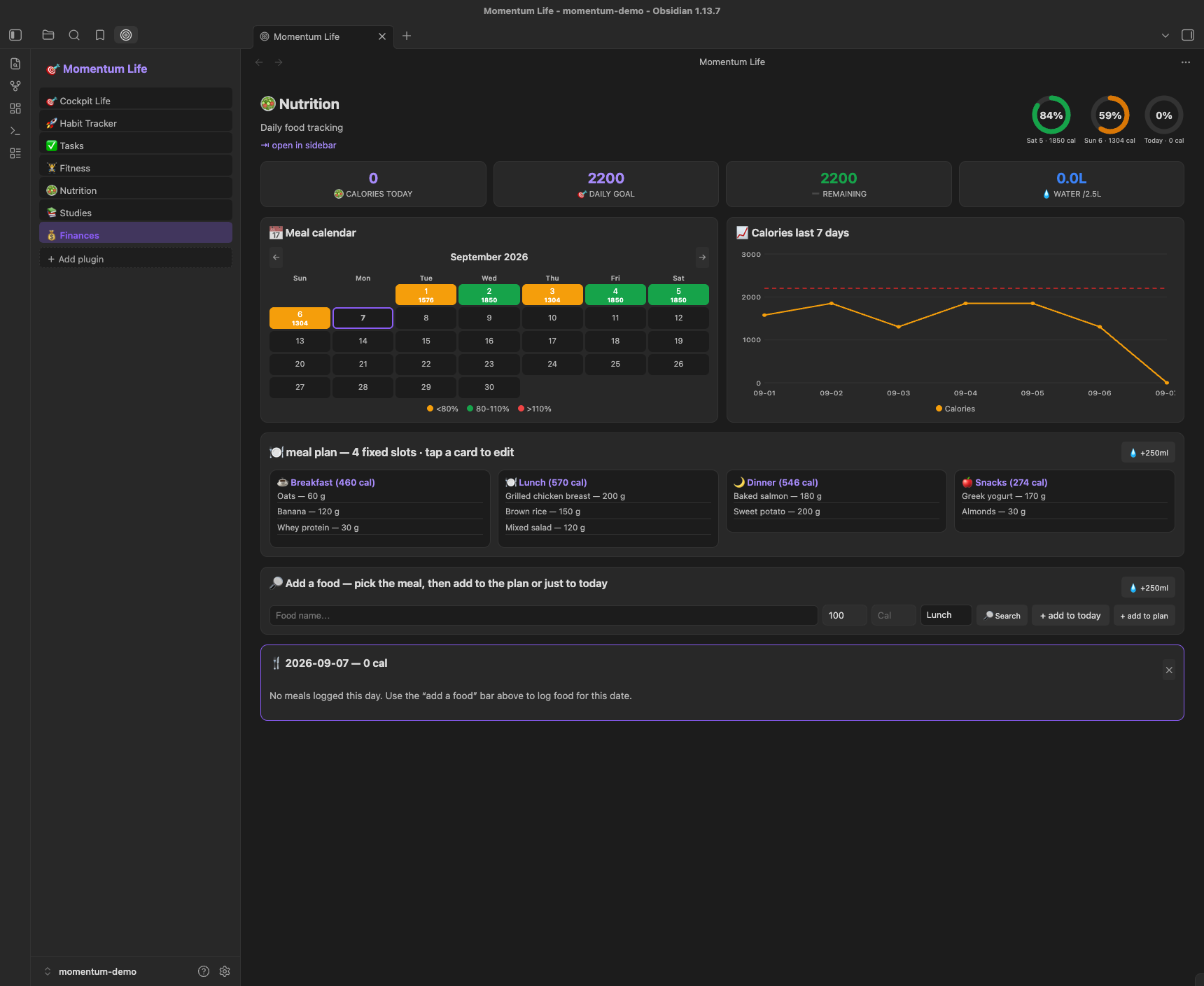
🥗 Nutrition
Four fixed meal slots, food search against Open Food Facts, and a calorie calendar.
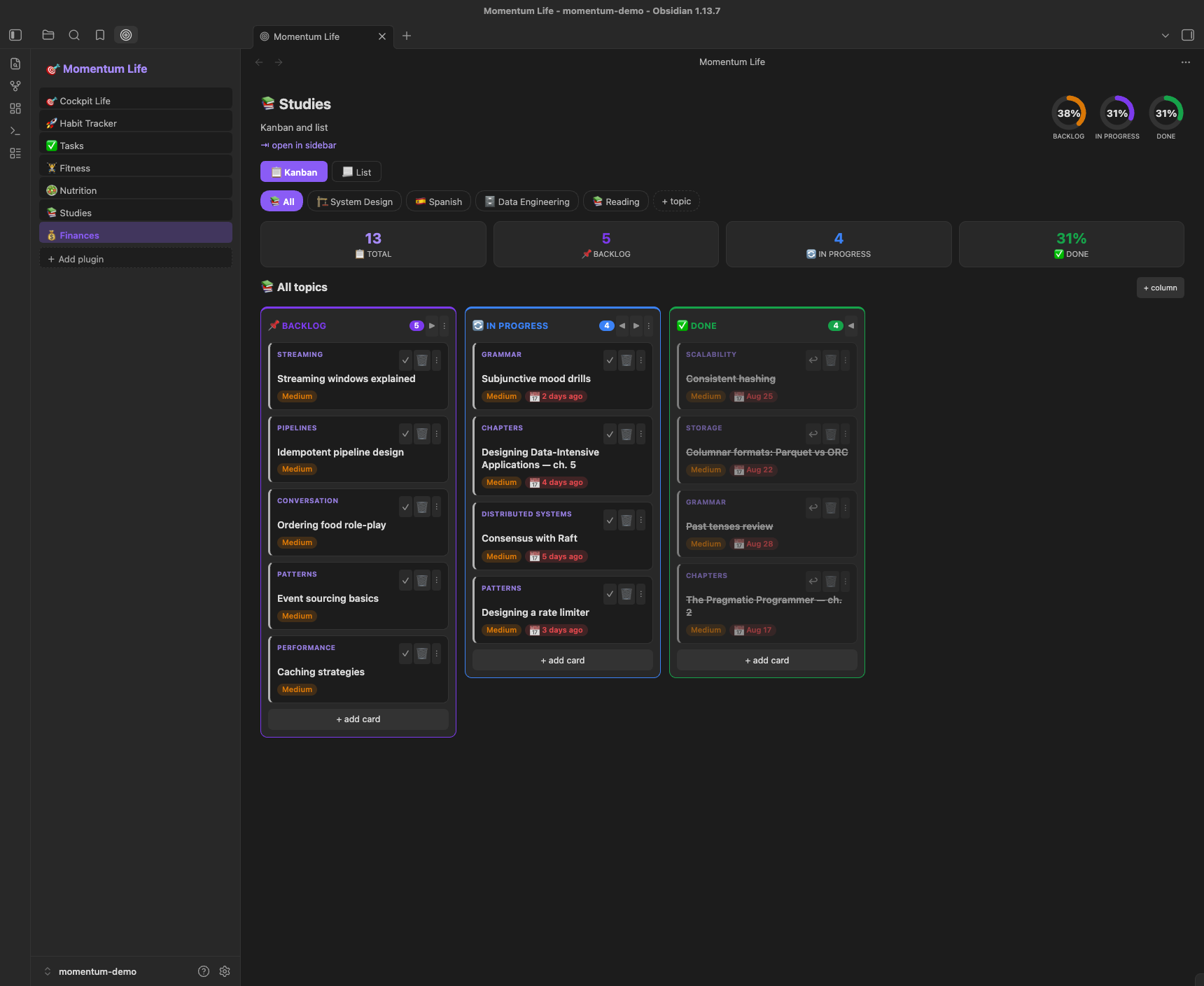
📚 Studies
A Kanban per topic, with subtopics and links to the material.
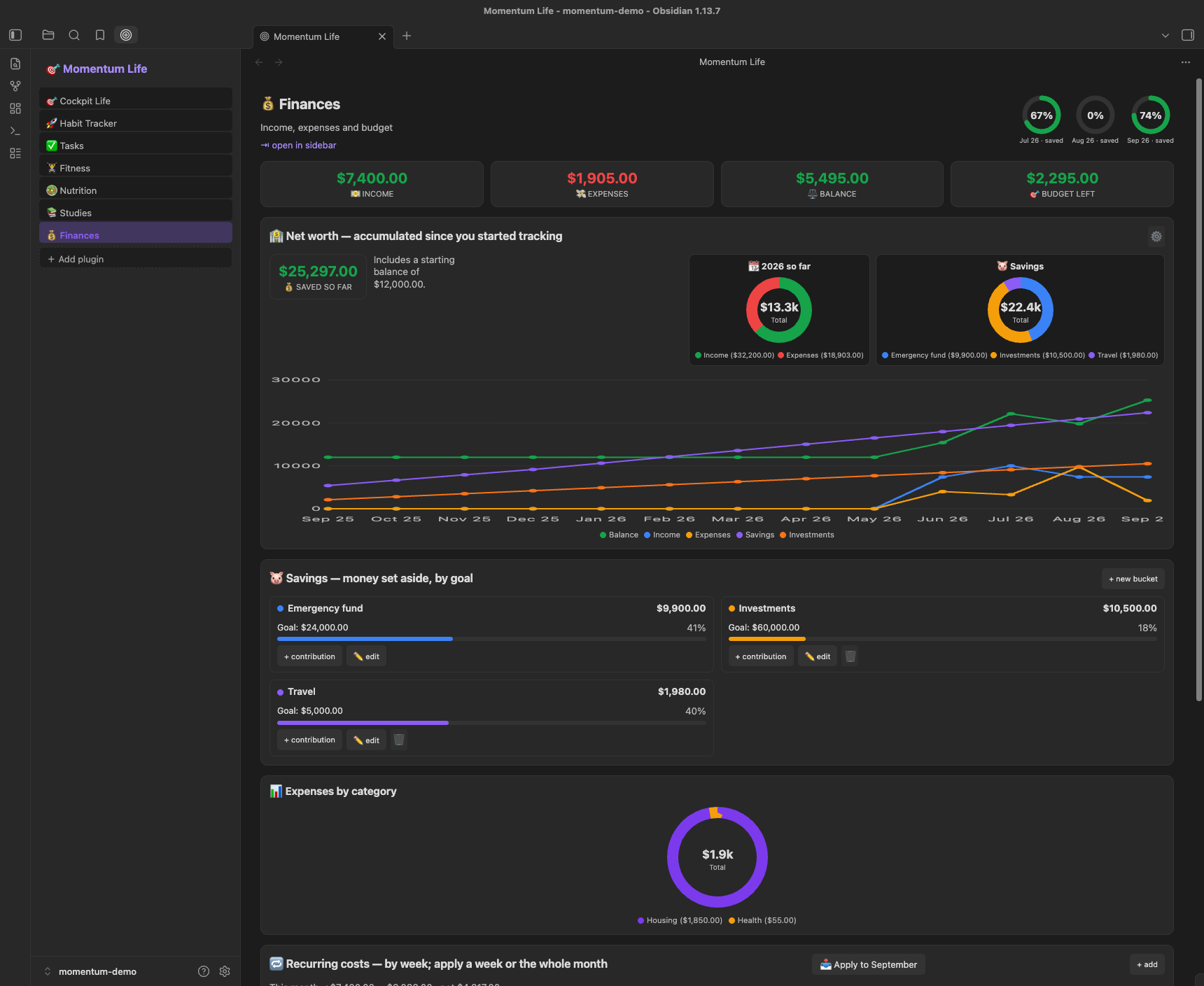
💰 Finances
Ledger and monthly breakdown, a net worth trend since you started tracking, and savings buckets with their own goals.
Cockpit Life
The default tab, built for a single daily pass instead of hopping between pages. Nothing here has its own data format — every action calls the same code the owning module's page uses, so the two views can't drift apart.
- Capture column — tasks due today or overdue with an inline
+ add(no modal, so you can type several in a row), today's habits with their current streak and a 7-day consistency bar, then per-topic study progress. - Trends column — tasks completed over 7 days, completion per board, workout minutes, calories, and the monthly balance, each with a one-tap action next to it (log water, add income or an expense).
- Open tasks column — every open task grouped by board, filterable by board, paged the same way the Kanban columns are. Completed tasks stay out of the way on their board.
- Four status donuts across the top: workouts by type, studies, tasks, and habits today.
Habit Tracker
Habits are tracked month by month, bullet-journal style, with all three chart styles per habit: a dot row, a bar chart and a line chart.
- Dots — one per day of the month. Tap any past or current day to log or unlog it, so a day you forgot to mark isn't lost.
- Weekly consistency — a horizontal bar per week showing how many of that week's days you hit.
- Rolling rate — a 7-day completion-rate line, to see the trend rather than a single day.
- Six habits are derived automatically from your other modules (workout, logged meal, water goal, calorie goal, completed task, studied); the rest are yours. Custom habits come in two flavours: do (build it, streak counts logged days) and quit (break it, streak counts days since the last relapse).
Finances
Beyond the ledger and the monthly category breakdown:
- Net worth — an accumulated trend since you started tracking, with lines for balance, income, expenses, savings and investments, over a fixed 13-month window that slides forward as time passes. An optional starting balance covers money you already had.
- Savings buckets — a fixed Emergency fund plus any buckets you create. Each has an optional goal and a dated contribution log; the balance is always derived from that log, so it can't drift out of sync with the entries.
- Recurring items — monthly and weekly templates, appliable a week at a time or for the whole month.
Google Tasks sync
Two-way sync between your Tasks boards and Google Tasks. Off by default — enable it under Settings → Google tasks.
- Each board maps to a Google Tasks list; the default My Tasks board pairs with your Google default list. Tasks are matched by a stable id, so renames don't create duplicates.
- Sign-in uses OAuth (PKCE) through a small hosted broker, so no credentials ship in the plugin and the same flow works on desktop and mobile.
- Deletion is guarded: if an unusually large number of tasks disappear at once, the sync asks you to confirm before removing anything on either side.
- Privacy: privacy policy — your tasks are stored only in your vault, and the broker never sees their content.
Connecting your Google account
The app has completed Google's OAuth verification, so connecting is the normal Google consent flow — no "unverified app" warning and no account limit:
- In Settings → Google tasks, turn on the sync and click Connect Google account.
- Your browser opens Google's consent screen. Review the requested permission — the plugin asks for Google Tasks access only — and click Continue.
- You're returned to Obsidian and the plugin confirms it's connected.
Momentum Pro
Momentum is free, and the whole life dashboard (habits, tasks, fitness, nutrition, studies, finances, file manager, Google Tasks sync, and Markdown/text Google Drive sync) stays free.
Momentum Pro is an optional one-time US$10 unlock for the heavier extras — currently binary file sync on Google Drive (images, PDFs, and other non-text files). During the closed beta, Pro features are unlocked for everyone at no cost.
- Payment is handled outside Obsidian by a merchant-of-record store (Gumroad / Lemon Squeezy), which collects tax and issues a license key. There is no in-app purchase and no server of ours.
- To activate, you paste the license key in Settings → Momentum pro. The plugin sends only that key to the store's verify API to confirm the purchase — nothing else (see Network use & privacy).
- The plugin's source is fully public; the license check lives in the open code. That's expected for a community plugin.
Terms: by activating Pro you accept the Pro & Beta Terms — in short: beta, "as is", no guaranteed support, and if the project is ever discontinued the intent is to open-source it (making Pro free) or hand it to a new maintainer. The free, local features never depend on us.
Install (dev)
npm installnpm run dev(watch) ornpm run build(production, one-off).- Copy/symlink this folder into your vault at
.obsidian/plugins/momentum-life/(must containmanifest.json,main.js,styles.css). - In Obsidian: Settings → Community plugins → enable "Momentum Life".
- Open via the command palette → "Momentum Life: Open" (panel in the left sidebar).
Network use & privacy
Momentum works offline by default. It only reaches the network in these optional cases, and only when you actively use them:
- Nutrition food search — queries the
Open Food Facts public API
(
world.openfoodfacts.org) over HTTPS, sending only the search term you typed. No API key or account required. - Google Tasks sync (opt-in) — when you connect and enable it, the plugin talks to Google's Tasks API and to a small OAuth broker (a Cloudflare Worker) that holds the app credentials server-side. Only your task titles, status and due dates plus your Google auth tokens are sent, and only for the tasks you sync. Disabled by default.
- Google Drive sync (beta, opt-in) — when you enable and connect it, the plugin talks to Google's Drive API and to a separate OAuth broker (its own Cloudflare Worker, isolated from Tasks). Only the files in the folder/scope you chose are synced, plus your Drive auth tokens. Disabled by default.
- Momentum Pro license check (only if you buy Pro) — to unlock paid features, the plugin sends only your license key to the store's public verify API (Gumroad/Lemon Squeezy), which answers whether the key is a valid purchase. No other data is sent, there is no server of ours involved, and this never runs unless you activate a license.
No personal data, vault content, or telemetry is transmitted otherwise. If you do not use these features, the plugin makes no network requests.
Data location
Set the Data root folder in plugin settings (default: Momentum Life).
| Path | Holds |
|---|---|
Tasks/<Board>/ |
One folder per board, one note per task. The folder is the board |
Tasks/Lists/<board>.md |
Markdown checklist mirrors, for interop with other plugins |
Habits/ |
One note per custom habit, with its date-keyed log |
Fitness/splits.md, Fitness/Exercises/, Fitness/Workouts/, Fitness/Months/ |
Splits config, exercise library, logged sessions, monthly hubs |
Nutrition/Plan/, Nutrition/Logs/, Nutrition/Months/, Nutrition/water.md |
Meal plans, logged meals, monthly hubs, water log |
Studies/boards.md, Studies/<Topic>/ |
Topic list and one note per study card |
Finance/Transactions/, Finance/Months/, Finance/recurring.md, Finance/savings.md |
Ledger, monthly hubs, recurring templates, savings buckets |
Notes/ |
Quick notes |
Config/settings.md |
Your settings (currency, targets, columns, board order) |
Task boards are plain folders, so creating a folder under Tasks/ creates a board and
dropping a .md file into one creates a task — the plugin adopts it, repairs its
frontmatter and files it. Tasks/_orphaned/ is an archive and is excluded everywhere.
Readable notes & monthly hubs
Finance transactions, Nutrition logs and Fitness workouts are saved with human-readable filenames, and each month gets a hub note so the file list and Graph View stay legible. Frontmatter is still the source of truth — filenames and hub notes are derived, regenerable views, so renaming or regenerating them never changes your data or totals.
Readable per-item names. Each item is one Markdown file named from its own fields (invalid filename characters are sanitized, accents preserved):
| Item | Filename pattern | Example |
|---|---|---|
| 💰 Transaction | <category>-<note>-<amount>-<YYYY-MM-DD> |
Groceries-Market-84.20-2026-06-30 |
| 🥗 Meal log | <Meal>-<kcal>cal-<YYYY-MM-DD> |
Lunch-620cal-2026-06-30 |
| 🏋️ Workout | <Split>-<duration>min-<YYYY-MM-DD> |
PushDay-45min-2026-06-30 |
The transaction note segment is dropped when empty, amounts always use two
decimals with a . separator (no income/expense marker in the name), and if two
items would share a name the plugin appends the smallest 2, 3, … suffix —
never a random string.
Module-prefixed monthly hubs. Each module keeps one hub per month under its
own Months subfolder, named <Module> <YYYY-MM MonthName> so basenames never
collide across modules:
Finance/Months/Finance 2026-06 June— Income, Expenses and Balance in your configured currency, plus a linked, date-sorted list of that month's transactions.Nutrition/Months/Nutrition 2026-06 June— total calories, average per day, days logged, total protein/carbs, and the month's logs.Fitness/Months/Fitness 2026-06 June— workout count, total minutes, a per-split breakdown, and the month's sessions.
Every item body gets a wikilink to its hub (for example [[Finance 2026-06 June]]),
and hubs are regenerated whenever you add or delete an item. A month with no
items has its hub removed automatically. There is no global cross-module hub.
Graph View tip. Because each item links to its <Module> <YYYY-MM MonthName>
hub, the Graph View naturally clusters your notes into one group per module per
month. Open the Graph View and the hubs become the center of each monthly
cluster — a quick visual timeline of your finances, nutrition and training.
Migrating an existing vault
If you already have legacy-named notes, run the command palette command
"Momentum: migrate notes to readable names". It renames Finance, Nutrition
and Fitness notes to the readable scheme, adds each hub wikilink at most once,
and regenerates the month hubs — for all three modules in one pass. The rename is
backlink-aware (existing wikilinks keep resolving) and body-preserving (manual
lines you added, such as Hub: [[Hub - Personal]], are kept). It is idempotent
and guarded, so running it again does nothing and reports zero renames. A
one-time guarded auto-run also fires the first time you open a vault on a new
schema version; the explicit command is always available to re-run it.
Backup, dry-run & rollback. Before migrating a large vault:
- Back up first — commit your vault to git or copy the data folder. This is the simplest full rollback.
- Dry-run preview — the migration supports a dry-run mode that computes the full report (renames, skips, hubs, warnings) without writing anything, so you can preview the impact before committing to it.
- Trash recovery — hub notes removed for empty months (and any file the migration replaces) go to Obsidian's trash, so you can restore them from Settings → Files & Links → recover deleted files.
Migration only touches filenames and hub notes; your transaction, meal and workout data lives in frontmatter and is never modified, so totals stay identical across renames.
Markdown schema
Each module reads and writes plain Markdown notes with YAML frontmatter. Examples:
# Tasks/<Board>/<title>.md
task_id: "uuid"
title: "Close the deal"
status: "in progress"      # one of the task columns
priority: "high"
kanban_name: "Side Projects"   # mirrors the folder; the FOLDER is the source of truth
group: "KCD 26"
due: "2026-09-30"
type: "task"
# Habits/<name>.md
id: "h1717171717"
type: habit
habit_type: "do"           # "do" (build it) or "quit" (break it)
name: "Meditate"
emoji: ⭐
log:                       # date -> logged (for "quit", a date means a relapse)
  2026-09-04: true
  2026-09-05: true
# Notes/<title>.md
title: "Idea"
color: yellow
type: note
Project structure
src/main.ts— plugin entry (view registration, command, settings).src/view.ts— dashboardItemView(sidebar + page router).src/context.ts— shared context (store + config + refresh).src/data.ts— Vault data layer (read/write/list + per-module loaders).src/types.ts— domain model + defaults.src/ui.ts— reusable Modal/Notice helpers.src/modules/*.ts— one renderer per page.styles.css— UI styles mapped to Obsidian theme variables.
Releasing
- Bump the version in
manifest.json,versions.json,package.jsonand theUSER_AGENTinsrc/foodapi.ts, then runnpm install --package-lock-onlyso the lockfile stays in sync (the release build usesnpm ci). - Tag it to match
manifest.jsonversion, with novprefix:git tag 0.6.9 && git push origin 0.6.9. The GitHub Action builds and attachesmain.js,manifest.jsonandstyles.cssto the release, with provenance attestations. - Verify:
gh attestation verify <asset> --repo jnagase/obsidian-momentum.
The community directory page renders
this README and reads manifest.json straight from the repo, so it picks up documentation
and screenshot changes on its own — there's nothing separate to upload there.