
README file from
GithubSquare Dance Module Box
Module Box is an Obsidian plugin for square dance callers. It replaces the box of 3×5 cards, one choreography module per card, that callers used to carry around. Your modules are notes in your Obsidian vault. When the dance floor reaches a formation, Module Box shows the modules that start there on a large, high-contrast screen you can read from the mic. When a module ends, it can offer the ones that start where that one finishes.
Module Box works on desktop only. It reads your notes and only writes to them when you toggle a flag on a card.
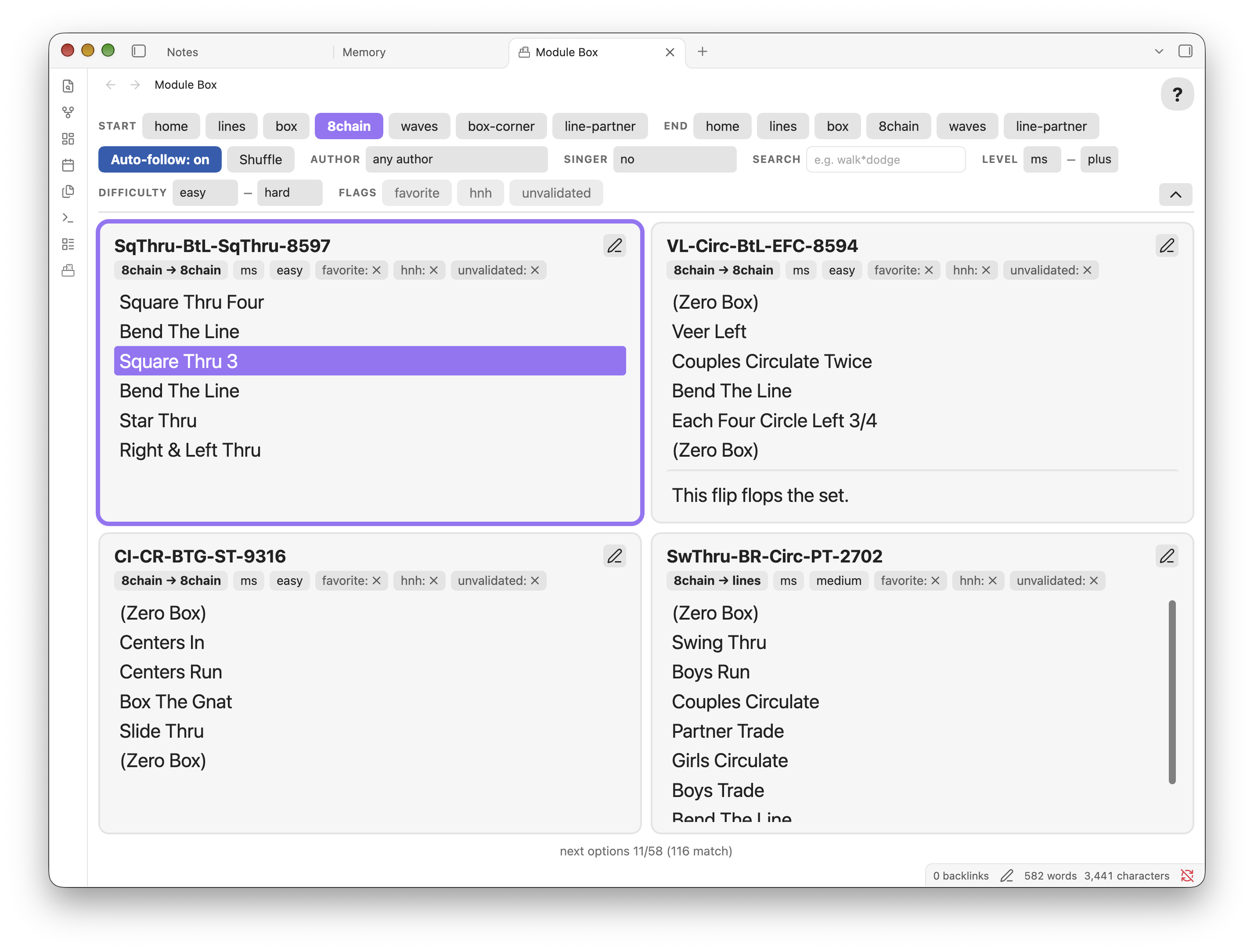
How the screen works
The view is a 2×2 grid of cards.
- Top row: the module you're calling now, plus one alternative. The selected card is outlined, and the arrow keys move a highlight through its calls so you can keep your place.
- Bottom row: the next two options, taken from the modules that match the
filters. Click one, or press
1or2, to call it next. The whole bottom row then moves up to the top row. - Auto-follow: when this is on, choosing a module sets the Start filter to that module's end formation, so the next options always chain on.
- Filters: Start and End formation, Author, Singer, a search of the calls,
Level and Difficulty ranges, and custom flags. The short filter bar shows Start,
End and Auto-follow, plus Author, Singer and Search while they're set. The
chevron under the
?button shows every filter.
The module order is shuffled each time the view opens and when you click the Shuffle button. Filters are remembered between sessions.
Writing modules
A module is a markdown note in the modules folder (Module-Box by default;
change it in the plugin settings). Subfolders are included, so you can organize
your modules however you like. Notes whose names start with _, such as _Template.md,
are skipped. A note must have start, end, and level properties to count as a module.
---
start: home
end: home
level: ms
difficulty: medium
author: Frank Lescrinier
favorite: true
---
Heads Square Thru 4,
Right & Left Thru,
Dive Thru,
Centers Square Thru 3,
Allemande Left

---

Anything after a --- line is a comment. It is shown on the card but not
searched, and the highlight skips the --- line.
| Property | Meaning |
|---|---|
start, end |
Formation names, such as home, lines, box, 8chain, waves. Use any names you like; the chips are built from the values in your notes. Chaining needs an exact match: a module ending in lines is followed by modules starting in lines. |
level |
Program level: ms, plus, a1, a2, c1 to c4. Any other value is listed as unk. |
difficulty |
easy, medium, or hard. A missing or other value is listed as unknown. |
author |
Any text. Filter by it with the Author select. |
singer |
Marks modules for singing calls, such as corner-progression or break. The Singer filter defaults to "no", which shows only modules without this property. |
| Flags | Any property that only ever holds true or false, such as favorite. Each one becomes a filter chip, and a chip on each card that toggles it in the note. A missing flag counts as false. |
Each line of the note body is one call. A trailing comma is removed.
Keyboard
Press ? in the view, or click the ? button, for the full list.
| Keys | Action |
|---|---|
↑ ↓ |
Move the highlight through the selected card's calls |
← → |
Page through more next options |
1 or [, 2 or ] |
Call the left or right next option |
h l p b c 8 w |
Toggle the Start filter: home, lines, line-partner, box, box-corner, 8chain, waves |
| Shift + the same key | Toggle the End filter |
a |
Toggle auto-follow |
s |
Re-shuffle |
f |
Show more or fewer filters |
/ |
Jump to the search box. Enter or Esc leaves it. |
The formation keys only work for formations that appear in your modules.
Search
Type words to find modules whose calls contain all of them, in any order.
* matches anything within one line, so walk*dodge finds both "Walk and
Dodge" and "Walk & Dodge". Case doesn't matter. Only the calls are searched,
not the comments after ---.
Installation
Install from Settings → Community plugins → Browse and search for "Square Dance Module Box". Then open the view from the card box icon in the ribbon, or with the "Square Dance Module Box: Open Module Box" command.
To install by hand, download main.js, manifest.json, and styles.css from
the latest release into
<vault>/.obsidian/plugins/module-box/, then enable the plugin under
Community plugins.