
README file from
GithubMission Control
Mission Control turns a configurable vault folder into a home-tab dashboard for tasks, projects, recurring work, bookmarks, recent files, and inbox notes.
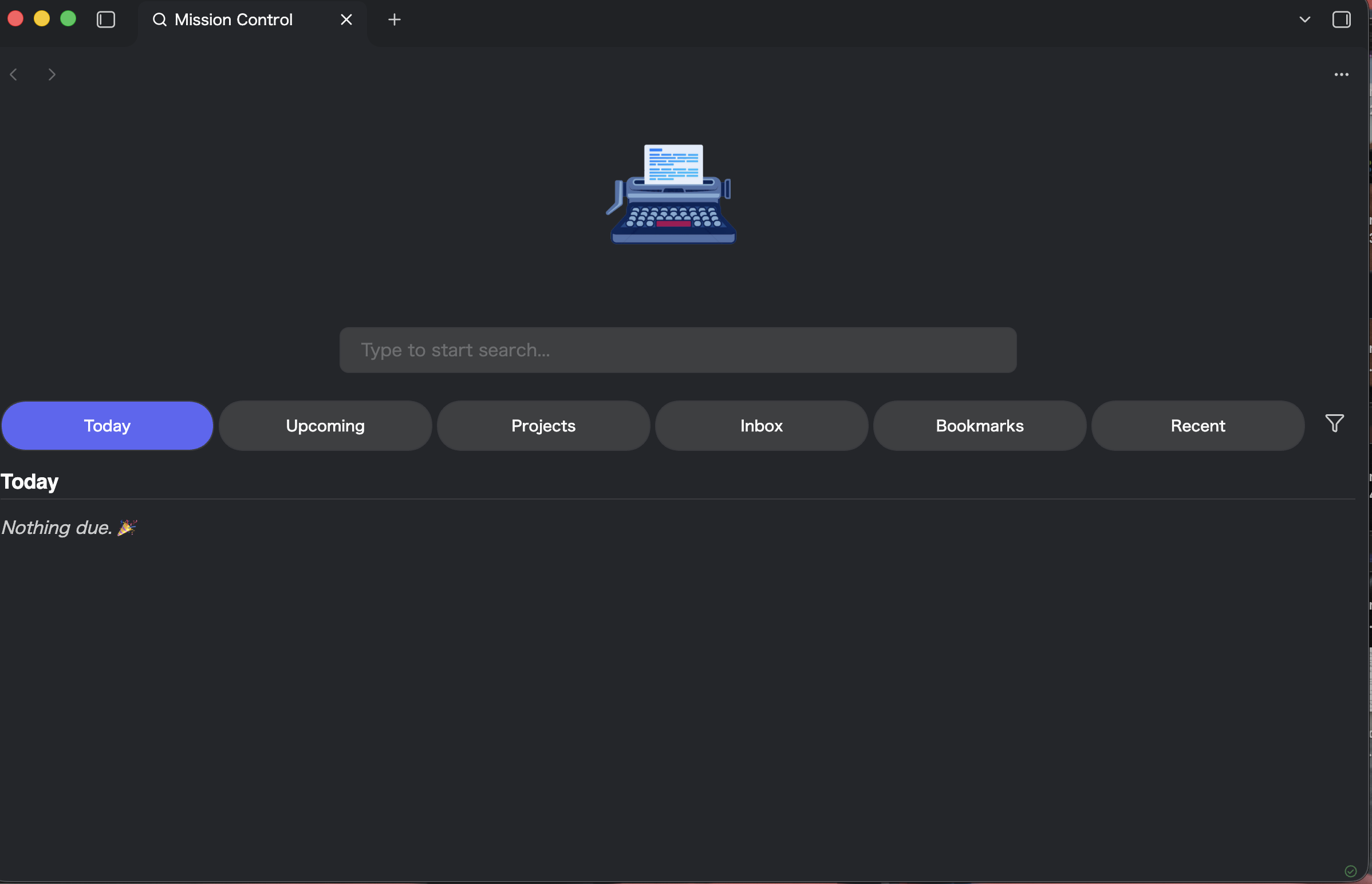
Features
- Today and upcoming task views with due, scheduled, overdue, priority, and in-progress states
- A Backlog view for undated work and anything dated beyond the upcoming window, so no open task is hidden
- A Done view of recently completed work, grouped by completion date
- Quick-add: type a task at the top of the dashboard to append it to your capture note, or to the selected project
- Project summaries grouped by source note and heading
- Recurring-task overview and automatic creation of the next occurrence when a task is completed
- Tag filtering on both note-level tags and tags written on the task line, including nested tags (selecting
#workmatches#work/q2) - Inbox, Bookmarks, and recent-file tabs
- Full-text search through the optional Omnisearch plugin, with a built-in filename fallback
- Configurable startup behavior, dashboard tabs, title, logo, fonts, and colors
- Desktop and mobile layouts
Mission Control reads task syntax used by Tasks and Dataview, but neither plugin is required.
Getting started
- Open Settings → Mission Control.
- Choose a Task source folder. Mission Control scans Markdown files in this folder recursively.
- Optionally choose an Inbox folder, enable or hide dashboard tabs, and configure the day boundary.
- Optionally set a Quick-add note to capture tasks from the dashboard.
- Run Mission Control: Open new tab or use the ribbon icon.
Quick-add takes the same syntax it reads, so Ship it 📅 2026-06-01 ⏫ #release creates exactly that task. With a project selected, it captures into that project note instead of the quick-add note.
Mission Control recognizes Markdown task lines such as:
- [ ] Write release notes 📅 2026-08-12 ⏫ #release
- [ ] Weekly review 🔁 every week ⏳ 2026-08-14
- [/] Investigate mobile layout [priority:: high]
The Done view lists tasks by their ✅ completion date and reaches back as far as the Completed window setting. Tasks completed without a ✅ date aren't listed — there's no way to tell whether they're recent. Mission Control stamps the date on anything it completes itself.
Supported task states are open ([ ]), complete ([x]), in progress ([/]), and cancelled ([-]). Supported date fields include due (📅), scheduled (⏳), start (🛫), completion (✅), and created (➕).
Optional integrations
- Omnisearch: enables full-text results in the search bar. Without it, Mission Control searches filenames and aliases.
- Bookmarks: enables the Bookmarks dashboard tab when Obsidian's core Bookmarks plugin is active.
Manual installation
Download main.js, manifest.json, and styles.css from a release and place them in:
<vault>/.obsidian/plugins/mission-control/
Restart Obsidian, then enable Mission Control under Community plugins.
Development
Requires Node.js 18 or newer.
npm ci
npm run dev
npm test          # logic tests + component render tests
npm run build
npm run check     # lint + test + typecheck + build
Component styles are extracted into styles.css at build time rather than injected from JS, so they can be overridden with a CSS snippet.
The UI is written with Svelte 5 runes; the compiler runs with runes: true, so legacy syntax is rejected rather than silently compiled in compatibility mode.
Set VAULT_PLUGIN_DIR and run npm run deploy to copy a production build into a development vault.
Credits
The home-tab shell was adapted from obsidian-home-tab by Lorenzo (olrenso), under the MIT License. Its original license is preserved in licenses/obsidian-home-tab-LICENSE.
Mission Control is released under the MIT License.