
README file from
GithubMermaid Standard
Bring upstream mermaid back to Obsidian. Since Obsidian 1.15, ```mermaid blocks are drawn by Obsidian's own engine (lib/pele.min.js, "Pele") instead of mermaid. Pele parses the syntax fine, but it drops the decoration layer — theme, look and themeVariables are silently ignored, so a note that asks for theme: forest and look: handDrawn renders in Obsidian's plain grey style.
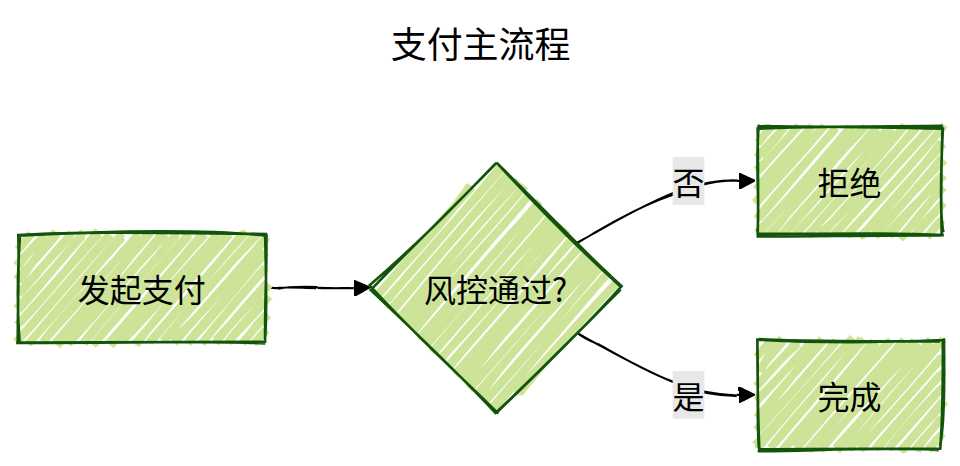
This plugin hands rendering back to real mermaid, so those settings work again:
---
title: Payment flow
config:
  theme: forest
  look: handDrawn
---
flowchart LR
    Pay[Pay] --> Risk{Risk ok?}
    Risk -->|no| Reject[Reject]
    Risk -->|yes| Done[Done]
How it works
Reading view and live preview both end up calling pele.mount(el, source, opts). The plugin wraps window.pele (its exports are getter-only, so a Object.create(pele) wrapper is used instead of mutating) and replaces mount with a mermaid renderer that returns the same controller shape (result / source / error / zoom / update / refresh / destroy) and still calls opts.onRender, so Obsidian's link post-processing keeps working.
- One
mermaid.initialize()per render:themefollows the app (theme-dark→dark),fontFamilyfollows--font-mermaid. - Frontmatter
config:and%%{init}%%directives still win over those defaults. securityLevel: 'strict',suppressErrorRendering: true— syntax errors become a single red line instead of an injected error diagram.- Bundled engine: mermaid 11.17.2 (~3.4 MB
main.js).
Compatibility
| Obsidian | 1.15.0+ (before 1.15 the app already used mermaid 11.13) |
| Mobile | untested — no Node APIs are used, so it should work |
| Diagram types | everything upstream mermaid 11.13 supports; zenuml is not supported |
| Other plugins | none required |
Install
- Community plugins: browse for "Mermaid Standard" once it is listed.
- BRAT: add
dmstory/obsidian-mermaid-standard. - Manual: copy
main.js,manifest.jsonandstyles.cssinto<vault>/.obsidian/plugins/mermaid-standard/, then enable it in Settings → Community plugins.
After enabling, scroll the open note or run the command Re-render diagrams in current note.
Limitations
The plugin hooks window.pele.mount, an internal API. A future Obsidian release may change it — when that happens the hook quietly stops applying and you get stock Pele rendering back (no crash, no data loss).
Development
npm install
npm run dev    # watch build
npm run build  # production build -> main.js
npm version patch|minor|major bumps manifest.json and versions.json via version-bump.mjs; the tag push triggers .github/workflows/release.yml, which builds and attaches main.js, manifest.json and styles.css to the GitHub release.
Review notes
The community directory's automated review reports two things worth explaining up front:
- Dynamic code execution (
eval/new Function) — this comes from the vendored mermaid bundle (one small helper inside mermaid's own code), not from plugin code.src/main.jscontains noeval, nonew Functionand no remote code loading; everything is bundled at build time by esbuild. - Artifact attestations — releases are built by
.github/workflows/release.yml, which attestsmain.js,manifest.jsonandstyles.csswithactions/attest-build-provenance, so the assets are verifiable against this repository.
The plugin makes no network requests and collects no telemetry. It only swaps one method on window.pele inside the app.
中文
Obsidian 1.15 起用自研的 Pele 引擎替换了 mermaid.js,theme / look / themeVariables 等标准 mermaid 配置不再生效。本插件接管 pele.mount,改回官方 mermaid 渲染,让这些配置恢复正常。安装后在「设置 → 第三方插件」里启用即可。
License
MIT