
README file from
GithubMengshi Cockpit
An all-in-one Obsidian workbench plugin — Calendar, Projects, Todos, Gantt, Feishu (Lark), and Claude Code Sessions in a single interactive dashboard.
A Chinese translation is available at README.zh-CN.md.



Features
| Tab | Name | What it does | Highlights |
|---|---|---|---|
| 📅 | Calendar | Two views: 日新 (monthly grid, daily summary + status) and 月异 (quarter month-cards + weekly cards with weekly-report tags & busy lights; month → daily view) | One-click daily note, inline status editing, weekly/monthly report skeleton generation from diary draft |
| 📂 | Projects | Auto-scan project folders, two-dimensional categorization, card view | Auto-discovers projects, editable tags/categories, maintainable links |
| ✅ | Todos | Aggregates - [ ] tasks from multiple sources; checking a box writes back to the source file |
Groups by project, collapses completed items, skips template noise |
| 📊 | Gantt | Gantt timeline, drag scheduling, multi-phase, milestones | Today line, phase bars, two-way README sync |
| 📡 | Feishu | Feishu Wiki / Drive browsing, project categorization, link checks, smart meeting notes | Deep scan, auto-categorization, access stats, file moves |
| 💬 | Sessions | Visualize Claude Code and CodeM sessions, group by project, archive & harvest status | Turn details, session archiving (out of 30-day cleanup scope), one-click resume, harvest marker |
🖊 Quick capture: a bottom FAB offers "Diary / Todo / Project" quick entry (not a separate panel).
Reports & Skills
- One-click weekly / monthly report skeleton from the calendar: pick «📝 extract draft from diary» (auto-aggregate project tags + daily one-liners + status stats into
ai_summary) or «🧱 empty skeleton (fill by hand)». - Bundled skills, one-click install from Settings → Sessions:
session-harvest— summarize a conversation into vault noteswork-report— keep local diary → generate weekly / monthly reports (fully local, no personal info bundled)- Installs to
~/.claude/skills/or~/.agents/skills/; existing files are backed up to.bak.
Demo
| Calendar | Gantt |
|---|---|
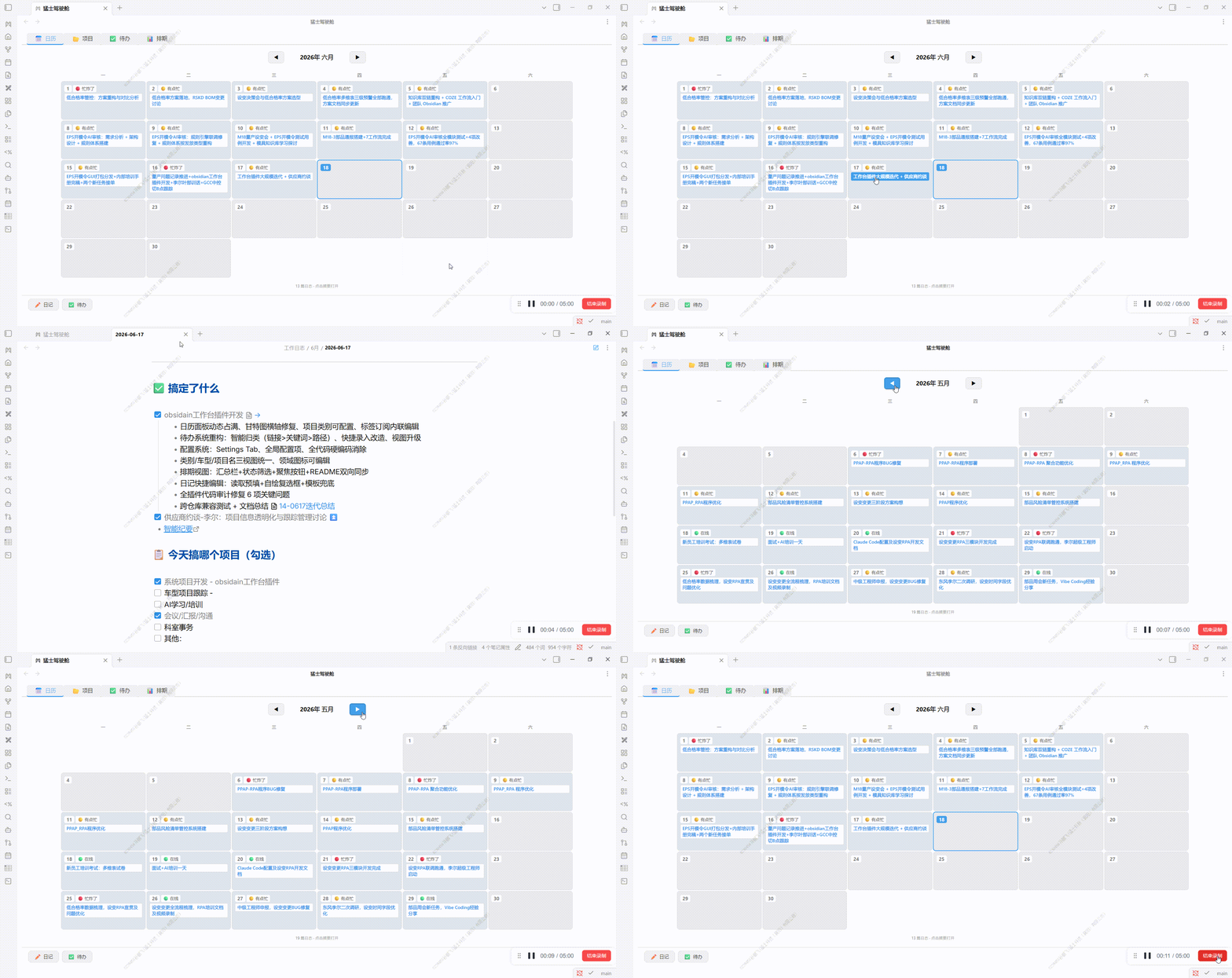 |
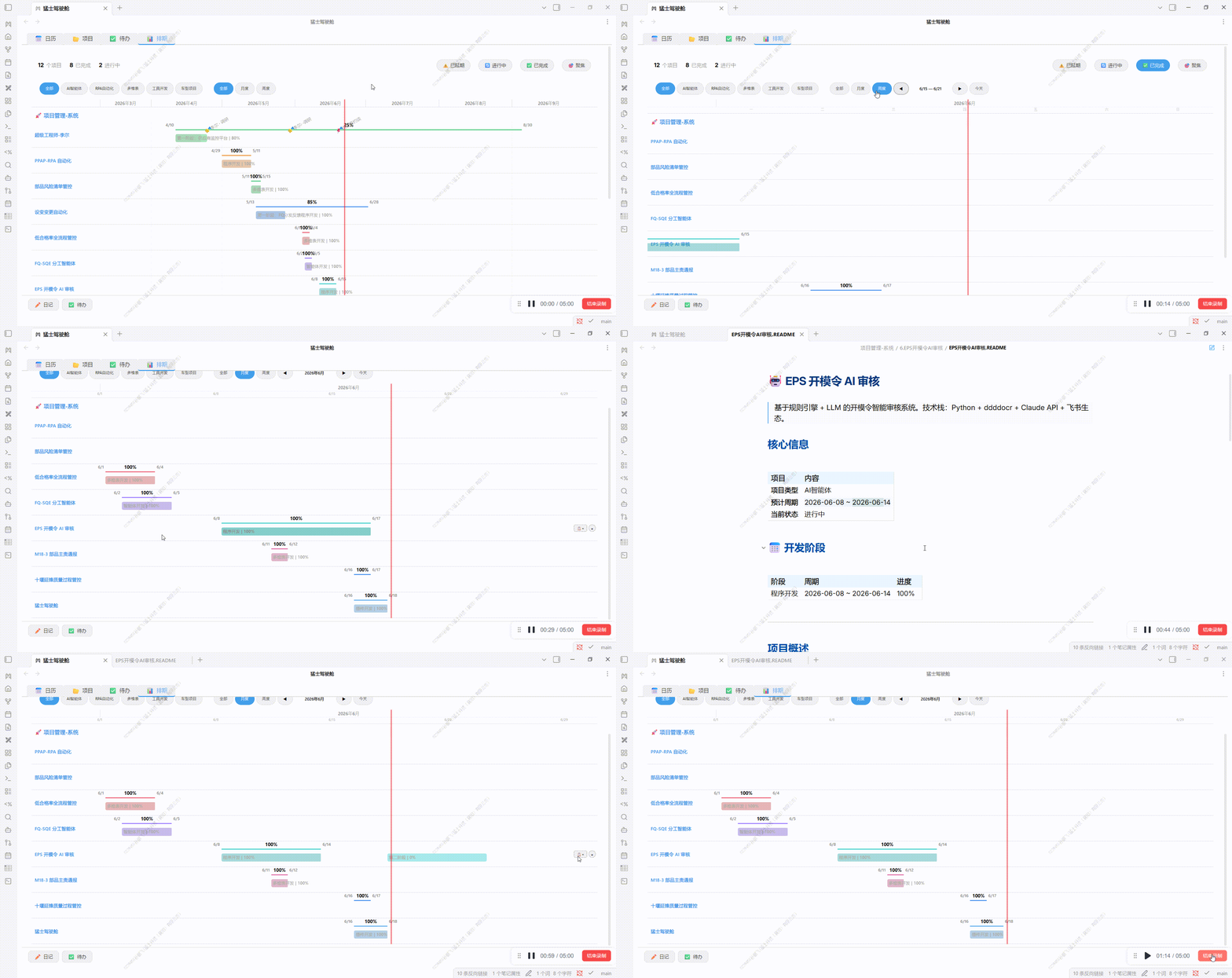 |
Installation demo: see
assets/demo/插件安装.gif.
Installation
From Obsidian Community Plugins (recommended)
- Open Obsidian → Settings → Community plugins → turn off Restricted mode
- Community plugins → Browse → search Mengshi Cockpit → Install and enable
- A shield-shaped icon appears in the ribbon; click it to open the workbench
Manual install (Release)
- Download the latest
main.js,manifest.json,styles.cssfrom Releases - Put them into
.obsidian/plugins/mengshi-workbench/in your vault - Settings → Community plugins → Enable
Build from source
git clone https://github.com/Spenf710/obsidian-mengshi-cockpit.git
cd obsidian-mengshi-cockpit
npm install
# Build directly into your vault's plugin folder (recommended):
OBSIDIAN_VAULT="C:/path/to/your/vault" npm run build
# Or build to ./dist and copy manually:
npm run build
Output directory priority: OBSIDIAN_VAULT env var → local .obsidian → ./dist.
Setup
The plugin works out of the box, but configure it under Settings → Mengshi Cockpit for the best experience:
| Setting | Description | Default |
|---|---|---|
| Work log folder | Folder for daily notes | Empty → "工作日志" |
| Diary template | Template used for new notes | templates/工作日志.md |
| Project roots | Project-type folders (multiple allowed) | Empty → add manually |
| Default categories / tags | Vocabulary for project classification | 通用 / 其他 |
| Tabs | Toggle the 6 tabs independently | All on |
Feishu (optional)
The Feishu panel relies on the external lark-cli tool (install and log in yourself):
npm install -g @larksuite/cli
lark-cli auth login
The plugin auto-detects lark-cli (with a npx fallback); a guide is shown when it is missing.
Sessions (optional)
The Sessions panel reads local Claude Code session records (~/.claude/projects/) — no setup needed. "Loop / Open in Claude" requires the Claude Code CLI; buttons show a hint when it is absent.
Privacy & Data
- Everything is processed locally: it reads your vault's
.mdfiles, optionally reads~/.claude/projectssession JSONL, and calls Feishu cloud APIs (vialark-cliusing your own credentials) only when you open the Feishu panel. - Nothing is uploaded to third parties: Feishu calls only happen when you perform a panel action (browse / search / stats).
- Settings (including personal overrides) are stored in
.obsidian/plugins/mengshi-workbench/data.json.
Development
npm run dev    # watch mode + static file sync
npm run build  # production build
- Source:
src/main.ts(plugin shell) +src/data/*(data layer) +src/views/*(view layer) - Build: esbuild bundle →
main.js; standalonestyles.css;manifest.jsonversion aligned with the release tag
Platform
| Item | Details |
|---|---|
| Minimum version | Obsidian ≥ 1.7.2 |
| Desktop | ✅ (requires Node runtime; Loop / Sessions / Feishu CLI / Gantt are desktop-first) |
| Mobile | Not published (isDesktopOnly: true) |
Credits & License
- The logo is an original military-style creation with no third-party copyright dependencies.
- Released under the MIT License.