
README file from
GithubMarp Extended for Obsidian


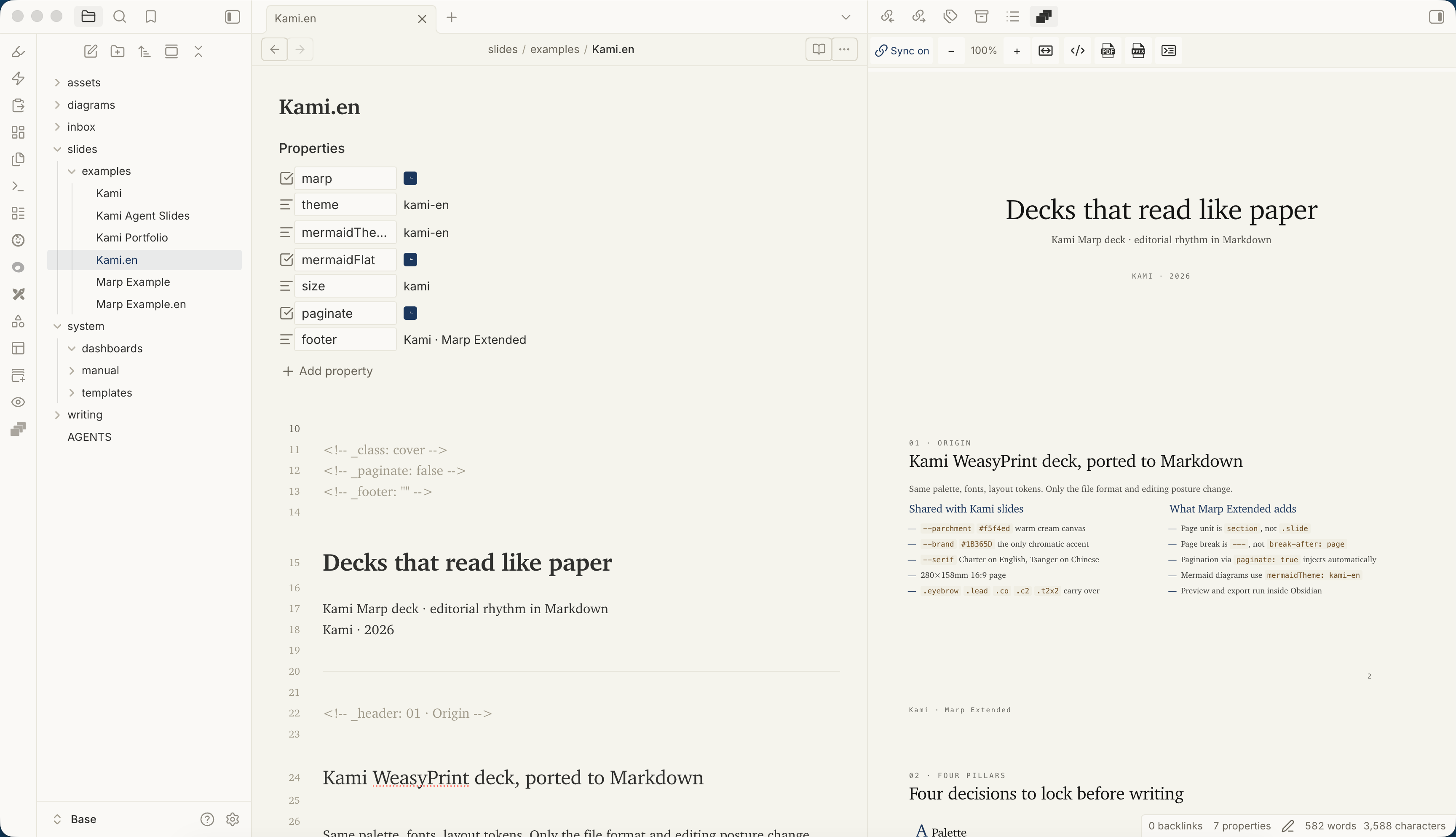
Marp Extended is an Obsidian plugin for creating, previewing, presenting, and exporting Marp slide decks from Markdown notes.
Project lineage: Marp Extended originated from Samuele Cozzi's Marp Slides for Obsidian and is now maintained as an independent plugin project. Upstream credits are preserved below.
Features
- Preview Marp slides inside Obsidian.
- Export slide decks as HTML, PDF, or PPTX through a user-installed Marp CLI.
- Present slide decks from the plugin.
- Use bundled Marp theme CSS installed into
.marp-extended/themes/on first load, plus custom theme CSS from your vault. - Add custom Marp themes by pasting CSS in plugin settings.
- Convert Obsidian image wiki-links to standard Markdown image links for preview/export.
- Convert note wiki-links (
[[path|alias]]) to clickable internal links in the preview sidebar; exports keep only the display text. - Built-in Mermaid diagrams rendered with
beautiful-mermaidand official Mermaid, featuring zoom and pan in Live Preview and Reading view (can be toggled in settings). Reading view omits the show-source button. - Auto-fit long linear
flowchart LR/TD/TBchains into compact zigzag bands so slide scaling keeps node text readable. Turn this off in Settings → Auto-fit wide Mermaid flowcharts. - Use standard Marpit fragments and presenter comments in preview, with fragment commands and a resizable notes panel labeled by slide.
- Keep the Markdown note and Deck preview in sync while Sync preview is on: the pane you are using drives the other pane. See preview sync.
- Add theme-independent Marp Extended comment markers for slide metadata, semantic text, callouts, 1–6 columns, and configurable card grids.
- Keep preview and managed exports on the same shipped Marp Core 5 semantic engine.
Markdown compatibility
Marp Extended renders slides with Marp, so notes should primarily use Marp-compatible Markdown. Obsidian image embeds are supported as a convenience by converting image wiki-links before preview/export.
Supported image wiki-link forms:
| Obsidian syntax | Converted Marp-compatible syntax |
|---|---|
![[image.png]] |
 |
![[image.png|Alt text]] |
 |
![[image.png|600]] |
 |
![[image.png|600x400]] |
 |
For example:
![[Pasted image 20260625124927.png]]
![[Pasted image 20260625124927.png|Screenshot]]
![[Pasted image 20260625124927.png|600]]
![[Pasted image 20260625124927.png|600x400]]
These are converted to standard Markdown image links / Marp image directives. Paths are URL-encoded so spaces become %20:


When possible, the plugin resolves the image through Obsidian's link resolver and emits a path Marp can read. If the image cannot be resolved, the plugin falls back to treating the wiki-link target as a path relative to the current note.
Note wiki-links are also recognized:
基于 [[sources/transcripts/聊聊朱镕基那个时代和经济政策|来源笔记]] · 再快一点
The slide shows the alias (来源笔记; without an alias, the raw link path). In the preview sidebar the text is clickable and opens the note inside Obsidian (Cmd/Ctrl-click or middle-click opens a new tab; unresolved targets only show a notice). Links with heading or block subpaths ([[Note#Section]], [[Note#^block]]) navigate to that location. In HTML/PDF/PPTX exports the link is dropped and only the display text remains. Wiki-link-like text inside fenced code blocks and inline code spans (for example Mermaid A[[subroutine]] shapes or `[[x]]` samples) is left untouched.
Other Obsidian-only extensions are not converted automatically. If Marp does not support an Obsidian syntax directly, write it in standard Markdown or Marp syntax.
Marp Extended inherits standard Marpit slide splitting, directives, images, backgrounds, scoped styles, fragmented lists, and presenter comments. Marp Core adds fitting headings, emoji, math, code highlighting, inline SVG, and other Marp features. The plugin supplies the host behavior that Marpit leaves to an integrating application: fragment stepping and a presenter-notes panel in the Obsidian preview.
See also:
Marp Extended syntax
Marp Extended adds an Obsidian-friendly %%marp-*%% layer only where standard
Marp/Marpit Markdown has no equivalent. The markers compile before preview and
export, while their contents remain ordinary Markdown.
| Purpose | Canonical syntax |
|---|---|
| Current-slide directives | %%marp-slide[class=cover paginate=false]%% |
| Lead, subtitle, metadata | %%marp-lead%%, %%marp-subtitle%%, %%marp-metadata%% |
| Themeable callout | %%marp-callout[variant=warning]%% |
| Columns | %%marp-columns%%, split with %%marp-column%% |
| Card grid | %%marp-cards[columns=2]%%, split with %%marp-card%% |
For example:
%%marp-columns%%
### Left
Column content
%%marp-column%%
### Right
Column content
%%/marp-columns%%

%%marp-callout[variant=note]%%
A themeable callout.
%%/marp-callout%%
Callouts are visible slide content; presenter notes use ordinary Marpit
<!-- comments -->. See
Marp Extended syntax for every marker, generated
class, nesting/fence rule, and runtime control, and
preview sync for how the note and Deck preview follow
each other.
Recommended Obsidian workflow with Pivi
For AI-assisted slide authoring inside Obsidian, we recommend using Marp Extended together with Pivi. Marp Extended previews, presents, and exports the deck; Pivi can work with the open note, linked vault context, selected text, and reusable Agent Skills without leaving Obsidian.
This repository includes an obsidian-marp Agent
Skill that teaches Pivi the supported Marp,
Marpit, Marp Extended, theme, Mermaid, image, and export conventions. To install
it:
- Install Pivi from Obsidian Community Plugins and configure a model.
- Open Settings → Pivi → Agent → Skills.
- Under Install from remote, enter
https://github.com/shuuul/obsidian-marp-extended/tree/main/skills/obsidian-marpand choose List skills. - Select obsidian-marp, then choose Install selected skills.
On the next Pivi chat turn, select /obsidian-marp from the slash menu and ask
it to create, revise, debug, or export the current slide note. For example:
/obsidian-marp Turn the current note into a concise 10-slide deck using the Kami theme.
Getting started
Install from Obsidian Community plugins
Marp Extended is submitted to the Obsidian community plugin directory:
https://community.obsidian.md/plugins/marp-extended
Open the plugin page in Obsidian or search for Marp Extended in Settings → Community plugins → Browse.
Install with BRAT
Beta builds are published as GitHub Pre-releases and can be installed with BRAT. Beta builds may be unstable:
- Install and enable the BRAT plugin in Obsidian.
- Open BRAT settings and choose Add Beta plugin.
- Paste this repository URL:
https://github.com/shuuul/obsidian-marp-extended. - Enable Marp Extended in Obsidian community plugin settings.
Run BRAT: Check for updates to beta plugins and UPDATE to install a newer beta. Remove Marp Extended from BRAT tracking before returning to the Community Plugins stable channel.
First use
- Install from the Obsidian community plugin directory, install with BRAT, or build the plugin into your vault's
.obsidian/plugins/marp-extended/directory. - Enable Marp Extended in Obsidian community plugin settings.
- On first load, Marp Extended installs bundled, managed default theme CSS into
.marp-extended/themes/. Fork a bundled theme in settings before editing it. - Open a Markdown note and run Slide Preview from the command palette or ribbon icon.
- To export, install or configure Marp CLI (or enable npx fallback) and then use the export commands for PDF, PDF with notes, HTML, or PPTX.
Local fonts for bundled themes
Bundled themes do not load font files from the network. Install the matching fonts on your operating system before opening Obsidian when you want the theme to match its upstream design; otherwise the browser uses the CSS fallback stack.
| Theme | Recommended local fonts |
|---|---|
kami default / lang: zh* |
TsangerJinKai02 W04/W05, CJK serif fallbacks, JetBrains Mono — Chinese typography |
kami + lang: en |
Charter / Georgia / Palatino, JetBrains Mono — English typography |
default / gaia / uncover |
Marp Core built-ins — system font stacks; body size scaled to Kami 13pt in preview/export |
Marp Extended does not bundle font files. TsangerJinKai02 may require a separate license for commercial use.
Kami is one theme file. Keep Chinese decks on theme: kami (omit lang or set lang: zh-CN). For English typography, set:
theme: kami
lang: en
Export requirements
Preview and presentation work from the plugin bundle. Export runs an external
Marp CLI command, but passes the plugin's shipped marp-engine.cjs so preview and
managed export share Marp Core 5 semantics. Marp Extended does not bundle the
full CLI/Puppeteer/browser toolchain.
Install Marp CLI globally, set an explicit executable path in Settings → Marp Extended → Marp CLI path, or enable Use npx fallback to let the plugin run a pinned Marp CLI package through npx when no executable is found or when a browser-backed PDF/PPTX export fails without an explicit CLI path:
npm install -g @marp-team/marp-cli
marp --version
Use Auto-detect in settings to search PATH and common Homebrew locations such as /opt/homebrew/bin/marp. If marp is not found automatically, set Marp CLI path to the executable path, such as /opt/homebrew/bin/marp or C:\Users\you\AppData\Roaming\npm\marp.cmd.
Marp Extended removes its temporary Markdown and preview HTML files when the preview process exits. It also reclaims temporary files older than 24 hours from the current deck directory before export. To remove historical files throughout the vault, use Settings → Marp Extended → Historical temporary files.
The supported CLI version is exactly 4.5.1. The opt-in npx fallback uses
@marp-team/[email protected]; it requires Node.js ≥ 20.19 plus npm and may
download the package on first use. Auto-detected incompatible versions can fall
back to this pinned package. An explicitly configured incompatible CLI path fails
with an actionable version error.
Manual release installs include four runtime assets: main.js, manifest.json,
styles.css, and marp-engine.cjs. Community-plugin installs receive Obsidian's
standard three assets; main.js contains the same compressed engine and
materializes a SHA-256-checked, content-addressed engine file on first export.
⚠️ PDF and PPTX export require Google Chrome, Chromium, or Microsoft Edge. You can set a custom browser path with the
CHROME_PATHsetting if Marp CLI cannot auto-detect your browser.
Development
Requires Node.js ≥ 22.20 for local development. This is separate from the Node.js ≥ 20.19 runtime requirement for the optional npx export fallback.
npm install
npm run typecheck
npm run lint
npm test -- --runInBand
npm run build
For live Obsidian testing, copy .env.local.example to .env.local and set OBSIDIAN_VAULT to your vault path. npm run dev and npm run build will then auto-copy main.js, manifest.json, styles.css, and marp-engine.cjs into <vault>/.obsidian/plugins/marp-extended/. Reload the dev plugin with the Obsidian CLI:
npm run obsidian:reload
Useful scripts:
| Command | Description |
|---|---|
npm run dev |
Watch build for local development |
npm run build |
Typecheck, build main.js + marp-engine.cjs, and smoke-test the standalone engine |
npm run typecheck |
Run TypeScript checks only |
npm run lint |
Run ESLint over src/**/*.ts |
npm run check:specs |
Validate tracked specs under specs/ |
npm run sync:themes |
Regenerate packagedDefaultThemeCss.ts from assets/ |
npm test |
Run Jest unit tests |
npm run test:coverage |
Run Jest unit tests with coverage |
npm run analyze:bundle |
Build and emit metafile.json for esbuild bundle analysis |
npm run obsidian:reload |
Reload the local Obsidian dev plugin and check dev errors |
npm run obsidian:profile -- path="slides/examples/kami.md" |
Capture preview Chrome metrics and Marp Extended timing marks for a vault-relative note path; pass cpu=true for a .cpuprofile |
npm run version:beta |
On next/beta, prepare the next x.y.z-beta.N package version without changing stable Obsidian metadata |
main.js is generated. Edit files under src/, then rebuild.
Developer guidance lives in AGENTS.md. Release notes live in CHANGELOG.md.
Current Marp-related runtime dependencies center on @marp-team/marp-core
5.0.2 (npm next channel; latest remains 4.x) with curated plugins (Shiki,
MathJax) plus beautiful-mermaid for the custom Mermaid stack. Preview and
export both instantiate the shipped Core 5 engine; export uses Marp CLI 4.5.1
only as the host for templates, browser-backed formats, and file orchestration.
Marp Extended does not bundle Marp CLI into main.js.
Theme authors: Core 5 highlights code with Shiki. Prefer --marp-shiki-* CSS variables on section instead of .hljs-* classes.
Preview ships a curated Shiki language subset (common web/systems/data languages used in slides) instead of Marp Core’s full 200+ grammar pack, to keep main.js smaller. Unsupported fence languages fall back to plain text. Edit src/shims/marp-shiki.cjs to add languages.
The packaged Kami theme styles code blocks after upstream Kami code-card language: ivory fill, soft border, mono ~10pt, width: fit-content; max-width: 100%. One kami theme covers Chinese and English: omit lang (or use zh*) for Chinese metrics; set lang: en for English metrics.
Security note
Slide HTML is enabled for Extended wrappers, inline Mermaid SVG, and author raw
HTML. The Obsidian preview iframe is sandboxed without script permission, but an
HTML export follows Marp CLI --html behavior and may execute author-supplied
scripts when opened. Treat decks and themes as trusted author content.
Runtime and development dependencies audit clean with npm audit and npm audit --omit=dev.
Acknowledgment
Marp Extended builds on the original Marp Slides for Obsidian plugin by Samuele Cozzi.
Slide themes available out of the box:
- Marp Core built-ins:
default,gaia,uncover(no vault CSS install). - Packaged custom theme:
kamifrom tw93/Kami (MIT). Installed into.marp-extended/themes/on first load. It uses Chinese typography by default and English typography withlang: en. TsangerJinKai02 may need a separate commercial font license.
Add more themes anytime by pasting CSS in settings or dropping files into .marp-extended/themes/.
Many thanks to: