
README file from
GithubEnglish · العربية · አማርኛ · Беларуская · বাংলা · Català · Čeština · Dansk · Deutsch · Ελληνικά · Español · فارسی · Suomi · Français · Gaeilge · עברית · Magyar · Bahasa Indonesia · Italiano · 日本語 · ქართული · ភាសាខ្មែរ · 한국어 · Latviešu · Bahasa Melayu · नेपाली · Nederlands · Norsk · Polski · Português · Português (Brasil) · Română · Русский · संस्कृतम् · Slovenčina · Shqip · Српски · Svenska · ไทย · Türkçe · Українська · Oʻzbekcha · Tiếng Việt · 简体中文 · 繁體中文
Lure
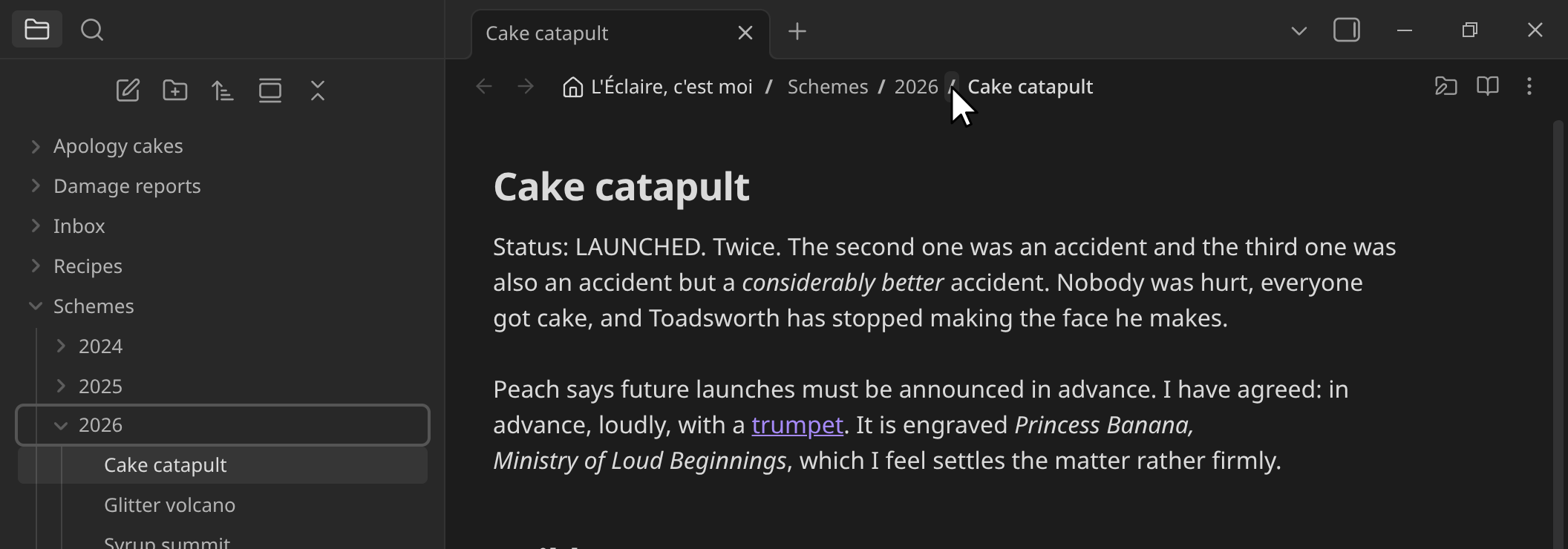
An Obsidian plugin that turns the filename in a note's header bar into a clickable, editable breadcrumb of its full vault path — like the address bar in the Dolphin file manager.
Obsidian 1.8.7+ · desktop only · AGPL-3.0
AI disclosure
- Agent — Claude Opus 5 / 5.5 and Claude Sonnet 5 (Anthropic, via Claude Code): wrote the TypeScript, the CSS, all 45 translation sets and the documentation. Translations are machine-generated and unreviewed by native speakers.
- Usage — 3 Aug – 28 Sep 2026, 32 sessions, ~10,800 responses: ~9.7 M tokens generated, ~43.6 M sent, ~3235.8 M cached re-reads (~3289.1 M total); plus 431 headless translation runs: ~3.6 M generated, ~3.6 M sent.
- Upstream — the model learned from open source code, documentation and community writing published by others. Most of the credit goes there.
- Author — Vault51: specified every feature, tested each iteration in a live vault, directed the fixes, reviewed all output.
Features
- Click a folder for a dropdown of its parent's contents — swap one folder for a sibling, leave the rest of the path alone. The note's name works the same way, selecting the name without its extension.
- Click the delimiter after a folder to reveal and expand it in the File Explorer. One setting swaps the two roles.
- Right-click or drag any entry — the File Explorer's own context menu, entry for entry, and its drag behaviour. Paths outside the vault get an equivalent menu built for them, down to Delete by way of the system trash.
- Click the filename or empty space to type a path, with autocomplete.
/descends, Backspace steps out, Enter commits — and a path that isn't there yet is simply created, with a notice saying where it went. - The dropdown opens on the entry you're standing in, and arrowing or hovering through it fills the field with what you're pointing at. A row you point at is shown as the offer it would make; moving off either end of the list gives back what you had typed, and taking the pointer off it hands the highlight back to where you were. The list follows the caret: the folder it is in, filtered by the letters in front of it.
- Pencil Folder button switches the same interactions to move/rename, validated as Obsidian validates. A name already taken is red in the list, and choosing it opens both paths side by side to edit, with swapping places, names or both a pick away.
- Hold Ctrl to open in a new tab — or, in move/rename mode, to copy the note there instead. The note's name and the folder segments take the same modifiers, and drag, as their File Explorer rows do.
- Names complete themselves as you type — what Tab would write appears after the caret, selected and spelled the way the name is, whatever case you typed — the agreement of the folder's names, or the step toward the first of them; typing swallows it letter by letter, → takes one letter, Tab or End takes it whole, Backspace takes it back. The dropdown keeps filtering by what you typed, not by what was offered.
- Tab completes like a shell: it extends what you typed as far as the names in that folder agree, walks toward one of them a step at a time when they don't, and steps into a folder only once one name is left. Past the end of the path it widens the selection instead: name, name with extension, path from the vault, path from the system root. Shift+Tab walks the same road backwards — marking what it gives back rather than deleting it — and past the start of it keeps going up the path, then loops round to the system path. Either way round, a lap comes back to the path you built.
- Right-click to copy — twice for a name, three times for everything to the right of it, and on the empty space for the whole path or the system path.
- Drag a note onto a folder in the row to move it there, links and all — the destination is already on screen, so it is one drag rather than a trip through the file tree. The vault's name works too, for the root. A whole selection moves as one, and a folder that cannot take what is offered shows nothing rather than failing after the fact.
- Drop text onto the row to write it down — onto a folder or the vault name to name a new note for it, onto the note's own name to add it to the end of what you are reading. A file off your desktop works the same way, and the row rings blue while it would land.
- The field wears the colour of what it names — the same colour its row has in the dropdown — and goes red once nothing answers to it, so you can see before pressing Enter whether it will open a note or make one.
- HTML files show as pages, in a frame with every permission withheld — no scripts, no network, no origin of its own — with the stylesheets and images beside the file carried in so a saved page still looks like itself. The source is one press away.
- Type a URL —
https://,obsidian://, or afile://or percent-encoded path — and it is opened rather than treated as a note name. Web addresses go to a tab of Obsidian's own Web viewer where you have it on. - Long paths shorten where the letters are redundant — never past what tells a folder from the one beside it, smoothly rather than a letter at a time — and scroll only when there is nothing left to compress. Point at a shortened name to get it back in full.
- F2 alternates between the inline title and the path bar, opening on the name without its extension and walking out to the full paths on further presses. It passes cleanly through Obsidian's rename dialog when the title is scrolled out of view. A Focus the path bar command walks the same rungs without renaming; the settings' Hotkeys row takes you to bind it.
- Click the vault name to browse your other vaults, home, the filesystem root and mounted drives without switching vaults. Read-only until you open the red padlock that takes the rename toggle's place out there, and framed in the error colour throughout. Off by default — see outside the vault.
- The vault root lists the pages a pane can hold —
:graph,:search, and whatever views your plugins register. Pick one, or type it: a colon begins no filename, so the labels double as an address.:graphtyped inside a folder opens the graph of that folder. With a start-page plugin installed, the vault's own delimiter opens that page on the first click and folds the file tree on the next. - A row on panes that hold no file — an empty tab reads
vault / :blank, the graphvault / :graph, and the field beside it is an address bar: type a path and Enter opens it in that pane, or makes it. Sidebar panes keep Obsidian's own title. - Two warning tiers — red outside the vault, orange for text files Obsidian has no editor for. See the warning colours.
- Themeable icons, swapped from a CSS snippet — and 46 languages: every one Obsidian ships, plus Greek and Sanskrit, which it has no setting for. Pick one for the plugin alone, or follow Obsidian's own.
- Settings: language, alignment, delimiter presets, which click opens the dropdown, vault name, dot files, file extensions.
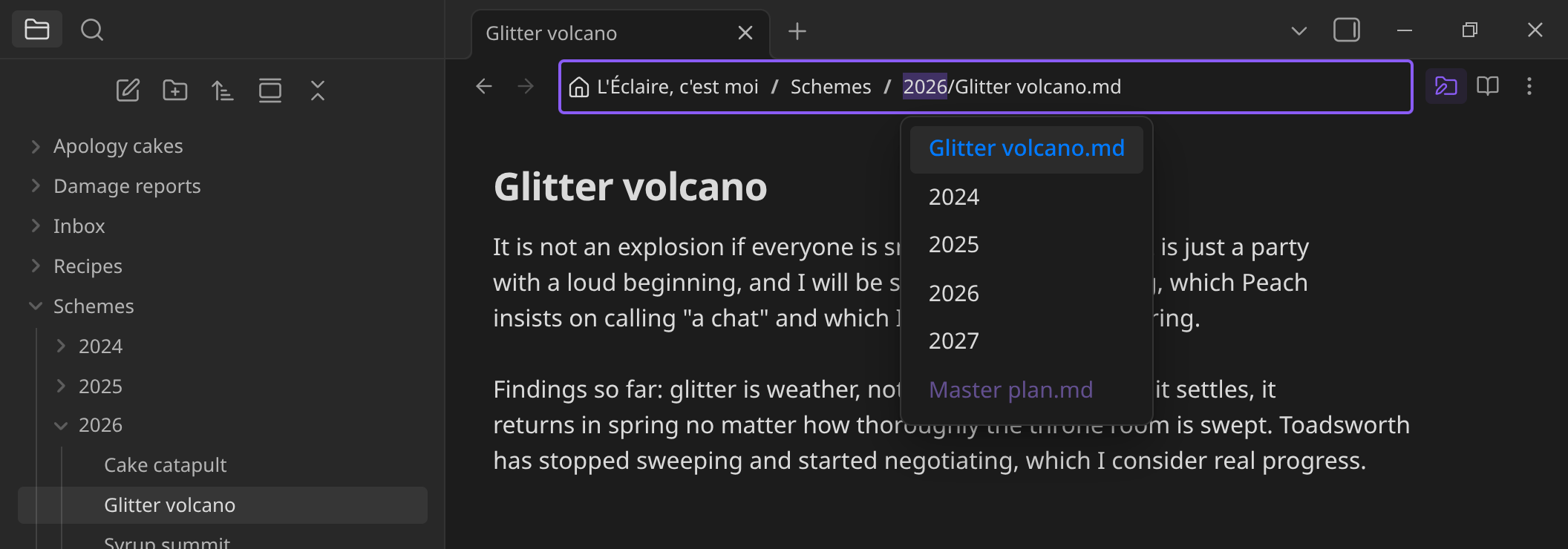
In move/rename mode the same dropdown changes what it offers: the note's current name pinned at the top to move it without renaming, folders to move it into, and names already taken in red; picking one asks what to do about the file in the way.
Outside the vault
Obsidian's developer policies require plugins to explain any access to files outside the vault, so, plainly:
Whether it does any of this at all. Only if you turn on Access external files, which is off by default. With it off there is no way to reach an external path from the plugin, and none of the code below ever runs.
What it reads. Only when you ask it to. Clicking the vault name lists your other vaults — read from Obsidian's own obsidian.json — plus your home folder, the filesystem root, and mounted drives (/proc/mounts on Linux, /Volumes on macOS, drive letters on Windows). Browsing from there lists directory contents, and opening a file reads that one file.
What it writes. Nothing, until you press a button that says so. There are two such buttons, each covering only its own surface:
- The viewer's Edit as text button unlocks the file in front of you, for that one file in that one tab. Your edits are then saved back to it as you type.
- The header's red padlock, which stands in the rename toggle's place while the path bar points outside your vault, unlocks creating, renaming, moving and deleting at external paths — and hands the slot back to the toggle once open. It re-locks when you come back inside, and on the press that leaves rename mode, so permission never outlives the folder you granted it for.
Neither unlock is stored in the workspace or in settings, so writing is never armed on a file you don't remember opening. Nothing is ever overwritten in either state — an existing target is refused, using the filesystem's own exclusive-create rather than a check that could lose a race.
Moving a note out of your vault is the one write that costs something nothing can give back: Obsidian only updates links inside the vault, so every link pointing at that note breaks. It is offered behind a dialog that says so and counts the notes affected, and it happens as copy-then-delete through Obsidian's own trash, so it is as recoverable as deleting a note. Holding Ctrl copies it out instead.
Why. Notes you want are often in another vault, a sync folder, or a USB stick, and Obsidian's own answer — switch vaults — closes everything you had open. This lets you go and look without leaving, and fix a typo while you're there.
The limitation. Obsidian's editor is bound to files inside the vault, so an external file cannot be opened as a real note with links, backlinks and the rest; no plugin can do that. Lure shows it in its own viewer instead (Markdown, images, audio, video, PDF), with Open externally for everything else. The path bar stays framed in the error colour whenever it points outside your vault, and the trail starts at the location you picked — a vault name, your home folder, a drive — rather than at the machine's directory layout.
Installation
In Obsidian: open Settings → Community plugins → Browse, search for Lure, then Install and Enable — or press Add to Obsidian on community.obsidian.md/plugins/lure.
Manual: download main.js, manifest.json and styles.css from the latest release into <vault>/.obsidian/plugins/lure/, then enable it under Settings → Community plugins.
BRAT: add Gelaende51/obsidian-lure as a beta plugin.
From source: npm install && npm run build — see development.
Compatibility
No plugin is required. The core File Explorer, if enabled, is what reveals folders in the sidebar; without it those clicks are no-ops.
Tested against the community plugins that share the note header or answer the folder click — both load orders, each on and off:
- Folder notes — the delimiter opens a folder's note instead of revealing the folder, making every segment of the path somewhere you can go, however deep: the note is resolved from that plugin's own convention rather than left to it to answer. It is also the only one that publishes such a convention; Folder Note and create folder notes with dropdown publish none and never claim the header path, so with those the delimiter reveals the folder as usual.
- Quick Explorer and Front Matter Title — both draw into the same header element; Lure keeps the row whichever loads first, and turning either off leaves the other intact.
- Nav Link Header, Running Head, Crumbs, Breadcrumbs — own their own strip, and coexist.
Desktop only — the interaction model needs hover, precise clicks and a keyboard. Full results, remaining expectations, and how this compares to Quick Explorer and Breadcrumbs are in compatibility.
Contributing
- Issues and pull requests welcome — especially translation corrections, since all 45 locales are machine-translated and unreviewed by native speakers. See development for setup and ground rules.
- Issue tracker: https://github.com/Gelaende51/obsidian-lure/issues
- Donations: Ko-fi. The plugin is free and AGPL-licensed either way; tips are appreciated, never required. Intended use is carbon offsetting — an intention, not a commitment: nothing is offset until the total is large enough to be worth the effort, and this line will say so once anything actually has been.
Credits
- Vault51 — author: design, requirements, and manual testing throughout.
- Claude Opus 5 / 5.5 and Claude Sonnet 5 (Anthropic, via Claude Code) — implementation, translations and docs, under the author's direction. See AI disclosure.
- Obsidian — the application this extends, and the source of every component the plugin uses: its plugin API, the Lucide icon set behind
setIcon, the bundled i18next instance the context-menu labels are read from, and its own CSS classes and variables. Nothing third-party is bundled; the plugin has no runtime dependencies.
The Obsidian team did not participate in this project in any way — they did not write, review, endorse or support it. Obsidian is a trademark of Dynalist Inc.; this is an independent, unaffiliated plugin.
Contributors will be listed here as contributions land.
Links
- Documentation: docs/
- Changelog: CHANGELOG.md
- Plugin page: https://community.obsidian.md/plugins/lure
- Web presence / source: https://github.com/Gelaende51/obsidian-lure
- Donations: Ko-fi — see contributing.
- License: LICENSE — GNU AGPL-3.0-only, © 2026 Vault51. Forks and redistributed builds must ship their source under the same licence.