
README file from
GithubLogseq Style Fold
Your lists stay folded the way you left them — written the way Logseq writes it.
An Obsidian plugin that remembers how each list item was collapsed, by writing a Logseq block property into the note instead of keeping the state somewhere outside it.
English · 简体中文
Contents
- Why
- What it does
- Markers
- How it folds
- Why the state lives in the file
- Commands
- Settings
- Installing
- Notes and limits
- Feedback and updates
Why
Logseq stores a folded block as a collapsed:: true property right under it. Obsidian does not understand that line: a vault that came from Logseq shows it as plain text, and Obsidian's own folds are forgotten as soon as the note is closed.
This plugin reads and writes that marker. The Logseq style is the default, so notes stay compatible with Logseq. If you prefer something else, set your own marker — an HTML comment <!-- collapsed:: true -->, an Obsidian comment %% collapsed:: true %%, or any line of text you like.
What it does
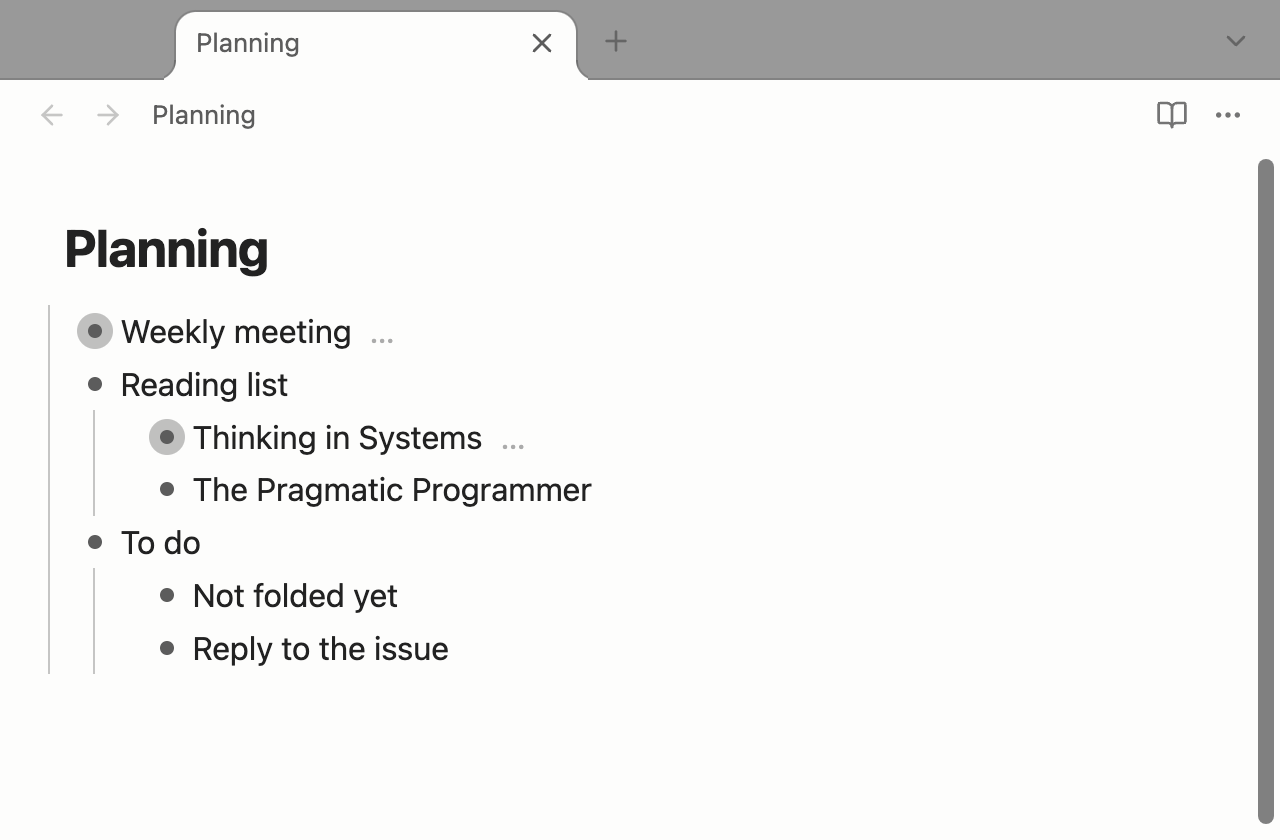
Fold something in a list, close the note, come back tomorrow — it is still folded.
- Weekly meeting
	collapsed:: true
	- Data sources
	- Definitions check
- To do
	- Not folded yet
The marker sits one indent level in, right under the item it belongs to — the same place Logseq puts it. Whatever style you choose, the plugin hides it everywhere you look:
- Live Preview and Source mode — the line is removed from the view, newline and all. It is not dimmed or squeezed; it is gone, and the cursor treats the spot as one atomic step, so you cannot land inside it while typing.
- Reading view — the marker is stripped from the rendered note (including Dataview's inline-field rendering of
collapsed:: true). A%% … %%comment is never rendered by Obsidian in the first place.
Nothing else about your note changes.
Markers
| Style | Written as | Notes |
|---|---|---|
| Logseq (default) | collapsed:: true |
Same as Logseq; notes round-trip between the two apps |
| HTML comment | <!-- collapsed:: true --> |
Invisible in any Markdown renderer — GitHub, static-site generators, other editors |
| Obsidian comment | %% collapsed:: true %% |
Invisible in Obsidian even without the plugin, but other renderers show it as text |
| Custom | any single line, e.g. [folded] |
Written as-is under each folded item |
collapsed:: lines are always recognised — bare, inside %% … %% or inside <!-- … --> — whichever style you write, so switching styles never loses existing folds. collapsed:: false (which Logseq can leave behind) is treated as unfolded and is reused when you fold that item again.
Recommended if your notes go elsewhere: the HTML comment
If your notes are also published or read outside Obsidian — a blog, a GitHub repo, a static site, another editor — pick the HTML comment style:
-
Clean everywhere. Every Markdown renderer drops HTML comments, so the published page shows no trace of your folds. A bare
collapsed:: trueor an Obsidian%% … %%comment would show up there as text. -
Easy to remove for good. The markers are a fixed, unambiguous pattern, so one regex search-and-replace across the vault (with multiline mode on) deletes them all and leaves everything else untouched:
^[ \t]*<!--[ \t]*collapsed::[ \t]*(?:true|false)[ \t]*-->[ \t]*\r?\nReplace with nothing. Only whole marker lines match; the same text inside a sentence is left alone. For a single note, the Remove all fold markers from this note command does the same.
How it folds
The folding itself is not drawn by this plugin — it calls the same CodeMirror fold that ⌥S uses. You get Obsidian's own arrow, the … at the end of the line, the same click to unfold. A folded numbered item shows its number darker and bold, instead of in the accent color Obsidian uses by default.
Marker and fold are kept in sync in both directions:
- A marker in the file folds that item when the note opens, and again whenever another plugin or a sync rewrites the file and the fold gets lost. This direction only ever folds; it never unfolds something for you.
- Fold something yourself — ⌥S, the arrow, whatever you already use — and the marker is written for you. Unfold it and the marker is removed. Typing and rewrites of the file don't count as folding.
- Jump to a line inside a fold from elsewhere — a backlink, a search result, a block reference — and the folds around it open, their markers are removed, and the cursor lands on that line. Nothing outside the fold changes.
- Press Enter at the end of a folded item and, as in Logseq, a new sibling starts below the whole folded block; the item stays folded. Without this, Enter lands in front of the hidden marker line and the new item takes the marker and all the children with it. Ordered lists continue their numbering, and a checklist item gets a fresh
[ ]. - Another plugin that folds on its own can wrap that in
app.plugins.plugins["logseq-style-fold"].quietly(() => …), and those folds are not recorded as yours.
Why the state lives in the file
A JSON file in the plugin folder, keyed by line numbers or text hashes, falls apart on a note that keeps being rewritten: line numbers shift the moment anything is inserted above, and hashes break when the wording changes. A line written into the note travels with its own content through git, sync, export and any rewrite that keeps the block itself.
Commands
| Command | What it does |
|---|---|
| Fold or unfold the list item at the cursor | Toggle the item the cursor is on (an item without children cannot be folded) |
| Fold every list item in this note | Fold everything at once |
| Unfold every list item in this note | Unfold everything |
| Fold only top-level list items | Fold the outermost items, leaving inner levels as they are |
| Remove all fold markers from this note | Delete every marker — back to the text as it was before the plugin |
| Show or hide fold markers | Show marker lines as plain text, for checking what is in the file |
Bind any of them to a hotkey in Settings → Hotkeys.
Settings
| Setting | Default | What it does |
|---|---|---|
| Marker style | Logseq | Logseq collapsed:: true, HTML comment <!-- collapsed:: true -->, Obsidian comment %% collapsed:: true %%, or a custom line |
| Show a fold button on hover | On | An unfolded item shows a small collapse button at the end of its line while hovered |
| Show descendant count on the fold button | On | ⌄ 3 instead of ⌄ |
| Fold in Reading view | On | Honour the markers in Reading view, with a clickable badge to unfold |
| Fold in Source mode | Off | Source mode hides the marker either way; turn this on to fold there too |
| Show fold markers | Off | Show marker lines as plain text for checking |
Installing
Copy main.js, manifest.json and styles.css into <vault>/.obsidian/plugins/logseq-style-fold/, reload Obsidian, and enable Logseq Style Fold in Settings → Community plugins. Or add it through BRAT from MatsuriMW/logseq-style-fold.
Notes and limits
- Outside Obsidian,
collapsed:: trueshows up as text — which is exactly what Logseq expects. Pick the HTML comment style if you want it invisible everywhere else. - Markers survive any tool that keeps the block they belong to. A rewrite that deletes or re-words the block itself loses its fold state.
- Code blocks, callouts, ordered lists and checklists are handled. Lists inside tables are not folded.
- Markers are matched by the item's own text fingerprint within its nesting level, so two identical items at the same depth in one note share a fold state.
- The plugin only ever writes its own marker lines; nothing else in a note is modified.
Feedback and updates
To follow new features, send feedback or keep up with progress, follow me on Twitter: @Matsurimywaifu.