
README file from
GithubLogic Graph for Obsidian
Draw logic circuits, truth tables, Karnaugh maps, and timing diagrams straight from a plain-text code block.
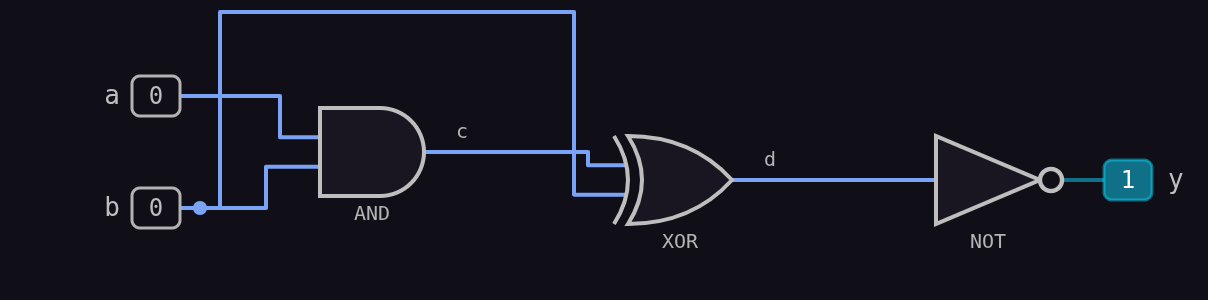
(a,b) AND (c)
(c,b) XOR (d)
(d) NOT (y)
Features
- Circuit diagrams — AND, OR, NAND, NOR, XOR, XNOR, NOT, and BUF gates (2–6 inputs each), drawn as clean SVG with live signal state.
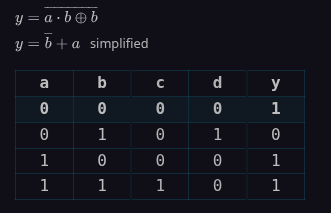
- Truth tables — click a row to drive the circuit; rows update the diagram instantly.
- Karnaugh maps — 2 to 6 inputs, with the Quine–McCluskey minimal cover and coloured groups (exact minimum when the search is small enough).
- Boolean expressions — both the structural expression of your circuit and the simplified sum-of-products form, rendered as LaTeX.
- Timing diagrams — optional per-gate delay; waveform view and/or animated bit-travelling view.
- Bubble pushing — De Morgan symbol matching, with per-gate manual flips.
- Circuit reduction — structural rewrites (double NOT, NOT-into-NAND/NOR, merged cascades, absorption, shared gates, buffers) and two-level methods (SOP, POS, NAND-NAND, NOR-NOR). Every reduced circuit is verified against the original before it is shown.
- Export — copy the truth table as Markdown, the expressions as LaTeX, the circuit as Mermaid, or save the diagram as PNG/SVG into your vault.
- Templates — half adder, full adder, multiplexer, decoder, majority, parity, XOR-from-NAND.
@help— drop@helpinto a block for a full in-app reference with live examples.
The block syntax
One gate per line: (inputs) GATE (output).
(a,b) XOR (sum)
(a,b) AND (carry)
Signals no gate drives are the inputs; signals nothing uses are the outputs. Names may contain letters, digits, and _. Comments start with # or //.
Directives (at the top of a block):
| Directive | Effect |
|---|---|
@help |
Show the reference above the circuit. |
@hide table / @show kmap |
Toggle table, expr, diagram, kmap, timing. |
@simplify structural (or @reduce) |
Draw a reduced circuit. Methods: structural, best, sop, pos, nand, nor, off. |
@bubbles |
Bubble-pushing view; click a gate to flip it by hand. |
@compact |
Merge truth-table rows that don't depend on some inputs (shown as X). |
@delay 0.5 / @delay random / @delay off |
Per-gate delay (0–30 s, or random 0–5 s). |
@timing-graph / @timing-animation / @timing-both |
Delay on, with the chosen timing view. |
Companion extension: image import (WIP, not ready for shipment)
The separate Logic Graph – Image Import extension turns a picture of a circuit into a block, entirely on your device. Install both plugins to use it; this plugin works fully without it. See that extension's README for details.
Installing
- Copy both plugin folders into
<vault>/.obsidian/plugins/<id>/. - Enable them in Settings → Community plugins.
(You only need the import extension if you want to import from images.)
Known limits
- Truth tables, Karnaugh maps, and minimisation work up to 12 inputs (2ⁿ rows).
- Diagrams and simulation work up to 32 inputs and 256 gates.
- Very large circuits may export to PNG with fine detail compressed; SVG export is exact.
- Timing animation is illustrative; for very fast gate chains several sprites may overlap.
Reporting issues
I'll respond as soon as I can.
Support me
If Logic Graph saves you time, you can buy me a coffee or support the project on Patreon — it genuinely helps and keeps the plugin free for everyone.
- Ko-fi: https://ko-fi.com/clemm0