
README file from
GithubLiterature Matrix
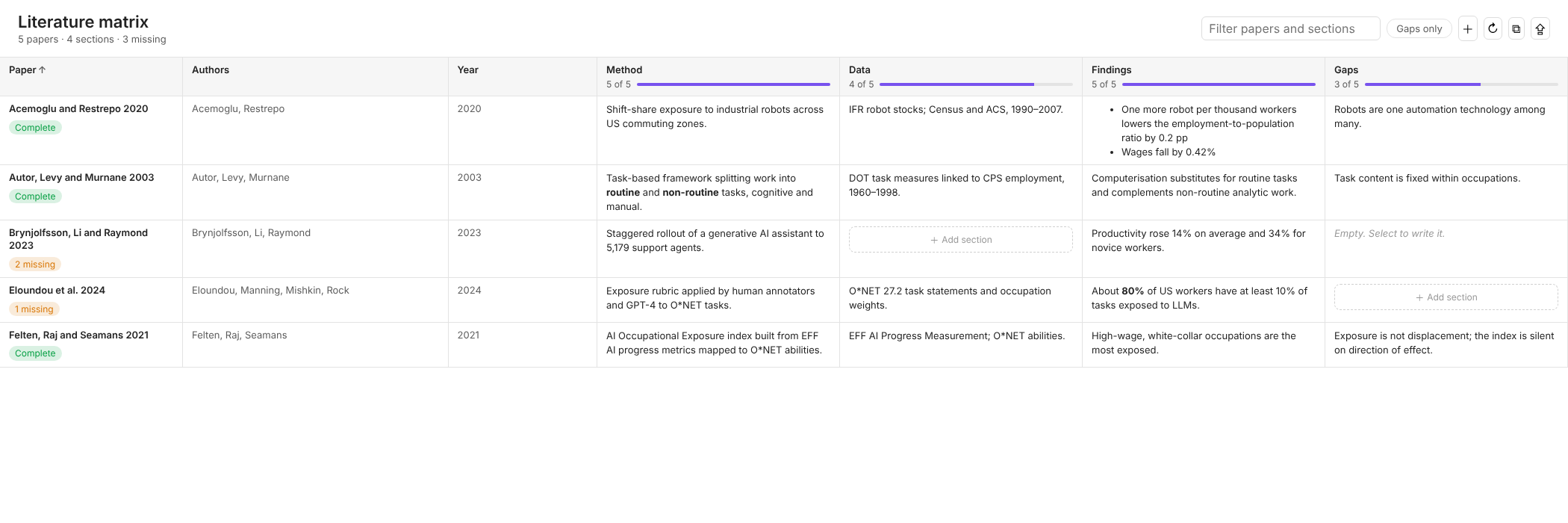
A synthesis matrix for your literature notes. Each paper is a row. Each section you care about, such as Method, Data, Findings and Gaps, is a column. You read across a row to see one paper and down a column to compare every paper on the same question.
What it does
- Builds the matrix from your own notes. It reads the headings you already write in literature notes and pulls the text under each one into its column. Nothing is copied or duplicated.
- Shows where the gaps are. Every column shows how many papers cover it. Each paper gets a badge: complete, or the number of sections still missing.
- Fixes gaps in one click. A missing section has an "Add section" button that adds the heading to the note and opens the note there.
- Opens the source. Select any cell to jump to that heading in the note.
- Filters and sorts. Search across titles, properties and section text, show only papers with gaps, and sort by title or by any property such as year.
- Exports. Save the matrix as a Markdown table in a new note, or copy it as CSV for a spreadsheet.
- Creates new literature notes with your columns already in place as headings.
It works offline, on desktop and mobile, and never sends your notes anywhere.
How to use it
- Open Settings → Literature Matrix and choose the folder your literature notes live in, a tag such as
#paper, or both. - Open the matrix from the ribbon icon or run Literature Matrix: Open matrix from the command palette.
- Write your notes with headings that match your columns:
---
authors: Autor, Levy, Murnane
year: 2003
tags: [paper]
---

## Method
Task-based framework splitting work into routine and non-routine tasks.

## Data
DOT task measures linked to CPS employment, 1960–1998.

## Findings
Computerisation substitutes for routine tasks.

## Gaps
Task content is fixed within occupations.
Heading level does not matter, and the match ignores case and a trailing colon. A section runs until the next heading of the same or a higher level, so subheadings stay inside their section.
Settings
| Setting | What it does |
|---|---|
| Folder | Only include notes in this folder and its subfolders. Leave empty for the whole vault. |
| Tag | Only include notes with this tag. Nested tags count, so #paper also matches #paper/labour. |
| Sections | The columns, separated by commas. Use | to give one column several heading names. The default is Method|Methods|Methodology, Data|Dataset|Sample, Findings|Results, Gaps|Limitations. |
| Properties | Frontmatter properties shown next to each paper, such as authors, year, venue. |
| Render Markdown in cells | Show links, lists and formatting in cells. Turn it off for plain text in very large vaults. |
A note's title property is used as its name in the matrix when it has one. Otherwise the file name is used.
Commands
- Open matrix
- Create literature note
- Export matrix to a note
- Copy matrix as CSV
Exported matrix notes carry a literature-matrix-export property so they never appear as papers in the matrix.
Install
Search for Literature Matrix in Settings → Community plugins → Browse, then select Install and Enable.
To install by hand, download main.js, manifest.json and styles.css from the latest release into <your vault>/.obsidian/plugins/literature-matrix/, then enable the plugin in Settings.
Build from source
npm install
npm run build
License
MIT © Dev Das