
README file from
GithubLink Flair
Compact icons and readable labels for web links, app deep links, and native Obsidian links. Works in Reading view and Live Preview while preserving your Markdown.
| Without Link Flair | With Link Flair |
|---|---|
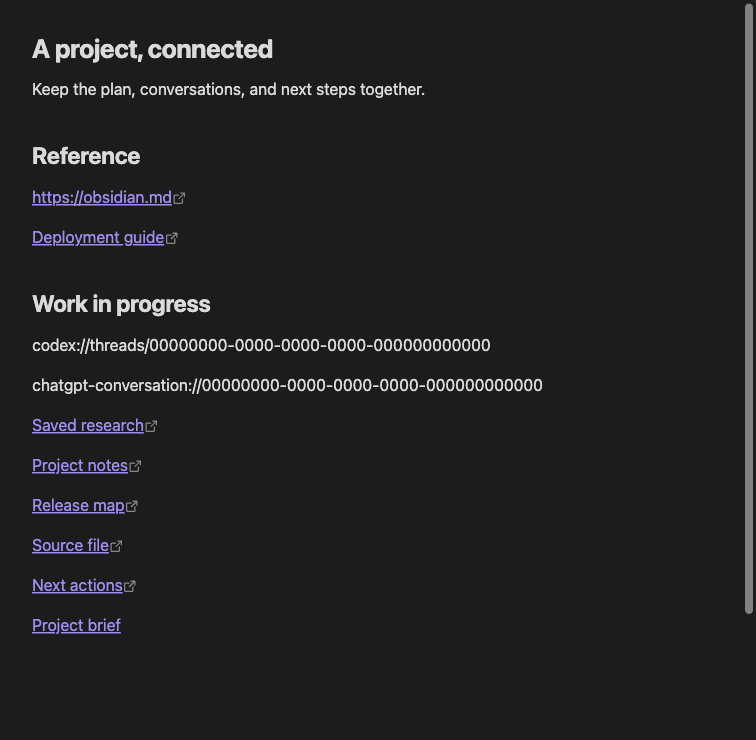 |
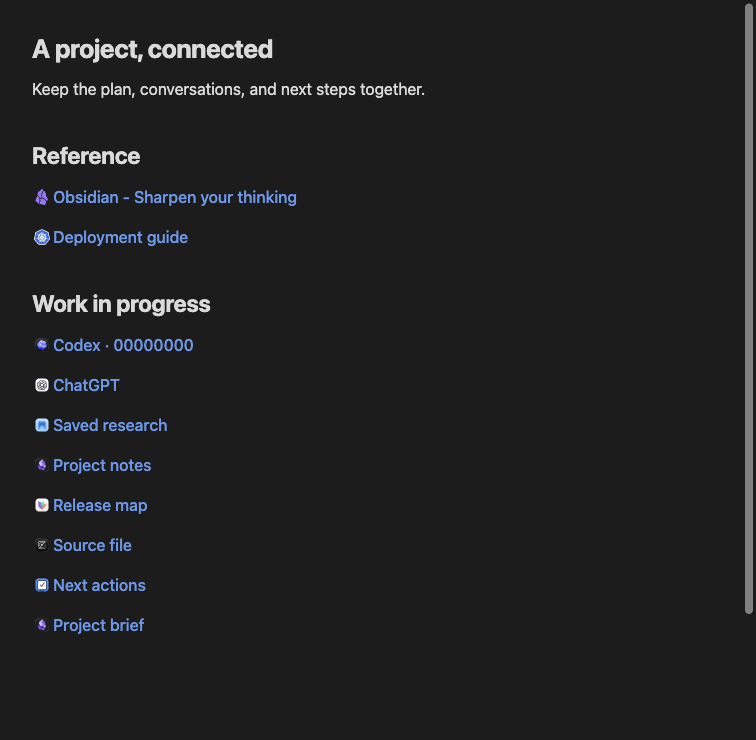 |
Both screenshots show the same synthetic Markdown note in Obsidian. The plugin changes its presentation, not its source.
Features
- Cached website icons and page titles for bare web URLs, with useful fallbacks.
- Custom website icons from a file or image URL, saved for offline use, including sites behind a VPN.
- Bundled icons for 24 supported apps, including ChatGPT, Codex, Claude Code, OmniFocus, DEVONthink, Drafts, Bear, Visual Studio Code, Cursor, Hookmark, and nine JetBrains IDEs; generic icons for other app links.
- Native note links retain aliases, backlinks, navigation, and hover previews.
- Explicit Markdown labels keep their text and formatting. Source mode stays unchanged.
- Live appearance controls for colors, text weight, and icon size, spacing, opacity, brightness, and saturation.
- Commands to copy destinations or Markdown links, show a URL, use a page title as link text, and clear cached metadata. Commands that change text are explicit, undoable edits.
Installation and compatibility
Requires Obsidian 1.13.7 or later. Install it from Settings → Community plugins → Browse → Link Flair, or open its Obsidian Community page.
For a published release, download main.js, manifest.json, and styles.css from the same GitHub release. Put them in <vault>/.obsidian/plugins/link-flair/, reload Obsidian, and enable Link Flair under Settings → Community plugins. Installation does not require Node.js or the source repository.
To install a local build:
- Run
npm ciandnpm run packagein this repository (Node.js 22.13 or later). - Copy
dist/link-flairinto your vault's.obsidian/plugins/directory. - Reload Obsidian and enable Link Flair under Settings → Community plugins.
Tested on macOS, iPhone, and iPad; release entries in the changelog note device testing. Windows and Linux UI testing is pending. Linux CI runs automated tests and build checks.
Usage
Open links normally in Reading view. In Live Preview, selecting a compact URL reveals its source for editing; desktop modifier-click opens its destination. Authored and internal links retain Obsidian's native interactions. An app link requires its destination app and URI handler to be available on that device.
Open Settings → Link Flair to change appearance and link behavior. Use Use theme link colors to follow your theme, or choose your own normal and hover colors for light and dark mode. Underline links on hover optionally adds a dashed underline; it is off by default, so hovering only changes the link color. Reset appearance restores appearance defaults without changing link behavior or cached metadata.
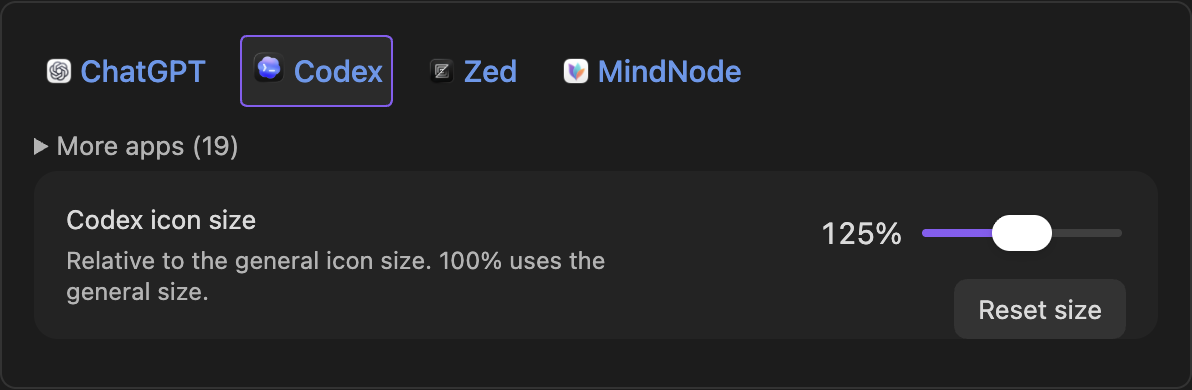
The appearance preview initially shows ChatGPT, Codex, Zed, and MindNode. Expand More apps to see the other supported apps. Select a supported app in the preview to adjust only its icon size (50–200% of the general icon size). Reset size restores that app to 100%; Reset appearance also clears all individual app sizes. Website favicons continue to use the general size. Brightness, saturation, and opacity remain adjustable for all icons, with original colors at their defaults.
See supported apps and URL schemes for the full list. Destinations are preserved exactly. App item metadata is not retrieved; use [Your label](app://…) for a specific title.
To replace an icon, open Settings → Link Flair → Site icons → Add site icon. Paste the link to decorate. Entire site (the default) extracts the hostname and covers every path, scheme, and port on that host; subdomains are separate. Only this URL matches the normalized address, including its path and query. Fragments are ignored. The form shows the resulting target before saving. A URL-specific rule takes priority over a site rule.
Under Icon from, paste a website page or a direct image URL and choose Get icon. Web pages are searched for declared favicons; the downloaded image is shown before you save. The icon is the website's favicon, which may differ from a product logo pictured on the page. Choose file imports your own image instead. Edit or remove rules from the settings list. Compact links in Live Preview also offer Customize site icon in their context menu.
Imported images are stored as static PNGs up to 128 pixels, work in both themes, and stay available without VPN access. Files may be PNG, JPEG, SVG, WebP, GIF, AVIF, or ICO, up to 2 MB. Custom icons survive cache clearing and appearance resets. To carry them between devices, sync the plugin's settings.
Network and privacy
Remote web metadata is enabled by default. Link Flair requests titles and favicons directly from linked websites using Obsidian's request API. Websites receive the requested URLs. Bare URLs that look one-time, signed, or account-changing (for example ?token=, ?code=, signed download links, or /unsubscribe and /logout paths) are not opened automatically: they show the site name, and Use page title as link text loads the title on request. No analytics, account, plugin backend, or third-party favicon service is used. App URIs, internal links, and bundled app icons do not require network requests.
Turn off Remote web metadata to stop automatic requests. Explicitly importing a website or image URL still makes requests to resolve and download its icon, including when automatic metadata is off. Already-sent requests cannot be cancelled. Fetched titles and icons are cached on each device and are not synced. Settings and custom icons are stored in data.json, which your sync configuration may carry; changes synced from another device apply without a restart. Notes do not depend on the cache. See network behavior and limits.
The copy commands write a link destination or Markdown link to the clipboard when invoked. Reading-view copy removes decorative icons from the selected content. Link Flair does not read existing system clipboard contents.
Documentation and development
- Contributing: setup, commands, pull requests, and releases.
- Testing: automated checks and desktop/mobile acceptance.
- Design: architecture, behavior, and limitations.
- Application artwork: sources, distribution status, and updating images.
- Changelog: version history.
Source code is licensed under MIT. Third-party application icons and trademarks are excluded from that license and belong to their respective owners. They identify link destinations; Link Flair is not affiliated with or endorsed by those owners. See artwork sources and usage information.