
README file from
GithubLantern
A desktop-only Obsidian plugin that turns a locally-installed qmd (Tobi Lütke's local markdown search engine) into vault search, and adds a grounded, cited chat agent that searches and reads your notes through your own local LLM. Everything runs on your machine — Lantern bundles no models and reimplements no search; it drives the tools you already run (qmd for retrieval, llama.cpp-class models via qmd, your own LLM server for chat).
Why it exists
A vault fills up fast, and a big one gets dark — you know something's in there, just not where, or what you called it (and half of what matters is scattered in markdown outside it anyway). Lantern is the light you carry through it: ask in plain language and get the answer back, cited, so you can find your own thinking again.
Scope
Intentionally narrow. Lantern's job is to surface and cite the right notes fast — not to be a coding copilot, a writing assistant, or a general chatbot, and it won't grow into one. The chat agent retrieves and answers from what you've already written; web search is a bolt-on for outside context when the vault comes up short, nothing more.
Reality check — read before installing. Lantern is a thin front end over infrastructure you run yourself: qmd 2.8.3+ (see Requirements) and, for chat, a local OpenAI-compatible LLM server. If you don't already run local models and a local search daemon, it won't work until you do.
What it does
- Search pane — hybrid (text + semantic), text-only (BM25), or vector-only modes; optional cross-encoder reranking and a Recent boost; saved searches; a libraries on/off toggle to also search external qmd collections (your vault is always searched). Scope tokens in the query box narrow results —
#tag(repeatable, AND; nested tags match),folder:Projects/,within:14d, andkey=valuefrontmatter (e.g.status=active) — and a scope-only query lists matching notes instantly. The box autocompletes#tag,[[links]], and the scope tokens as you type. Results from other collections open in your system editor. - Chat pane — ask a question and an agent searches (tag/folder/frontmatter/date-scoped when useful, with qmd's
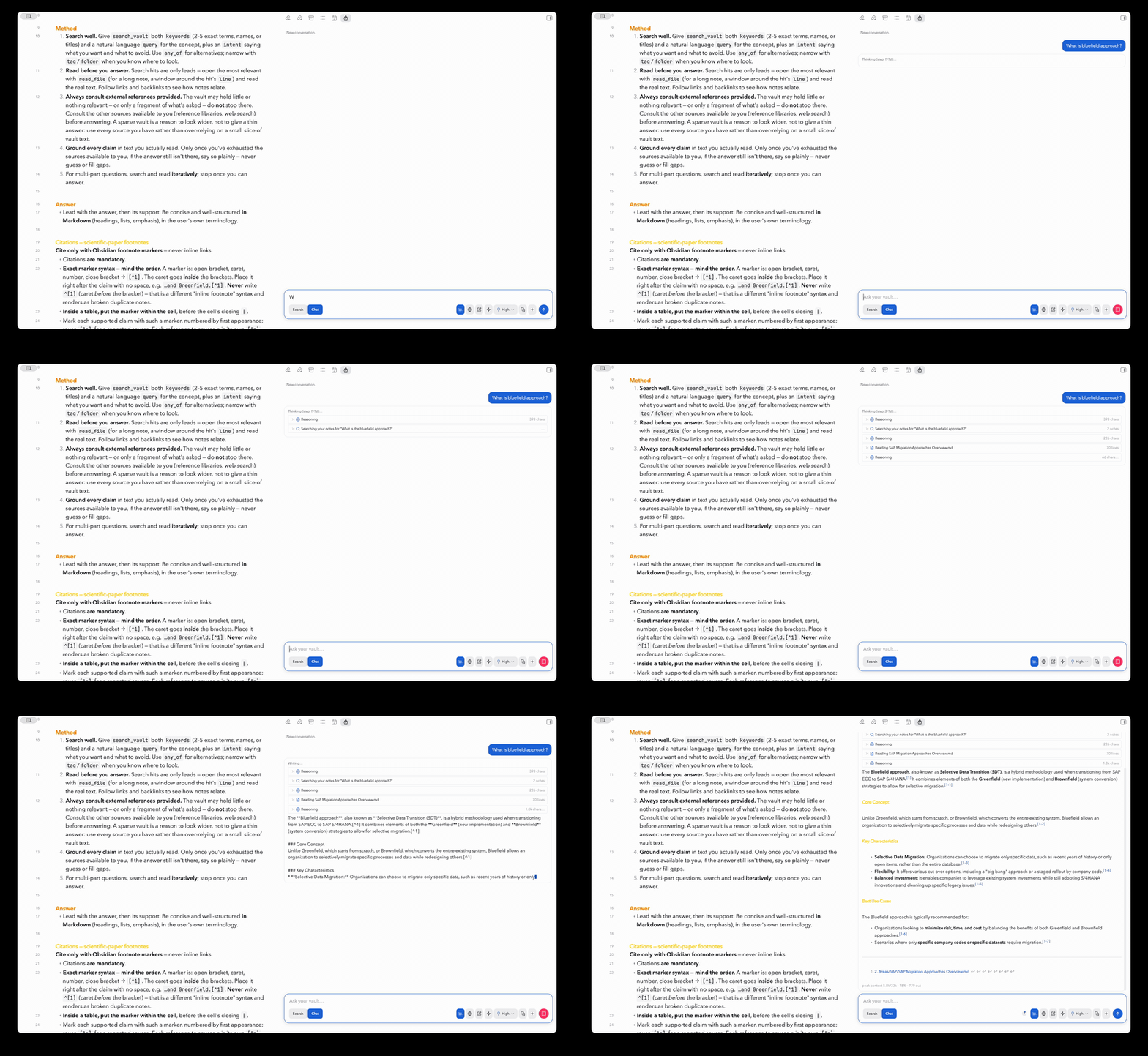
"phrase"/-exclusionsyntax and hyde hypothetical-answer queries), reads your notes, lists your checkbox tasks, reads your daily notes, and streams a grounded answer with footnote citations ([^1]markers → a references section; vault notes as[[wikilinks]], references/web as markdown links). Collapsible plain-language tool trace, live reasoning block, a Stop button, per-answer delete/retry/copy, prompt templates (⚡), and follow-up questions (history is compacted to fit local context windows). Optional persistent chat threads (off by default). - Reference libraries for chat — configure external qmd collections (a PMBOK guide, API docs, a project's docs…) and the agent consults them via
search_references/read_referencefor any relevant information your vault doesn't have, citing them alongside your[[vault notes]]. References use the same query craft and recall floor as the vault search.read_referencereads the file on disk and falls back to qmd's indexed copy (MCPget) when the file or its collection root has moved. A library chip in the chat bar controls which references are available per conversation. - Optional write tools (off by default): ask the agent to capture a note (inbox folder only) or append to a daily note — every write shows an Apply/Deny card before anything changes. Note/web content the agent reads is treated as untrusted (prompt-injection-aware).
- Optional web search (off by default): when the vault can't answer, the agent can search the public web — via Perplexity (needs a key) or Exa (key optional; without one it uses Exa's free keyless endpoint) — and cite the sources. Search only: results are returned for the local model to read and cite; pages are never fetched. This is the only feature that sends anything off your machine.
- Editor integration: select text → right-click → Search selection / Ask about selection; or Ask about this note.
- First-run setup card that reports what's missing (qmd binary → daemon → vault registration), a status overview in settings with one-click qmd and LLM reachability tests and live index status, and an optional status-bar item while the vault index is behind or busy.
How it works
Obsidian  ──register──►  qmd collection (your vault)     [qmd CLI: collection add / update / embed]
Obsidian  ──search────►  qmd HTTP daemon  ──►  results   [POST http://localhost:8181/query]
Obsidian  ──chat──────►  local LLM  ──tools──►  qmd + vault files  ──►  cited answer
- On first use you register your vault as a qmd collection; qmd indexes and embeds it (qmd downloads its GGUF models on first run — expect a few hundred MB and a slow first index).
- Searches POST to qmd's local HTTP daemon (
qmd mcp --http), which keeps the models warm. Results map back to vault files and open at the matching line. - Chat runs an agentic tool loop against your local LLM; the model searches and reads notes, then answers from what it actually read.
Requirements
Lantern bundles no models or servers; you install and run all of these:
-
qmd 2.8.3 or newer. Install from npm (Node ≥ 22) or Bun:
npm install -g @tobilu/qmdqmd --versionshould report 2.8.3 or later. Older releases (≤ 2.5.3) return slugified filenames that don't map back to vault files; Lantern shows a notice on startup and flags the version in the settings status overview.- macOS is qmd's documented platform (needs SQLite with extension support:
brew install sqlite). Linux works wherever qmd runs. Windows is untested.
- macOS is qmd's documented platform (needs SQLite with extension support:
-
A stronger embedding model. qmd's default (EmbeddingGemma-300M) is fast but shallow. Tested with Qwen3-Embedding-4B: much slower indexing and more RAM, materially better recall. Set this in qmd, not Lantern.
-
For chat (optional): a local OpenAI-compatible LLM server — llama-server (run with
--jinjafor tool calling) or LM Studio. Without one, search works fully; only the chat pane is unavailable. A hosted OpenAI-compatible API also works (OpenAI: base URLhttps://api.openai.com/v1+ an API key) — at the cost of sending note content to that provider. -
For web search (optional): a Perplexity API key (a Pro subscription is not API access — it includes a $5/month API credit, then pay-as-you-go), or Exa (API key optional — without one Lantern uses Exa's free, rate-limited keyless endpoint).
-
Obsidian 1.7.2 or newer, desktop, with the vault on the local filesystem. Lantern is desktop-only (it shells out to the qmd binary).
Privacy — what stays, what leaves
- By default, nothing leaves your machine. Search and chat run entirely against your local qmd and your local LLM. Your notes, embeddings, and chats are never uploaded; qmd's index lives in qmd's local cache.
- The one exception is web search, and it's off by default. When you enable it, the query (derived from your notes) is sent to the provider you choose — Perplexity or Exa — to get back sources. Lantern never fetches web pages; it only retrieves search results for the local model to cite.
- Pointing chat at a hosted API opts out of all of that. If you set the LLM base URL to a remote endpoint (e.g.
https://api.openai.com/v1orhttps://api.anthropic.com/v1), every question, system prompt, and note excerpt the agent reads is sent to that provider. Retrieval still runs locally in qmd; the model doesn't. - What Lantern does about it. Requests carry the conversation and nothing else. It never sends
store,previous_response_idor any conversation-state handle (so nothing accumulates provider-side between turns), never sendsuser/metadata/safety_identifier(so traffic isn't tied to a person beyond your own API key), never opts into Anthropic'scache_controlprompt caching (which would park a copy of your notes on their infrastructure for 5m–1h), and never forwards one provider's opaque reasoning to another. Chat transcripts and reasoning stay in your vault. Enforced bytests/agent/privacy.test.ts, which allowlists the exact fields each provider receives. - What Lantern cannot do about it. Both providers retain API inputs for abuse monitoring (~30 days) regardless of any request parameter, and OpenAI's implicit prompt caching is automatic. Neither is settable by a client — changing them takes a zero-data-retention agreement on your account. If that matters, keep chat on a local model.
Install
Install qmd first. A missing qmd, a qmd not on Obsidian's PATH, or a qmd older than 2.8.3 is behind almost every "it doesn't work."
From Community Plugins: Settings → Community plugins → Browse → search Lantern → Install → Enable.
Manual — download main.js, manifest.json, and styles.css from the latest release into <your-vault>/.obsidian/plugins/lantern/, then enable Lantern under Community plugins. (Or build from source: npm install && npm run build, then ./scripts/install.sh /path/to/your/vault. No model or WASM files are needed.)
First-run setup (the setup card flags each of these if missing):
- Set qmd binary path to your qmd executable. Use a full path (e.g.
/Users/you/Library/pnpm/qmd) — Obsidian's Electron process often doesn't see your shellPATH. The status overview at the top tests it. - Click Register vault. The first run indexes and embeds your vault (this can take a while and loads the models once).
- For chat, set the LLM base URL (e.g.
http://localhost:8080/v1) and hit Test. - Click the lantern in the left ribbon, or run Lantern: Open search / Lantern: Open chat from the command palette.
Usage
- Search modes: Hybrid (text + semantic), Text only (BM25, no models — fastest), or Vector only (semantic).
- Scope tokens: narrow a search to part of your vault.
#project standupranks results within notes tagged#project(repeatable and AND-ed; nested tags match —#projectincludes#project/active). Alsofolder:Projects/,within:14d(modified in the last N days), andkey=valuefrontmatter (status=active; quote values with spaces:status="in progress"). A scope-only query (no search terms) lists matching notes newest-first. The query box autocompletes all of these as you type. - Reranking: toggle qmd's cross-encoder reranker (higher precision, ~2–4 s per query warm).
- Chat: switch the pane to Chat, ask a question; the answer streams in with clickable footnote citations, and the send button becomes Stop while it runs. Tweak reasoning effort from the chat bar; delete/retry/copy any answer from its hover actions.
- Also search collections: pick other qmd collections to search alongside your vault — the list icon next to the setting opens a checkable menu of qmd's collections (the choice is shown read-only); their results open in your system editor. In chat, the library chip toggles these per conversation.
- Keeping the index fresh: run Lantern: Update qmd index for this vault, or enable Auto-update on change in settings (debounced 30 s). The qmd daemon picks up index changes automatically — no restart, so the models stay warm; the embed pass is skipped entirely when nothing changed.
- Index status: enable Show index status in the status bar (off by default) and a status-bar item appears while the vault's index is behind or busy —
3 notes changed · update in 24s,qmd update · 4s,qmd embed · 1m 12s,embedding pending(qmd's embed lock was held),index update failed, orqmd embed runningwhen another process holds qmd's embed lock. Click it to run Update index. Changes made while Obsidian was closed count too (file modified after the last index run). It's hidden when the index is current; the settings status overview shows the same state either way. qmd reports pending embeddings only globally, so this tracks what Lantern saw: vault edits and its own update/embed runs.
The first query after the daemon starts is a warm-up (models load, ~3–9 s); subsequent queries are faster.
Settings
The settings tab opens with a status overview (one-click qmd + LLM reachability tests), then these groups:
qmd connection
| Setting | What it does |
|---|---|
| qmd binary path | Path to the qmd executable — use a full path (Obsidian's Electron PATH is minimal) |
| Daemon port | Port for qmd's HTTP daemon (default 8181) |
| Auto-start daemon | Start qmd mcp --http --daemon automatically if it isn't running |
| Stop daemon on unload | Stop the daemon when the plugin unloads (off = keep it warm) |
Indexing
| Setting | What it does |
|---|---|
| Vault collection name | qmd collection that mirrors this vault (auto-derived if empty) |
| Auto-update on change | Re-index the vault in qmd after file changes (debounced 30 s; off by default) |
| Show index status in the status bar | Status-bar item while the vault index is behind or busy (countdown, update/embed elapsed time); off by default |
Search
| Setting | What it does |
|---|---|
| Default to hybrid search | Text + semantic by default (off = text-only / BM25) |
| Rerank results | qmd's cross-encoder reranker (Qwen3-Reranker) — higher precision, ~2–4 s/query |
| Minimum relevance score | Hide results below this score (0–0.7; default 0.65 — lower for more recall) |
| Results per page | Number of results to request (5–50; default 20) |
| Search intent | Optional context sent with every query to disambiguate results |
| Vault context | A short description of what the vault holds, attached to the qmd collection (qmd context add) to improve ranking. Saved here; Apply pushes it to qmd (empty + Apply clears it) |
| Also search collections | qmd collections to search alongside the vault — pick them from qmd's list (the list icon opens a checkable menu); the choice is shown read-only |
Chat (local LLM)
| Setting | What it does |
|---|---|
| LLM base URL | OpenAI-compatible endpoint (llama-server …:8080/v1, run with --jinja; LM Studio …:1234/v1; OpenAI https://api.openai.com/v1) |
| Model | Model name, with a list-picker. Empty = auto-pick (required for multi-model / router servers) |
| API key | Bearer token. Required by hosted APIs; local servers usually ignore it |
| Context size | LLM context window in tokens; 0 = auto-detect (llama-server /props, or router launch args). Set it for endpoints that don't report it — LM Studio, and OpenAI, which is assumed to be 128k. Sizes the tool-result budget + history compaction |
| Temperature | Sampling temperature (0–2) |
| Default reasoning effort | Thinking strength: off / low / medium / high (also switchable per question from the chat bar) |
| Pass reasoning back during tool use | Re-send each step's reasoning within a question (on by default; off saves context for models that ignore it) |
| Max tool iterations | Search/read steps the agent may take per question (1–20) |
| Agent search results | Results per search_vault call (2–20; small keeps a local model's context lean) |
| Agent minimum score | Relevance floor for the agent's search_vault calls (0–0.7; default 0.4 — lower than the pane's, so the agent sees more candidates to read and filter) |
| Max file read size | UTF-8 bytes read_vault returns before truncating (1000–50000) |
| Persist chat threads | Save conversations across reloads (off by default; a Previous-chats menu appears in the chat bar) |
| Max persisted chats | How many chats to keep on disk (0 = unlimited; oldest last-interaction pruned first) |
| Chat templates | Opens a separate screen to edit reusable chat prompts for the ⚡ menu ({{date}} = today) |
| Prompts | Opens a separate screen to tune every bundled prompt — the system prompt plus the gated appendices (web / write / references), the date-context and final-answer messages. Each is editable and has a Reset to default. Stored as overrides only: a blank field uses the bundled default (so untouched prompts keep improving across updates), and any {{placeholders}} are flagged if dropped. The System prompt note lives here too and, when set, overrides the inline system-prompt editor |
Write tools (off by default — every write shows an Apply/Deny card in the chat)
| Setting | What it does |
|---|---|
| Enable write tools | Adds create_note (inbox folder only) + append_to_daily_note; off = the agent stays read-only |
| Inbox folder | The only folder create_note may write into |
Web search (off by default — enabling it sends queries to the selected provider). Search only — pages are never fetched.
| Setting | What it does |
|---|---|
| Enable web search | Adds a search_web tool; the agent searches the vault first, the web only when needed |
| Search provider | Perplexity (API key required) or Exa (API key optional — without one, Exa's free keyless endpoint). The Test button checks the selected provider |
| Perplexity API key | Your key from perplexity.ai → Settings → API (a Pro subscription ≠ API access; $5/mo credit then pay-as-you-go) |
| Exa API key | Optional — from exa.ai → Dashboard → API Keys. Blank = free keyless endpoint (rate-limited); a key raises the limits |
| Web results per search | How many results search_web requests (1–20) |
Troubleshooting
- Search results won't open, or the agent says it can't find a note it just found — your qmd is older than 2.8.3 (≤ 2.5.3 returns slugified filenames). Run
npm install -g @tobilu/qmd, thenqmd updateso qmd re-stores the literal paths. - "Embedding skipped — another qmd embed is running" — qmd 2.8 serializes
qmd embedwith a process lock. The text index is current; run Update qmd index again after the other embed finishes. Auto-update on change shows this once per busy stretch. - qmd answers 403 "Origin not allowed" — qmd 2.8.3 refuses HTTP requests that carry a non-loopback
Originheader (DNS-rebinding guard). Lantern sends none; a 403 means a proxy or another tool in front of the daemon adds one.QMD_ALLOWED_ORIGINSextends the allowlist. - "qmd binary not found" / search does nothing — set the qmd binary path to a full path; Obsidian's Electron process usually doesn't see your shell
PATH. The settings status overview tests it. - Daemon won't start — start it yourself (
qmd mcp --http --daemon) or enable auto-start; check the daemon port (default 8181) isn't already in use. - Chat errors, or the LLM rejects the model — pick a concrete model id in settings (router/multi-model servers reject placeholders), and run llama-server with
--jinjafor tool calling. - A hosted API 400s on a parameter (
Unknown parameter: 'chat_template_kwargs') — Lantern sends llama.cpp's reasoning controls, which strict endpoints reject. It strips them forapi.openai.comup front, and for any other endpoint it drops, renames, or sets the param the error names, then retries. The console logs every adaptation. - Chat with an OpenAI reasoning model doesn't think — not a bug: gpt-5.x rejects function tools in
/v1/chat/completionsunlessreasoning_effortisnone("To use function tools, use /v1/responses or set reasoning_effort to 'none'"), and the agent always sends tools. Lantern sendsnone, so the reasoning-effort setting is inert on those models. Reasoning + tools together needs the Responses API, which Lantern doesn't speak. - First query is slow — the first query after the daemon starts loads qmd's models (~3–9 s); later queries are warm.
- Weak search results — use a stronger embedding model in qmd (see Requirements), enable rerank, and/or lower the minimum relevance score for more recall.
- Windows — untested; expect rough edges.
Development
npm install
npm run build      # type-check + bundle to main.js
npm run dev        # watch build
npm test           # run the unit tests
npm run lint
Lantern is a thin client: src/qmd/ holds the qmd integration (QmdClient for the HTTP query/daemon, QmdCli for indexing commands, QmdService to orchestrate them), src/agent/ holds the chat agent (LlmClient, AgentLoop, tools, prompts), and src/ui/ is the Obsidian view + settings. There are no bundled runtime dependencies — queries use Obsidian's requestUrl and indexing shells out to qmd.
Credits
- qmd by Tobi Lütke — the search engine Lantern drives.
- Engineered with support from Claude Code.
Support
Lantern is free. If you find it useful, you can buy me a coffee.
License
MIT © Bartosz Porzezinski