
README file from
GithubKnowz AI Sync for Obsidian
Your vault is already the best record of what you know. This connects it to Knowz and turns it into something you can ask.
Sign in, and your notes become a retrieval system: chunked and embedded into a vector store,
searchable by meaning rather than keyword, traversable as a graph that inherits your
[[wikilinks]], and reachable by AI agents that answer from your own writing instead of
guessing. The same corpus powers enterprise AI chat, so a team can ask questions of everything
it has collectively written.
Sync is two-way. Local edits upload automatically after a short quiet period, and notes that
changed only in Knowz are written into the vault on Sync, Pull, or the periodic
auto-pull. If the same note changed on both sides, your Obsidian copy is kept and the Knowz
version is saved beside it as a .knowz-conflict.md sidecar.
See what your Obsidian vault becomes
Sync is only the beginning. In the Knowz web app, the same Markdown becomes enriched, searchable, connected knowledge that you can explore and ask questions about.
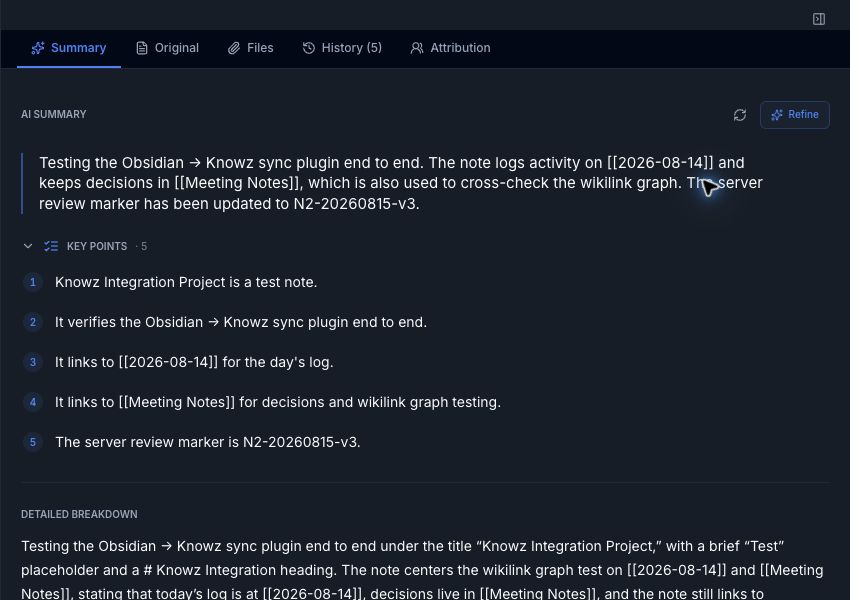
AI summaries and structured knowledge
Knowz generates an overview, key points, and a detailed breakdown while preserving the original Markdown and its history.
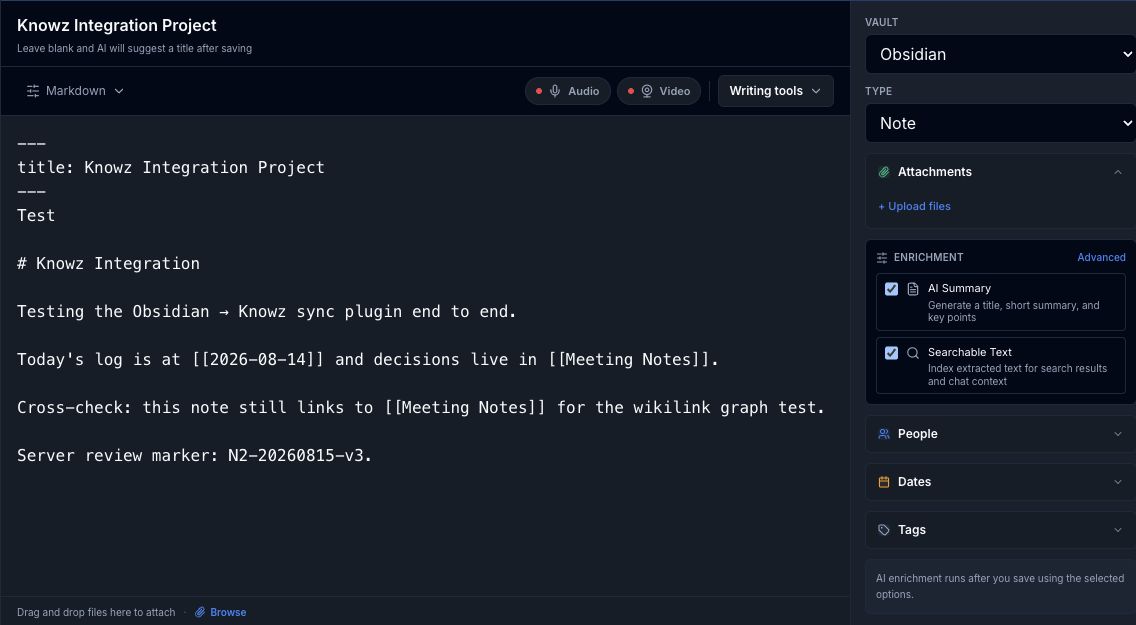
A knowledge editor with AI controls
Work directly with Markdown, choose the destination vault, attach files, and control AI summary and searchable-text enrichment per item.
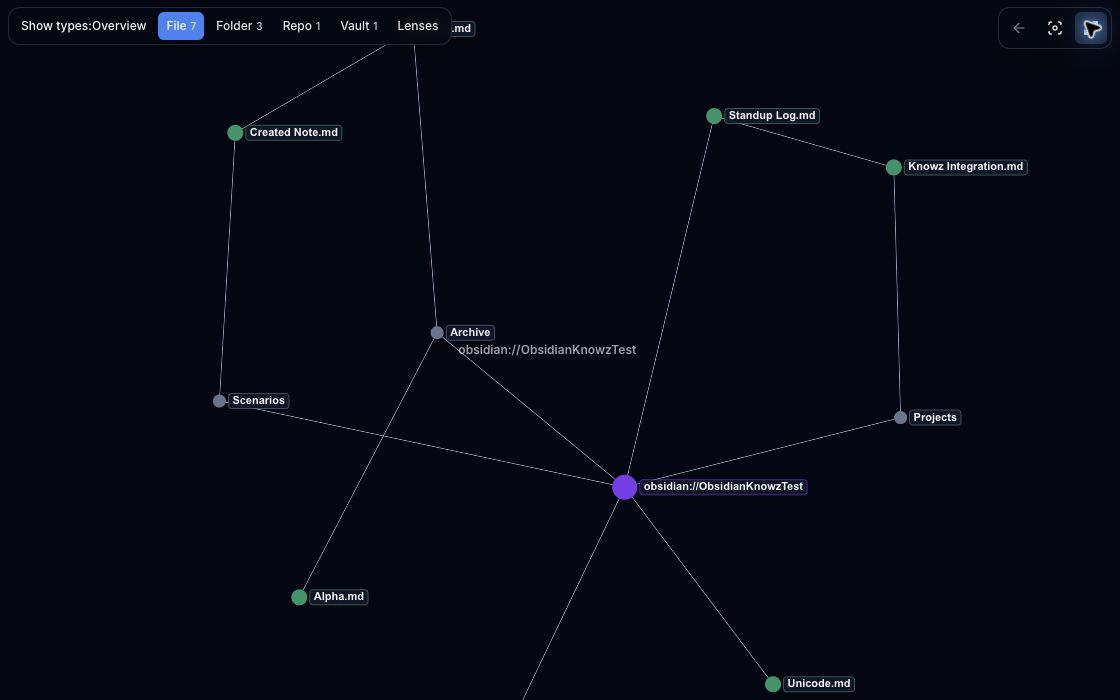
Your Obsidian links as an interactive graph
Folders, notes, and [[wikilinks]] become navigable relationships instead of disappearing
into a flat file list.
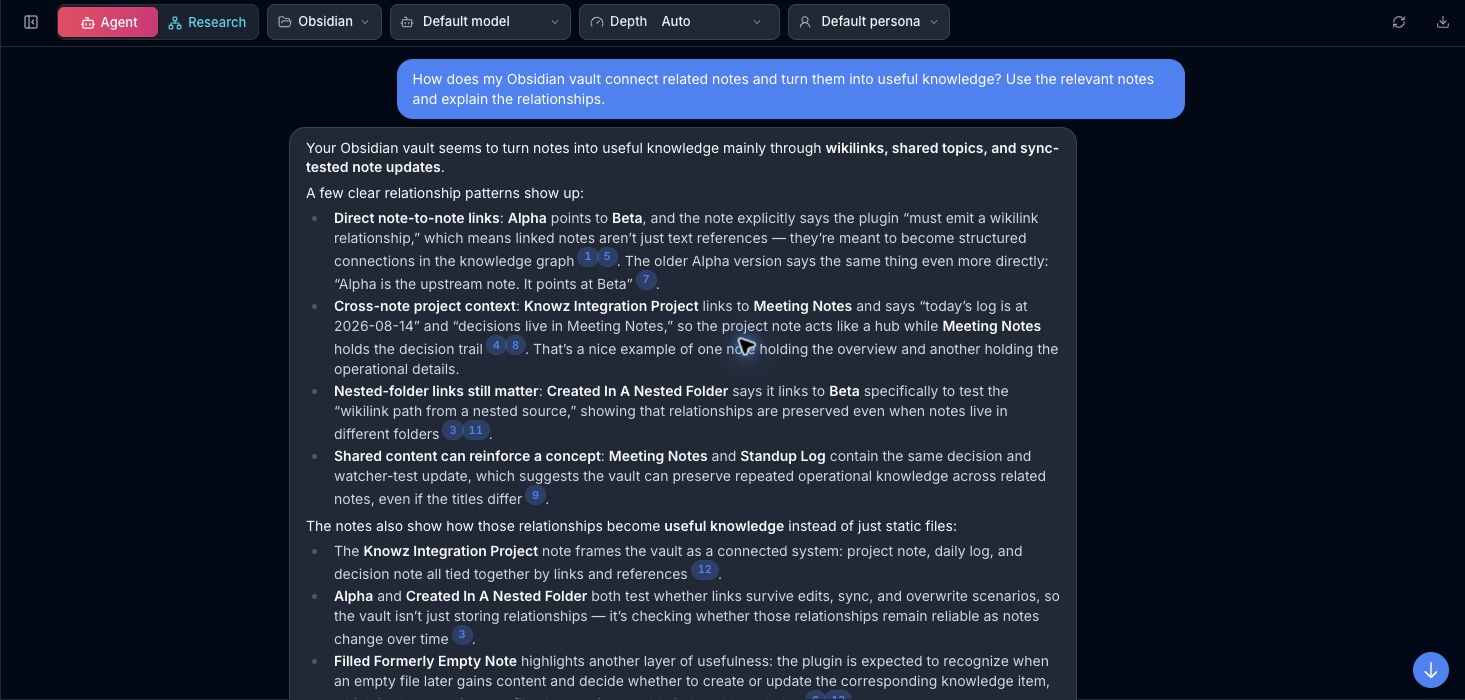
Grounded agentic chat
Scope an agent to the Obsidian vault and get a multi-step answer grounded in the notes, with clickable sources and passages rather than an untraceable response.
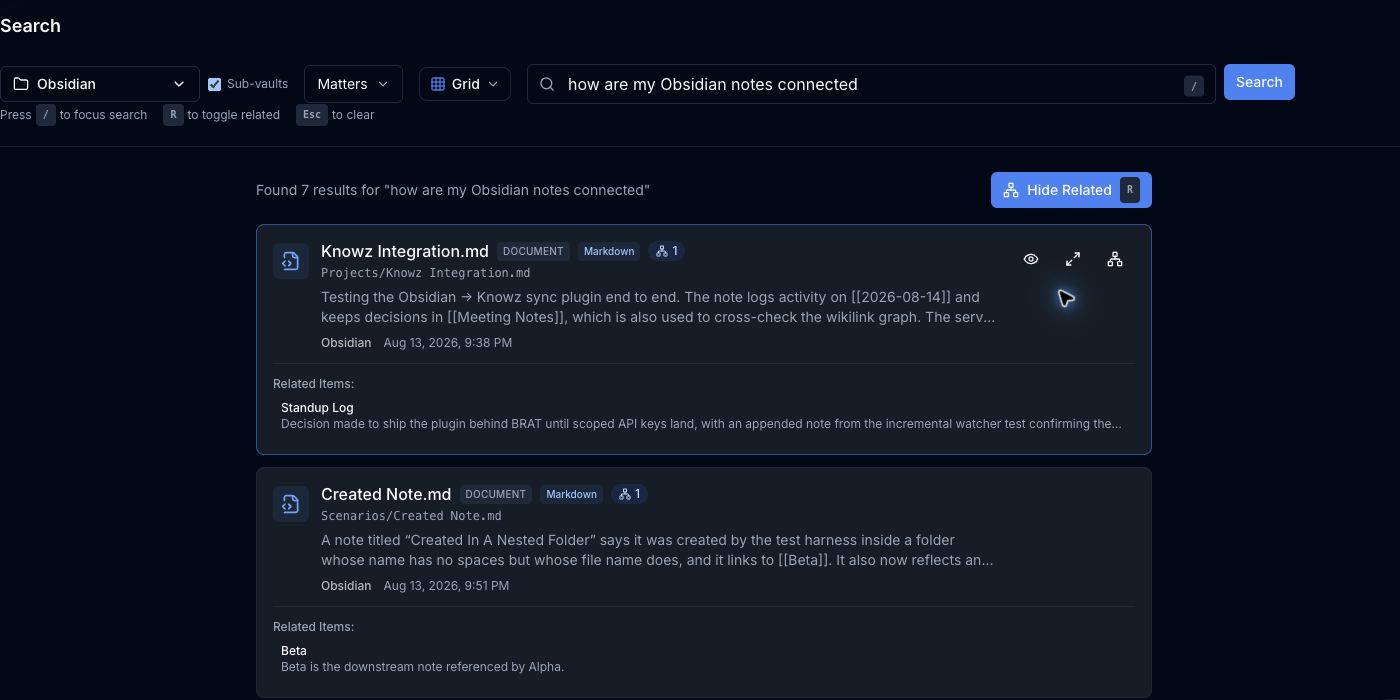
Semantic search and related-note discovery
Search by meaning, preview the matching passages, and reveal related notes created from the vault's link graph.
Feature availability depends on the Knowz plan and tenant configuration.
What you get with a Knowz account
- Semantic search. Find the note you meant, not the one that happened to share a word.
- Vector embeddings and chunking. Long notes are split intelligently, so retrieval returns the passage that answers the question rather than a whole document.
- Agentic retrieval. Agents plan multi-step lookups across your corpus and cite what they used.
- A knowledge graph. Your wikilinks become real relationships, so connected ideas surface together.
- AI chat over your notes, individually or across a team, with enterprise controls.
- AI enrichment. Summaries and extracted entities generated as notes arrive.
These are Knowz platform capabilities and need a Knowz account. What this plugin does is put your vault there and keep it current:
What the plugin does
- Syncs your Markdown notes to a Knowz vault of your choosing.
- Preserves your link graph. Wikilinks are read from Obsidian's own resolved-link index — not scraped with regular expressions — so links resolve exactly the way Obsidian resolves them.
- Keeps up as you write. Create, edit, rename, and delete are picked up from vault events and pushed in a coalesced batch, so a burst of edits becomes one upload rather than fifty.
- Syncs both ways. Sync with Knowz pushes local notes and pulls Knowz notes in one pass. Push to Knowz and Pull from Knowz are available as commands and settings buttons when you want one direction only.
- Keeps conflicts visible. If a note changed in both places, Obsidian wins, the Knowz
copy is written to
{name}.knowz-conflict.md, and a Notice tells you. - Titles notes the way you'd expect. Front-matter
titlewins, then a leading H1, then the filename. - Stays out of the way. Your Obsidian configuration folder,
.trash/, and.smart-env/are excluded automatically, and note content is transmitted verbatim — no rewriting, no reformatting.
Requirements
- Obsidian 1.13.0 or later, on desktop or mobile.
- A Knowz account. The plugin does nothing without one — see below.
Getting a Knowz account
You can create or sign into a Knowz account from the plugin. Open Settings → Knowz AI Sync and choose Connect to Knowz. Obsidian shows you a sign-in code and a button that opens the approval page; check that the page shows the same code, approve there, and the plugin receives an expiring personal key without putting it in a URL or asking you to copy it. Closing that window cancels the sign-in. Back in Obsidian, choose an existing Knowz vault or create one from the vault dropdown.
Self-hosting Knowz instead? Open Advanced manual setup, set your deployment's API URL,
and enter a personal ukz_ key and vault ID. The manual fields remain available when a hosted
deployment does not expose the browser sign-in flow.
Check that git sync is available on your plan. The plugin uses the Knowz git-sync
endpoints (integrations.enableGitSync), which are tier-gated. If the feature is off for your
tenant, the plugin's first request returns HTTP 403 — upgrade the plan or ask your Knowz
administrator to enable it.
Install
From the Obsidian community directory
Open Settings → Community plugins → Browse, search for Knowz AI Sync, and install.
Using BRAT
- Install and enable the BRAT community plugin.
- Choose Add Beta plugin and enter
knowz-io/obsidian-knowz-sync. - Enable Knowz AI Sync under Settings → Community plugins.
Manually
- Download
main.jsandmanifest.jsonfrom the latest release. - Create
<vault>/.obsidian/plugins/knowz-sync/and copy both files into it. - Restart Obsidian and enable Knowz AI Sync under Settings → Community plugins.
To build from source instead: npm install && npm run build.
Setup
Open Settings → Knowz AI Sync, choose Connect to Knowz, finish browser approval, and select the Knowz vault you want to use. The settings are also reachable by searching Obsidian's settings for "Knowz", "sign in", "vault", or "excluded paths".
| Setting | What it's for | Where it comes from |
|---|---|---|
| Connect to Knowz | Browser sign-in that creates an expiring personal key. | Approve in the Knowz web app. |
| Knowz vault | The destination for this Obsidian vault. | Pick or create one after connecting. |
| Sync now / Push / Pull | Two-way sync, or one direction. | Ribbon, command palette, and Settings. |
| Sync on startup | Run a full two-way sync each time Obsidian launches. Off by default. | Your choice. |
| Excluded paths | Folders and file patterns to keep out of Knowz. One per line. | See Excluding notes. |
The API URL, personal key, and raw vault ID remain under Advanced manual setup for self-hosted deployments and recovery.
Then run Sync with Knowz from the ribbon, the command palette, or Settings. Before the first sync the plugin tells you how many notes it will upload and how many already in Knowz it will download, and waits for you to agree. Nothing leaves or is written until you do.
To see exactly what would be sent at any time, run Preview which notes would sync.
Excluding notes
Your Obsidian configuration folder (normally .obsidian/, wherever you have it), .trash/,
and .smart-env/ are excluded automatically. Add your own patterns
under Excluded paths, one per line:
| Pattern | Matches |
|---|---|
Journal/ |
that folder and everything inside it |
*.private.md |
any file with that name pattern, in any folder |
Work/*/draft.md |
draft.md one folder below Work/ |
Work/**/draft.md |
draft.md at any depth below Work/ |
note-?.md |
note-a.md, but not note-ab.md |
Matching is case-insensitive, and lines beginning with # are treated as comments.
How syncing behaves
Sync is bidirectional. A note changed only in Knowz is pulled on Sync, Pull, and the
five-minute auto-pull. A note changed only in Obsidian is pushed. If both copies changed,
Obsidian keeps the note, the Knowz version is written to {name}.knowz-conflict.md, and the
Obsidian body is pushed so the sides converge. Knowz-side deletes are not pulled; delete a
note in Obsidian to remove it permanently. Encrypted Knowz items are skipped and never
written as ciphertext. AI summaries stay in Knowz and are not written into notes.
Full syncs repair drift. A full sync compares your eligible notes against a fresh manifest from Knowz, so anything left inconsistent by a previously failed push is corrected rather than left behind.
Beyond that:
- The plugin registers your vault with Knowz once per session, idempotently, under the
identifier
obsidian://<vault-name>. - Incremental changes are collected and pushed after a 15-second quiet period, so editing produces one upload rather than one per keystroke.
- A rename is sent as a rename, not as a delete plus a create, so the note keeps its identity
and history on the Knowz side. Moving a note with Finder or
mvis paired the same way, provided the delete and create land in the same debounce window. - Empty and whitespace-only notes are not synced until they have content.
- A failed push is retried once after roughly two seconds. Local sync state only advances after the server confirms, so an interrupted sync resumes rather than silently skipping.
- A full sync that reads an empty vault while notes are already synced is refused outright, rather than interpreting it as "the user deleted everything."
- After the first confirmed sync, the plugin pulls safe Knowz-side changes every five minutes and still pushes local edits after a 15-second quiet period. Sync with Knowz, Push to Knowz, and Pull from Knowz run the same planner immediately.
Disclosures
Obsidian asks plugin authors to state plainly how their plugin behaves. Here is ours.
This plugin requires an account. Knowz AI Sync does nothing without a Knowz account, a vault ID, and a personal API key. There is no offline or local-only mode.
This plugin uses the network. It communicates with the Knowz API at the base URL you
configure — https://api.knowz.io by default, or your own Knowz deployment. It contacts no
other host, and it loads nothing at runtime from any third party. The URL must use https
(except for localhost, for local development), and you are warned if it points somewhere
other than a knowz.io address.
What is transmitted. The Markdown content of the notes it syncs, their paths within your vault, the name of your vault, a SHA-256 hash of each note's content used to detect changes, and the pairs of notes connected by your wikilinks. This is the payload the feature requires: the notes are what gets indexed, and the link pairs are what becomes the graph.
What is not transmitted. Non-Markdown files and attachments, anything under your Obsidian
configuration folder,
.trash/, or .smart-env/, and anything outside your Obsidian vault. The plugin reads no file
outside the vault and uses no Node.js or Electron API.
Your Obsidian configuration folder is excluded unconditionally and cannot be re-included, since it holds every plugin's stored data — including credentials.
What the plugin can see. To decide what to sync, the plugin asks Obsidian for the list of every Markdown file path in your vault. It has to: nothing else can tell it which notes exist, or which of them have been added, renamed, or removed since the last sync. Your exclusions are applied to that list before any note is opened, so an excluded note's path is seen, but its contents are never read and neither its contents nor its path are sent to Knowz. Only the notes that survive the filter are read, and only those are uploaded. The one exception is a note you exclude after it has already synced: the next full sync sends its path once, to delete it from Knowz.
Everything else in the vault is synced, minus whatever you add under Excluded paths. The plugin shows you the count and the destination before the first upload, and the Preview which notes would sync command lists what is currently in scope.
What is written. The plugin writes Markdown into this vault on Sync, Pull, the
five-minute auto-pull, and explicit Apply. It creates missing notes and parent folders
for notes that exist only in Knowz. On a conflict it writes a {name}.knowz-conflict.md
sidecar next to the original note and leaves your Obsidian copy in place. Encrypted Knowz
items and AI summaries are not written. Conflict sidecars are never uploaded.
No telemetry. This plugin collects no usage analytics, no crash reports, and no client-side telemetry of any kind.
Payment. The plugin itself is free and MIT-licensed. Knowz is a commercial service, and your Knowz plan governs the features available to your account.
About your API key
Your key is stored in .obsidian/plugins/knowz-sync/data.json inside your vault, in plain
text. Obsidian offers a secret storage API that keeps a credential out of the vault; this
plugin has not moved to it yet, because that store is per-device and would mean re-entering
your key on every device you sync this vault to. Doing it well is planned.
Be aware that any other plugin you install can read that file. That is true of every Obsidian plugin that stores a credential, and it is not something a plugin can prevent — so the protection that matters is limiting what the key is allowed to do.
What follows from that:
- Use a non-administrative key, and give it an expiry. Grant it only what syncing needs.
- If your vault is in version control, add
.obsidian/plugins/knowz-sync/data.jsonto your.gitignorebefore you configure the plugin. - If you sync your vault between devices, remember the key travels with it.
- Revoke the key from your Knowz account if a vault copy ends up somewhere it shouldn't.
We are working on narrowly-scoped keys that can do nothing but sync a single vault, which will reduce the consequences of exposure. Until then, treat the key as you would any password stored in a file.
Current limitations
- Knowz-side deletes are not pulled into Obsidian.
- Conflicts are not merged: Obsidian keeps the note and the Knowz copy is saved as a sidecar.
- Attachments and non-Markdown files are not synced.
- Front-matter tags are not yet mapped to Knowz tags.
- Empty notes are not synced until they contain content.
- A note that is moved and edited before the debounce fires cannot be distinguished from a delete plus an add, because its content hash changes too. In that case the note is re-created on the Knowz side under a new item ID.
Contributing
npm install, then npm test for the suite, npm run typecheck, and npm run build for a
release build. Manual verification steps that need the Obsidian desktop app and a live Knowz
environment are in docs/manual-verification.md.
Support
Bugs and feature requests: GitHub issues.
License
MIT © Rapid Venture Group LLC