
README file from
Github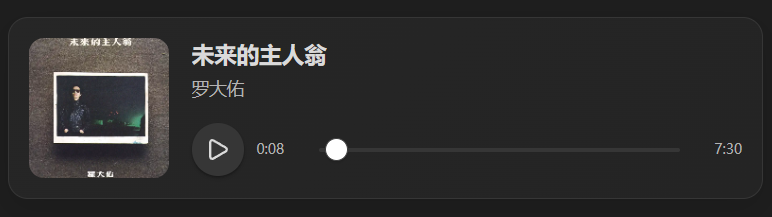
Knowledge Objects
Knowledge Objects renders semantic objects stored in Markdown as interactive components in Obsidian.
The initial release supports local music objects.
Features
- Render
musicfenced code blocks as audio players - Display title, artist, cover image, progress, and duration
- Support local audio and image files stored inside the vault
- Work on desktop and mobile
- Preserve readable Markdown when the plugin is unavailable
Usage
Create a fenced music block:
title: Rising Force
artist: Yngwie Malmsteen
src: Assets/music/rising-force.mp3
cover: Assets/images/rising-force.jpg
Both src and cover use vault-relative paths.
Requirements
- Audio files must be stored inside the Obsidian vault
- Cover images must be stored inside the Obsidian vault
- Paths must use vault-relative paths rather than operating-system absolute paths
Installation
Community plugins
Once the plugin is available in the Obsidian Community Plugins directory:
- Open Obsidian Settings.
- Open Community plugins.
- Search for
Knowledge Objects. - Install and enable it.
Manual installation
Download the following files from the latest GitHub release:
main.jsmanifest.jsonstyles.css
Place them in:
<Vault>/.obsidian/plugins/knowledge-objects/
Then restart Obsidian and enable the plugin.
Roadmap
Future versions may support additional semantic objects such as papers, repositories, books, movies, and games.
License
MIT