
README file from
GithubKandyban
A non-destructive Kanban view for markdown projects, inside Obsidian. Reads bold-key metadata directly, lets you drag cards between status columns, and writes changes back without touching the rest of the file.
Works particularly well with SweetClaude-structured projects (the convention Kandyban was originally built against), but supports any markdown items that lead with a bold-key block:
**Status:** open,**Priority:** next,**Milestone:** MS-001, etc.


Kandyban gives SweetClaude users a board and a list view over their project's issues (I-*) and milestones (MS-*). It reads SweetClaude's native bold-key markdown directly, lets you drag cards between status columns, edit enums inline, search and filter, and writes changes back to the same files with annotations preserved byte-identical.
SweetClaude in Claude Code remains the primary working interface — Kandyban is a visibility and ergonomics layer alongside it.
Screenshots
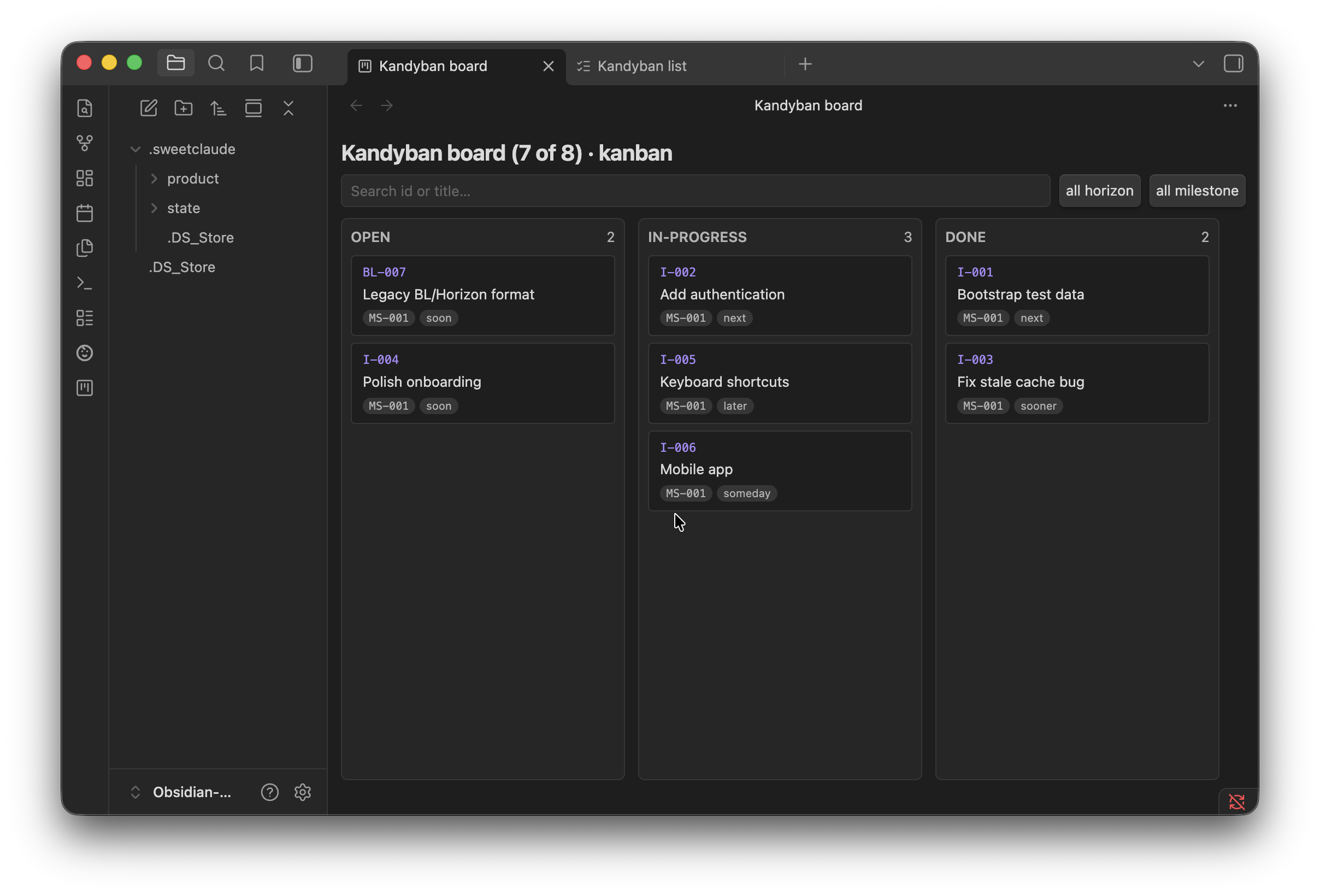
Board view
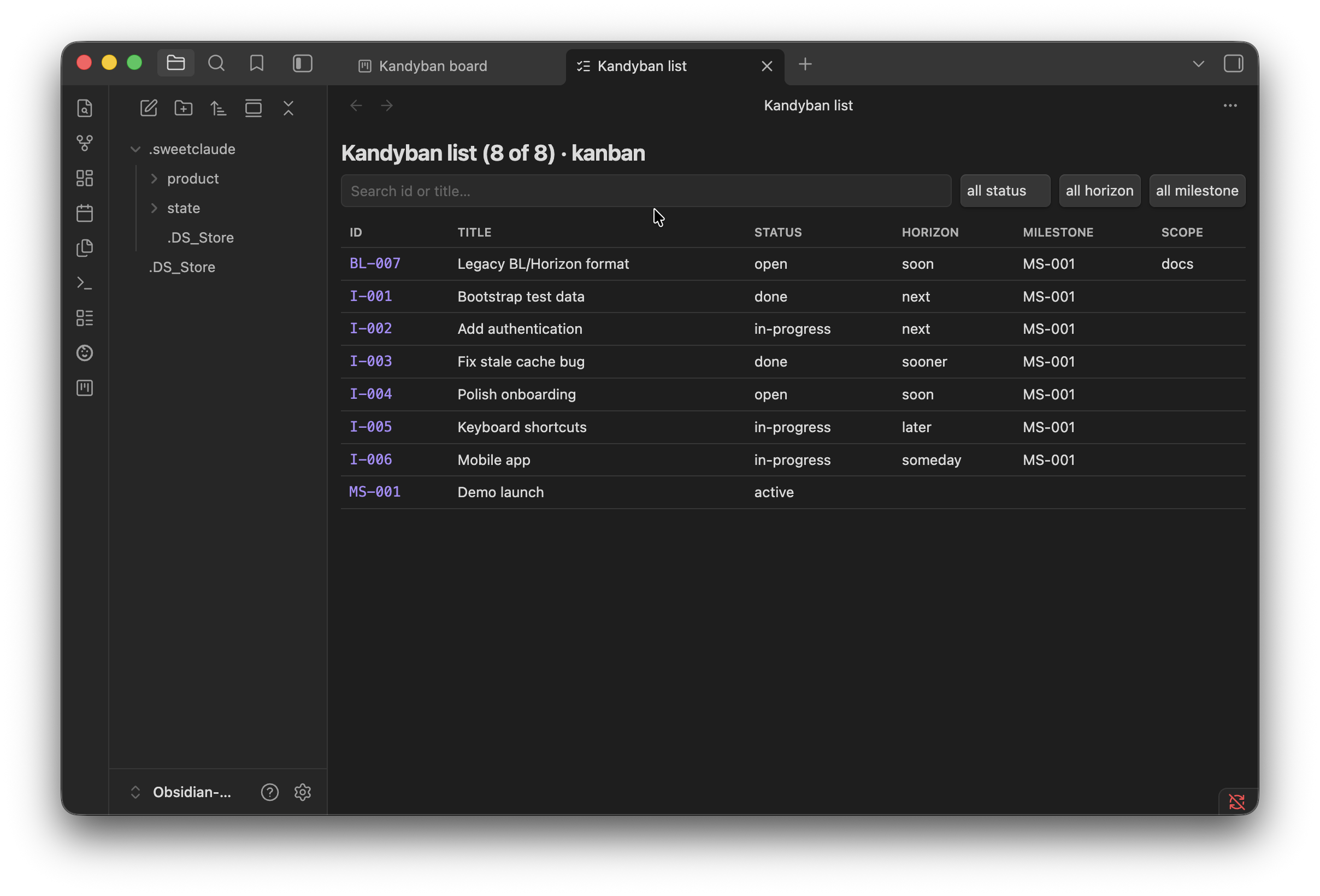
List view with inline status picker
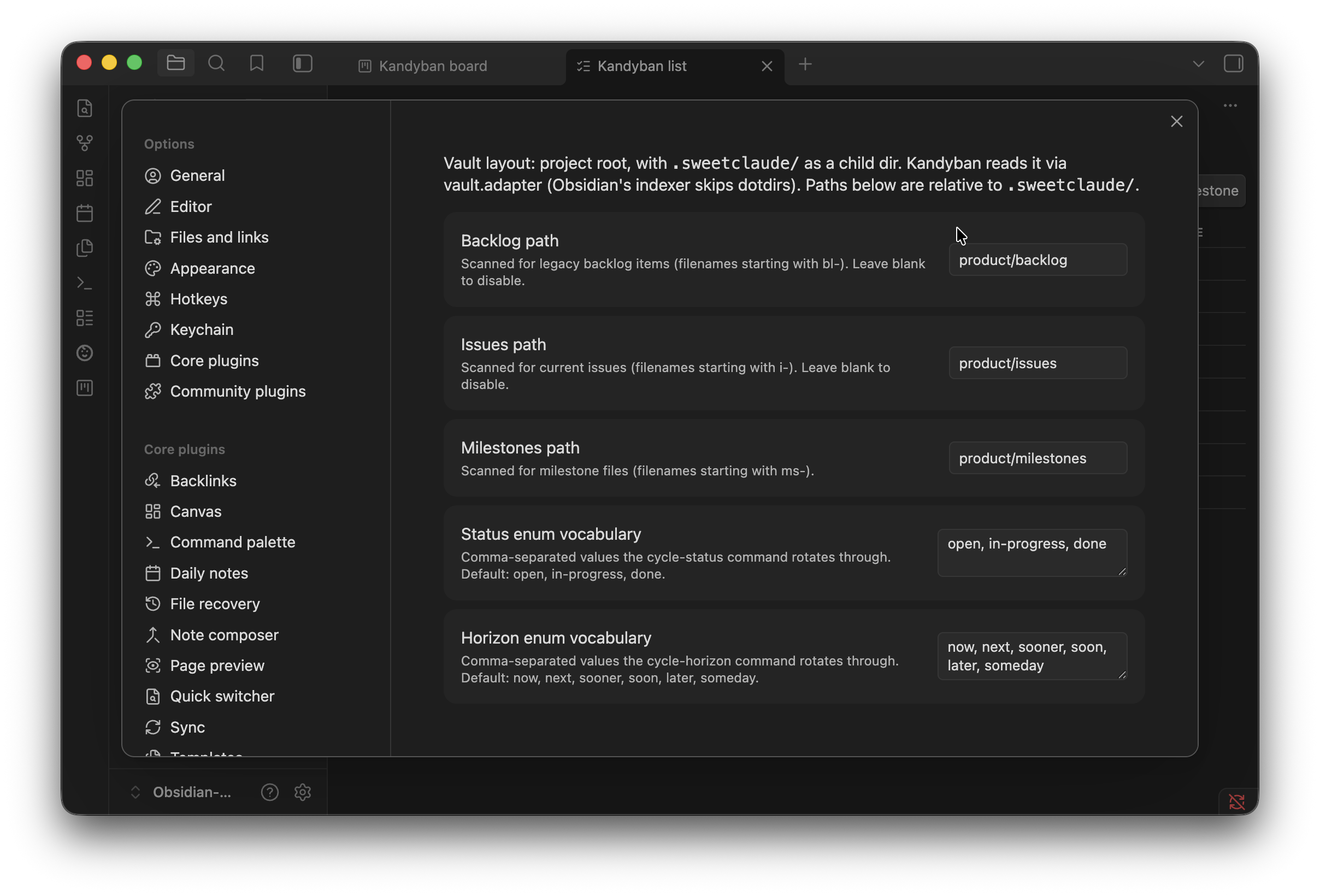
Settings
Features
- Board view (kanban). Columns by status, cards by work item, native HTML5 drag-and-drop between columns. Cards show ID, title, milestone, and a horizon chip.
- List view (table). All items in a sortable-feeling table with ID, title, status, horizon, milestone, and scope columns. Click ID/title to open the file.
- Inline enum editing. Click a status or horizon cell in the list view to pop a native Obsidian picker; pick a new value to write it to disk.
- Non-destructive writes. Annotations like
done (merged 2026-05-19, PR #29)ordeferred — blocked on …are preserved byte-identical when you change the leading enum. The full file content outside the field stays untouched. - Search. Type in the toolbar's search box to filter by ID or title. Focus and cursor position survive re-renders. Clear with the ✕ button or by clearing the field.
- Filter dropdowns. Filter by status, horizon, or milestone. Filters are populated from the actual values present in your vault.
- FLIP animation. When a card moves between columns, it animates from its old position to the new one with a brief destination flash so you can track what happened.
- Mode-aware views. Kandyban reads your project's
modefield fromstate/phase.yamland adapts: kanban/agile render normally, flow mode shows a placeholder ("work is inferred"), Shape Up mode explains the kanban doesn't apply, unset mode renders normally (for SweetClaude projects that haven't set a mode field — e.g. older convention). - Cycle commands.
Cycle status forwardandCycle horizon forwardrotate through your configured enum vocabularies for the active file — useful with hotkeys. - Configurable enum vocabularies. Status and horizon rotation sets are settings — set your own if your project uses non-default values.
- Dual convention support. Reads both the framework-standard
I-*(current SweetClaude) and the legacyBL-*convention some projects use. Recognizes**Horizon:**and**Priority:**as the same field. Milestone values likeMS-002-browser-extension-mvpcanonicalize toMS-002. - Ribbon icons. One-click access from Obsidian's left ribbon: a kanban-square icon opens the board, a checklist icon opens the list.
Compatibility
- Obsidian: 1.5.0 or newer (per
manifest.json). - Platforms: desktop.
isDesktopOnly: falseis declared, but views are not optimized for narrow screens. Tested on macOS. - SweetClaude: any project with
MS-*milestone files and eitherI-*orBL-*work items. Tested against the framework's 3.68.6 release with a vault containing both conventions.
Vault setup
Kandyban supports two vault layouts and auto-detects which one you're using. Pick whichever fits your workflow:
Option A — open your project root as the vault (recommended for multi-project setups)
your-project/                     # ← open THIS as your Obsidian vault
├── src/                          # your code (visible in the file explorer)
├── package.json                  # also visible
└── .sweetclaude/                 # Kandyban finds and reads this via vault.adapter
    ├── product/{backlog,issues,milestones}/
    ├── state/phase.yaml
    └── …
Each project gets a distinct vault name (your project's directory name) — solves the "all my vaults show as sweetclaude" problem. Trade-off: Obsidian's indexer skips dotdirs, so .sweetclaude/* files don't have TFile references. Kandyban uses vault.adapter (low-level filesystem access) for everything it needs internally, so board / list / drag / edit all work — but click-to-open a card falls back to the system handler (your OS default markdown app) instead of opening in an Obsidian editor pane.
To get full Obsidian integration in Option A, install a community plugin that makes the indexer include dotdirs (search community plugins for "Show Hidden Files" or "Show Dotfiles"). With one installed, .sweetclaude/* becomes regular indexed files and click-to-open lands in Obsidian. Kandyban detects this at load and adapts.
Option B — open .sweetclaude/ itself as the vault (original mode)
your-project/.sweetclaude/        # ← open THIS as your Obsidian vault
├── product/{backlog,issues,milestones}/
├── state/phase.yaml
└── …
Click-to-open works natively. Trade-off: every project's vault root is .sweetclaude/, so multi-project setups all show the same vault name in Obsidian's switcher. ALSO: don't use Obsidian's "Rename vault" — it moves the directory on disk and breaks SweetClaude's hardcoded paths.
To pick the hidden .sweetclaude/ folder in the vault picker:
- macOS: press
⌘+Shift+.(period) inside the file dialog. - Windows / Linux: TBD — verify and PR.
- Or symlink for a friendlier name:
ln -sf .sweetclaude my-project-vaultthen pickmy-project-vault.
Which layout is Kandyban using right now?
The view headers show your detected layout — e.g. Kandyban board (134 of 134) · kanban. Kandyban's Rescan vault and show cache hint command also surfaces the current mode in its Notice.
Quick start
After installing and enabling Kandyban:
- Click the kanban-square icon in Obsidian's left ribbon (or open the command palette with
⌘+Pand search for "Kandyban: Open board"). - The board renders columns by status (
open,in-progress,doneby default), with one card per work item. - Drag a card to a different column to change its status. The underlying
.mdfile is updated immediately; annotations are preserved. - Click a card to open the underlying file in a new pane.
- Open the list view — click the checklist icon in the left ribbon, or use the command palette → "Kandyban: Open list" — for a tabular layout with inline enum editing.
Usage reference
Board view
- Columns: one per status value in your configured vocabulary (
open/in-progress/doneby default). Any extra status values present in your data appear as additional columns at the right so nothing is hidden. - A card's column is its
**Status:**field — nothing else. Kandyban reflects what's written in the file; it does not infer progress. If a coding agent (or anyone) starts work on a ticket without writing an in-progress status into its metadata, the card stays in whichever column its**Status:**says — it will not move on its own. To show it as in-progress, drag the card to that column (which writes the status back to the file), or have the agent set**Status:**itself. Note that in project-root layout, external edits to.sweetclaude/*files don't reach Obsidian until you runRescan vault and show cache hint(see Vault setup). - Cards: show
id(monospace),title,milestonebadge (if set), and ahorizonchip (if set). Within a column, cards are ordered byhorizon(your configured order, e.g.now → … → someday), with no-horizon cards last. - Drag to move: native HTML5 drag and drop. Drop targets highlight on hover. After drop, the card animates from old to new position; the destination card flashes the accent color for ~900ms so the eye lands at the change.
- Click a card to open the underlying file in a new tab.
- Scope: the board surfaces only items with
kind: backlog(i.e.I-*andBL-*). Milestone files (MS-*) are not rendered as cards — they're link targets.
List view
- Columns:
id,title,status,horizon,milestone,scope(read from the bold-key**Scope:**field if present). - Click
idortitleto open the underlying file in a new tab. - Click a
statusorhorizoncell to pop an inline picker — choose a new value to write it. - Empty states: if no items are indexed yet, the table explains how to check your settings. If filters exclude everything, you see "no items match the current filters."
Search and filters
Both views share the same toolbar pattern:
- Search input: matches
idortitle(case-insensitive substring). Focus and cursor are preserved across re-renders so typing isn't disrupted. The ✕ button clears the search and refocuses the input. - Filter dropdowns:
status(list view only — board's columns already filter status),horizon,milestone. Options are populated from the unique values currently present in your vault. Chooseall <field>to clear that filter.
Drag and drop
Only available in the board view. The plugin uses a custom MIME type (application/x-kandyban-file-path) so the drag payload identifies the exact source file by path — not by item ID. This avoids mis-targeting when a project has duplicate IDs (it happens — Saive has six MS-NNN files where IDs collide).
Inline enum picker
Available in the list view's status and horizon cells. Clicking pops an Obsidian Menu with all configured enum values; the current value carries a ✓ icon. Picking a new value writes to the file. The picker uses Obsidian's native popup so it integrates with whatever theme you have installed.
The horizon cell writes back to whichever field name the file actually uses on disk: **Horizon:** (legacy/Saive convention) or **Priority:** (current SweetClaude convention). The plugin detects which form is present and updates the matching field.
Cycle commands
Cycle status forward— bind a hotkey to this command. With a SweetClaude.mdfile open in an editor pane, the command writes the next status in your configured rotation. Stops at the end and wraps to the start.Cycle horizon forward— same idea, for the horizon/priority field.
Both commands no-op gracefully if the active file isn't a SweetClaude artifact, has no current status/horizon, or has an empty configured rotation.
Ribbon icon
A kanban-square icon appears in Obsidian's left ribbon. Click to open the board view. Tooltip: "Kandyban board."
Rescan command
Kandyban: Rescan vault and show cache hint rebuilds Kandyban's in-memory index from disk (useful if you suspect your edits diverged from what the plugin sees) and shows a Notice reminding you how to refresh SweetClaude's own cached session-status.txt. See SweetClaude cache staleness.
Settings reference
Open Settings → Community plugins → Kandyban to configure:
| Setting | Default | Purpose |
|---|---|---|
| Backlog path | product/backlog |
Vault-relative dir scanned for legacy BL-* files. Leave blank to disable. |
| Issues path | product/issues |
Vault-relative dir scanned for current I-* files. Leave blank to disable. |
| Milestones path | product/milestones |
Vault-relative dir scanned for MS-* files. |
| Status enum vocabulary | open, in-progress, done |
Comma-separated; the Cycle status forward command rotates through this list, and the board derives its columns from it. |
| Horizon enum vocabulary | now, next, sooner, soon, later, someday |
Comma-separated; the Cycle horizon forward command rotates through this list. |
All three path fields can be cleared if you don't have that artifact type. Path changes trigger a full re-scan immediately.
Project mode support
Kandyban reads the mode field from your vault's state/phase.yaml and adapts:
| Mode | Behavior |
|---|---|
kanban |
Renders normally (the default fit). |
agile |
Renders normally. (Sprint-aware filtering is on the roadmap.) |
agile_enterprise |
Renders normally. |
unset (no mode: field) |
Renders normally — covers older SweetClaude projects and the Saive-style BL-* convention. |
flow |
Shows a placeholder explaining work is inferred in flow mode and there's nothing to render. |
shape_up |
Shows a placeholder explaining Shape Up has no backlog by design; suggests waiting for a pitch-board view. |
The current mode is shown in the view header (e.g. Kandyban board (134 of 134) · kanban). Changing the mode: line in phase.yaml triggers an automatic refresh — no plugin reload needed.
How it works
Bold-key contract preservation
SweetClaude artifact files lead with a bold-key metadata block:
# I-007: MVP Launch Readiness

**Type:** chore
**Status:** in_progress
**Priority:** next
**Effort:** s
**Milestone:** MS-001
**Depends on:** I-001, I-002
When Kandyban writes a change (e.g. cycling status from in_progress → done), it uses a surgical splice: only the leading enum portion of the targeted **Field:** line changes. Everything else — the H1, other bold-key lines, the body, and any annotation after the enum (parentheticals, em-dashes, or - separators) — is preserved byte-identical.
The parser and writer are pure TypeScript modules with no Obsidian dependencies, covered by 33 vitest cases including round-trip byte-identity assertions against fixtures drawn from real corpus variation.
SweetClaude cache staleness
SweetClaude regenerates a cached state/session-status.txt via a Claude Code PostToolUse hook that fires after Claude Code's own Write/Edit tool calls. Obsidian's vault.modify writes do not go through Claude Code, so the hook does not fire, and the cache goes stale until something else triggers regeneration.
Practical impact: after using Kandyban to drag cards or cycle enums, your project's cached session-status.txt shows pre-edit data. Slash commands that recompute from disk (/sweetclaude:status) are unaffected — they show live truth. Slash commands or memory tools that read the cached file will show stale data.
Refresh paths:
- Run
/sweetclaude:statusin Claude Code — recomputes from disk (doesn't write the cache, but you see fresh state). - Edit any file in the framework's watched set (e.g. add a noop line to
state/checkpoint.md) — triggers the regenerator. - Start a new Claude Code session — preflight regenerates.
Kandyban's own in-memory index stays in sync with the vault via Obsidian's file-watcher events. The staleness is exclusive to SweetClaude's framework caches, not Kandyban's.
Known limitations
- Native SweetClaude artifact types beyond
I-*/BL-*/MS-*are not surfaced. Epics, themes, sprints, roadmap items, releases, pitches, and cycles are readable in Obsidian's native pane but not rendered in the board or list. Filter chips for epic / theme are a likely post-MVP addition. - No item creation from inside Kandyban. Creating a new
I-*is the framework's job (/sweetclaude:project-issues new). A capture command is on the roadmap but blocked on a compatibility-investigation step. - No sprint-aware filtering for agile mode. Agile-mode projects render the same as kanban-mode projects.
- No Shape Up pitch view. Shape Up projects see only a placeholder.
- Desktop-tested only. The plugin declares
isDesktopOnly: false, but mobile layouts are unverified. - SweetClaude cache staleness (see above) — Kandyban can't trigger Claude Code's
PostToolUsehook from within Obsidian.
Troubleshooting
".sweetclaude/ doesn't show up in Obsidian's vault picker." Inside the file dialog, press ⌘+Shift+. (macOS). On Windows/Linux, see Picking the hidden folder.
"The board is empty even though my vault has items." Check Settings → Kandyban → paths. Are the configured paths (backlog / issues / milestones) correct relative to your vault root? Then run Kandyban: Rescan vault and show cache hint to force a re-scan.
"The board shows a placeholder about flow mode but I have items." Your state/phase.yaml has mode: flow set. Either remove the line (Kandyban will render normally) or change the mode to kanban / agile.
"My status changes don't appear in /sweetclaude:status output." That's likely the cache staleness issue. Run /sweetclaude:status again — it recomputes from disk. Or edit state/checkpoint.md to trigger regeneration.
"The X icon on the search field is invisible against my theme." Open an issue with a screenshot. The icon uses var(--text-normal) which most themes respect; some themes override it to subtle values.
"Drag-drop opens the wrong file when I have duplicate IDs." This was a real bug fixed in I-007 — make sure you're on the latest build. The drag payload now uses file path (unique), not item ID.
"Don't rename the vault in Obsidian." Obsidian's "Rename vault" action moves the directory on disk. If your vault is .sweetclaude/, renaming it breaks every SweetClaude tool that hardcodes that path — slash commands, the state-regenerator hook, the artifact tooling, and Kandyban itself. If you need a friendlier label in Obsidian's vault switcher, see the multi-vault note below.
"All my Kandyban vaults show as 'sweetclaude' in Obsidian's vault switcher." Known consequence of the vault-as-.sweetclaude/ model — every project's vault root has the same name. Workarounds: (a) hover over the entry to see the full path tooltip; (b) wait for the planned "open project root as vault" support (see roadmap) which will let you pick a per-project name; (c) use the non-hidden symlink trick from Picking the hidden folder and give each symlink a project-specific name.
Development
# Install deps
npm install

# Watch build (rebuilds main.js on every save)
npm run dev

# Production build
npm run build

# Lint (ESLint with eslint-plugin-obsidianmd)
npm run lint

# Tests (vitest)
npm test

# Watch tests
npm run test:watch
To test the plugin against your own SweetClaude vault while iterating, symlink the built artifacts into the target vault:
mkdir -p /path/to/your-project/.sweetclaude/.obsidian/plugins/kandyban
for f in main.js manifest.json styles.css; do
  ln -sf "$PWD/$f" /path/to/your-project/.sweetclaude/.obsidian/plugins/kandyban/$f
done
Then enable Kandyban in that vault and reload Obsidian (or toggle the plugin off and on) to pick up new builds.
Roadmap
- Sprint-aware filtering for agile mode.
- Epic / theme classification filters.
- Pitch-board view for Shape Up projects.
- Item creation from Obsidian — pending a compatibility audit of
/sweetclaude:project-issues new.
Contributing
Issues, PRs, and feedback welcome via this repo's GitHub Issues.
Before submitting a PR, please:
- Ensure
npm run lint,npm run build, andnpm testall pass. - If you're changing the parser or writer, add a vitest fixture covering the new variant.
- If you're changing UI behavior, exercise it manually against a real SweetClaude vault (not just the synthetic fixtures).
Acknowledgments
- SweetClaude — the framework Kandyban sits beside. Project work tracked through SweetClaude's own conventions; Kandyban honors the formats it produces.
- Obsidian — the platform.
- The plugin's structure derives from the Obsidian sample plugin template, heavily rewritten.
License
MIT — Dan Seaman, 2026.