
README file from
GithubKanban Moonlight

A native Kanban board plugin for Obsidian. Transform your markdown notes into an interactive, visual Kanban board using frontmatter metadata.
Features
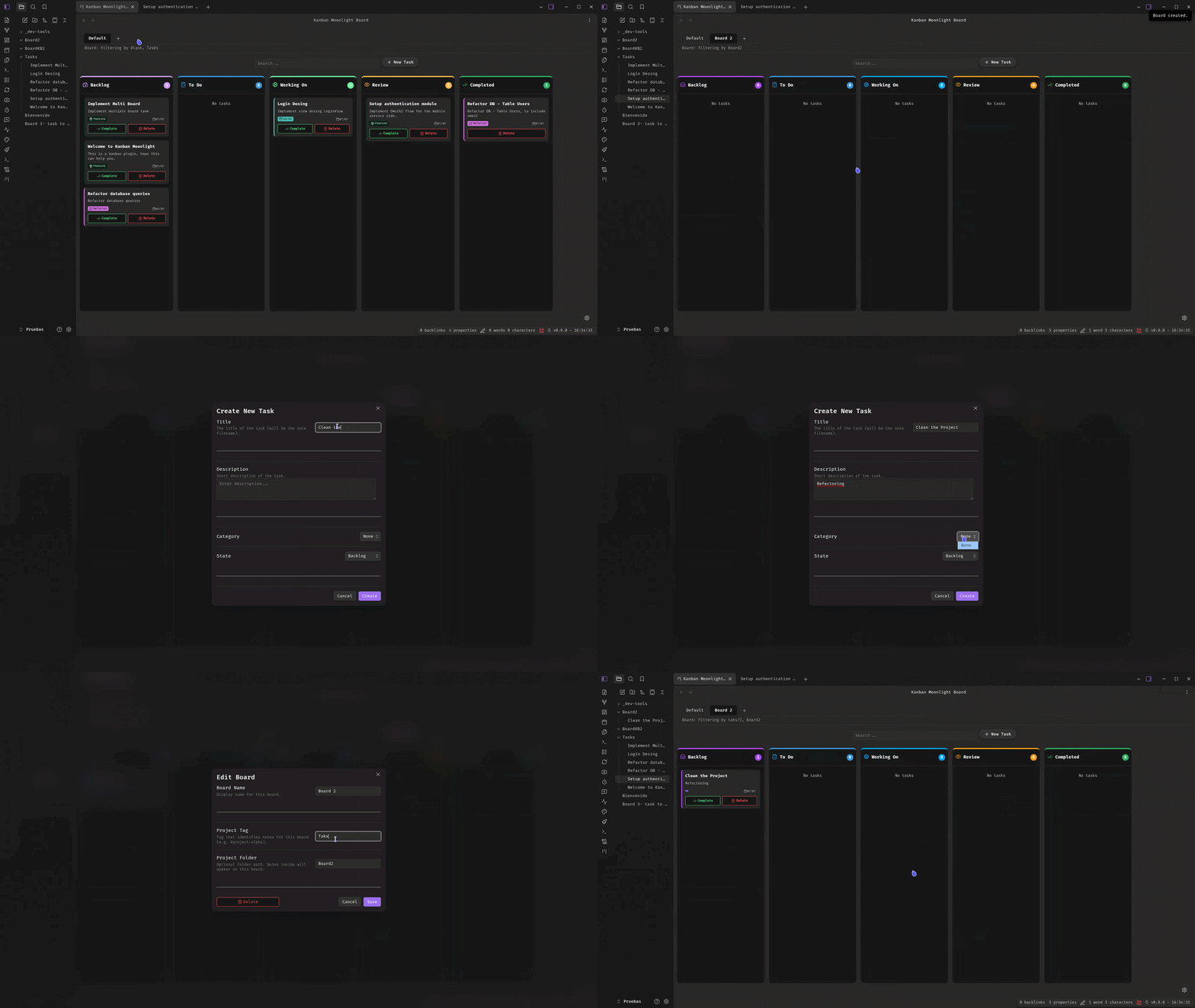
- Multi-board Support: Create and manage multiple independent Kanban boards, each with its own columns, categories, tag, and folder configuration.
- Board Tabs: Switch between boards via a tab bar at the top of the Kanban view.
- Three View Modes: Toggle between Board, Gantt Chart, and Dashboard views.
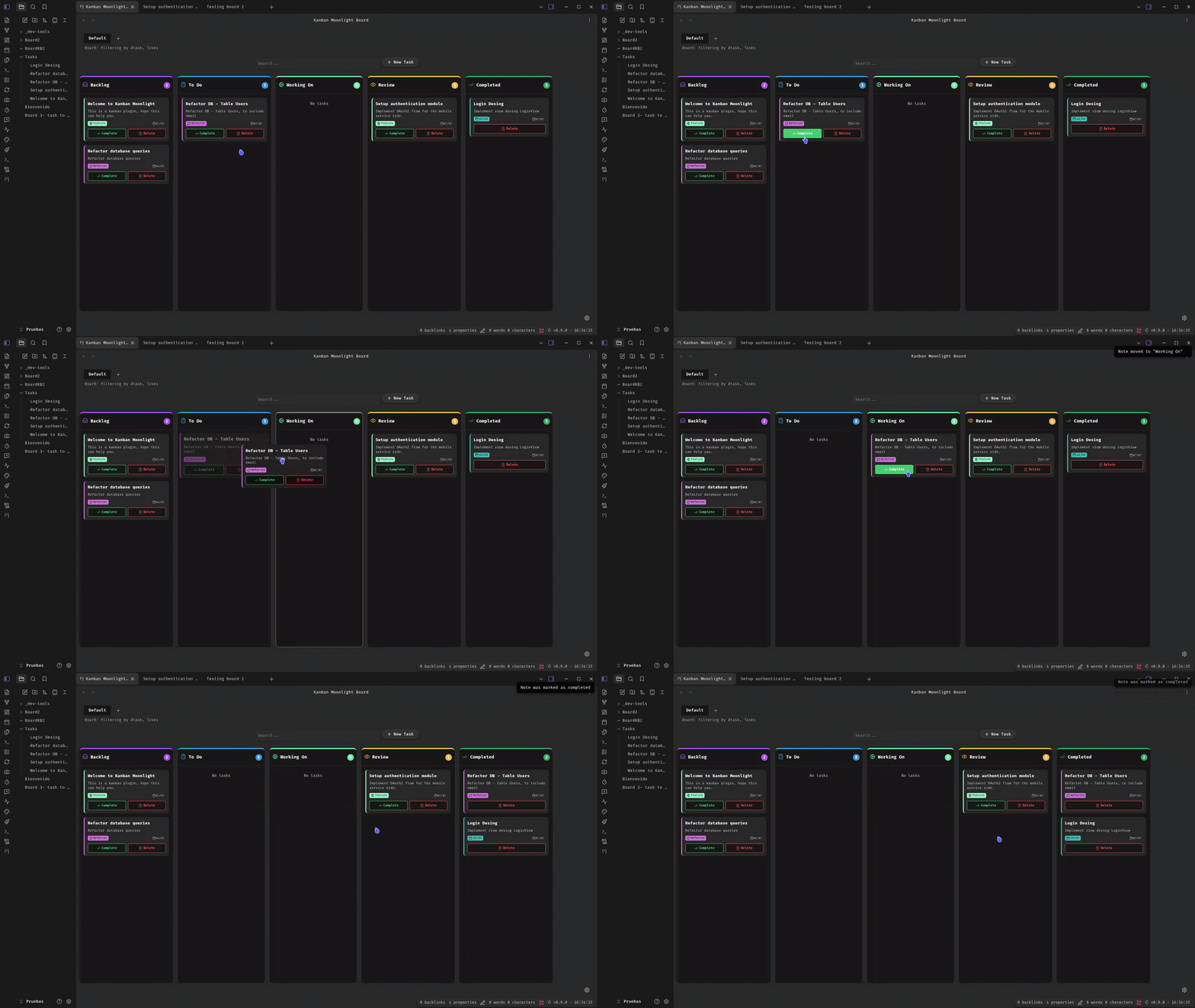
- Drag & Drop: Move notes between columns by dragging cards — frontmatter
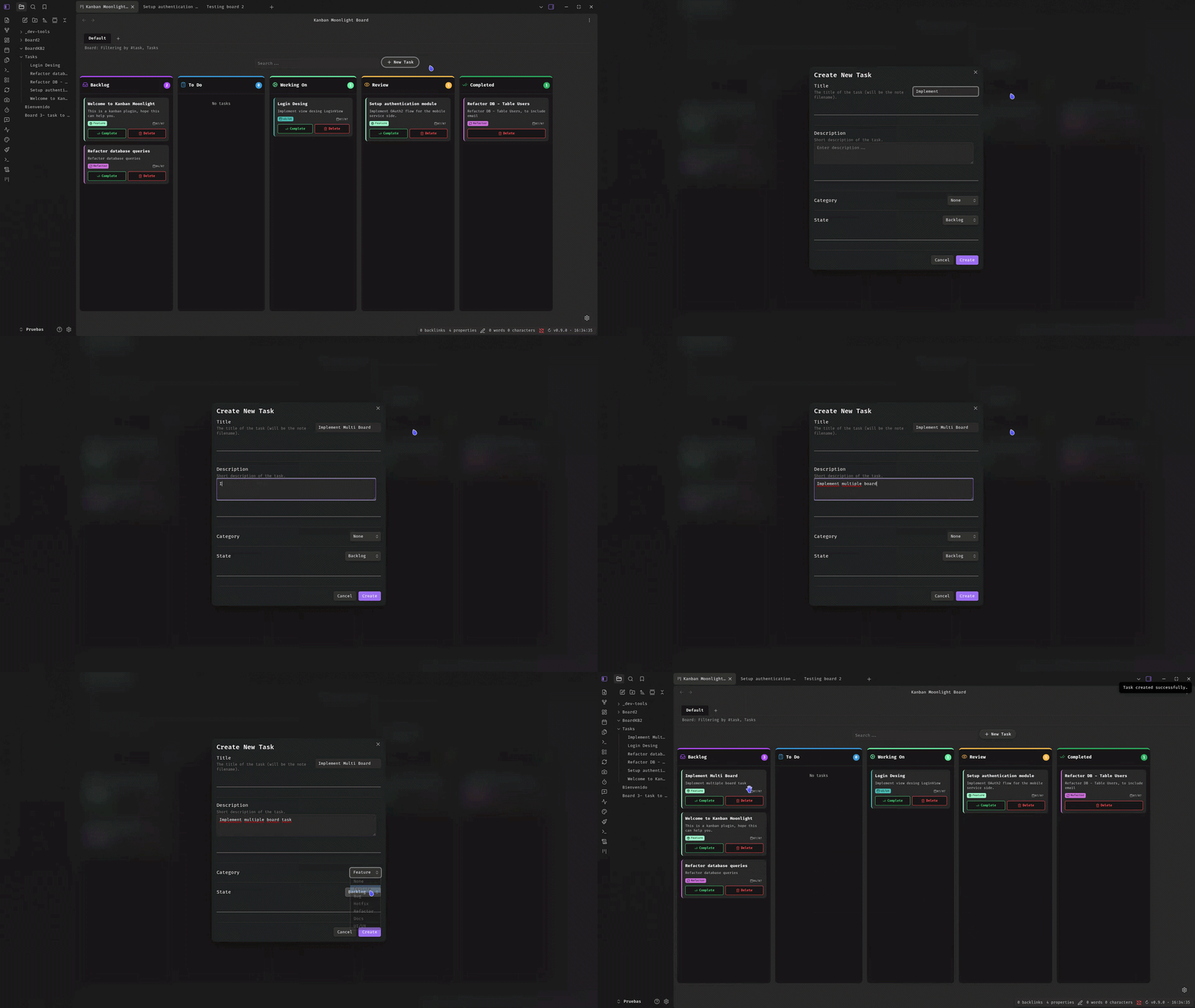
stateis updated automatically with a full history log. - Create Task: Create new tasks directly from the Kanban board or via the command palette. A modal lets you set title, description, category, and initial column.
- Delete Task: Remove tasks with a single click. A confirmation dialog prevents accidental deletion. Also available as a command.
- Search / Filter: Real-time search across note titles, descriptions, categories, and tags with debounced input.
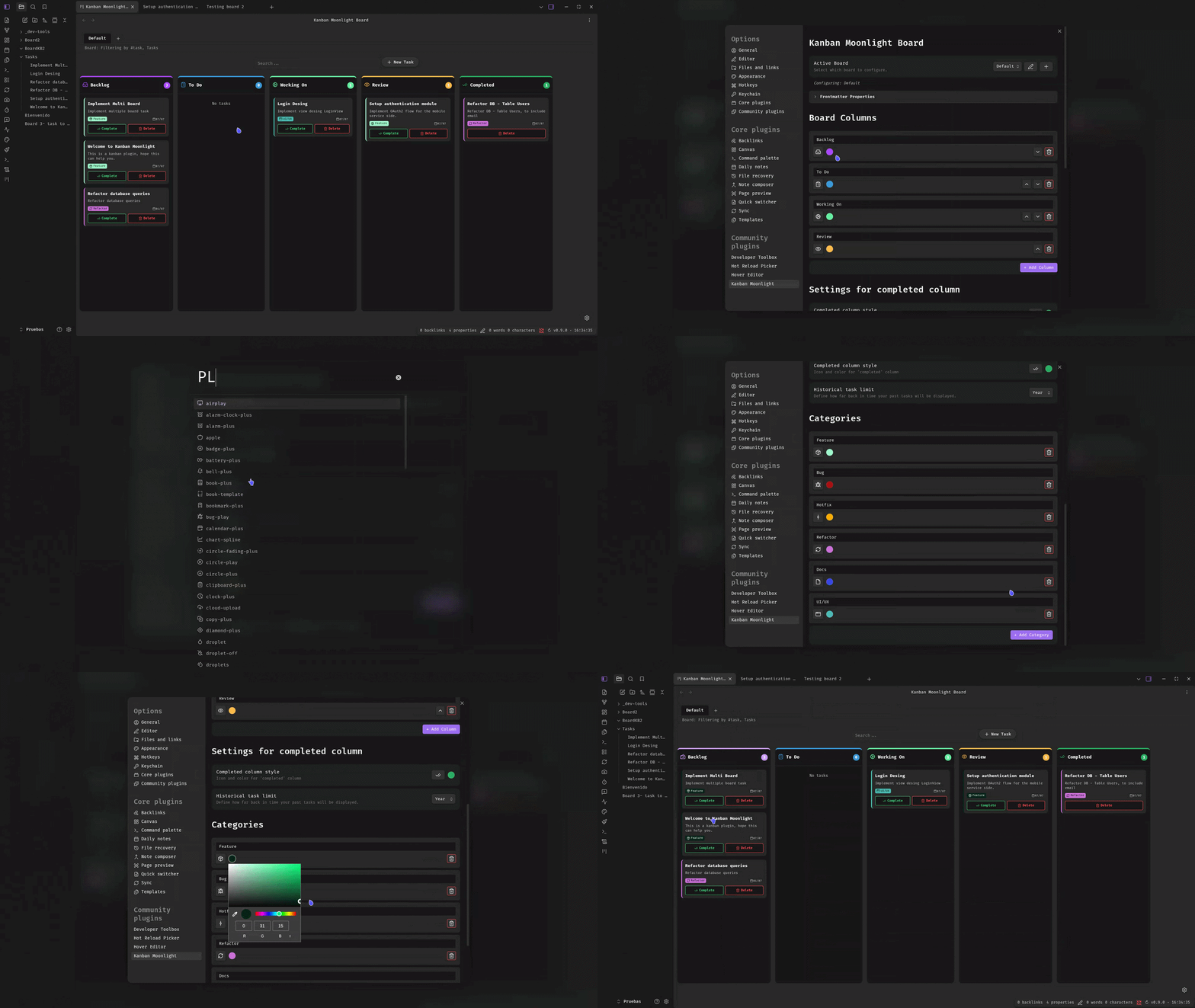
- Customizable Columns: Add, remove, reorder and rename columns. Configure each column's icon and color. Each board has its own column configuration.
- Categories System: Define categories with icons and custom colors to classify notes (displayed as colored borders and tags with automatic contrast text).
- Completion Tracking: Mark tasks as complete with a single click. Completed notes appear in a dedicated column with a configurable time window (day/week/month/year).
- History Log: Every state change, creation, and completion is recorded in the note's frontmatter
historyarray with timestamp and origin. - Gantt Chart: Visual timeline of tasks with Day/Week/Month zoom levels. Task start/end dates are calculated from history events. Configurable start column per board.
- Dashboard: Overview with tasks by status, by person, by category, and recent activity.
- Auto-refresh: The board refreshes automatically when notes are modified, created, or deleted.
- Icon Selector: Choose from hundreds of Lucide icons for columns and categories via a searchable suggest modal.
- Sorting: Notes are sorted by modification time (most recent first) within each column.
- Quick Settings: Access Settings directly from the Kanban view via the gear icon.
- i18n: English and Spanish built-in, auto-detected from Obsidian's locale.
Gantt Chart
The Gantt chart provides a visual timeline of your tasks. Switch to the Gantt view tab to see your tasks as horizontal bars on a timeline.
How dates are calculated
| Field | Source |
|---|---|
| Start | Date of the created event in the task's history (or file creation) |
| End | Last completed event in history, or today if not completed yet |
Each board has a Start Column setting that determines which column marks the beginning of work. The Gantt chart uses this to calculate task duration from history events.
Zoom levels
- Day: Individual days with month headers. Best for short-term planning.
- Week: Weeks with day abbreviations. Good for medium-range views.
- Month: Months with date ranges (1-7, 8-14, etc.). Best for long-term overview.
Features
- Synchronized scrolling between task list and timeline.
- Today line indicator.
- Color-coded bars based on task state.
- Task labels with contrast text for readability.
- Weekend highlighting in Day and Week views.
Dashboard
The Dashboard provides an overview of your project:
- Tasks by Status: Bar chart showing task distribution across columns.
- Tasks by Person: List of assigned tasks per team member.
- Recent Activity: Timeline of recent state changes.
How it works
Each board filters notes by a combination of tag and/or folder. Notes are displayed as Kanban cards based on their frontmatter:
| Frontmatter property | Default | Description |
|---|---|---|
tags |
#task |
Tag that determines which notes appear on the board (configurable per board) |
state |
backlog |
Current column ID (backlog, todo, workingOn, review, or custom column IDs) |
description |
— | Short description shown on the card |
category |
— | Category for color-coded borders and tags |
history |
— | Auto-generated log of state changes (array of { state, stateId, date, from } objects) |
All frontmatter property names are configurable in Settings. Each board has its own columns, categories, and completed column configuration.
Installation
From Obsidian Community Plugins (pending review)
- Open Settings → Community plugins
- Disable Restricted mode if enabled
- Click Browse and search for "Kanban Moonlight"
- Install and enable the plugin
Manual install
- Download the latest release from the releases page
- Extract
main.js,manifest.json, andstyles.css(if present) to<vault>/.obsidian/plugins/kanban-moonlight/ - Reload Obsidian and enable the plugin in Settings → Community plugins
Usage
- Click the Kanban icon in the left ribbon or open the board via command palette.
- Use the tab bar to switch between boards, or click + to create a new board.
- Switch between Board, Gantt, and Dashboard views using the view tabs.
- Click + New Task or run the Create New Task command to add a task.
- Fill in the title (required), description, category, and initial column.
- Drag cards between columns to update their state.
- Click Complete to mark a task as done, or Delete to remove it.
- Use the search bar to filter cards in real time.
- Click the gear icon (bottom-right) to open Settings.
Settings
| Setting | Description |
|---|---|
| Board Selector | Switch between boards. Create new boards or edit existing ones. |
| Frontmatter Properties | Collapsible section showing the configured property names for state, description, and category. |
| Columns | Add, remove, reorder, rename columns per board. Change each column's icon and color. |
| Completed Column | Customize the completed column's icon, color, and time window (day/week/month/year) per board. |
| Start Column | Select which column marks when a task begins (used by the Gantt chart). |
| Categories | Define note categories with icons and custom colors per board. |
| People | Manage team members with name, email, color, and notes. |
Each board has its own independent configuration for columns, categories, completed column, and start column. Board settings (name, tag, folder) are managed via the Board Modal.
Commands
| Command | Description |
|---|---|
| Create New Task | Opens a modal to create a new kanban task. |
| Delete Kanban Task | Deletes the currently open note if it's a kanban task. |
Demos
Demo 1 — Drag & drop and task completion
Demo 2 — Creating tasks
Demo 3 — Customizing the board
Demo 4 — Multiple boards
Translation
Kanban Moonlight includes built-in translations for:
- English (default)
- Spanish
The language is automatically detected from your Obsidian locale settings.
Development
# Install dependencies
npm install

# Development (watch mode)
npm run dev

# Production build
npm run build

# Lint
npm run lint
Compatibility
- Desktop: ✅ Full support
- Mobile: ✅ Full support
- Obsidian minimum version: v1.7.2
Support
License
MIT