
README file from
GithubKalendae
Change an existing date in your note with a date picker or Ctrl/Option + ↑/↓, instead of retyping it. Insert new ones by typing them in plain words.
Kalendae — the first day of the Roman month, when a priest called out the dates for the month ahead.
Features
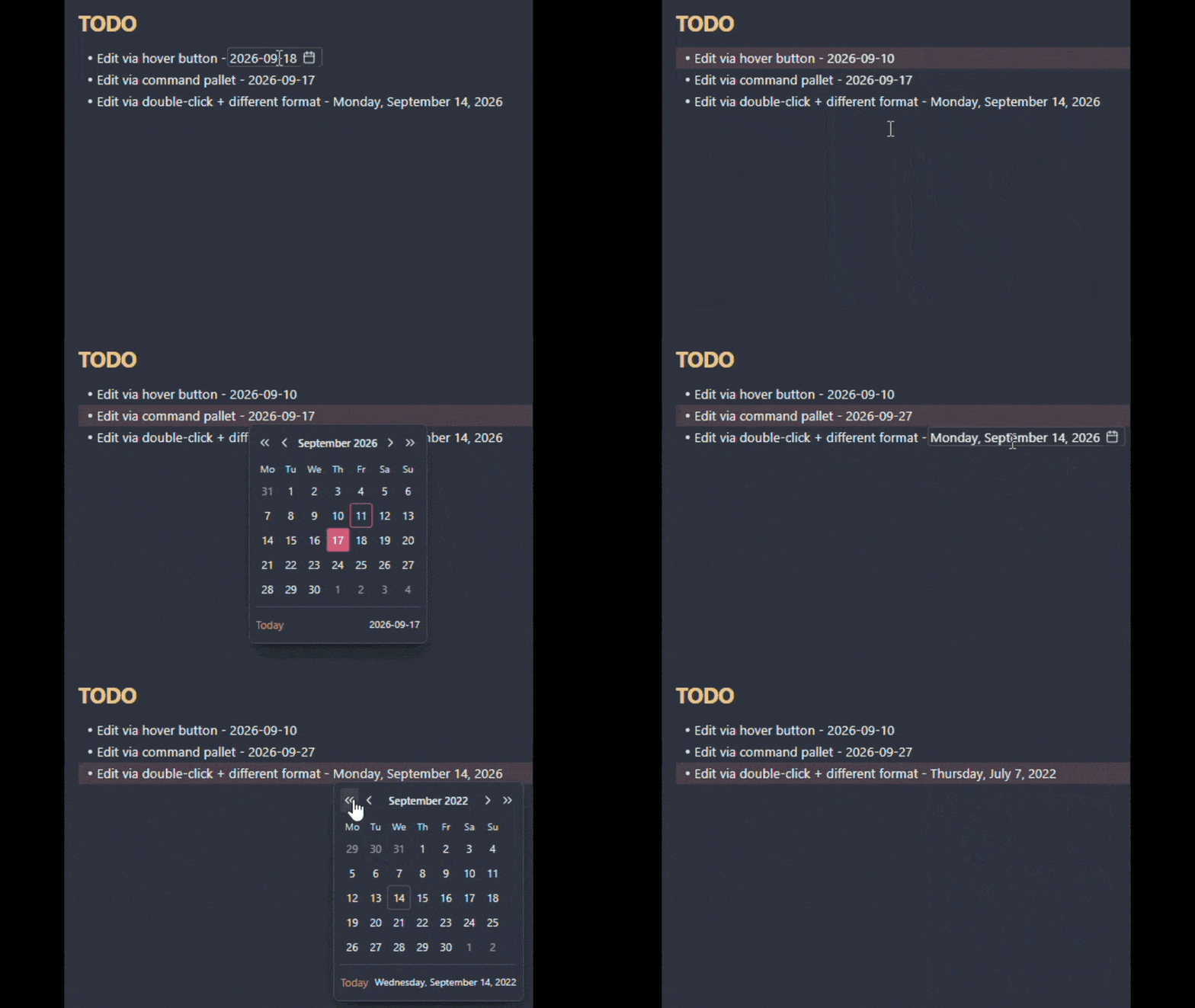
- Change a date: click the calendar icon beside it or double-click it to open a calendar for selection.
- Calendar switcher: configurable calendar view and custom shortcuts.
- Type a date: in plain words, like
tomorrow,next friday, orend of this quarter. Press Enter to convert it to a format of your choice. - Quick adjustment: hold Ctrl/Option and press ↑ or ↓ to step the day, month, or year under the cursor.
- Your formats: supports dates in 10 built-in or custom formats. Keeps your format on updates.
- 13 interface languages, matching your Obsidian language.
Using it
Kalendae recognises the dates in your notes. Four ways to open the calendar on one:
- Hover the date and click the calendar icon that appears beside it.
- Double-click the date.
- Click a Tasks plugin emoji in front of the date: ➕ 🛫 ⏳ 📅 ✅ ❌. Doesn't require the Tasks plugin.
- Put the cursor on the date and run Kalendae: Pick a date from the command palette.
Pick a day on the calendar, and Kalendae rewrites the date in its original format.
To add a new date, run Kalendae: Pick a date with the cursor anywhere else, or type it. New dates use the first format in your list.
The calendar with quick dates
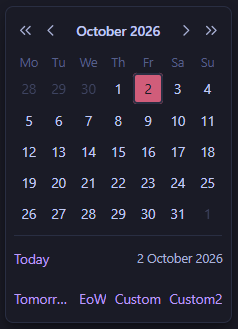
Pick a day from a month view, without typing.
Select a date, the static Today shortcut, or one of four configurable quick dates (18 built-in plus custom).
Settings → Kalendae → Calendar lets you configure the first day of the week, week number display, a preview of the new date, and quick dates.
Typing a date
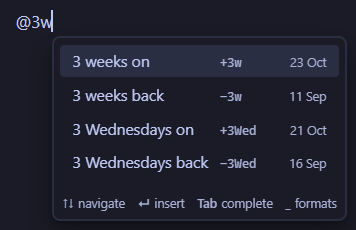
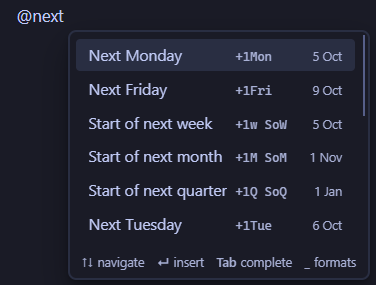
Type @ at the start of a word, then the date. A list of suggestions opens and updates as you
type. Press Enter to write the highlighted date into your note.
| Say it | Examples |
|---|---|
| In words (English only) | @next friday, @in three weeks, @3 months ago |
| By name, in any language you turn on | @Nov 3, @3 Nov 2027 |
| Shorthand | @1d, @2w, @eom (end of this month), @2w EoW (end of the week two weeks on) |
Type _ before pressing Enter to write the date in another of your formats. Tab completes the
highlighted suggestion, and Esc closes the list without changing your text.
Change @ and _ under Settings → Kalendae → Typing a date. The How to type a date page walks through every way to say a date.
Quick adjustment
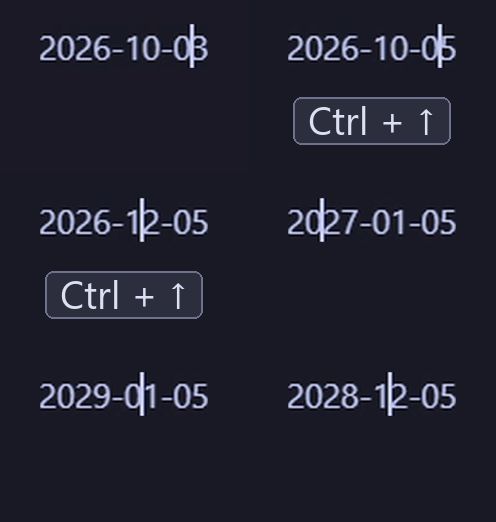
Put the cursor on a date, hold Ctrl/Option (configurable in settings), and press ↑ or ↓ to step the day, month, or year under the cursor.
Date formats
Kalendae supports 10 built-in date formats, and you can create your own.
The default format is YYYY-MM-DD. Configure your formats under Settings → Kalendae → Date formats.
When a date fits more than one format, like 03/09/2026 (3 September or 9 March), the first
matching format in your list wins. Drag the formats into the order you want.
Custom format
Write a custom format, using the moment.js tokens that Obsidian relies on under the hood:
| Part | Tokens | |
|---|---|---|
| Year | YY YYYY |
required |
| Month | M MM MMM MMMM |
required |
| Day | D DD Do |
required |
| Day of the week | d dd ddd dddd |
optional |
Anything in the pattern that isn't an ASCII letter (a dash, a dot, a comma, parentheses, non-English letters) is matched as is and kept in the output. Square brackets [ and ] are the exception and can't be used.
Where it looks
Choose where Kalendae finds dates, both to change them and to type new ones:
Settings → Kalendae → Sections to scan:
| Section | Description | Risk | Default |
|---|---|---|---|
| Body text | Regular paragraphs, lists, bold, italics, etc. | Safe | Always On |
| Headings | Section heading, e.g. # 2026-09-10 |
Can break references to this section | On |
| Frontmatter | Markdown file frontmatter | Obsidian has its own date picker for properties | Off |
| Inline code | Code inside text surrounded by ` | Safe | Off |
| Code blocks | Code sections surrounded by ``` | Safe | Off |
| Wikilinks | Links to other notes | Can point to a note that doesn't exist | Off |
The Kalendae: Pick a date command edits and inserts dates in every section, regardless of these settings.
Scope
Works in Source mode and Live Preview. Reading mode is not supported, by design.
Languages
English, Deutsch, Español, Eesti, Français, 日本語, 한국어, Lietuvių, Latviešu, Português, Русский, Українська, and 中文. Kalendae follows the language Obsidian is set to.
Corrections and contributions to other languages are welcome!
Troubleshooting
If the date is not recognised, check these:
- The format doesn't match any enabled ones in the settings
- The section is not scanned, e.g. code block
- A letter or digit touches it, e.g.
v2026-09-10 - The date is invalid, e.g.
2026-02-30 - The month or weekday name is in a language that isn't turned on under Settings → Kalendae → Languages
If the list of dates doesn't open when you type @, check that it starts a word (my@ doesn't
open it) and that the section is scanned.
If ↑ and ↓ don't change a date, an Obsidian hotkey may already use the same keys. Kalendae shows a warning next to the setting when it does.
Development
npm install
npm run dev     # watch mode
npm run build   # typecheck + lint + production bundle
npm test
Symlink this folder into <vault>/.obsidian/plugins/kalendae/ and install
Hot Reload to get changes without restarting Obsidian.
See CONTRIBUTING.md for bug reports, feature requests, and translations.