
README file from
GithubObsidian JSON Table Viewer
A premium Obsidian plugin that transforms standard JSON data into beautiful, interactive, and recursively nested tables. It works both inside note code blocks and as a direct file viewer for .json files in your vault.
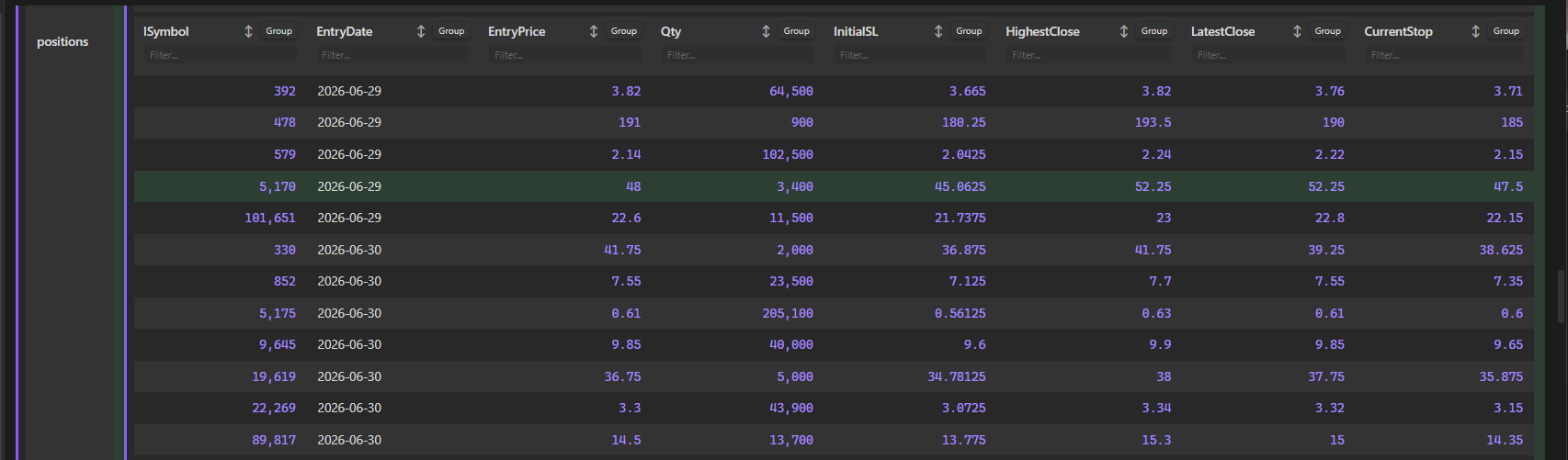
Features
- Recursive Table Rendering: Automatically converts nested objects and arrays into vertically or horizontally nested tables, with visual left-border indicators to display nesting depth.
- Interactive Headers:
- Sorting: Click any column title or arrow indicator to cycle through Ascending (
▲) -> Descending (▼) -> Unsorted (↕). - Filtering: Type in the
Filter...input box below headers to filter matching rows instantly. - Grouping: Group rows dynamically by any column values. Group headers are collapsible and show item counts (e.g.,
📁 exchange: IB_US (2 items)). - Each nested table maintains its own independent sort, filter, and group states.
- Sorting: Click any column title or arrow indicator to cycle through Ascending (
- Direct
.jsonViewer: Registers the.jsonfile extension so that clicking any JSON file inside Obsidian's file explorer opens it directly as an interactive, structured table. - Live Reloading: Listens to vault file modifications and automatically re-renders note tables when the referenced JSON file changes.
- Smooth Sticky Scrolling:
- Sticky Headers: Column headers stay locked at the top of the viewport when scrolling down tall tables.
- Sticky Property Keys: Property keys in vertical tables (such as
compilerOptionsorposition) align to the top and scroll dynamically with the viewport inside their row container.
- Rich Visuals & Highlights:
- Zebra Striping: Alternating row backgrounds using Obsidian's native
var(--background-secondary-alt)variable. - Yellow Hover Highlights: Premium soft yellow/gold highlight on hover.
- Row Selection: Click anywhere on a row (excluding inputs, buttons, and links) to toggle a soft green highlight selection.
- Formatted numbers, clickable URL links, and colored badges for booleans.
- Zebra Striping: Alternating row backgrounds using Obsidian's native
Installation
Manual Installation
- Download
main.js,manifest.json, andstyles.cssfrom the latest release. - In your vault, navigate to
.obsidian/plugins/and create a folder namedobsidian-plugins-json-table-viewer. - Paste the three downloaded files into that folder.
- Open Obsidian, go to Settings -> Community Plugins, reload the list, and toggle on JSON Table Viewer.
Usage
1. Direct JSON Codeblocks
You can write raw JSON directly inside a json-table codeblock:
{
  "portfolioName": "Growth Fund",
  "active": true,
  "holdings": [
    { "symbol": "AAPL", "shares": 50, "price": 172.5 },
    { "symbol": "MSFT", "shares": 25, "price": 420.2 }
  ]
}
2. Referencing JSON Files in your Vault
You can display tables by referencing .json files stored in your vault:
path: data/portfolio.json
(Or simply write data/portfolio.json or file: portfolio.json)
License
This plugin is licensed under the MIT License.