
README file from
GithubIonSync
Self-hosted, end-to-end vault synchronization for Obsidian. You run the server; the plugin keeps every device in sync over WebSocket.
How it works
┌─────────────┐   WebSocket (ws:// or wss://)   ┌──────────────┐
│  Obsidian   │ ◄──────────────────────────────► │  IonSync     │
│  Plugin     │                                  │  Server      │
└─────────────┘                                  └──────────────┘
     Device A                                         │
                                                      │ broadcasts
┌─────────────┐                                       │
│  Obsidian   │ ◄─────────────────────────────────────┘
│  Plugin     │
└─────────────┘
     Device B
- Last-write-wins conflict resolution by client-reported mtime
- Versioned storage — server keeps N historical versions per file (configurable)
- Auto-update — server distributes new plugin builds to clients on connect
- Web dashboard — monitor peers, devices, stored files, and server logs at
/dashboard - LLM API (optional) — let an AI assistant search, read, write and edit your notes over a token-protected REST API, without the server ever seeing plaintext. See LLM API
Quick start with Docker
# 1. Create an env file
echo "IONSYNC_PASSWORD=your-secret-password" > .env

# 2. Start the server
docker compose up -d

# 3. Open the dashboard
open http://localhost:3000/dashboard
The server listens on port 3000 by default. Data (SQLite database + file versions) is stored in a Docker named volume so it survives container restarts. Automatic SQLite backups are written to <dataDir>/backups/ (a pre-migrate snapshot on every startup, plus periodic daily snapshots via VACUUM INTO); tune them with the backup config block or the BACKUP_INTERVAL_HOURS / BACKUP_RETAIN env vars.
Docker configuration
Environment variables
Set these in your .env file or directly in docker-compose.yml:
| Variable | Default | Description |
|---|---|---|
IONSYNC_PASSWORD |
required | Shared password — used by the plugin and the dashboard |
IONSYNC_PORT |
3000 |
Host port (maps to container port 3000) |
IONSYNC_LOG_LEVEL |
3 |
0 silent · 1 errors · 2 warnings · 3 info |
IONSYNC_VERSIONS_PER_FILE |
5 |
Maximum stored versions per file path |
IONSYNC_CLEANUP_INTERVAL |
3600 |
Cleanup job interval in seconds |
IONSYNC_KEEP_DELETED_SECS |
604800 |
Seconds to retain deleted file records (default 7 days) |
Custom config file
For advanced options (TLS, custom paths), mount a config file instead:
# docker-compose.yml
volumes:
  - ./config.js:/app/config.js:ro
// config.js
export default {
  password: "your-secret-password",
  port: 3000,
  host: "0.0.0.0",
  appDir: "/app",   // do not change when using Docker
  dataDir: "/data", // do not change when using Docker
  cleanup: {
    intervalSecs: 3600,
    versionsPerFile: 5,
    keepDeletedFilesSecs: 7 * 24 * 3600,
  },
  logs: { level: 3 },
};
TLS / HTTPS
// config.js
export default {
  password: "...",
  tls: {
    key:  "/certs/privkey.pem",
    cert: "/certs/fullchain.pem",
  },
  appDir: "/app",
  dataDir: "/data",
};
# docker-compose.yml
volumes:
  - ./config.js:/app/config.js:ro
  - ./certs:/certs:ro
ports:
  - "3000:3000"
The server will use wss:// when TLS is configured. Update the plugin connection URL accordingly.
The tls block above secures the public sync server. The admin dashboard
runs on a separate port and is plain HTTP by default (fine when it's bound to
loopback/LAN). To protect its session cookie in transit, serve it over HTTPS one
of two ways — either marks the cookie Secure:
// config.js — (a) native TLS for the dashboard (self-signed is fine on a LAN)
adminTls: { key: "/certs/dash-key.pem", cert: "/certs/dash-cert.pem" },

// …or (b) behind a TLS-terminating reverse proxy (Caddy/nginx/Traefik):
trustProxy: true,   // trusts X-Forwarded-Proto — enable ONLY behind such a proxy
trustProxy can also be set with the TRUST_PROXY=1 environment variable.
Manual setup (without Docker)
Prerequisites
- Node.js 18+
- npm 9+
Install
git clone <repo>
cd v2
npm install
Build the server
# Compile shared types
npm run build -w packages/protocol

# Compile the server
npm run build -w packages/server
Configure
cd packages/server
cp config.example.js config.js
# Edit config.js — set password and any other fields
Run
# Production (compiled)
cd packages/server
npm start

# Development (live reload via tsx)
npm run dev
Plugin installation
The plugin is not yet published to the Obsidian Community Plugin directory. Install it manually:
-
Build the plugin (requires the server to already be set up):
cd packages/plugin npm run build # Outputs: packages/server/client/main.js, styles.css, manifest.json -
Copy to your vault:
<vault>/.obsidian/plugins/ion-sync/main.js
<vault>/.obsidian/plugins/ion-sync/styles.css
<vault>/.obsidian/plugins/ion-sync/manifest.json
Or set
OBSIDIAN_PLUGIN_DIRbefore building and it copies automatically. -
Enable the plugin in Obsidian → Settings → Community plugins.
-
Configure in Settings → IonSync:
- Server URL:
ws://your-server:3000(orwss://with TLS) - Password: same as
IONSYNC_PASSWORD
- Server URL:
Auto-update
Once connected, the server compares the plugin's version and build against the files in packages/server/client/. If they differ, the server pushes new plugin files to the client and the plugin hot-reloads itself. This means you only need to manually install once — future updates propagate automatically when you rebuild and redeploy.
Signed updates. Because the plugin hot-reloads server-pushed code, update bundles are ed25519-signed so a rogue or man-in-the-middle server cannot push arbitrary code (this works over ws:// and wss:// alike — no TLS required). Provide the private key to the image build as the IONSYNC_SIGN_KEY build argument (raw 32-byte ed25519 key, hex):
docker build --build-arg IONSYNC_SIGN_KEY=<hex-private-key> -t ionsync .
In Dockhand, set IONSYNC_SIGN_KEY as a build environment variable on the stack. The plugin pins the matching public key in packages/plugin/src/updateKey.ts (to rotate, change both). If no key is provided the build is unsigned and clients that pin a key will refuse to auto-update — a safe, loud failure, never remote code execution. The private key never enters the runtime image.
Dashboard
Visit http[s]://your-server:3000/dashboard to access the web dashboard.
| Tab | What it shows |
|---|---|
| Overview | At-a-glance stats: active peers, known devices, file count, pending uploads |
| Peers | Currently connected WebSocket clients — trigger sync or disconnect individually |
| Devices | All devices that have ever connected, with last-seen timestamp |
| Files | Browse and delete stored file versions (searchable by path) |
| Logs | Live-tailing server log ring buffer |
The dashboard auto-refreshes every 5 seconds. Authentication uses the same password as the plugin, stored as a 7-day HttpOnly cookie.
LLM API
An optional REST API that lets an AI assistant (or any script) work with your vault: search, list, read, create, edit, move and delete notes. Changes reach every synced device within seconds and are kept in version history like any other edit.
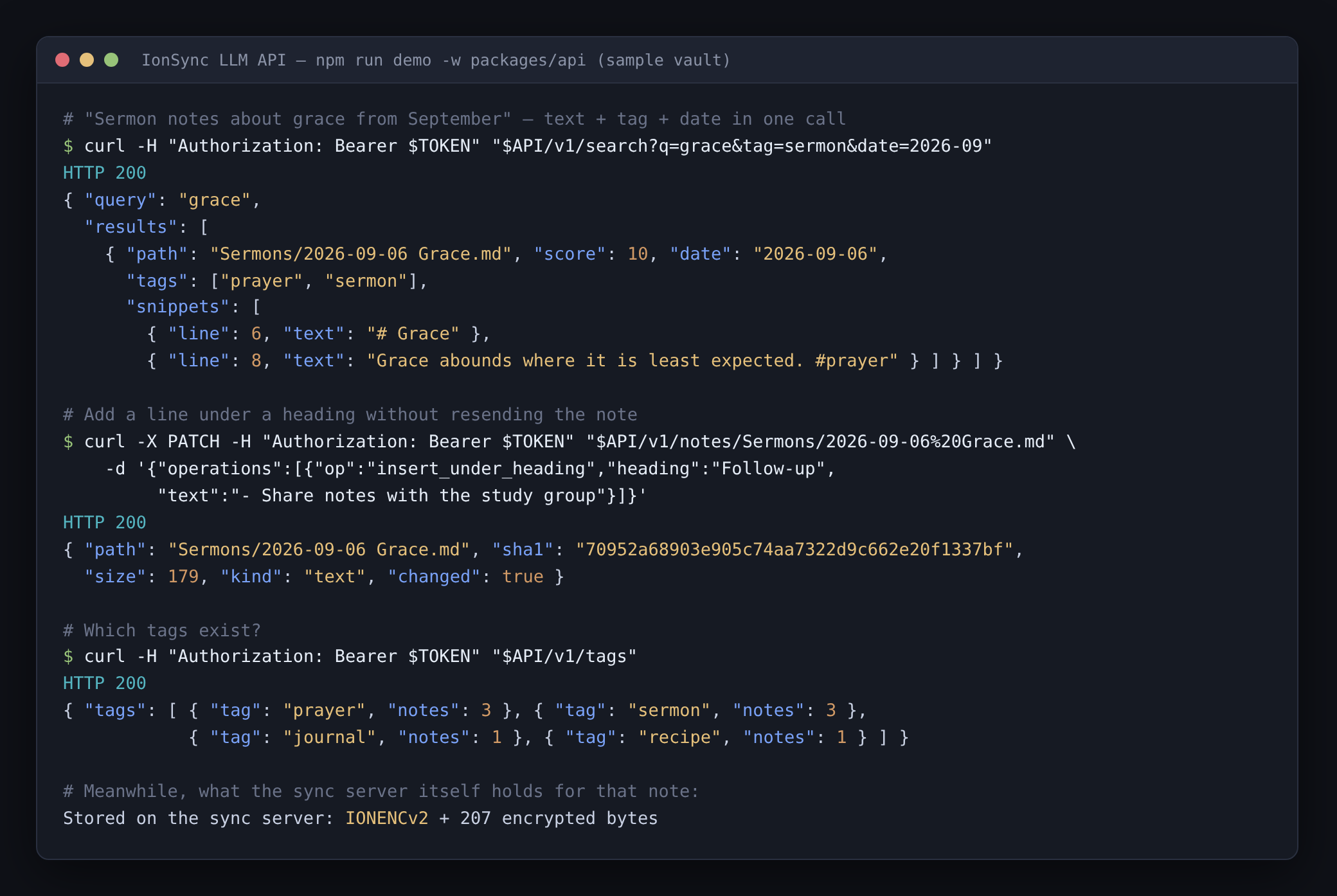
Real output from npm run demo -w packages/api, which runs the API against a throwaway server and a sample vault.
┌────────────┐  HTTPS + bearer token  ┌──────────────┐  WebSocket (as a device)  ┌──────────────┐
│ LLM / tool │ ─────────────────────► │ ionsync-api  │ ◄───────────────────────► │ IonSync      │
└────────────┘                        │ decrypts in  │      ciphertext only      │ Server       │
                                      │ memory       │                           └──────────────┘
                                      └──────────────┘
It runs as a second container (ionsync-api, same image) that logs in to the server as an ordinary sync device named "LLM API":
- End-to-end encryption stays intact. The vault password lives only in the API container; the sync server still stores ciphertext, and plaintext is never written to disk.
- No silent overwrites. Writes go through the same conflict handling as the plugin. A write that races another device returns
409and the losing text is kept as a reviewable conflict. - Search with filters. Full-text search plus tag, frontmatter and date scoping:
q=sermon&date=2026-09,tag=prayer,frontmatter=type:sermon. - Built for models. An OpenAPI 3.1 spec at
/v1/openapi.jsonwith descriptions written for an LLM, targeted edits (append,replace,insert_under_heading), a folder overview, and outline or line-window reads for long notes. - Fenced.
.obsidian/and other dot-folders are invisible, deletes are rate-capped, and an optional second token is read-only.
Enable it
The API is off until it has a token.
# .env
IONSYNC_API_TOKEN=$(openssl rand -hex 32)     # full access: read, write, edit, move, delete
IONSYNC_E2EE_PASSWORD=your-vault-encryption-password   # only if E2EE is on in the plugin
# IONSYNC_API_READ_TOKEN=...                  # optional: a token that can only read and search
# IONSYNC_API_PORT=3002                       # host port
# IONSYNC_API_TZ=America/Los_Angeles          # time zone for date filters
# IONSYNC_API_TRUST_PROXY=1                   # when behind a reverse proxy / tunnel
docker compose up -d
curl http://localhost:3002/v1/health          # {"ok":true,"connected":true,"synced":true}
Then point your assistant at http://<host>:3002/v1/openapi.json and give it the token as a Bearer token. To reach it from outside your network, put it behind HTTPS (a reverse proxy or tunnel) — never expose the port over plain HTTP.
Full reference — every endpoint, filter, edit operation and limit: packages/api/README.md.
Project structure
v2/
├── packages/
│   ├── protocol/   # Shared TypeScript message types (wire protocol)
│   ├── server/     # Node.js WebSocket + HTTP server
│   ├── plugin/     # Obsidian plugin (esbuild bundle)
│   └── api/        # Optional LLM REST API (headless sync client)
├── Dockerfile
├── docker-compose.yml
└── CLAUDE.md       # Developer reference
See CLAUDE.md for the full architecture, protocol reference, and developer guide.
License
MIT