
README file from
GithubInline RSS
Show the latest posts from RSS and Atom feeds as a table inside any note: a home page, a daily note, a project dashboard, anywhere.
Installation
From Obsidian:
- Open Settings → Community plugins and turn off Restricted mode if it is on.
- Select Browse, search for Inline RSS, then select Install.
- Select Enable.
Manually:
- Download
main.js,manifest.jsonandstyles.cssfrom the latest release. - Put them in
<your vault>/.obsidian/plugins/inline-rss/. - Reload Obsidian, then enable Inline RSS under Settings → Community plugins.
Usage
Add an inline-rss code block to any note, with one feed per line. Options are optional.
```inline-rss
max: 15
per-feed: 3
refresh: 30
Hacker News | https://hnrss.org/frontpage
Obsidian | https://obsidian.md/feed.xml
The Onion | https://theonion.com/feed/
```
Renders as a table of Title / Source / Date, newest first, with an "Updated …" line and a Refresh link.
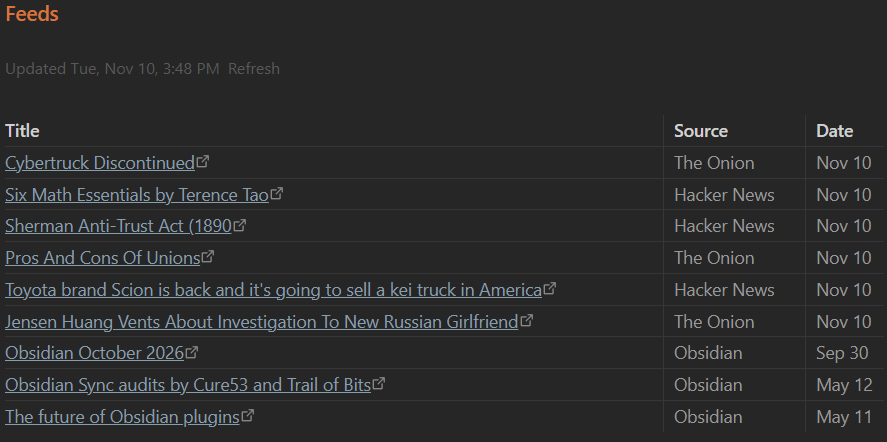
Options
| Line | Default | Meaning |
|---|---|---|
max: N |
15 | Total rows in the table |
per-feed: N |
3 | Most rows taken from any one feed |
refresh: N |
30 | Minutes before a feed is fetched again |
Name | URL |
A feed. The name shows in the Source column. A bare URL also works. | |
// text |
Comment, ignored |
Notes
- Supports RSS 2.0, RSS 1.0 (RDF) and Atom.
- Feeds refresh while Obsidian is open, on the Refresh link, or with the Inline RSS: Refresh feeds command.
- Results are cached in the plugin's own
data.jsonso the table shows instantly on startup. Nothing is written to your notes. - Network use: the plugin requests only the feed URLs you list in your notes. No other requests, no telemetry.
Support
This plugin is provided as-is and is intentionally minimal. Issues and PRs may not get a response. Fork freely.
License
MIT