
README file from
GithubImmich Journal
An Obsidian plugin that inserts photos from your self-hosted Immich server into your daily notes — resized, captioned, and linked back to Immich.
Status: early development. Not yet released as a Community Plugin. Install via BRAT (see below) to try it now.
Features
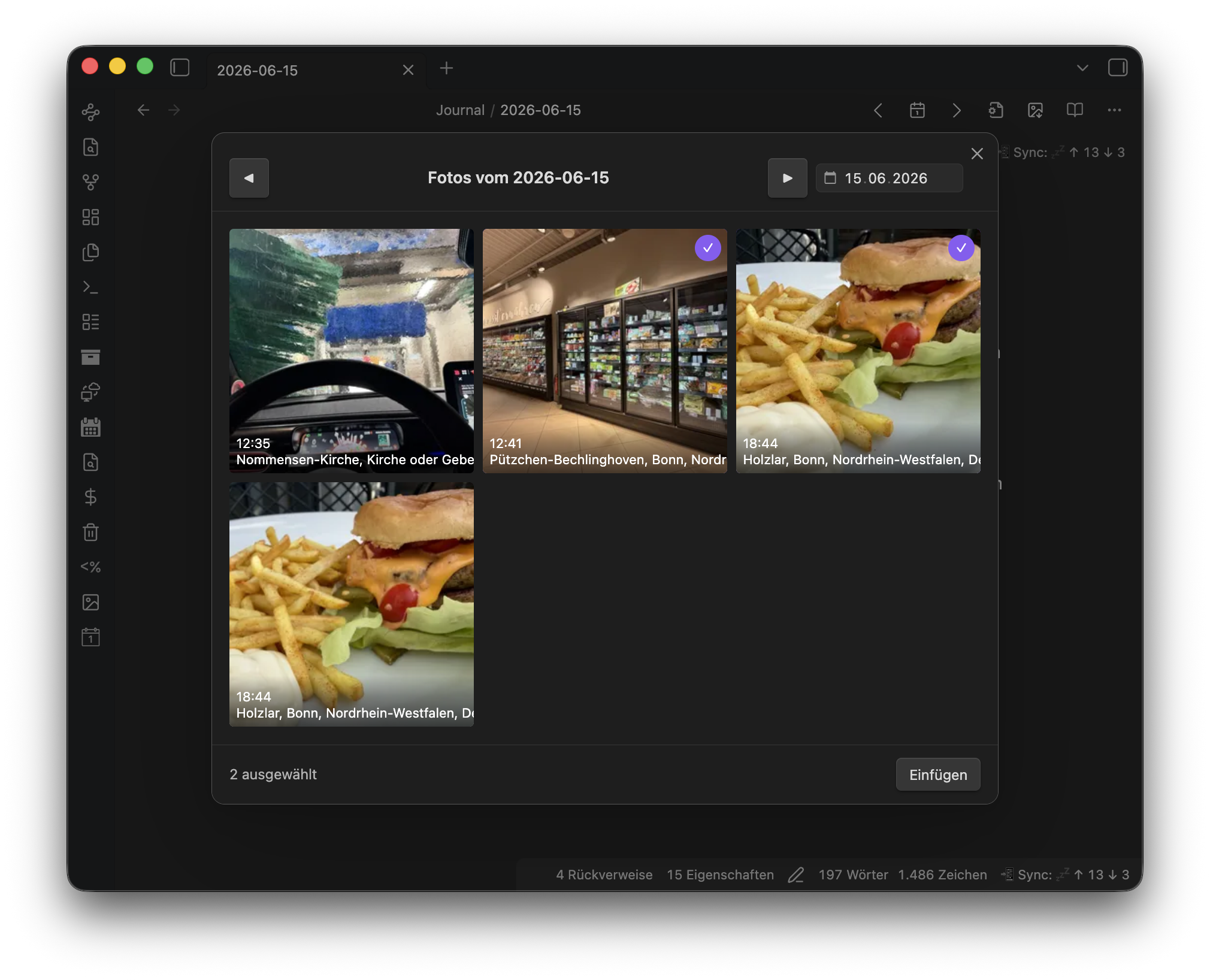
- One command opens a picker with all photos taken on the current daily note's date
- Date is detected from the note title (configurable format) or a frontmatter field — and when neither resolves, the picker simply opens on the most recent day that has photos
- Multi-select in the grid, then insert all chosen photos below each other — at the cursor position, at the top of the note (after frontmatter), or at the bottom (configurable)
- Photos are saved as resized local copies — the longest edge is scaled down to a configurable maximum (default 800 px), never upscaled, JPEG quality 0.85 — so your vault stays small and the original never leaves Immich
- Simple embed presets (markdown linked to Immich, markdown without link, wikilink) — the photo's Immich description automatically becomes the caption line, and an empty caption is omitted entirely, no dangling formatting
- Or full control via a custom template with Immich metadata variables
(
{{description}},{{time}},{{city}},{{country}},{{camera}},{{people}},{{filename}}, …) - Each inserted photo links back to the original asset in your Immich web UI
- Works on desktop and mobile — including setups where Immich is only reachable through a VPN such as Tailscale
- Localized UI: English, German, Spanish, French, Japanese, Chinese
Requirements
- A self-hosted Immich server you can reach from the device running Obsidian
- An Immich API key with at least the
asset.readandasset.viewpermissions
Setup
- In Immich, go to Account Settings → API Keys and create a new key. Grant it
asset.readandasset.view. A key that is scoped too narrowly will authenticate fine but fail with 403 Forbidden as soon as the plugin tries to load a thumbnail — the built-in "Test connection" button in the plugin settings checks a real thumbnail fetch, not just a lightweight ping, specifically to catch this. - In Obsidian, open Settings → Immich Journal and fill in:
- Server URL — e.g.
https://immich.example.com(no trailing slash) - API key — the key from step 1
- Server URL — e.g.
- Click Test connection. You should see a success message; if not, see Troubleshooting below.
- Run the "Insert photos from Immich for this day" command from a daily note (or via the ribbon icon), select photos, and insert.
Troubleshooting
| Result | Meaning |
|---|---|
| Success | Server reachable, key valid, thumbnail fetch works |
| Network error | Server URL unreachable — check the URL, and on mobile check your VPN connection |
| Unauthorized (401) | API key missing or invalid |
| Forbidden (403) | Key is valid but lacks a required scope — recreate it with asset.read + asset.view |
Settings reference
| Group | Setting | Default | Notes |
|---|---|---|---|
| Connection | Server URL | (empty) | e.g. https://immich.example.com |
| API key | (empty) | Stored in plain text in data.json, per Obsidian's standard plugin-data behavior |
|
| Test connection | — | Verifies reachability, auth, and a real thumbnail fetch | |
| Insert | Insert position | At cursor | At cursor, top of note (after frontmatter), or bottom of note |
| Photo embed | Markdown, linked to Immich | Presets: markdown linked to Immich / markdown without link / wikilink — or a custom template | |
| Custom template | []({{immichUrl}})*{{description}}* |
Only shown for the custom preset; lines that render empty are omitted | |
| Max edge length (px) | 800 |
Longest side of the inserted image; portrait and landscape scaled the same way; never upscales | |
| JPEG quality | 0.85 |
Applied when re-encoding the downscaled image | |
| Attachment folder | attachments/immich/{{year}}/ |
Supports date placeholders | |
| File name template | {{date}}_immich_{{assetIdShort}} |
Includes the asset ID so re-inserting the same photo reuses the existing file instead of duplicating it | |
| Daily note | Title date format | YYYY-MM-DD |
Moment.js format used to parse the note title |
| Frontmatter fallback field | (empty) | Used if the title doesn't parse, e.g. created |
|
| Display | Grid columns | 3 |
Applies on desktop and mobile alike |
| Language | Auto | Follows Obsidian's locale; can be forced to English, German, Spanish, French, Japanese, or Chinese |
Works great with Tailscale / VPN
The most common self-hosted Immich setup is a server reachable only inside a private network or VPN (Tailscale, WireGuard, etc.), not on the public internet. Immich Journal works well with this:
- All requests go through Obsidian's
requestUrl()API, so there is no CORS configuration to worry about on the Immich side, on desktop or mobile. - On iPhone/iPad, make sure your VPN (e.g. the Tailscale app) is connected before using the plugin. Without it, the server is simply unreachable.
- If the server can't be reached, the plugin shows a clear error instead of hanging — check your VPN connection first.
Installation
Not yet available in the Community Plugins directory. Until it passes community review, install it via BRAT (Beta Reviewer's Auto-update Tool):
- Install the BRAT plugin from Community Plugins.
- In BRAT's settings, add this repository:
https://github.com/fcandi/obsidian-immich-journal - Enable Immich Journal in your installed plugins list.
Immich version compatibility
Immich Journal deliberately uses only three stable, long-standing Immich API endpoints, to stay resilient against the fast pace of Immich's development:
POST /api/search/metadata— find photos taken on a given dayGET /api/assets/{id}/thumbnail?size=thumbnail|preview— load grid thumbnails and the higher-resolution image used for the resized insert- The web UI deep link pattern
{server}/photos/{assetId}— no API call, just a URL
If a future Immich release changes these, please open an issue with your server version.
Development
-
npm run dev— esbuild in watch mode, emitsmain.jsinto the repo root on every change. -
One-time setup: symlink this repo into your test vault's plugins folder, e.g.:
ln -s ~/DEV/obsidian-immich-journal "<vault>/.obsidian/plugins/immich-journal"Enable the plugin in Obsidian, then reload Obsidian (or use a hot-reload plugin) after each change to pick up the new
main.js. -
npm run build— production build. -
npx tsc --noEmit— type-check without emitting. -
npx vitest run— run the unit test suite.